
How to Master Video Personalization for Short-Form Success
Other
Personalized video content converts at three times the rate of generic equivalents according to HubSpot's 2026 State of Marketing report and SundaySky data summarized here. That single number changes how many marketers should think about short-form video.
Video personalization isn't just about dropping someone's first name into a clip. For creators repurposing podcasts, webinars, interviews, and YouTube videos into shorts, the bigger opportunity is matching the context of the clip to the viewer. That means changing the hook, framing, caption style, or angle of emphasis so the same source video feels relevant to different audiences.
That's the gap most tutorials skip. They explain data-driven personalization, but they rarely show how to personalize edited segments from long-form content for social feeds where attention is fragile and relevance has to appear fast.
Understanding Video Personalization Concepts
Think of video personalization like a studio cutting different trailers for the same movie. One trailer highlights action scenes for thrill-seekers. Another leans into character drama. The source material is the same, but the edit changes to fit the audience.
That's how modern video personalization works. Instead of treating a video as one finished file, teams treat it as a flexible system. The message stays consistent, but specific parts adapt based on who's watching, where they're watching, and what they care about.

What changes inside a personalized video
Three ideas matter most.
- Dynamic zones are the areas that can change, such as on-screen text, captions, images, logos, or calls to action.
- Variable placeholders are the fields that feed those zones, such as audience segment, platform format, topic angle, or CRM data.
- Runtime rendering means the final version gets assembled when needed, rather than being manually edited from scratch each time.
If that sounds technical, use a simple analogy. A restaurant kitchen doesn't cook every possible meal in advance. It keeps ingredients ready, then assembles the order when a customer asks for it. Personalized video works the same way.
Why this matters now
The category is growing quickly. The global video personalization platforms market is projected to grow from USD 2.1 billion in 2025 to USD 5.8 billion by 2032, with a 15.2% CAGR, according to Worldwide Market Reports. That projection reflects a broader shift away from static media and toward adaptable content systems.
Personalized video is less like exporting one final file and more like preparing a smart template that can respond to audience context.
For marketers repurposing long videos into shorts, this changes the editing mindset. Instead of asking, “What's the best clip?” ask, “What's the best version of this clip for this audience and platform?” If you want a broader look at how AI changes repurposing workflows, Klap's piece on video AI workflows is a useful companion read.
Business Value and Use Cases of Video Personalization
The business case is strong because personalized video changes how people respond, not just how content looks. Personalized video content converts at three times the rate of generic equivalents, is four times more likely to make customers feel valued, and is 3.5 times more likely to drive retention, according to HubSpot's 2026 State of Marketing report and SundaySky data.
That matters because many teams still treat short-form editing as a volume game. More clips help, but better-fit clips help more.
A quick visual helps frame the impact.

Where generic short clips fall short
A generic short often assumes every viewer wants the same entry point. That rarely holds true. A founder may care about growth strategy. A social media manager may care about execution details. A creator may care about storytelling hooks.
When all three see the same opening, one group may stay while the others scroll away.
Use cases that fit short-form repurposing
Here's where video personalization becomes practical for creators and marketing teams:
Use caseWhat gets personalizedWhy it helps
Webinar to Reel
Hook and caption angle
Different viewers need different reasons to stop scrolling
Podcast to Shorts
Highlight selection and framing
One guest answer can support several audience intents
Product education clip
CTA and supporting text
Viewers at different stages respond to different prompts
Agency content production
Aspect ratio, intro, caption style
Teams can adapt one source asset across client audiences
Data-driven and context-driven personalization
Data-driven personalization is often the first concept grasped. That's the easy part. Insert a name, company, product, or location. Useful, but limited.
The bigger benefit for repurposed shorts is context-driven personalization. That means the clip itself changes to reflect viewer intent. A long interview can produce one short that opens with a bold claim for cold audiences, another that starts with a practical lesson for warm audiences, and another that foregrounds subtitles and framing for mobile-first viewers.
Practical rule: If your audience segments differ in what they want from the same source video, the first thing to personalize is the opening angle, not the decorative details.
That's why personalized shorts often outperform generic edits. Relevance starts with the editorial choice, then the graphics follow.
Technical Approaches and Data Requirements for Video Personalization
At scale, personalized video needs structure. Teams can't manually create dozens or hundreds of variants without the process breaking down. The most reliable systems solve this by treating a video as instructions instead of a fixed media object.
According to Idea Usher's explanation of personalization engines, effective video personalization at scale relies on a modular rendering architecture that uses JSON-based manifests for dynamic zones, timing, and asset links. In plain language, that means the system stores a recipe for the video and fills in the right ingredients at render time.
What the architecture is actually doing
A good personalization engine usually handles four jobs:
- Template definition
The team defines what can change. This might include title cards, text overlays, lower thirds, thumbnails, background assets, or CTA screens. - Variable mapping
The system connects each changeable part to a field. That field could come from a CRM, a content database, a transcript tag, or a behavior signal. - Pre-render validation
Before rendering starts, the engine checks whether the input works. Text can't overflow. Image links must be active. Required fields can't be empty. - Runtime rendering
The system assembles the final video using rendering pipelines such as FFmpeg or Remotion, based on the selected variables.
The data you actually need
Many teams overcomplicate this step. You don't need every possible signal. You need the signals that change the edit in a meaningful way.
A practical starting set looks like this:
- Content metadata such as topic, speaker, format, and transcript segments
- Audience signals such as persona, funnel stage, or prior content interest
- Platform context such as vertical format, subtitle needs, and caption density
- Behavioral cues such as viewing duration or content downloads when available
That last category is especially important because it supports context-driven personalization. If you're trying to understand adjacent systems that swap media elements in real time, DAI for small businesses offers a helpful parallel from the ad tech side.
Why metadata quality determines output quality
If your transcript labels are messy, your personalization logic will be messy too. If your clips aren't tagged clearly, the system can't decide which version should go to which audience.
That's why transcript cleanup and metadata design matter early. A straightforward transcript workflow, like the one outlined in this guide to video-to-text workflows, can improve how AI identifies hooks, quotes, and reusable segments.
Clean data doesn't make a video more creative. It makes personalization more reliable.
Video Personalization Implementation Workflow
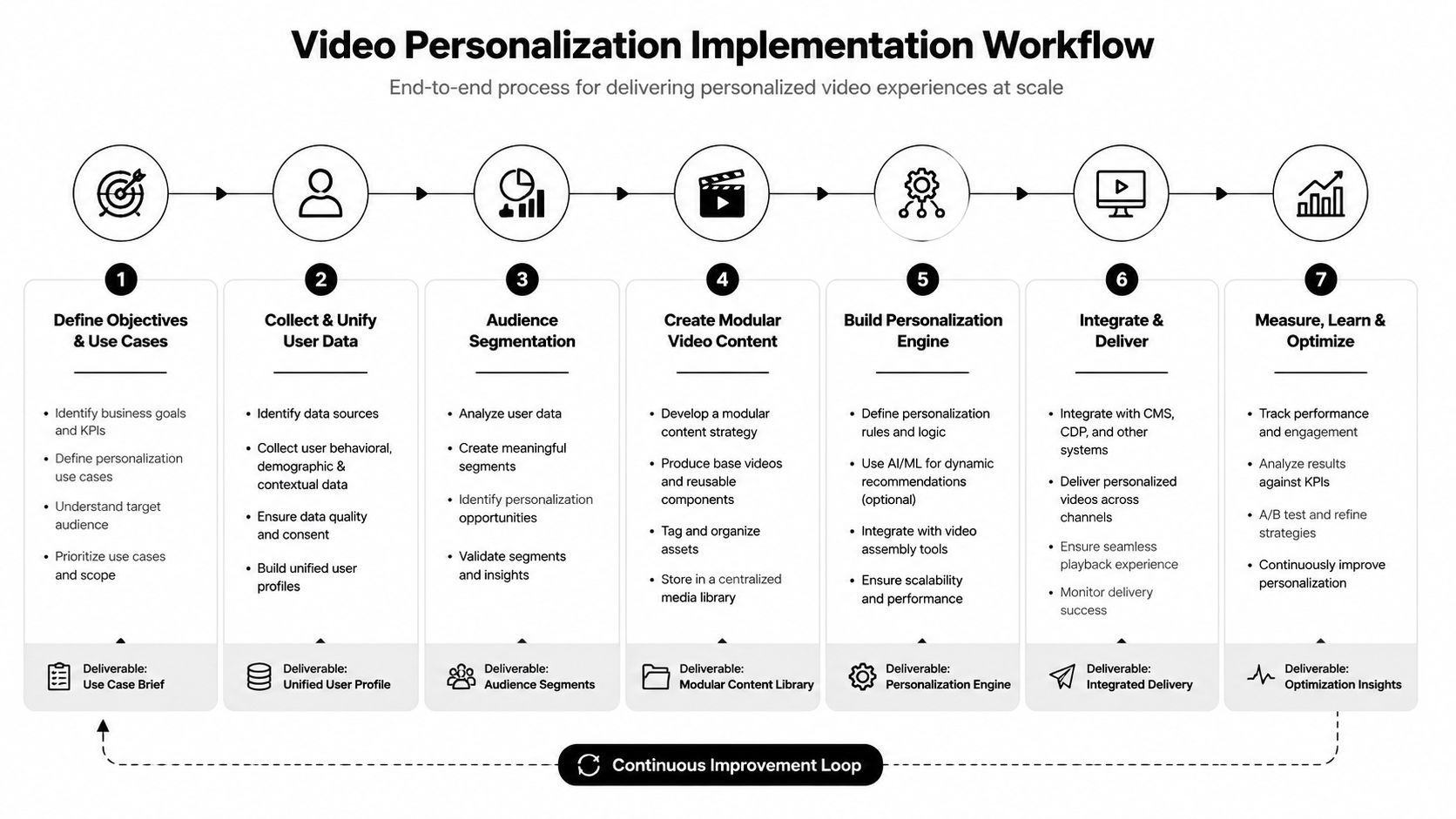
When approaching video personalization, it's best to start with a repeatable workflow, not an ambitious personalization matrix. The fastest wins usually come from adapting one strong long-form asset into a small set of audience-aware shorts, then tightening the process.
A useful workflow looks like this.
Stage one and two
Start with the source video. Upload the file or link the hosted version. Good source material includes webinars, interviews, YouTube episodes, podcast recordings, training sessions, and demos.
Then let AI identify candidate moments. AI-powered video personalization tools can reduce production costs by 23% and increase engagement time by 35% through dynamic audience segmentation and real-time customization, according to RemixVid's summary of personalized video analytics studies. That's why automated hook detection matters. It saves time before the editing decisions even begin.
Stage three and four
Review the generated clips with one question in mind: which audience is each clip for?
Many teams make a mistake by judging clips only by whether they are “good,” not whether they are “good for a specific viewer type.” A tactical breakdown from the AI video clipping tool guide helps here because hook quality and audience fit aren't always the same thing.
Use this review checklist:
- Opening strength. Does the first line create immediate relevance for the intended audience?
- Caption clarity. Can someone understand the clip with sound off?
- Framing fit. Does the crop support a mobile viewer without losing visual meaning?
- Single takeaway. Does the clip land one clear point, rather than three half-points?
Stage five through seven
Once the best candidates are selected, adjust start and end points. Small trims often change the energy of a clip more than fancy graphics do. Tighten the entry, remove throat-clearing, and end at the peak of clarity.
Then tailor light personalization elements. You might swap the hook text, choose a different subtitle style, or export multiple versions for different platforms.
A simple comparison helps:
Workflow choiceTypical result
One generic export for all audiences
Easier workflow, weaker relevance
A few audience-aware variants from one source
More control, better fit
Too many variables too early
Confusing process, inconsistent quality
The best implementation workflow is boring in the right way. It produces useful variants consistently, without turning each video into a custom production project.
Measurement Framework for Video Personalization Success
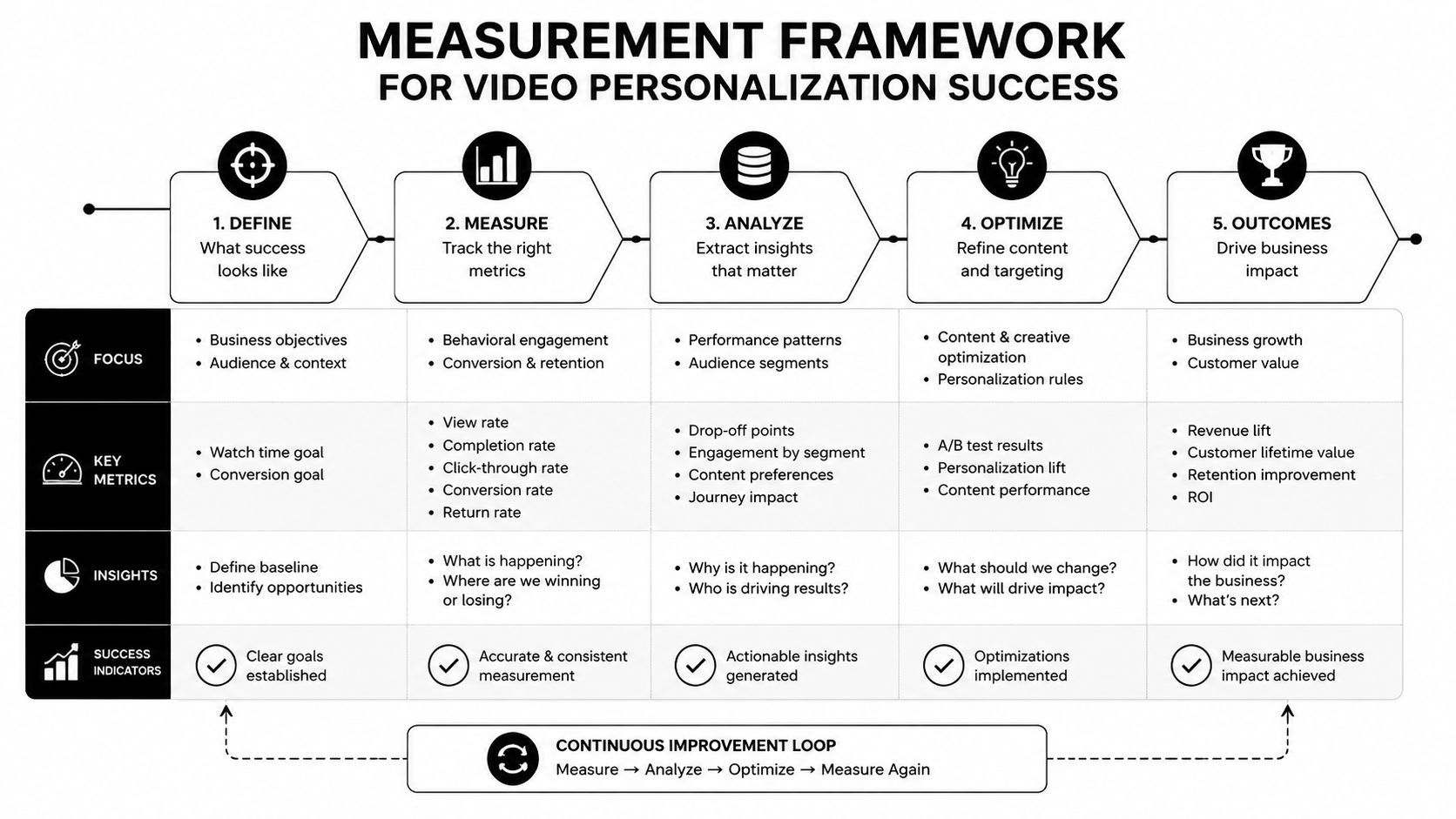
Measurement gets messy when teams track everything. The cleaner approach is to match one outcome to one layer of the funnel, then compare personalized clips against generic versions.
A strong benchmark matters because the upside can be substantial. Personalized videos deliver 280% higher ROI, generate 4.5x more clicks, and improve viewer retention by 35% compared to generic campaigns, according to Sendspark's comparison of personalized and generic video campaigns.
What to measure first
Use a narrow scorecard instead of a sprawling dashboard.
- Engagement quality tells you whether the opening and edit fit the audience.
- Click behavior shows whether the message and CTA align.
- Retention pattern reveals where viewers lose interest.
- Conversion outcome connects the clip to a business result.
A simple testing model
Run side-by-side comparisons between a generic clip and a personalized version of the same source moment. Keep the core footage similar. Change only the personalization layer you want to test, such as the hook angle, subtitle framing, or audience-specific CTA.
Track results by platform, because a version that works in one feed may not work the same way in another.
If a personalized version gets more clicks but weaker downstream action, the edit may be attracting the wrong audience rather than the right one.
That's why measurement should move beyond vanity metrics. A clip that earns views but doesn't improve retention, trust, or action may be entertaining without being useful.
Practical Examples and Best Practices for Video Personalization
A podcast episode with a marketing leader can become several very different shorts. One version opens with a mistake founders make. Another opens with a workflow tip for social managers. A third centers on a caption-friendly quote for mobile viewers who watch without sound. The source is identical, but the framing changes the audience fit.
A webinar works the same way. The sales team may want a short clip that leads with urgency. Customer success may want the part that explains implementation clearly. A creator may want the boldest opinion for discovery reach. None of those edits require inventing new material. They require choosing the right slice and packaging it for the right person.
The balance most teams miss
Many teams personalize too simplistically. They add a name, logo, or firmographic detail and call it a day. That can help in direct outreach, but repurposed social video usually needs something else first.
The overlooked balance is between data-driven and context-driven personalization.
- Data-driven means using known viewer details, such as role, account, product interest, or past interaction.
- Context-driven means reshaping the clip around intent, platform behavior, and the reason that audience would care.
This distinction matters because research summarized by Kaltura's discussion of video personalization points to a common gap. Many marketers say personalization improves ROI, but far fewer effectively use behavioral signals to adapt clips around viewer intent. That's especially relevant for short-form platforms where the first seconds carry most of the retention burden.
Best practices that hold up in the real world
For repurposed shorts, these practices tend to travel well:
- Limit the number of personalization layers. Using too many variables can make a short feel forced or over-engineered.
- Match the hook to intent. Lead with the problem, insight, or payoff that matters most to that audience segment.
- Treat captions as editorial, not decorative. The wording, pacing, and emphasis of subtitles can shape comprehension and tone.
- Export in batches, review by audience. It's easier to compare three variants for one segment than to judge ten unrelated clips at once.
- Delay heavy personalization if needed. Early over-personalization can feel intrusive. Sometimes the best move is to open with a strong universal hook, then introduce specificity after attention is earned.
A useful guardrail comes from Cloudinary's discussion of the right amount of video personalization, which notes that using three or fewer data dimensions tends to maximize engagement while avoiding coercive perceptions. For short-form repurposing, that's a smart ceiling. A concise hook, one relevant audience cue, and one platform-aware edit is often enough.
A simple editorial test
Before publishing a personalized short, ask two questions:
- Would this clip still make sense to the intended audience if I removed the explicit personalization?
- Does the personalization improve relevance, or is it just proving I have data?
If the answer to the second question is weak, revise the edit. Strong personalization should sharpen meaning, not just decorate it.
Conclusion and Next Steps
Video personalization works best when you stop treating it as a gimmick and start treating it as editorial decision-making supported by data. The strongest results usually come from a simple mix: audience-aware hooks, platform-ready formatting, clean metadata, and disciplined testing.
Start with one long-form asset you already own. Pull a handful of clips. Create a small set of variants based on audience intent, not just surface details. Measure how each version affects retention, clicks, and conversion, then refine the next batch.
If you want to turn long videos into social-ready shorts faster, Klap is built for that workflow. It helps creators and marketers transform webinars, YouTube videos, podcasts, and interviews into vertical clips with AI-selected hooks, captions, reframing, editing control, and export options for TikTok, Reels, and Shorts.
