
Opus Clip Pricing Review: Plans, Limits, and How It Compares to Klap
Other
Quick Summary
This guide breaks down Opus Clip’s Free, Starter, Pro, and Business plans, explains how the credits work, and shows what different workflows may use in practice. It also compares Opus Clip with Klap so you can see where Opus Clip wins on lower Pro pricing and where Klap offers stronger feature-per-dollar with clearer clip limits, 4K downloads, AI dubbing, and a workflow built for turning long videos into publish-ready shorts.
Is Opus Clip Pricing Worth It For The Videos You Actually Make?
Opus Clip pricing looks simple until you start counting credits. A 60-minute podcast, webinar, or interview can use 20% of a 300-credit Pro allowance before you even review the clips.
This Klap guide breaks down every Opus Clip plan, from Free to Starter, Pro, and Business. You will see how credits work, what each tier unlocks, and how Opus Clip compares with Klap at each level. The goal is to help you choose based on your workflow, not just the monthly price.
Why Listen to Us?
Klap helps creators, companies, and media teams turn long videos into ready-to-post shorts. Teams at Netflix, Red Bull, Spotify, Stanford, Adidas, Bolt, BuzzFeed, and more use Klap to repurpose video content at scale.
That gives us a clear view of what matters when comparing AI clip generators, from pricing and features to workflow speed and social-ready output.
Opus Clip Pricing at a Glance
Before anything else, here is a quick Opus Clip vs Klap monthly pricing summary:
Free options
- Opus Clip: Free forever with 60 credits per month, 1080p rendered clips, and a watermark. Editing is not included, and clips cannot be exported after three days.
- Klap: Allows users to create one video for free.
Starter and basic plans
- Opus Clip Starter: $15 per month for 150 credits, AI clipping, Virality Score, animated captions, editing tools, one brand template, and watermark removal.
- Klap Basic: $29 per month for up to 100 clips monthly, source videos up to 45 minutes long, and HD downloads.
Pro plans
- Opus Clip Pro: $29 per month for 300 credits, two seats, two brand templates, six social connections, AI B-roll, scheduling, custom fonts, and limited API access.
- Klap Pro: $79 per month for up to 300 clips monthly, source videos up to two hours long, 4K downloads, and AI dubbing in 29 languages.
Business and higher-tier plans
- Opus Clip Business: Custom pricing with customized credits, team seats, API access, custom integrations, dedicated storage, priority support, enterprise security, and advertising packages.
- Klap Pro+: $189 per month for up to 1,000 clips monthly, source videos up to three hours long, 4K downloads, and AI dubbing in 29 languages.
Pricing structure
- Opus Clip: Uses a credit-based pricing model.
- Klap: Uses monthly clip limits and maximum source-video lengths.
Best-value comparison
- Opus Clip: Better for users seeking a lower starting price and a more affordable Pro plan.
- Klap: Better for users who prefer simpler limits, need a high volume of clips, or require 4K downloads and multilingual AI dubbing.
Opus Clip is easier to justify when the main priority is the lowest Pro plan price. Klap may appeal more to teams that prefer predictable clip-based limits instead of tracking processing credits.
To see the difference clearly, let’s look at how Opus Clip credits work and how quickly they can add up. If you’re interested in exploring the tool itself, you can read our detailed OpusClip review.
How Opus Clip Credits Work
Many video clipping software tools use usage limits to measure processing. Opus Clip uses credits, and one credit equals one minute of original video imported. So, a 30-minute interview uses 30 credits. A 60-minute upload typically consumes about 60 credits.
Opus Clip pricing may look simple by monthly cost, but the real value depends on how much long-form video you upload. And while using Opus Clip as a short video generator may use credits slowly, a podcast team, webinar team, or agency working with longer recordings may use them much faster.
Next, let’s break down each Opus Clip plan and see what credits, limits, and features are available in each tier.
Opus Clip Free Plan
The first and lowest plan is the Free Plan. Opus Clip’s Free plan costs $0 per month and gives users 60 credits monthly. It includes up to 1080p rendered clips, auto reframe, and AI captions with emoji and keyword highlighting.
However, there are important limits. For example, the clips include a watermark, editing is not available, and clips are no longer exportable after 3 days.
Who should use the free plan? The Free plan is best for first-time users who want to understand how Opus Clip works before paying. It can also work for creators testing AI clipping with one or two short videos.
Opus Clip Starter Plan: $15/month
The Opus Clip Starter costs $15 per month and is built for individual creators who want more than the Free plan.
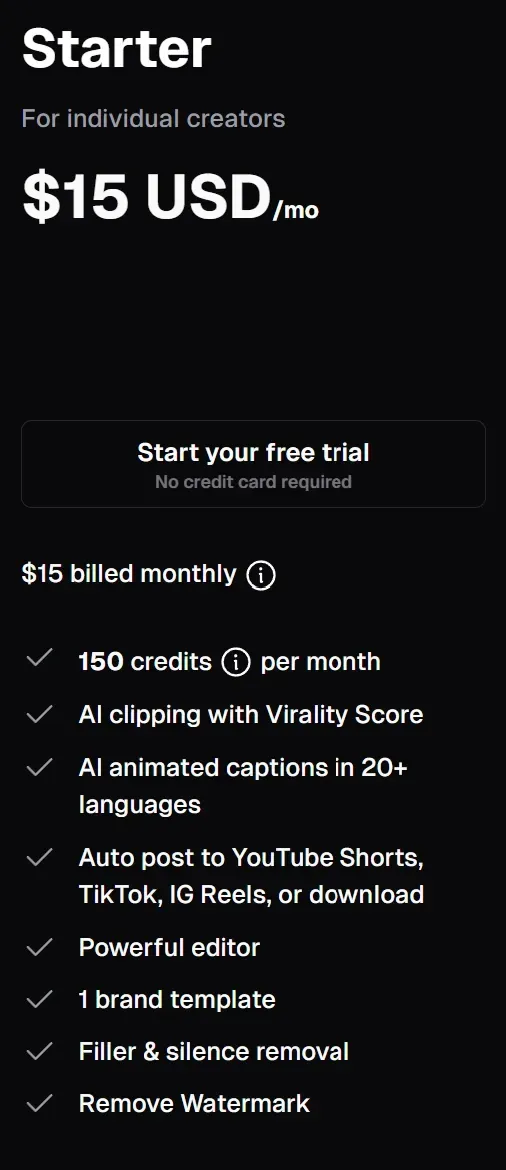
It includes 150 credits per month, AI clipping with Virality Score, AI animated captions in 20+ languages, auto posting to YouTube Shorts, TikTok, and Instagram Reels, plus the option to download clips. It also unlocks the editor, 1 brand template, filler and silence removal, and watermark removal.
This is the first Opus Clip plan that makes sense for creators who want to publish clips regularly.
Where the Credit Limit Starts to Matter
The 150-credit limit means you can process 150 minutes of source video per month. That may be enough if you mostly upload short interviews, short YouTube videos, or a few talking-head videos.
For example, two 60-minute podcast episodes would use 120 credits. That leaves 30 credits for the rest of the month. However, if you publish longer episodes or upload several videos weekly, Starter can feel limited as you run out of credits quickly.
Opus Clip Pro Plan: $29/month
The Opus Clip Pro costs $29 per month and is built for professional creators, marketers, and teams. It includes 300 credits per month, available instantly, plus a team workspace with 2 seats, 2 brand templates, and 6 social account connections.
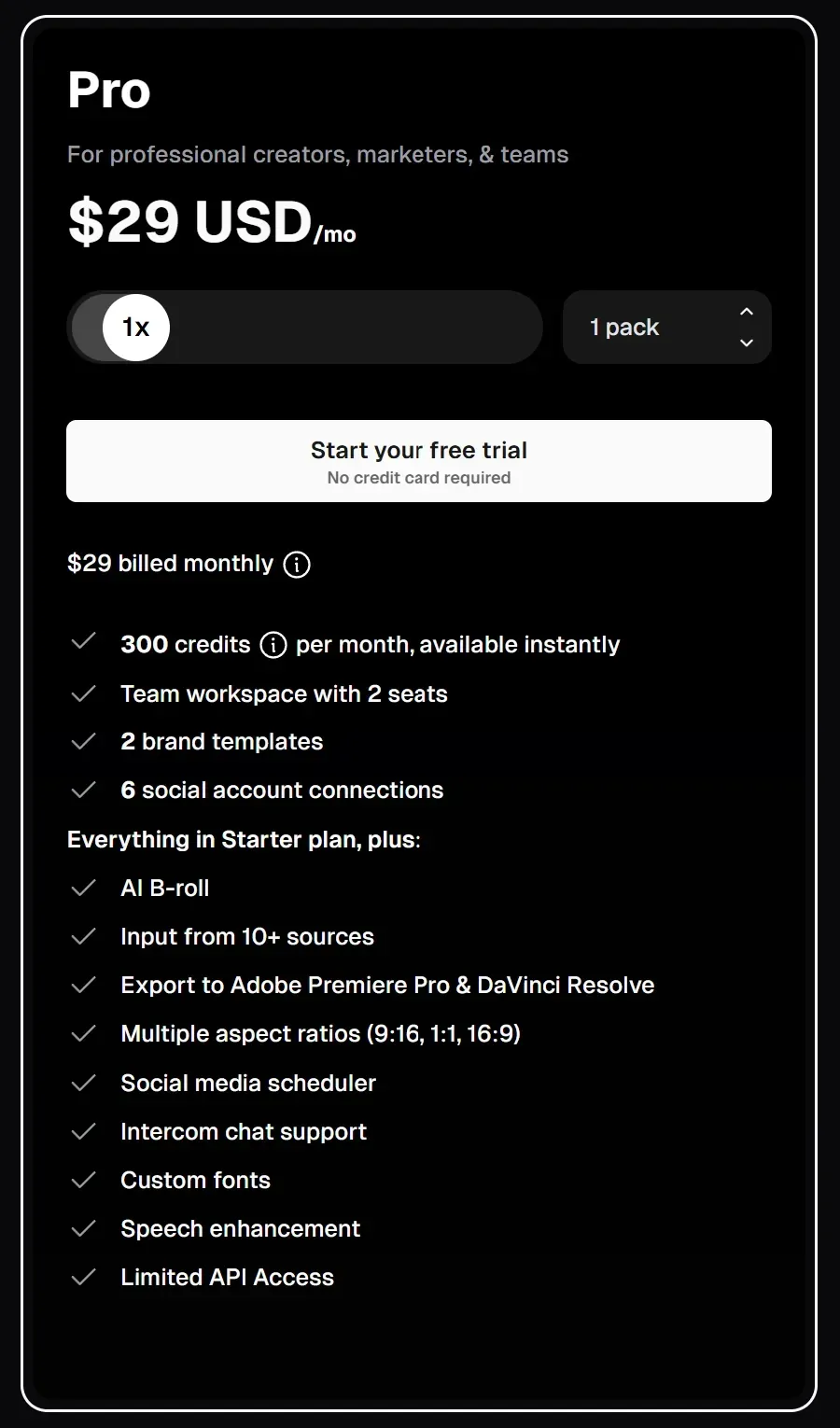
It also includes everything in Starter, along with AI B-roll, input from 10+ sources, export to Adobe Premiere Pro and DaVinci Resolve, multiple aspect ratios, a social media scheduler, Intercom chat support, custom fonts, speech enhancement, and limited API access.
Where the Credit Limit Starts to Matter
The Pro plan gives you more room than Starter, but credits can still move quickly if you work with long recordings.
A 60-minute upload uses about 60 credits. That is 20% of the monthly Pro allowance. Four 60-minute episodes use 240 credits, leaving 60 credits for extra uploads. If each episode is 90 minutes, four episodes use 360 credits, which goes beyond the 300-credit monthly limit.
For creators with steady short-form output, Pro can be a strong fit. For teams processing long podcasts, webinars, or client videos every week, the credit limit needs careful planning.
Opus Clip Business Plan: Custom Pricing
Opus Clip Business is built for organizations that need more control, volume, support, and custom workflows. Unlike the Free, Starter, and Pro plans, Business does not have a fixed public monthly price. Opus Clip lists it as custom pricing with customized credits, team seats and social connections.
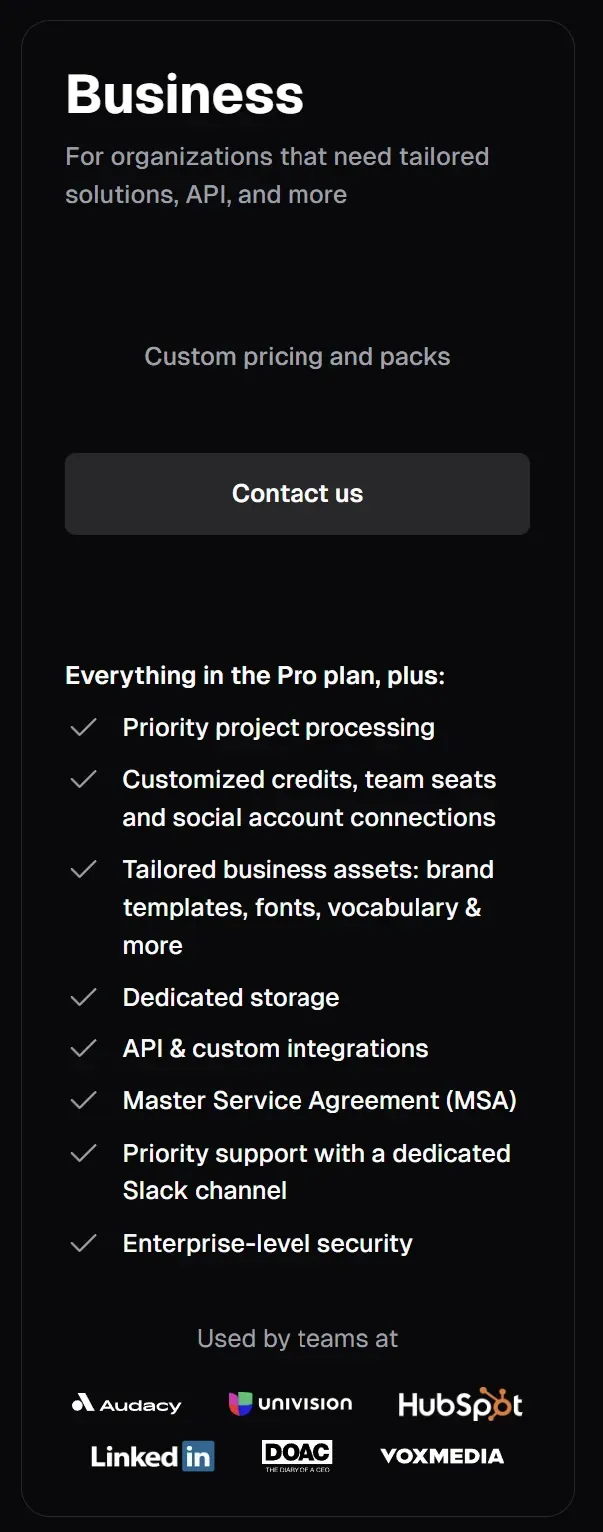
The Business plan includes everything in Pro, plus priority project processing, customized credits, team seats, and social account connections. It also adds tailored business assets such as brand templates, fonts, vocabulary, and more.
For larger teams, it includes dedicated storage, API and custom integrations, a Master Service Agreement, priority support with a dedicated Slack channel, and enterprise-level security.
Where The Credit Limit Starts To Matter
Business is the plan to consider when fixed monthly credits are not enough. A media team, agency, or brand repurposing many long videos each month can move past 300 credits quickly.
For example, 10 one-hour webinars would use 600 credits. Twenty one-hour client videos would use 1,200 credits. That type of workflow is where custom credits and team seats become more important than the base monthly price.
What Opus Clip Might Cost In Practice
Opus Clip credits are easier to understand when you connect them to real video workflows.
Since 1 credit equals 1 minute of source video, your usage depends on how much long-form content you upload each month. Here are some scenarios to drive home this point.
Scenario 1: One 60-Minute Podcast Per Month
One 60-minute podcast uses 60 credits. On Opus Clip Pro, which includes 300 credits per month, that is 20% of the monthly allowance.
This can be a good fit if you only upload a few long videos each month. You still have enough credits left for extra interviews, short videos, or test uploads.
Scenario 2: Weekly 60-Minute Podcast
A weekly 60-minute podcast uses more credits, but it can still fit inside the Pro plan.
The math is simple - 4 episodes x 60 minutes = 240 credits. That leaves 60 credits from the 300-credit monthly allowance. This works if your podcast creation and editing schedule is predictable and you do not upload many extra long-form videos during the same month.
Scenario 3: Weekly 90-Minute Podcast
Longer episodes change the calculation. For example, if you publish 4 episodes per month and each one is 90 minutes long, you would use 360 credits. That goes beyond the 300 credits included in Opus Clip Pro.
In this case, you may need more credits, annual credit planning, or a higher-volume workflow.
Scenario 4: Webinar Marketing Team
A marketing team repurposing content can use credits quickly irrespective of the pricing tier they are on.
For example, 8 webinars x 60 minutes = 480 credits. That is more than the standard 300 monthly credits on Pro. This is why teams need to calculate Opus Clip pricing based on source video length, not just the number of clips they expect to create.
Scenario 5: Agency Or Media Team
An agency or media team working across many videos will likely need more room. If they publish 20 videos that are 60 minutes long each, they have expended 1,200 credits.
That kind of volume can push users toward Opus Clip Business or custom pricing. This is also where Klap’s clip-based structure may be easier to forecast, since teams can plan around monthly clips, video length, and output needs instead of source-minute credits.
How Klap Pricing Works When You Plan By Clips, Not Credits
Klap uses a different pricing structure from Opus Clip. Instead of credits based on source-video minutes, Klap plans are based on monthly clip output and video length. That makes the pricing easier to forecast if you already know how many clips you want to create each month with your AI clip maker.
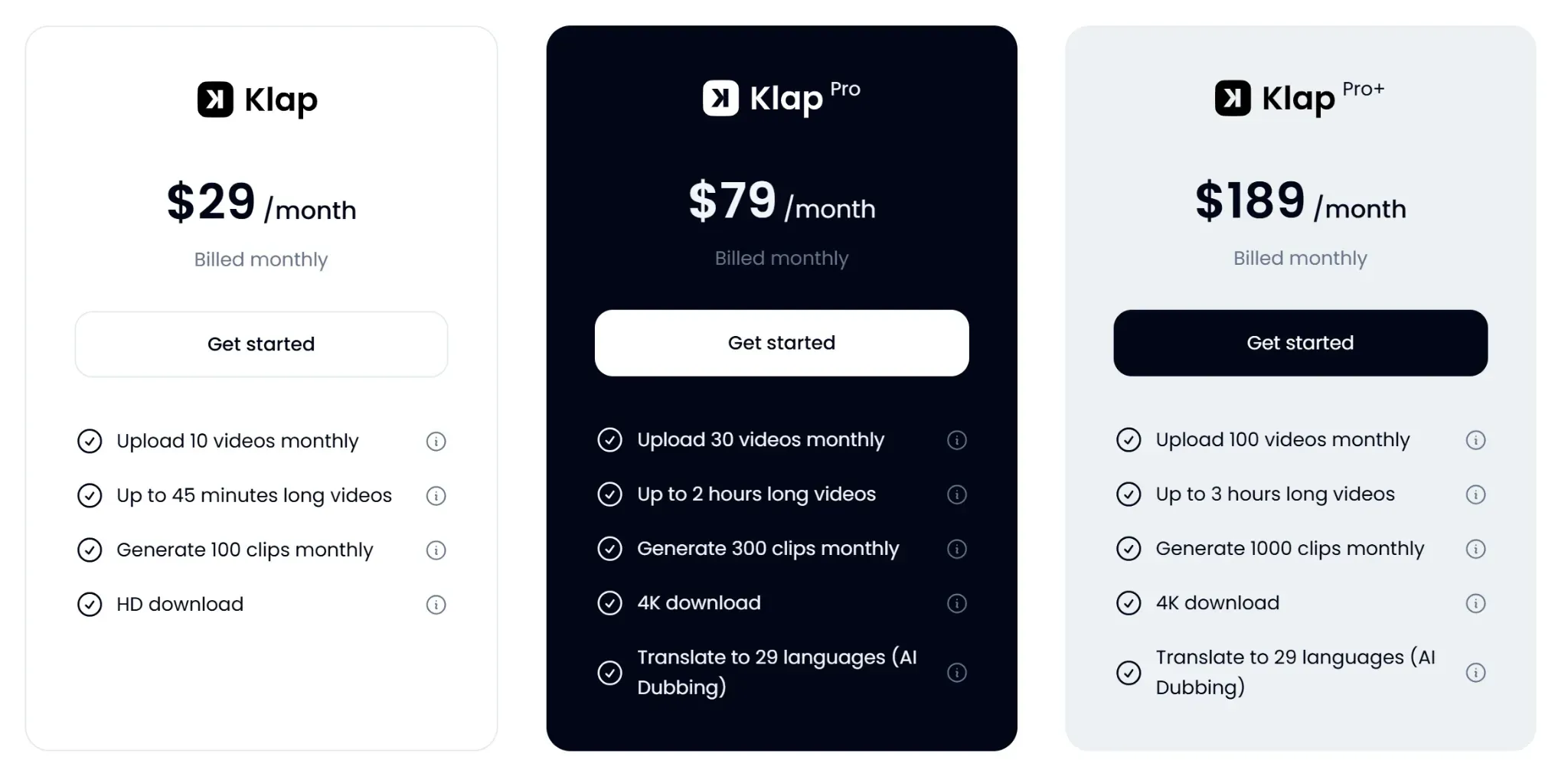
As a first-time user, you can try Klap by creating 1 video for free. After that, there are three main paid plans to choose from: Basic, Pro, and Pro+.
Klap Basic Plan at $29/Month
Klap Basic costs $29 per month. It lets you upload 10 videos monthly, process videos up to 45 minutes long, and generate 100 clips monthly. It also includes HD download.
This plan is a good fit if you are a creator or a small team that want to repurpose shorter videos into social-ready clips. It works best when your source videos are not too long and you want a clear monthly clip allowance instead of tracking credits.
Klap Pro Plan at$79/Month
Klap Pro costs $79 per month. It lets you upload 30 videos monthly, process videos up to 2 hours long, and generate 300 clips monthly. It also includes 4K download and AI dubbing in 29 languages.
This is where Klap’s feature-per-dollar value becomes clearer.
Opus Clip Pro has the lower monthly price, but Klap Pro includes a larger set of output-focused features for users who need longer video support, higher-resolution downloads, and multilingual content options.
Klap Pro+ Plan at $189/Month
Klap Pro+ costs $189 per month. It allows you to upload 100 videos monthly, process videos up to 3 hours long, and generate 1,000 clips monthly. It also includes 4K download and AI dubbing in 29 languages.
This plan is built for higher-volume workflows, such as agencies, media teams, podcasts, and companies that repurpose long videos often.
Instead of estimating usage by source-minute credits like Opus Clip forces you to, you can plan around clip output, maximum video length, and publishing needs.
Opus Clip Vs Klap: Which Gives Better Value?
Value depends on how you plan and publish content. Opus Clip has the lower Pro plan price at $29 per month. Klap Pro costs $79 per month. So, if you are comparing only the monthly price, Opus Clip is the lower-cost Pro option.
However, the main difference is not just price. Opus Clip pricing asks you to think in credits. Klap pricing asks you to think in clips, video length, and output.
If you are a creator or a team focused on publishing more short-form content from long videos, that structure can be easier to plan around.
Where Opus Clip Has the Advantage
Opus Clip makes sense if you want a lower entry point into AI video clipping.
The Starter plan costs $15 per month and includes 150 credits. The Pro plan costs $29 per month and includes 300 credits for the monthly billing, team workspace, brand templates, social account connections, AI B-roll, custom fonts, and scheduler access.
As a creator who uploads shorter videos or has a predictable monthly workload, that pricing can be easy to justify.
Where Klap Has the Advantage
Klap may appeal more to you if you prefer an AI clip generator with predictable clip-based limits instead of tracking processing credits.
Klap makes a stronger case when you look at included features and planning clarity. The Pro Plan includes 300 clips monthly, videos up to 2 hours long, 4K download, and AI dubbing in 29 languages.
That structure is useful if you are a creator or a team that thinks in terms of monthly clip output. Instead of calculating credits by source-video minutes, you can plan around how many clips you need and how long your videos can be.
Who Should Choose Each Tool?
The best choice depends on how much video you upload, how you plan your output, and which features matter most to your workflow.
Choose Opus Clip if:
- You want the lower Pro monthly price
- Your source videos are short or predictable
- You are comfortable tracking credits
- You mainly need AI clipping, captions, reframing, and social-ready exports
Choose Klap if:
- You want video-and-clip-based limits
- You need 4K downloads at Pro
- You want AI dubbing in 29 languages
- You work with long podcasts, webinars, interviews, or team content
Create More Shorts with a Pricing Model You Can Plan Around
Opus Clip pricing is attractive, especially at the Pro tier, where it has the lower monthly price. But credits make the real cost depend on how much source video you upload.
Klap is a strong alternative for users who want an AI clip generator with clearer clip-based pricing, 4K downloads, AI dubbing, and a long-video-to-shorts workflow. Instead of tracking source-minute credits, you can plan around clips, video length, and publishing needs.
Try Klap today and create your first video for free.
