
We Reviewed the 5 Best Pictory AI Alternatives for Turning Long Videos Into Shorts
Tools for Creators
Quick Summary
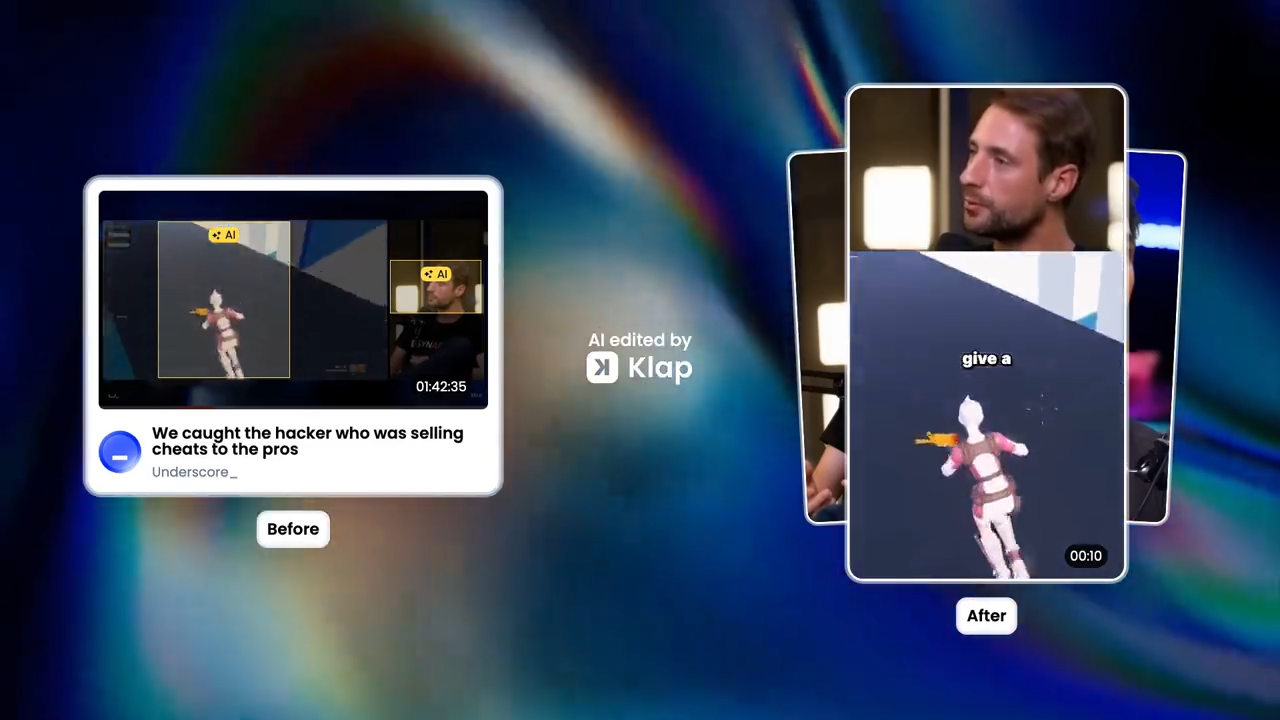
Pictory AI is useful for text-to-video creation and basic repurposing, but it may not be the most focused tool for turning long videos into Shorts, Reels, and TikToks. In this guide, we compare five alternatives built for long-to-short-form video workflows. For more ideas on video repurposing tools, check our blog.
Looking for a Pictory AI Alternative Built for Short-Form Repurposing?
Pictory AI is known for turning scripts and blog posts into videos. While it can also repurpose long videos into shorts, that workflow is only one part of a broader video creation platform.
In this Klap guide, we break down 5 tested Pictory alternatives specifically built to help you turn long videos into high-performing shorts, faster.
Why Listen to Us?
At Klap, we’ve helped over 2 million creators, podcasters, and marketing teams process long-form videos into viral short clips. This guide is based on that experience, with a focus on tools that make video repurposing faster and easier.
What is Pictory AI?
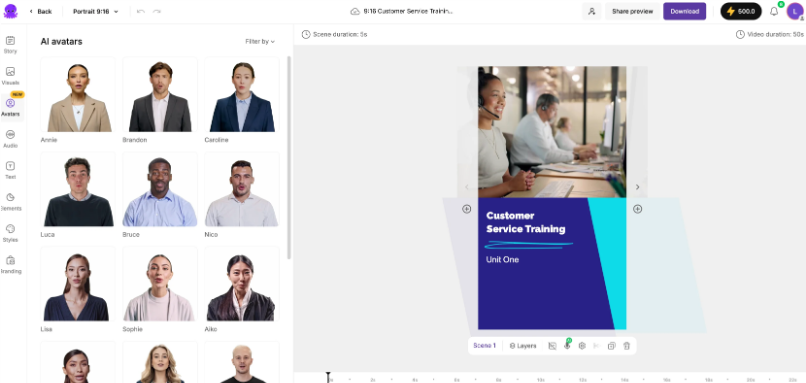
Pictory AI is an AI video creation tool that turns scripts, blog posts, URLs, and existing videos into edited videos. It helps users create videos with captions, visuals, voiceovers, templates, and brand elements without advanced editing skills.
Key Features
- Text-to-Video Creation: Turns scripts, blog posts, prompts, and URLs into editable video drafts with scenes, visuals, and narration.
- AI Video Editor: Helps trim videos, add captions, create highlights, and edit content without advanced video editing skills.
- Long-Form Video Repurposing: Turns longer videos into shorter highlight clips for social media, making it useful for webinars, podcasts, interviews, and educational content.
- Automatic Captions: Generates subtitles for videos to make content easier to watch across social platforms.
- AI Voiceovers: Adds text-to-speech narration for users who want videos with spoken audio but do not want to record their own voice.
Pricing
Pictory AI has a free trial, with paid plans starting at $25/month. Higher plans add more video minutes, brand kits, stock media, AI voiceover minutes, team features, and enterprise support.
Why Creators Seek Pictory AI Alternatives
- Limited Short-Form Focus: Pictory AI works well for text-to-video creation, but it may not feel as focused for users who mainly want Shorts, Reels, and TikToks from long-form videos
- Less Control Over AI Output: The first draft can still need manual edits, especially when the chosen visuals, pacing, or scene structure do not match the original idea
- Generic Stock Visuals: Some videos can feel stock-heavy, which may not suit creators or brands that want a more natural, platform-native style
- Learning Curve for New Users: The feature set is broad, so users may need time to understand which workflow fits their content
5 Best Pictory AI Alternatives
- Klap
- OpusClip
- Vizard AI
- Kapwing
- Descript
1. Klap
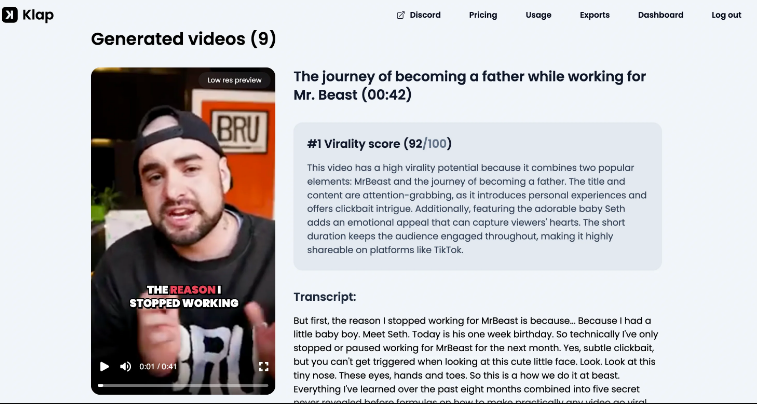
Klap is a smart Pictory AI alternative for creators who care most about turning long videos into short-form clips. While Pictory AI includes repurposing inside a broader video creation platform, Klap is built for that workflow from the ground up.
Our AI scans podcasts, interviews, webinars, and YouTube videos to find the moments most likely to work as short-form content. It then turns them into ready-to-post Shorts, Reels, and TikToks with clean reframing, dynamic captions, and less manual editing.
Key Features
- AI Clip Generation: Finds the most engaging moments in long-form videos and turns them into short clips for TikTok, Reels, and YouTube Shorts
- Smart Reframing: Keeps the speaker or main subject centered when converting horizontal videos into vertical clips
- Dynamic Captions: Adds bold, animated captions that make short-form videos easier to watch without sound
- Long-Form Video Repurposing: Turns podcasts, interviews, webinars, YouTube videos, and other long videos into multiple social-ready clips
- Ready-to-Post Shorts: Creates clips in short-form formats designed for TikTok, Instagram Reels, and YouTube Shorts
Pricing
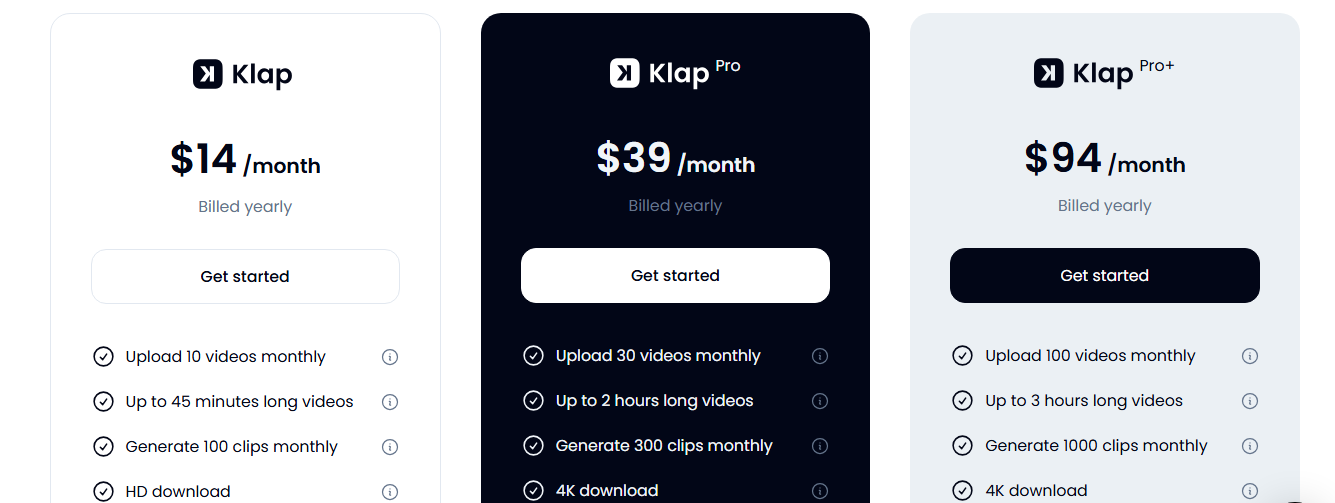
Klap uses a 3-tier subscription model based on video uploads and clip generation limits.
- Starter ($14/Month, Billed Yearly): 10 video uploads, up to 45 minutes each, and 100 clips with HD downloads
- Pro ($39/Month, Billed Yearly): 30 uploads, up to 2-hour videos, 300 clips, plus 4K downloads and AI dubbing
- Pro+ ($94/Month, Billed Yearly): 100 uploads, up to 3-hour videos, and 1000 clips for high-volume creators and teams
Pros
- Faster path from one long video to multiple publishable clips
- Better fit for creators who already have a steady flow of recorded content
- Less distracting than broader tools with too many unrelated video creation features
- Useful for scaling short-form output without hiring extra editors
- Simple enough for non-editors to turn raw footage into social content
Cons
- Not built for creating videos from blog posts, scripts, or URLs
- Less useful for teams focused on stock-heavy or avatar-led videos
2. OpusClip
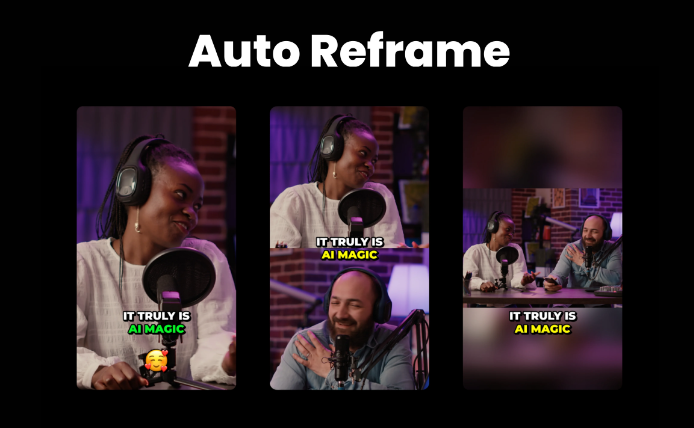
OpusClip is a video repurposing tool for creators who want more guidance on what to post. Its standout Virality Score feature ranks clips by short-form potential, helping users spot the moments most worth publishing first.
Key Features
- AI Curation: Identifies strong hooks and highlight moments, then turns them into short clips for social platforms.
- ClipAnything: Creates clips from different video types, including interviews, podcasts, vlogs, gaming, sports, and videos with little dialogue.
- AI Reframing: Resizes videos for different platforms while keeping speakers, moving subjects, or key objects centered.
- Animated Captions: Adds styled captions that sync with the video and can be customized with different templates.
- Virality Score: Scores clips based on their short-form potential, helping users decide which clips to post first.
Pricing
OpusClip’s paid plans start around $15/month when billed annually, with higher tiers offering more credits, exports, templates, scheduling, and team features.
Pros
- Works well for teams handling a mix of content formats and source videos
- Reduces extra steps between clipping, reviewing, and publishing
- Helps brands keep short-form output more consistent across campaigns
Cons
- Credit-based limits can feel restrictive for high-volume creators
- AI-selected clips may still need manual review before publishing
3. Vizard AI
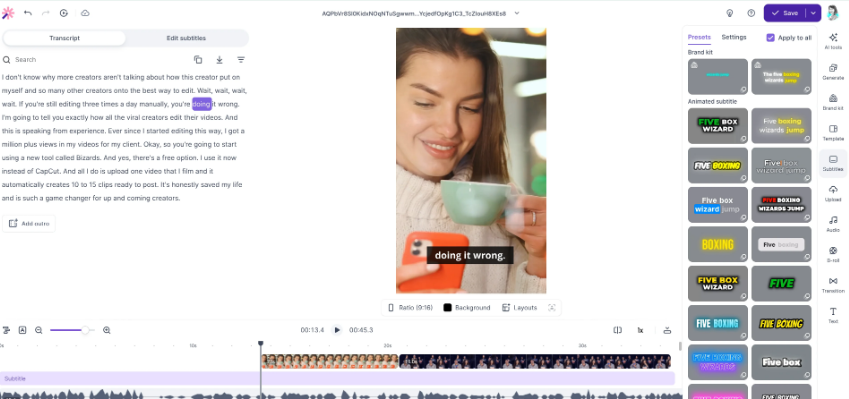
Vizard AI is a strong fit for teams repurposing webinars, interviews, podcasts, and recorded sessions into social clips. The tool’s main strength is the team workflow, helping users turn long recordings into captioned, resized, ready-to-share clips that are easier to review and manage.
Key Features
- AI Clip Generation: Finds highlight moments in long videos and turns them into short clips for TikTok, Instagram, YouTube, and other platforms.
- Auto Transcription: Transcribes uploaded videos so users can edit clips from the text instead of working only from the timeline.
- Aspect Ratio Resizing: Changes videos into platform-friendly formats, including vertical, square, and widescreen layouts.
- Timeline Editing: Gives users a built-in editor for trimming and fine-tuning clips before exporting.
- Brand Templates: Lets users apply saved templates so clips keep a consistent look across recurring content.
Pricing
Vizard AI’s paid plans start at around $16.9/month (billed annually), with higher tiers adding more minutes, watermark-free exports, better quality, social scheduling, brand tools, and team features.
Pros
- Easier for non-editors who prefer editing from text instead of a timeline
- Strong fit for teams repurposing recorded webinars, interviews, and training content
- Useful when multiple people need to review, edit, and manage social clips
Cons
- AI-selected clips still need manual review before posting
- Less suited for users who need advanced creative editing controls
4. Kapwing
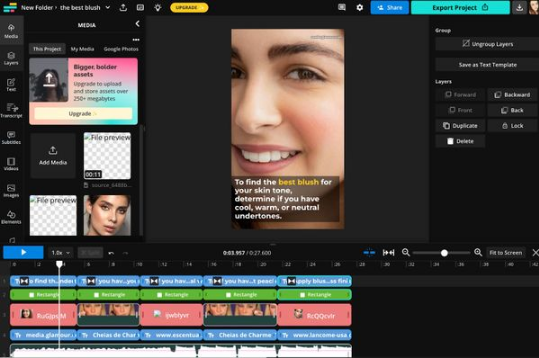
Kapwing is a good alternative for users who want repurposing and hands-on editing in one browser-based workspace. Teams can turn long videos into short clips, then trim, subtitle, resize, add B-roll, clean audio, and polish videos without using complex desktop software.
Key Features
- Repurpose Studio: Turns long videos and audio recordings into multiple short clips for social media.
- Browser-Based Editor: Lets users trim, split, resize, layer B-roll, add effects, and export videos online.
- Text-Based Editing: Allows users to edit video by editing the transcript, making cleanup easier for non-editors.
- AI Subtitles: Generates captions and subtitles for social videos, explainers, tutorials, and marketing content.
- Team Workspace: Supports shared projects, comments, brand assets, and collaborative review in one place.
Pricing
Kapwing’s paid plans start at $16/month per user when billed annually, with higher tiers adding more exports, 4K quality, brand kits, team tools, and advanced AI features.
Pros
- Great for teams that need both AI speed and manual editing control
- Easier to keep review, edits, and brand assets in one shared workspace
- More flexible than single-purpose clipping tools for mixed content needs
Cons
- May feel too broad for users who only want fast long-form-to-short-form clipping
- Per-user pricing can add up for larger teams
5. Descript
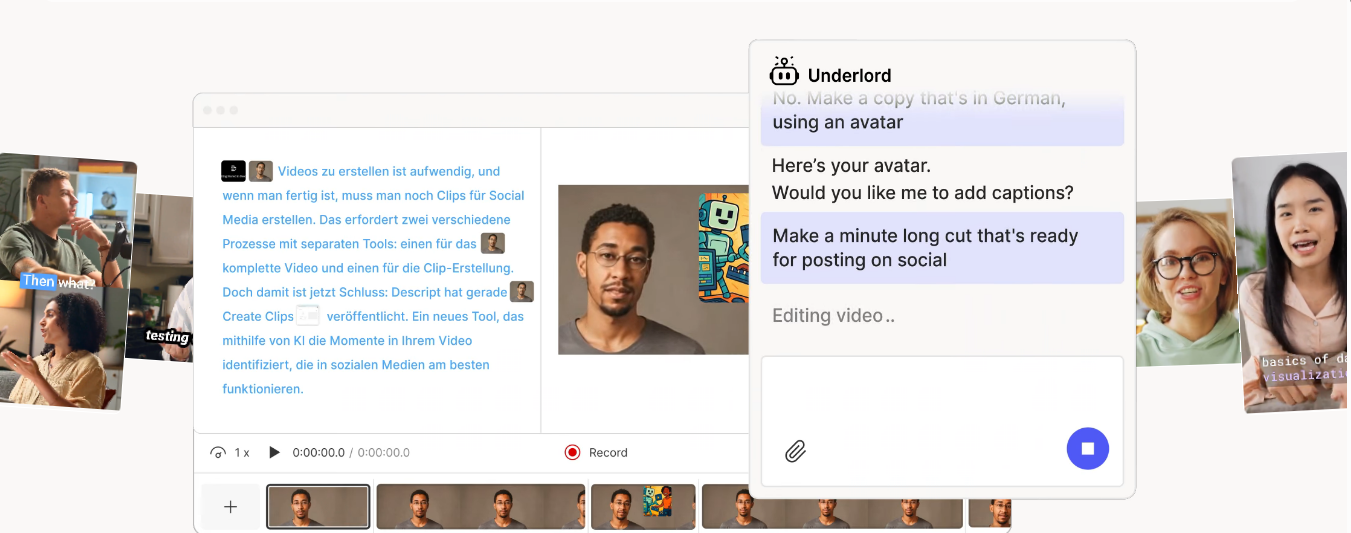
Descript is a Pictory AI alternative for creators and teams editing spoken video and audio. Its text-based workflow lets users clean up podcasts, interviews, webinars, and talking-head videos from the transcript before turning them into short social clips.
Key Features
- Text-Based Editing: Lets users cut, trim, and rearrange video by editing the transcript like a document.
- AI Co-Editor: Helps with tasks like finding clips, removing filler words, improving audio, and summarizing content.
- Create Clips: Turns longer videos into short clips for social media repurposing.
- Studio Sound: Improves spoken audio quality by reducing noise and making recordings sound cleaner.
- Screen Recorder and Rooms: Supports screen recording and remote recording sessions for creating fresh source content.
Pricing
Descript’s paid plans start at $16/month per person when billed annually, with higher tiers adding more media hours, AI credits, 4K export, translation, dubbing, brand tools, and team features.
Pros
- Easier for writers, podcasters, and non-editors who prefer editing from text
- Perfect for teams that need both content cleanup and repurposing
- Useful for improving rough recordings before clips are created
Cons
- Less focused on short-form clipping than tools built only for that workflow
- Per-person pricing can become expensive for growing teams
Turn Your Long Videos to Viral Shorts Faster With Klap
The right Pictory AI alternative depends on your workflow. For text-to-video, Pictory AI still has its place. But for turning long videos into short, social-ready clips, Klap gives creators a faster path from raw footage to publishable Shorts, Reels, and TikToks.
Our AI finds the strongest moments in podcasts, interviews, webinars, and YouTube videos, then adds smart reframing and dynamic captions so each clip is easier to edit, export, and post.
Try Klap for free today and turn your next long video into viral-ready shorts in minutes.
