
AI Scene Generator: A Creator's Guide to Digital Worlds
Other
You've got the script. You've got the campaign idea. You might even have a rough edit open already. What you don't have is the footage that would make it land.
That's the bottleneck most creators and marketers hit. You need a clean product close-up that doesn't exist yet. You need a moody city backdrop for a hook. You need a short transition scene to make a talking-head segment feel less static. The old options were familiar and frustrating: spend hours digging through stock libraries, hire out a custom shoot, or settle for visuals that are merely good enough.
An AI scene generator changes that equation.
Instead of asking, “Where am I going to find this shot?” you start asking, “How should this shot look?” That's a much better creative question. It moves the work from asset hunting to direction. For teams repurposing long-form content, that shift matters even more. You're no longer limited to what was captured on camera. You can build the missing connective tissue around existing footage, create custom visual context, and make one core asset do far more work.
The useful way to think about these tools isn't as a magic replacement for production. It's as a fast visual production layer that sits inside your workflow. Used well, it helps you storyboard faster, patch weak spots in edits, visualize concepts before spending real budget, and turn rough ideas into scenes you can publish.
The End of the Blank Canvas
A lot of content work starts with a mismatch between the idea and the assets on hand.
A strategist wants a launch video that feels cinematic, but the only footage available is a product demo and a founder interview. A YouTuber has a strong narration track, but no supporting visuals for the first thirty seconds. A social media manager needs five variations of the same campaign theme, yet doesn't have the time to brief a designer for every single one.
That's where the blank canvas usually becomes a production problem.
Before AI scene generators, filling that gap meant stitching together stock clips that almost fit, commissioning custom visuals, or cutting the concept down until it matched whatever content already existed. None of those options is ideal. Stock often feels generic. Custom work takes coordination. Cutting the idea down usually weakens the message.
An AI scene generator gives you a fourth option. You describe the scene you need, and the system generates a visual environment based on that prompt. Sometimes that's a single image for a storyboard frame. Sometimes it's a short clip that works as B-roll. Sometimes it's a stylized background, a product setting, or a sequence that helps bridge one idea to the next.
The real win isn't only speed. It's creative flexibility at the moment when most projects would otherwise compromise.
In practice, that means a marketer can mock up several campaign directions before choosing one. A creator can add visual variety to a video that was originally shot in one room. A small brand can test concepts that would have been too expensive to produce from scratch.
The feeling is less like opening a design tool and more like working with a very fast visual assistant. You still need taste. You still need judgment. But you're no longer starting from nothing, and that changes the energy of the work.
What an AI Scene Generator Is And Is Not
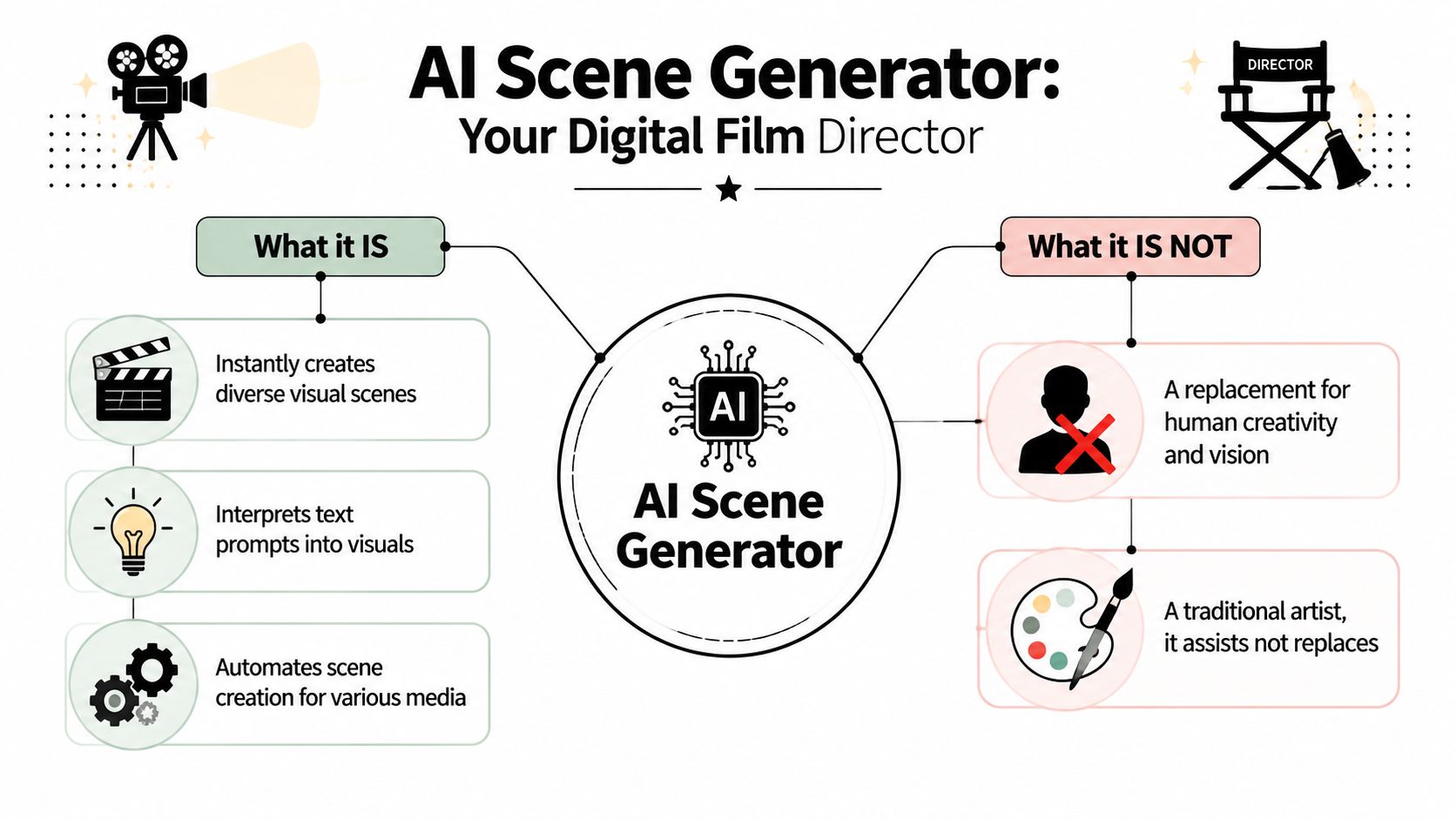
An AI scene generator is easiest to understand if you think of it as a digital film director with an instant art department. You give it a brief, and it assembles a scene: setting, mood, framing, lighting, and sometimes motion.
What makes it useful is that it doesn't just generate an isolated object. It creates a scene, which means relationships between elements matter. Background, foreground, perspective, and atmosphere all have to work together.
What it is
The strongest modern tools act like structured prompt-to-visual systems. Industry analysis notes that scene generation evolved from manual editing workflows into automated pipelines that can turn a short brief into a narrated sequence of scenes for explainer videos, product demos, tutorials, and social content, as described in this analysis of AI video generator core technologies.
That broad definition covers a few different categories:
TypeBest forTypical output
Image scene generators
Storyboards, concept frames, thumbnails, ad mockups
Single still scenes
Video scene generators
Short B-roll, transitions, visual inserts, social clips
Short moving scenes
3D scene generators
Product environments, immersive spaces, interactive mockups
Navigable or editable 3D setups
An image scene generator is useful when you need to decide what something should look like before you produce it. A video scene generator helps when the missing asset is motion, not just composition. A 3D workflow matters when the scene has to be manipulated, viewed from multiple sides, or used inside a more technical production pipeline.
That last category is especially relevant in commerce. If you work in product marketing, this example of 3D product visualization for mattress brands is a good reference point for how scene-based visualization supports selling without relying on traditional photography alone.
What it is not
It's not a replacement for judgment. It won't decide what belongs in your campaign, what supports your story, or what your brand should look like.
It's also not the same thing as a full editing suite. It can generate visual material, but shaping that material into a polished final piece still takes curation and editorial sense.
Useful distinction: An AI scene generator makes options. A creative lead makes choices.
It's also not one monolithic tool category. Some products are built for still imagery, some for short-form video, some for 3D, and some sit somewhere in between. If you're building a broader creator stack, this roundup of AI tools for content creators is a useful companion because scene generation usually works best alongside other specialized tools, not in isolation.
How These AI Tools Turn Words into Worlds
The simplest way to understand the process is to think like a kitchen.
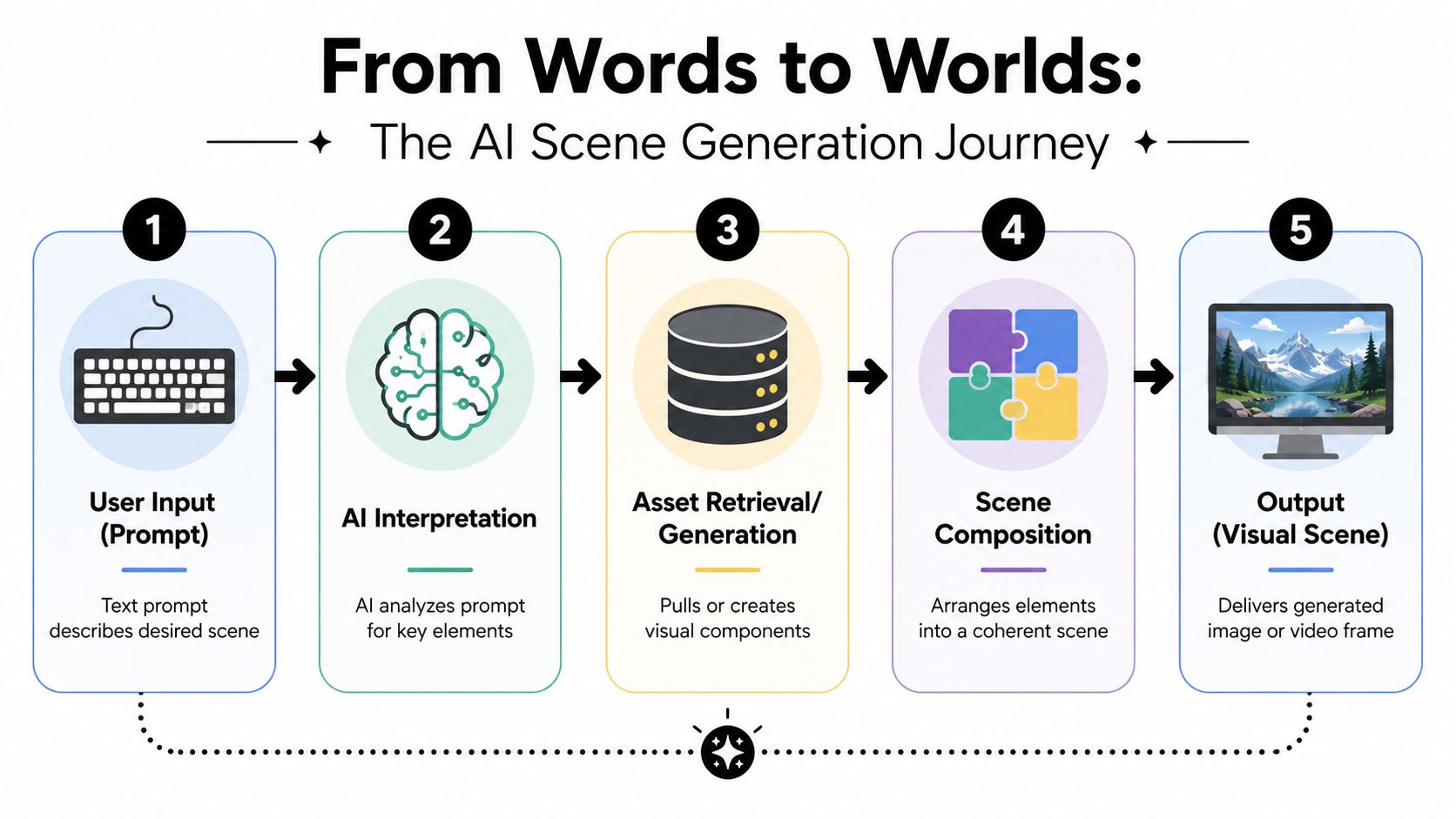
Your prompt is the ingredient list. The model is the recipe. The final visual is the dish that comes out of the kitchen.
That sounds obvious, but it explains why some prompts work and others don't. If you provide vague ingredients, the output will be broad and inconsistent. If you provide specific ingredients and clear constraints, the tool has much more to work with.
The input layer
Most scene generators accept some combination of:
- Text prompts that describe the environment, mood, camera framing, and action
- Reference images that help guide style, composition, or subject
- Start or end frames when you want continuity across motion
- Existing footage or assets in tools that support more editor-style workflows
Modern systems are typically prompt-conditioned multimodal tools, which means they can interpret more than one type of input and turn that into a structured output. In video workflows, they often support short scene durations of about 3 to 12 seconds, along with controls for motion, camera movement, multi-scene composition, and start or end frames, as outlined in this overview of AI scene generator capabilities.
The model layer
Behind the scenes, the model has been trained on vast amounts of real-world data so it can recognize patterns in images, motion, facial features, and speech-related cues. That training is what allows it to infer more than you explicitly wrote.
If your prompt says “minimalist office at sunrise, slow push-in, warm light on desk,” the system isn't only matching words. It's making educated guesses about layout, color, pacing, and visual relationships.
That's why the output can feel surprisingly complete. The tool expands a brief prompt into a fuller scene structure rather than merely placing isolated objects on a blank background.
The refinement layer
Here, the “magic” becomes a workflow.
Some systems can render scenes in seconds and then let you refine them through iterative prompting or editor-based adjustments before export, which is the practical advantage described in this AI scene generator workflow breakdown. You prompt, review, adjust, and repeat.
Start with the scene's job, not its decoration. If the shot needs to introduce a product, support narration, or bridge two ideas, write the prompt around that function first.
That habit makes troubleshooting easier. When a scene fails, the issue usually isn't that the tool is random. It's that the prompt described aesthetics without describing purpose.
Putting AI Scene Generators to Work
The fastest way to get value from an AI scene generator is to stop treating it as a novelty and start assigning it real production jobs.
The category is growing because creators and brands are doing exactly that. The AI image generator market is projected to grow from USD 8.7 billion in 2024 to USD 60.8 billion by 2030, a 38.2% CAGR, while the AI video generator market is projected to reach US$ 1,986.34 million by 2031, according to market projections covering AI image and video generation. That kind of growth signals a commercial shift. These tools are moving into everyday creative infrastructure.
Storyboards and pitch frames
This is one of the lowest-risk, highest-return uses.
If you need stakeholder buy-in before a production starts, generated scene frames help people react to something concrete. Not a paragraph in a doc. Not a moodboard assembled from five unrelated screenshots. A draft visual that feels close to the intended output.
For agencies and internal teams, this is often where the tool earns trust first. Nobody has to believe it can replace final production. They just have to see that it shortens the distance between idea and alignment.
Custom B-roll and visual fillers
Talking-head videos often drag because every visual beat looks the same. AI-generated scenes can solve that by supplying:
- Abstract environment shots for opening hooks
- Topic-specific inserts that support narration
- Stylized transitions between segments
- Visual metaphors that would be hard to film directly
If you're exploring that use case, this guide to an AI B-roll generator is a practical companion because B-roll is one of the clearest workflow bridges between generation and editing.
What works well here is specificity. “Startup office” is weak. “Empty glass-walled office at dawn, laptops sleeping, city lights fading, slow dolly past desks” is much more usable.
Product marketing and concept visuals
For product teams, scene generation is especially useful before a campaign is fully produced. You can test packaging environments, hero settings, ad concepts, and landing-page visuals without organizing a full shoot.
That doesn't mean every generated asset should go straight to market untouched. It means you can pressure-test ideas before investing in more expensive production steps.
Practical rule: Use AI scenes to explore options early and fill gaps late. Those are the two moments where the time savings are most obvious.
Social content and repurposing workflows
The tool transforms into more than a generator. It becomes part of a content system.
A long webinar, podcast, interview, or YouTube video usually contains a lot of useful information and not enough visual variation. AI scenes can add intros, cutaways, animated context, or short visual bridges around the strongest moments. That makes the source content more adaptable before it gets repurposed into smaller formats.
Here's a useful way to think about the workflow:
- Start with the core asset
A long-form video, interview, tutorial, or product walkthrough gives you the substance. - Generate support scenes where the edit feels thin
Add visual context around sections that need motion, atmosphere, or explanation. - Cut the finished piece into short-form outputs
Once the long-form asset is stronger, it becomes much easier to repurpose for social.
The repurposing step matters because generated scenes are most valuable when they extend the life of content you already have, not only when they create something brand new.
A short example of how creators think about that production flow is worth watching below.
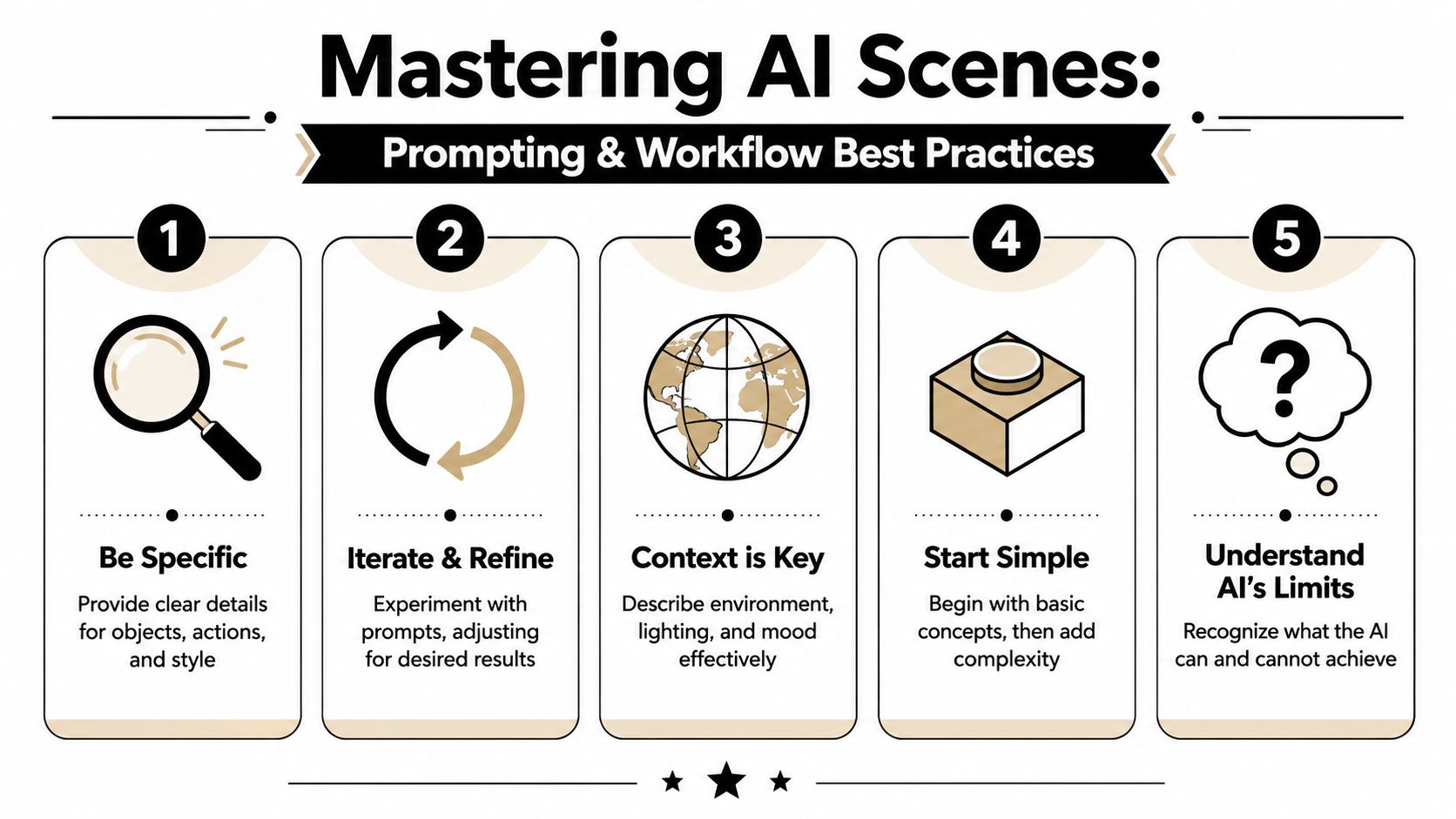
Mastering the Craft Prompting and Workflow Best Practices
Most disappointing results come from one of two issues. The prompt is too vague, or the workflow assumes one good output will solve everything.
Neither is true. Good AI scene generation is iterative, and the best users direct it the way a filmmaker directs a set.
Write prompts like a director
A weak prompt asks for a subject. A strong prompt asks for a shot.
Compare these two:
- “Modern kitchen”
- “Bright modern kitchen, matte white cabinets, morning light from left window, shallow depth of field, slow camera slide past marble island, clean product-ad look”
The second one gives the model structure. It defines environment, lighting, camera behavior, and style.
A practical prompt formula looks like this:
Prompt elementWhat to include
Subject
What is the scene about
Environment
Where it takes place
Lighting
Time of day, quality, direction
Camera
Framing, movement, lens feel
Style
Cinematic, commercial, minimalist, illustrated
Purpose
Hook, transition, explainer, product reveal
When prompts fail, they often fail because the writer skipped purpose. A beautiful scene that doesn't fit the edit is still the wrong scene.
Build scenes in passes
Don't try to get the perfect output in one prompt.
Use a layered process instead:
- Pass one: Establish the basic environment and composition
- Pass two: Refine mood, lighting, and style
- Pass three: Add motion, angle changes, or continuity cues
- Pass four: Clean up details and make export decisions
This sounds slower, but it's usually faster than writing one overloaded prompt and then fighting inconsistent results.
A related workflow appears in adjacent creative categories too. If you use generated scenes alongside animated overlays, this guide to AI motion graphics is useful because both workflows depend on clear visual intent and staged refinement.
Handle multi-angle consistency carefully
Many creators often stumble at this point.
A major challenge in AI scene generation is multi-angle consistency. Tutorials focused on cinematic angle generation advise starting from an eye-level baseline and then adjusting in small increments to avoid distortion and perspective errors, as noted in this guide to cinematic angle generation. That advice tells you something important: keeping a scene coherent across views is harder than generating one attractive frame.
What works better is a continuity-first workflow:
- Lock the base scene first
Get one clean, neutral angle that clearly defines layout and subject placement. - Change one variable at a time
Adjust rotation, elevation, or zoom separately instead of rewriting the whole prompt. - Keep anchor details constant
Repeat distinctive elements such as wardrobe, object placement, wall texture, or lighting direction. - Move in small steps
A slight left shift usually holds together better than a dramatic overhead jump.
If you need five matching shots, don't generate five separate ideas. Generate one scene, then direct variations from that source.
Know what not to force
Some scenes still break down under pressure. Crowded hand interactions, precise brand packaging details, complex anatomy, and long continuity chains can all expose weaknesses.
When that happens, the best move isn't endless prompting. It's reducing complexity, compositing selectively, or switching to a different production method for that moment.
That's part of the craft too. Experienced creators don't ask the tool to do everything. They ask it to do the parts it does well.
The Road Ahead Limitations and Future Potential
AI scene generators are useful right now, but they're not frictionless.
Consistency can still wobble across many scenes. Hands, small object details, and text inside visuals can go strange. Style can drift between generations even when the prompt looks nearly identical. If you've used these tools for any real campaign work, you've seen at least one output that was almost perfect except for the part you couldn't ignore.
There are also ethical and operational questions that serious teams can't skip. Copyright concerns around training data remain part of the broader AI conversation. So do questions about disclosure, misuse, and whether generated visuals could mislead an audience when context is missing.
What still requires human control
A strong workflow still needs a person to decide:
- Brand fit so scenes look like they belong in the same campaign
- Editorial judgment so generated visuals support the message rather than distract from it
- Quality control so artifacts, continuity errors, or odd details don't make it into the final cut
- Disclosure standards that match the context and audience expectations
That human layer isn't a temporary patch. It's the part that turns output into communication.
The future isn't “push button, get masterpiece.” It's faster production with better creative leverage for people who know what they're making.
Where the tools are heading
The direction is clear even if the details are still evolving. Scene generation is becoming more interactive, more controllable, and more tightly connected to the rest of the production stack.
That likely means tighter links with editing tools, smoother scene-to-scene continuity, better camera control, and workflows where creators can move from script to storyboard to generated visual sequence without jumping between as many disconnected steps. The most interesting future use case isn't just full text-to-video. It's collaborative production where AI handles more of the repetitive visual assembly and humans keep control of taste, narrative, and brand.
For creators and marketers, that's the part worth paying attention to. The main advantage isn't novelty. It's the chance to build richer content systems from the assets you already have, plus the scenes you can now create on demand.
If you're already producing long-form videos, the next bottleneck usually isn't ideas. It's turning those assets into enough polished short-form content to stay visible. Klap helps close that gap by turning long videos into social-ready clips with captions, reframing, and editing support, which makes it a practical fit for creators who want to pair stronger visual production with faster repurposing.
