
We Reviewed 7 Best AI B-roll Generators for Creating Engaging Videos
Tools for Creators

Quick Summary
This article reviews seven AI B-roll generators for creating engaging videos. We break down each tool’s features, pricing, and ease of use, showing how creators can add B-roll to improve pacing and storytelling while saving time on video editing.
Finding the Right B-Roll Shot for Your Video
You are editing a product tutorial and need footage of hands typing on a keyboard. Or you are cutting a marketing video that requires establishing shots of a coffee shop. Searching stock libraries takes time, licensing adds cost, and clips often do not match your video.
AI B-roll generators create custom clips from text prompts in seconds. These tools reduce reliance on stock libraries, simplify licensing, and speed up video editing workflows.
In this Klap article, we review seven AI B-roll generators, comparing output quality, pricing, ease of use, and ideal use cases to help creators, small teams, and media companies find the right tool for their workflow.
Why Listen to Us?
At Klap, we work with AI-powered video editing for over 2.1 million creators. Our technology analyzes thousands of hours of video daily to identify what makes clips effective. This practical experience with automated video editing informs our evaluation of AI B-roll tools and how they fit into video workflows.
What is an AI B-roll Generator?
Before selecting an AI B-roll generator, it helps to understand the role of B-roll.
B-roll is supplemental footage in video production that supports the main narrative. It provides context, visual detail, and depth, often showing scenery, reactions, or additional actions that complement the primary storyline.
An AI B-roll generator automates this process. It uses artificial intelligence to analyze your content and create relevant, high-quality B-roll clips, reducing editing time and streamlining video production.
For example, if a YouTuber explains how they edit videos, the talking-head clip is the A-roll. Screen recordings of the software, timeline zoom-ins, or previews of the final video are B-roll.
In short, A-roll tells the story, and B-roll shows it.
Why B-roll is Important in Video Content
B-roll supports the main narrative, adds visual variety, and enhances the viewer experience. Here are the main ways B-roll adds value:
- Enhances Visual Appeal: B-roll adds variety to static shots by showing different angles, actions, or scenes. This keeps viewers visually engaged while supporting the main story.
- Improves Storytelling: B-roll adds context by showing the environment, speaker reactions, or relevant actions. This helps viewers better understand the A-roll content and follow the narrative more clearly.
- Creates Seamless Transitions: B-roll fills gaps between scenes or topic changes, allowing the video to flow smoothly. It reduces abrupt jumps and keeps the narrative visually consistent.
- Supports Viewer Engagement: Strategic B-roll, such as close-ups, cutaways, or illustrative actions, keeps the video visually varied. This helps maintain viewer attention throughout the content.
- Elevates Production Quality: High-quality B-roll improves the overall look of a video. It allows creators to produce polished, professional content even with minimal original footage.
Top 7 AI B-roll Generators
- Klap
- Descript
- Submagic
- OpusClip
- Kapwing
- Veed.io
- Vmaker
1. Klap
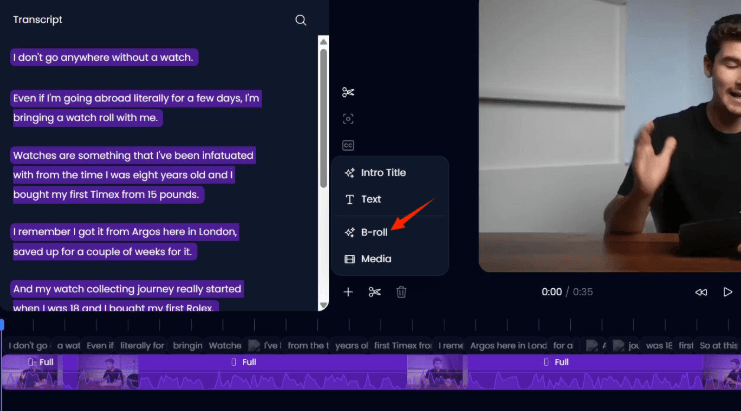
Klap is an AI video tool that automatically analyzes long videos and generates short clips, including suggested visuals that act like B‑roll for more engaging output. It reviews your footage and transcript to detect high‑impact moments and creates contextually relevant short‑form clips, saving time on manual editing.
The B‑roll‑style workflow is built into Klap’s editor. Creators can preview, trim, swap, or reposition clips while also editing captions, adjusting framing for different aspect ratios, and customizing subtitles or visual styles. Users often find it effective for talking‑head content, interviews, and social clips, where automatic clip extraction and formatting speed up workflow.
Key Features
- AI-powered B-roll insertion: Automatically detects key moments in your footage and transcript, then suggests or inserts relevant B-roll clips to enhance engagement.
- Dynamic reframing: Adjusts visuals to fit multiple aspect ratios, including 16:9, 9:16, and 1:1, making videos ready for social platforms without manual resizing.
- Integrated captions and dubbing: Add subtitles in 50+ languages and translate voiceovers directly in the editor to reach a wider audience.
- Quick trimming and editing: Cut, reposition, or fine-tune both B-roll and A-roll clips directly on the timeline for precise control.
- One-click export: Render videos in HD or 4K and share to social media or download with minimal steps.
Pricing
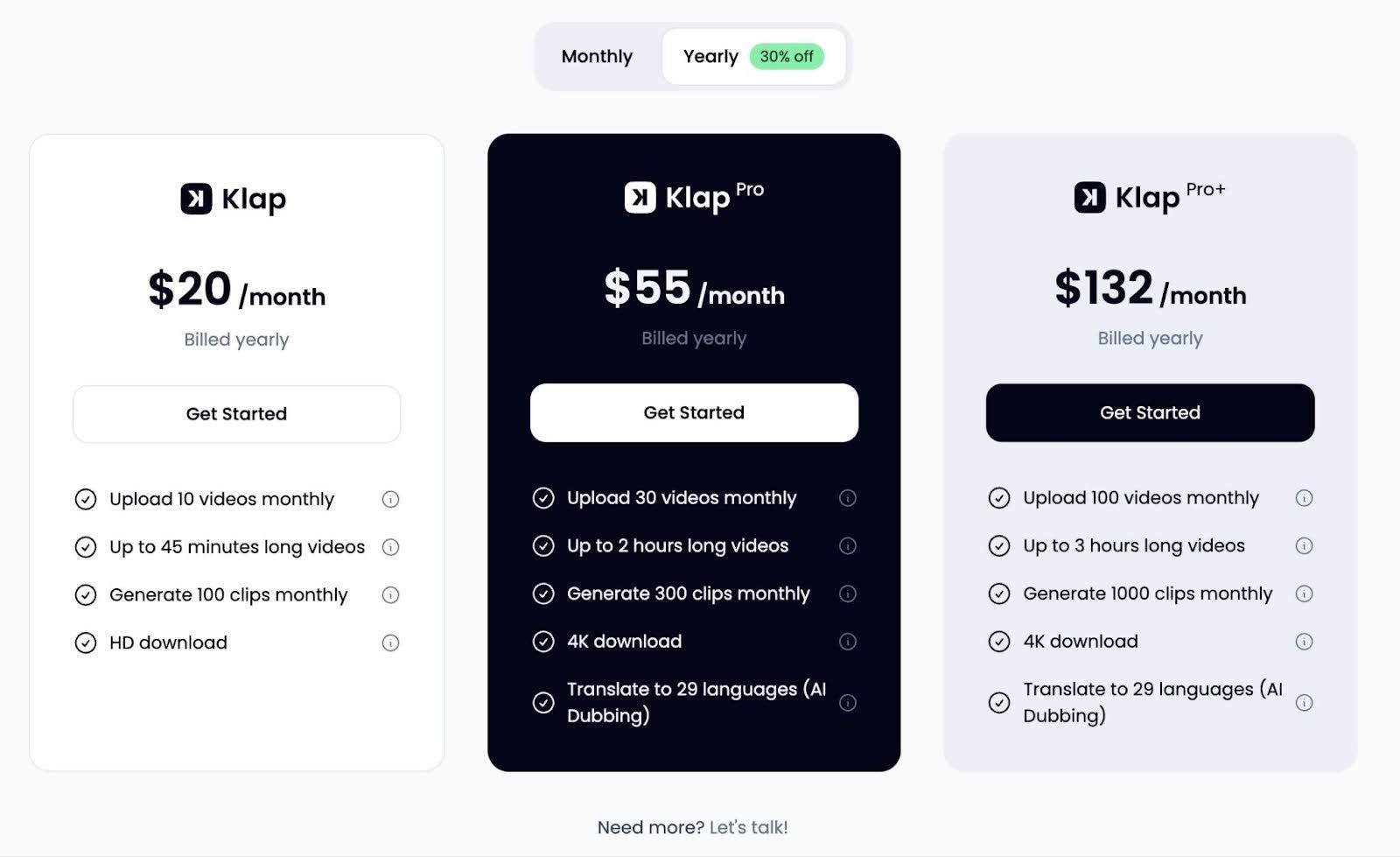
Klap offers three-tiered pricing structure
- Basic Plan: Upload up to 10 videos monthly with HD downloads and core AI tools included.
- Pro Plan: Upload up to 30 videos monthly, generate more clips, and unlock 4K downloads and language translation.
- Pro+ Plan: Best for heavy creators with the highest upload limits, 1,000 clips, extended video lengths, and full 4K + AI dubbing.
- Enterprise/Custom: For creators and teams needing higher limits or tailored solutions, Klap offers custom arrangements beyond the standard tiers.
Each tier increases upload, clip generation, and export quality to match your content volume and professional needs.
Pros
- Autogenerated captions are noted as helpful.
- AI helps identify key moments without manual cutting.
- Some users say it simplifies short-form video workflows.
- Users say it makes turning long videos into short clips faster.
Con
- Some users want more control over clip selection and fine-grained edits.
2. Descript
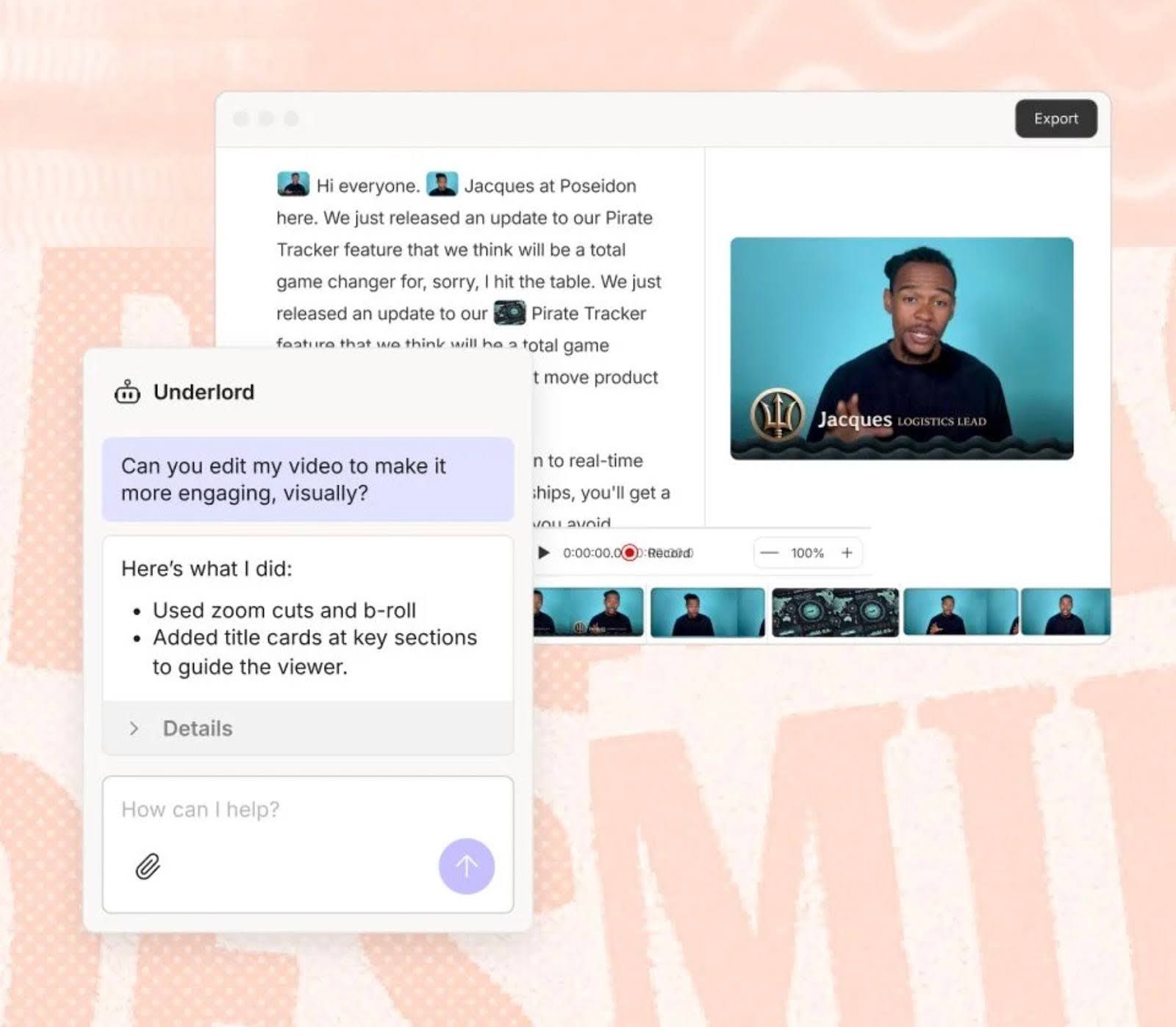
Descript’s transcript-first workflow converts audio into editable text, letting creators align B-roll, stock footage, or AI clips directly with dialogue and pacing.
The layered editor enables tutorials, talking-head videos, and educational content, with cutaways, overlays, and creative visuals, all without switching tools, reducing manual editing while producing polished, professional videos.
Key Features
- Transcript-Based Visual Insertion: Suggests and inserts stock or AI-generated visuals based on spoken words and context to enhance engagement.
- Built-In Stock Media Library: Provides licensed stock footage, images, and clips directly in the editor for cutaways and supporting visuals.
- Text-Based Video Editing: Edit video by editing text, making it simple to align B-roll with specific script moments.
- Scene and Layer Controls: Add visuals as layers above A-roll to cover cuts, pauses, or transitions without breaking the timeline.
- Integrated Captions and Overlays: Combine B-roll with captions, titles, and on-screen text seamlessly within the same editor.
Pricing
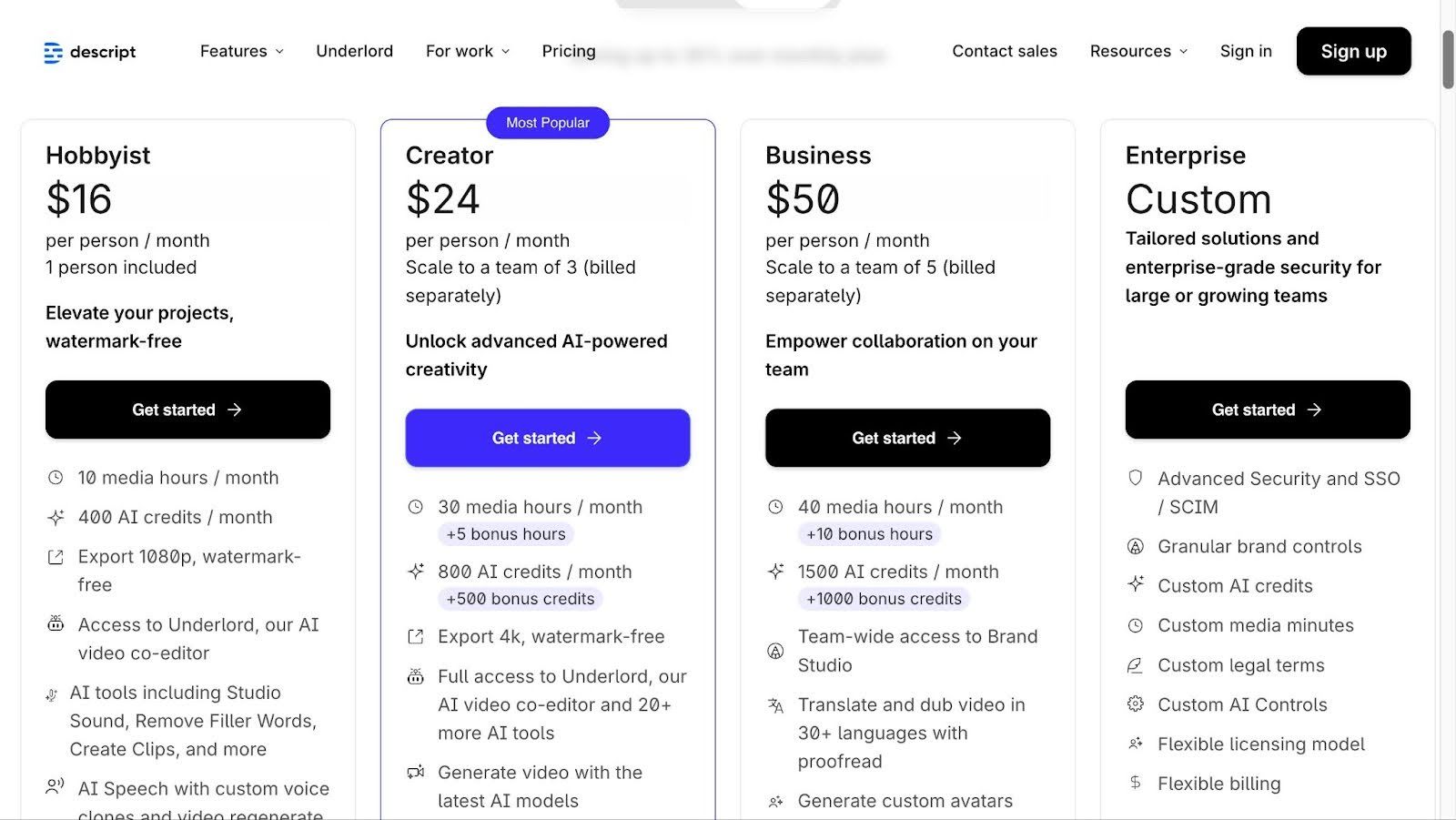
Descript offers a tiered pricing structure:
- Hobbyist: 10 media hours/month, 400 AI credits, 1080p watermark-free exports.
- Creator: 30 media hours/month, 800 AI credits, 4K exports, full AI tool suite.
- Business: 40 media hours/month, 1,500 AI credits, team collaboration, Brand Studio access.
- Enterprise/Custom: Tailored solutions for higher limits or large teams beyond standard tiers.
Pros
- AI tools like Overdub polish audio without re-recording.
- Many users find the text‑based workflow intuitive even for beginners.
- Transcript editing helps align visuals and cuts, reducing manual timeline work.
- Automatic transcription and filler removal save time versus traditional editing.
Con
- Some users note performance can be slow or resource‑heavy on large projects.
- A few users report the tool has a learning curve for more advanced features.
3. Submagic
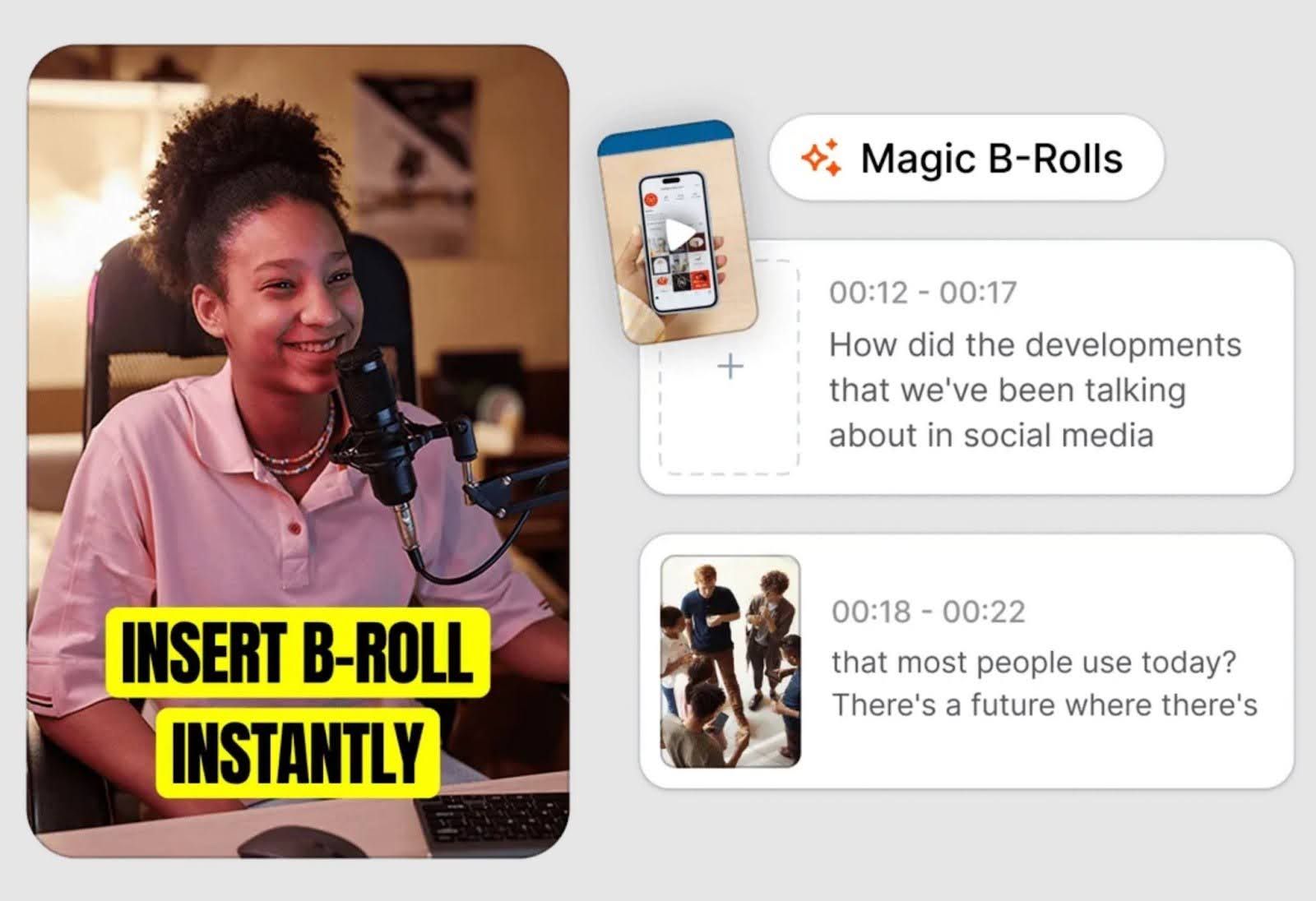
Submagic uses AI to generate and insert B-roll, turning long videos into engaging short clips. It analyzes transcripts and scenes to highlight key moments, suggesting visuals that enhance pacing, storytelling, and audience engagement.
B-roll clips appear in the editor timeline for preview, trimming, repositioning, or swapping, making it ideal for social media, tutorials, and interviews.
Key Features
- Automatic B-roll insertion: AI analyzes your transcript and scene context to add relevant B-roll with a single click.
- Magic B-rolls: Precise B-roll placement and timing without manual searching.
- Customizable visuals: Choose from royalty-free clips, images, GIFs, or upload your own.
- Additional AI tools: Auto captions, zoom effects, transitions, and sound effects integrated with B-roll.
- Transcript and timeline editing: Fine-tune B-roll placement by editing your video like text.
Pricing

Submagic offers a tiered pricing structure:
- Starter ($12/member/mo, annual): 15 videos/month (2 min max), AI captions, free B-roll, 1080p export.
- Pro ($23/member/mo, annual): 40 videos (5 min max), 4K import/export, premium B-roll, AI hooks, clean audio.
- Business + API ($41/member/mo, annual): 100 videos (30 min max), 60 FPS export, priority support, team workspace.
- Enterprise/Custom: Tailored for creators or teams needing higher limits and custom solutions beyond standard tiers.
Pros
- Automatic B‑roll and caption tools save editing time.
- Magic B‑roll creates contextually relevant clips with little effort.
- Users report that automatically generated B-roll clips speed up video editing
- Some users mention it feels intuitive even for beginners learning video workflows
Con
- Some advanced AI tools are limited to higher plan tiers.
- Some users report occasional export delays or slow preview performance.
4. OpusClip
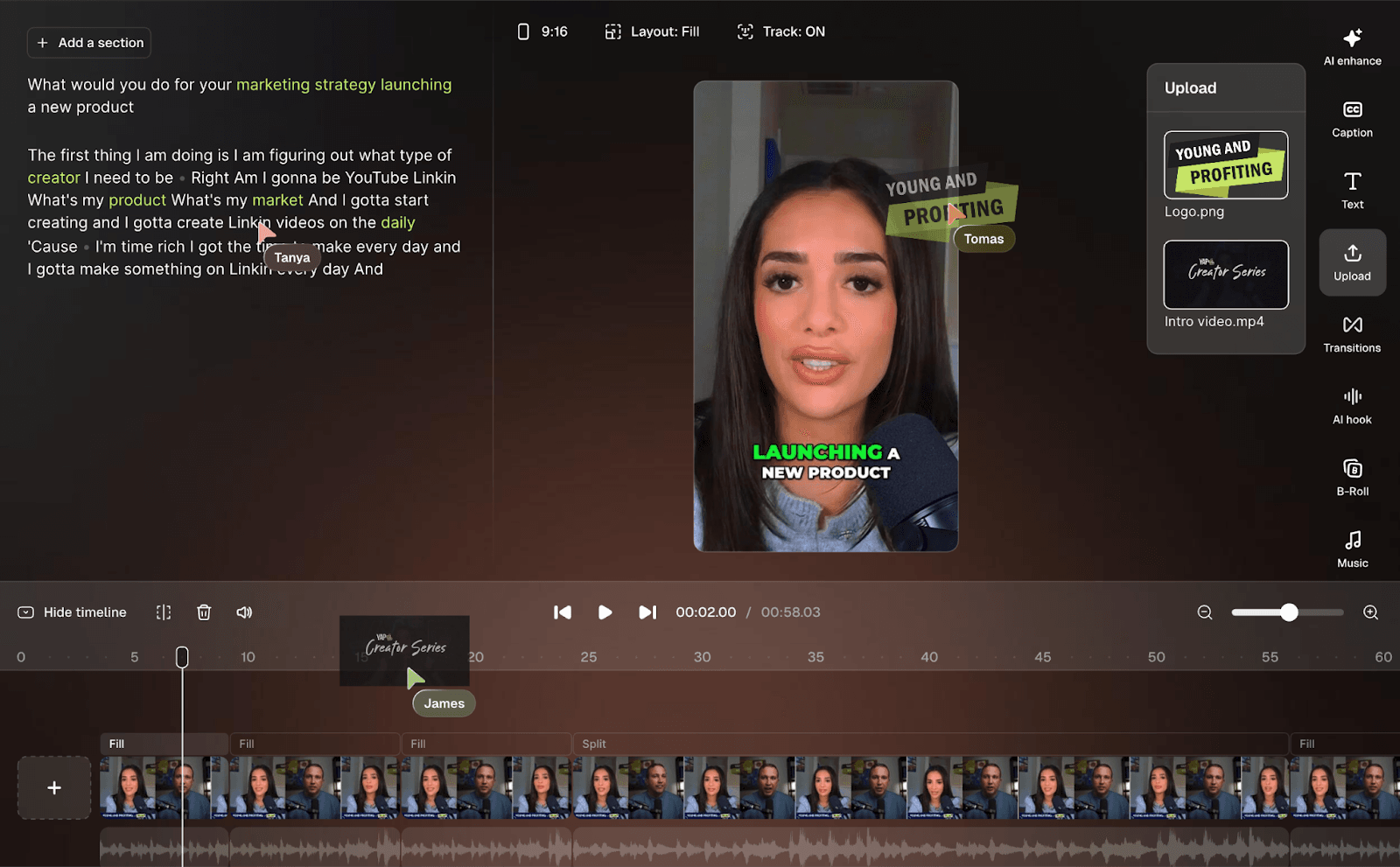
OpusClip is an AI video tool that automatically analyzes long-form footage and generates B-roll to enhance pacing, storytelling, and viewer engagement. Its AI detects key moments in your video and inserts stock or AI-generated visuals, reducing the need for manual editing and helping creators focus on content.
The editor allows users to preview, trim, reposition, or swap B-roll clips while managing captions, transitions, and audio enhancements. OpusClip is ideal for tutorials, vlogs, podcasts, and short social content, making it simple to produce polished videos with contextual visuals that keep viewers engaged from start to finish.
Key Features
- One‑click AI B‑roll: Automatically scans your footage and inserts relevant B-roll to enhance pacing and storytelling.
- Custom B‑roll upload: Upload your own videos or images to include alongside AI suggestions for personalized visuals.
- Stock footage integration: Access millions of royalty-free clips to enrich your content and boost visual variety.
- Editable B-roll clips: Trim, reposition, and refine generated B-roll directly on the timeline for precise control.
- Multi-tool workflow: Combine B-roll generation with captions, animated text, and intelligent reframing within the editor.
Pricing
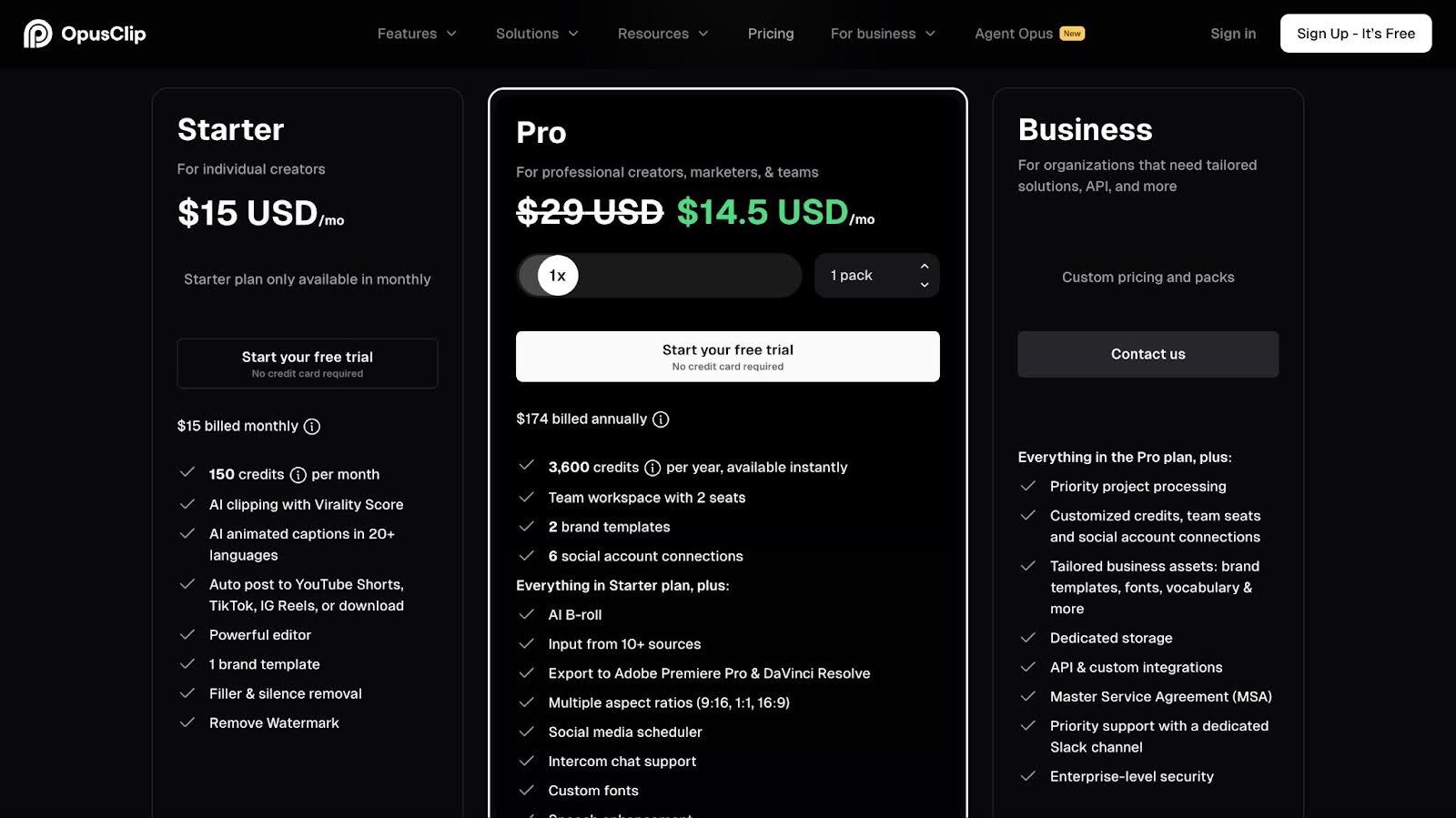
OpusClip offers a tiered pricing structure:
- Free Forever: 60 credits/month, AI clipping & captions, watermarked exports, limited clip storage.
- Starter: 150 credits/month, watermark-free, AI clipping with virality score, animated captions, one brand template, basic editing.
- Pro: 300 credits/month (or 3,600/year), team workspace, AI B‑roll, multi-aspect ratios, social scheduling, advanced captions & exports.
- Business/Custom: Tailored for agencies or large teams with higher limits, priority processing, API access, and enterprise features.
Pros
- Context-aware AI identifies key moments to speed up short-form editing.
- Transforms long videos into social clips for tutorials, vlogs, and podcasts.
- Integrated captioning and text automation keep visuals and subtitles aligned.
- Supports trimming, repositioning, and previewing clips directly on the timeline.
Con
- Free or lower-tier exports include watermarks and limited customization.
- AI clip selection isn’t always precise, so some moments may require manual adjustment.
5. Kapwing
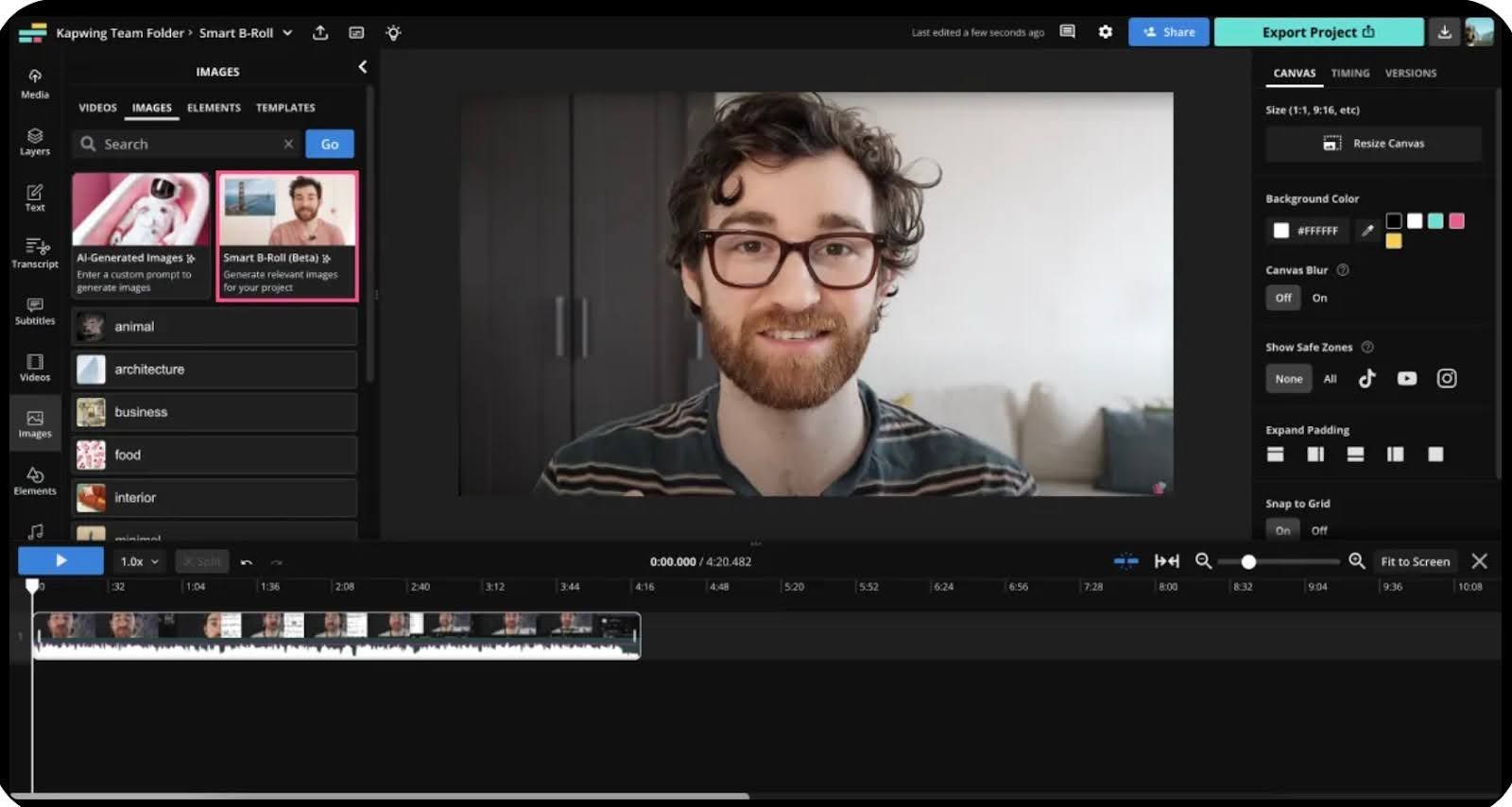
Kapwing’s AI analyzes transcripts to suggest and insert B‑roll, matching key spoken moments with stock or AI visuals. Users can preview, trim, replace, or reposition B‑roll while managing captions, voiceovers, and aspect ratios.
Ideal for tutorials, marketing, social, and educational videos, it makes producing polished, B‑roll‑enhanced content simple.
Key Features
- Transcript-aware B-roll generation: Analyzes spoken content and transcript context to suggest relevant visuals that reinforce key ideas and moments.
- Stock visuals and media suggestions: Access integrated stock media and AI-assisted visual suggestions directly within the editor.
- Timeline-native editing: All B-roll is placed directly in the timeline, making adjustments fast and intuitive without switching tools.
- Context-based visual matching: Visuals are selected based on transcript cues and content relevance to support the narrative.
- All-in-one workflow: Combines B-roll, captions, resizing, branding, and exports for social platforms in a single editor.
Pricing
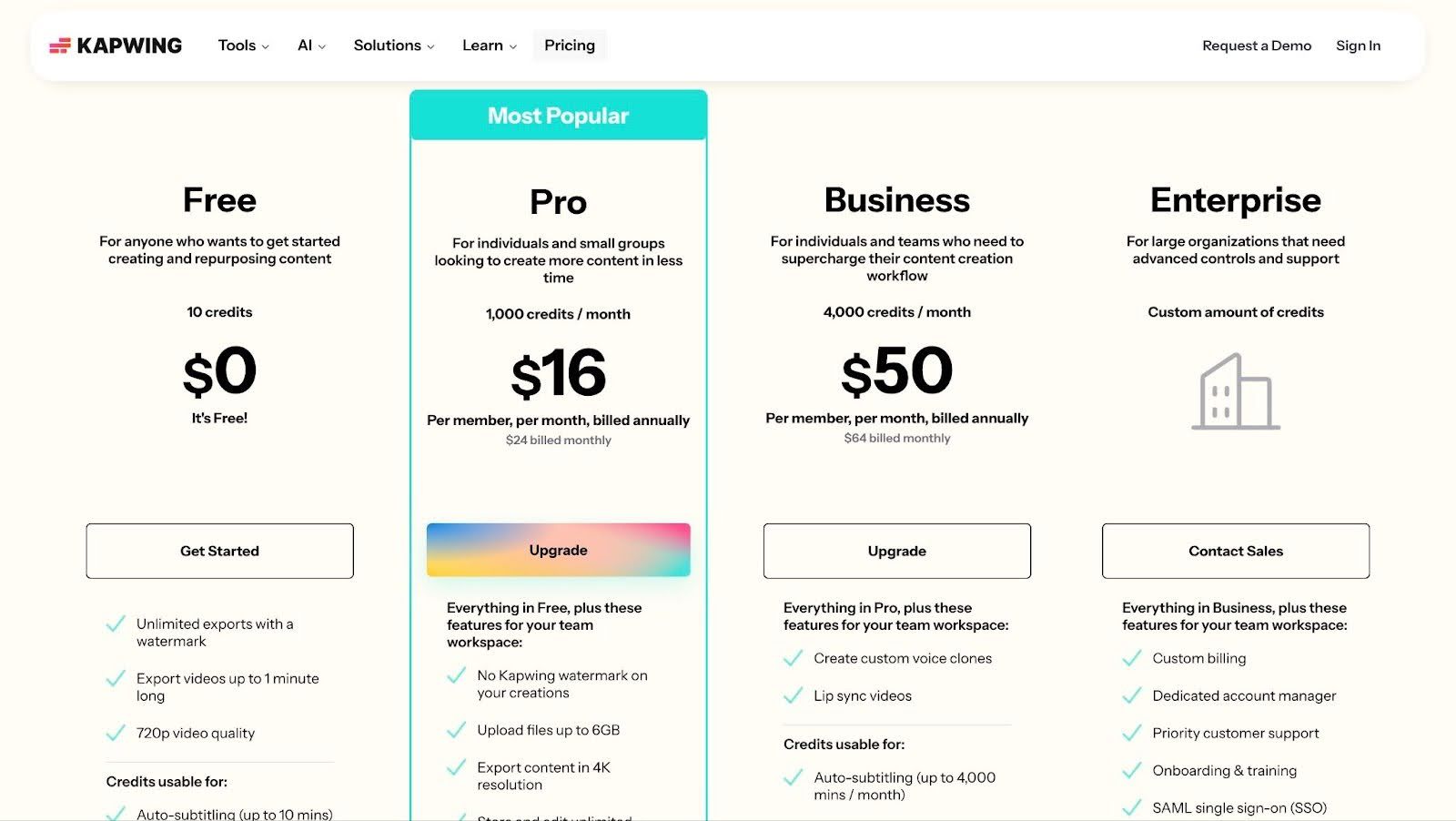
Kapwing offers a tiered pricing structure:
- Free: Basic editing, limited AI credits, watermarked 720p exports, short video length limits.
- Pro: 1,000 credits/month, watermark-free, 4K exports, long videos up to 120 min, unlimited storage, most AI & collaboration features.
- Business: 4,000+ credits/month, all Pro features, enhanced team workspaces, more subtitles/translations, advanced editing.
- Enterprise: Custom pricing, advanced controls, dedicated support, custom credits, enterprise security, and onboarding.
Pros
- Offers cuts, transitions, and resizing in a single workflow.
- Supports a range of social formats like TikTok and Instagram.
- Speeds up social video creation with built-in templates and short-form editing tools.
- Cloud-based editing lets users access projects from any browser without downloads.
Con
- Browser-based performance can lag on large or complex projects
- Free and lower-tier exports include watermarks and limited functionality.
6. VEED.io

VEED.io is a web-based AI video tool that lets creators add and edit B‑roll from any device. Its AI analyzes audio or transcripts to suggest and insert relevant visuals, enhancing storytelling, pacing, and context.
Users can preview, trim, reposition, or swap B‑roll while managing captions, subtitles, and aspect ratios, making it ideal for tutorials, marketing, social, and educational videos.
Key Features
- AI-Driven Visual Suggestions: Suggests contextually relevant B‑roll based on speech or transcript content.
- Integrated Editing Workspace: Place, trim, move, or replace B‑roll clips directly in the timeline.
- Transcription-based workflow: Transcribes spoken audio to guide context detection for B-roll suggestions.
- Subtitles & Captions Sync: Auto-generated captions align with speech to help match B‑roll with key moments.
- Multi-Format Support: Supports common aspect ratios like 16:9, 9:16, and 1:1 for social platforms such as YouTube, TikTok, and Instagram.
Pricing
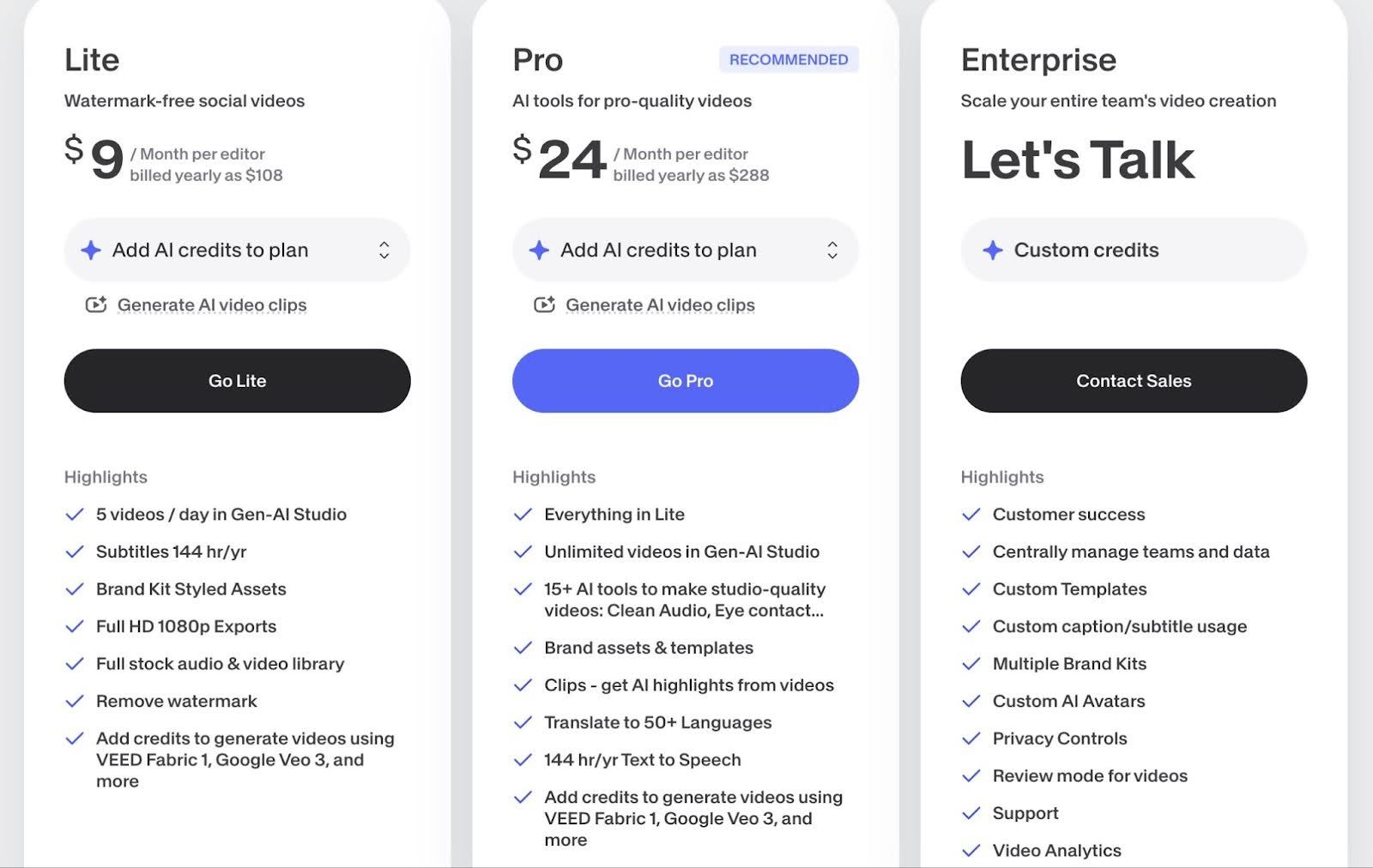
VEED.io offers a tiered pricing structure:
- Free Plan: Basic editing with watermarked 720p exports and limits on length and storage.
- Lite Plan: HD exports, no watermark, stock media, and essential AI tools.
- Pro Plan: Advanced AI tools, 4K exports, expanded features, higher limits, and team collaboration.
- Enterprise Plan: Custom pricing with advanced controls, dedicated support, multiple brands, and priority onboarding.
Pros
- Users say it’s easy to get started with basic edits.
- Built-in AI subtitles let you quickly add and style captions.
- Supports TikTok, Instagram, and YouTube with preset formats.
- Web-based editing works in the browser, accessible from any computer.
Con
- Free and lower-tier exports have watermarks and limited resolution or features.
- Performance issues such as lagging or freezing can occur on longer or complex timelines.
7. Vmaker AI
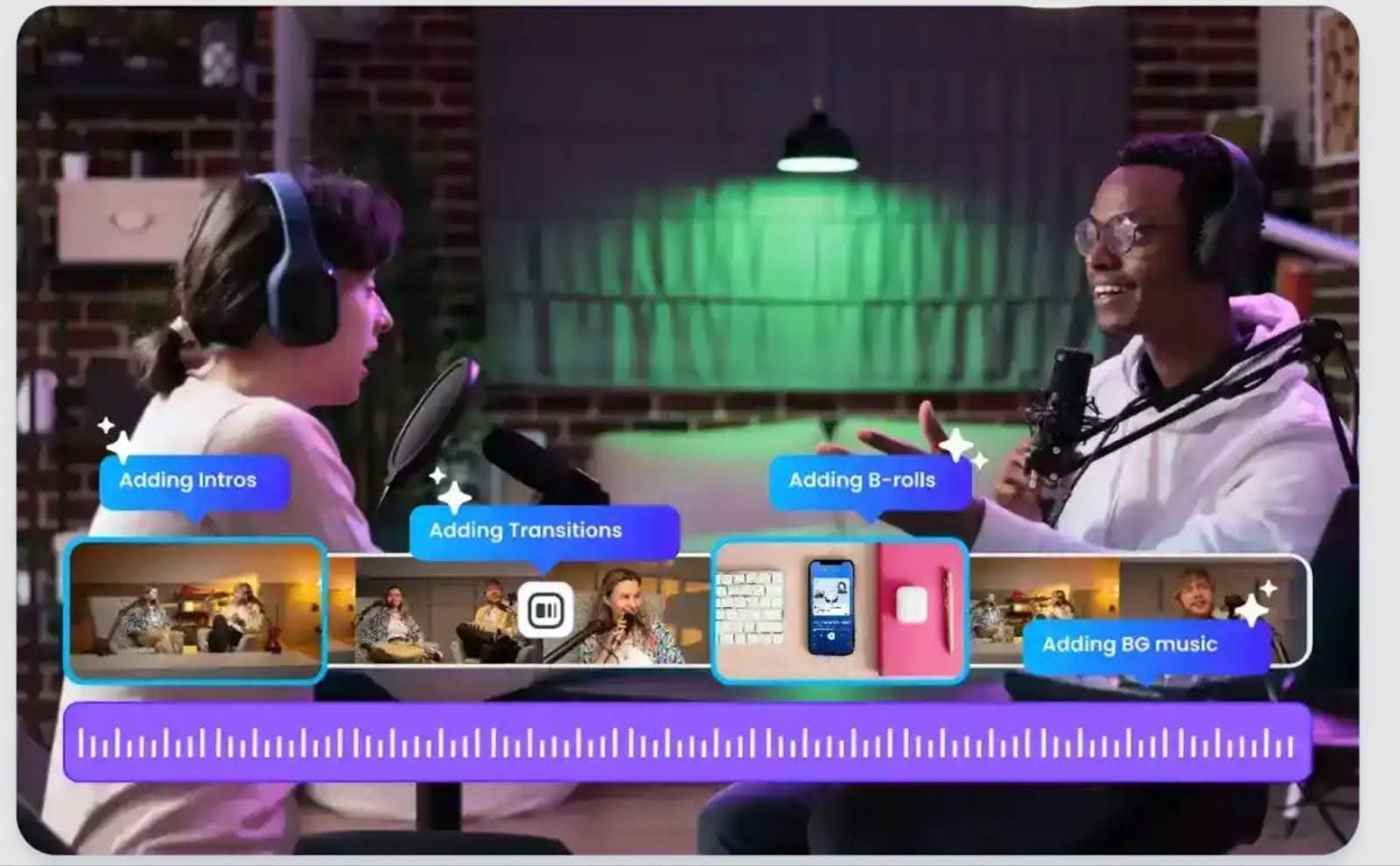
Vmaker AI is a cloud-based editor that adds B‑roll to talking-head and screen-recorded videos by analyzing narration, pauses, and scene changes.
B-roll suggestions appear in the browser timeline. Creators can accept, remove, or swap clips while editing subtitles, transitions, music, and effects, ideal for tutorials, demos, and explainer videos.
Key Features
- B-roll suggestions: AI identifies key moments and suggests relevant B‑roll based on video content and pacing.
- Royalty-free stock assets: Access an integrated library of videos, images, and GIFs to complement your main footage.
- Customizable transitions: Apply smooth transitions between main footage and B‑roll to maintain visual flow.
- AI subtitles & translations: Automatically generate captions and translate them into multiple languages, synced with your visuals.
- Online editing & fast rendering: Full editing and high‑speed export run directly in the browser without installing software.

- Free Plan: Basic editing tools, 720p exports, watermarked videos, ~5 min max length, limited storage.
- Starter Plan ($18/mo): HD (1080p) exports, no watermark, more downloads, premium assets, AI avatars, subtitles, and screen recording.
- Team Plan ($25/mo): Starter features plus 2K exports, larger storage, more premium assets & subtitle credits, background/green screen removal, extended AI avatars & voices, team collaboration.
- Enterprise Plan: Custom pricing, tailored export limits, enhanced security, dedicated support, and organization-level features.
Pros
- Recording and editing together reduces workflow friction.
- Browser-based editor with no software installation required.
- Helps produce shareable videos quickly with minimal setup.
- Quick screen and webcam recording makes tutorials and demos fast.
Con
- Customization is limited compared with traditional editors.
- Some users report occasional errors or inconsistent performance.
Enhance Your Videos Instantly with Klap’s AI B-Roll Generator
Creating engaging video content can be challenging when your footage feels flat or repetitive. Without the right visuals, even strong messaging can struggle to capture attention or keep viewers watching.
Klap makes adding B-roll effortless. Its AI analyzes your video and suggests relevant, high-quality clips, which you can adjust, trim, or swap instantly. Built-in captions, intelligent reframing, and dubbing help your videos look polished, dynamic, and optimized for any platform.
Try Klap now, upload your footage, and see how AI-powered B-roll can transform your content while keeping viewers engaged from start to finish.
