
Closed Caption Requirements 2026: A Creator's Guide
Other
Closed caption requirements apply to all nonexempt U.S. television programming, and most TV-originated internet clips carry caption obligations too. If you're slicing a long interview, webinar, or episode into shorts, the safe move is to assume captions aren't optional, then check which rule set applies before you export.
That's the point a lot of creators hit right when a strong clip is ready to post. The edit looks clean, the hook works, and then the caption question shows up because the same video can face different expectations on broadcast, social, and repurposed web distribution. Platforms also keep tightening how they treat captions in discovery and monetization, so the practical standard is no longer just “add text,” it's “add captions that pass review and display correctly.”
A creator repurposing a podcast clip for Reels has to think about more than reach. Accessibility, compliance, and upload friction all sit in the same decision. If you want a quick refresher on the production side, RedactAI content creation insights is a useful complement to the compliance angle, and Klap's caption workflow overview shows how repurposing tools fit into that process.
Why Closed Caption Requirements Matter for Your Content
A finished long-form video can feel like a single asset until you start cutting it into clips. The second you pull a segment from a TV-originated show, cable program, or broadcast interview, closed caption requirements stop being abstract legal language and become part of the export checklist. That's where a lot of workflows stall, because the clip may be short, but the rule path can still come from the original television source.
The repurposing problem creators run into
A lot of teams assume short-form equals exempt. That's a bad shortcut. If the source aired on U.S. television with captions, the internet redistribution rules still matter when that material gets posted online again, even if the final edit is only a few seconds long.
That distinction matters because short-form posts are often the most visible version of a larger asset. A clip that performs well on TikTok or YouTube Shorts can also be the clip that gets reviewed first by a platform, flagged by a moderator, or watched by someone who relies on captions to follow the soundless version. In practice, captioning protects both access and distribution.
Practical rule: if your clip came from television, don't treat the final length as the only compliance factor.
Why the rules affect reach as well as legality
Creators usually feel the impact in three places. First, some platforms surface captioned posts more reliably because the text helps with indexing and viewer retention. Second, captions reduce the chance that a strong clip lands with a rough viewing experience on mute. Third, compliance failures waste time, because a single missing caption track can force a re-export.
That's why repurposing tools now matter as much as editing tools. A workflow that automatically finds usable moments, formats them for vertical screens, and keeps captions attached is easier to maintain than a manual process that treats captions as a final afterthought. For a practical comparison of social output conventions, 2026 Instagram video specs is worth keeping nearby when you're deciding what kind of clip to publish.
What this guide helps you solve
The goal isn't just to confirm that captions are required. It's to help you sort out which source videos carry obligations, what compliant captions look like on screen, where platform rules overlap with FCC rules, and how to build a repeatable export process that doesn't break every time you post a new clip. Once that's clear, the rest of the workflow gets much easier.
The FCC Mandate Timeline and Current Requirements
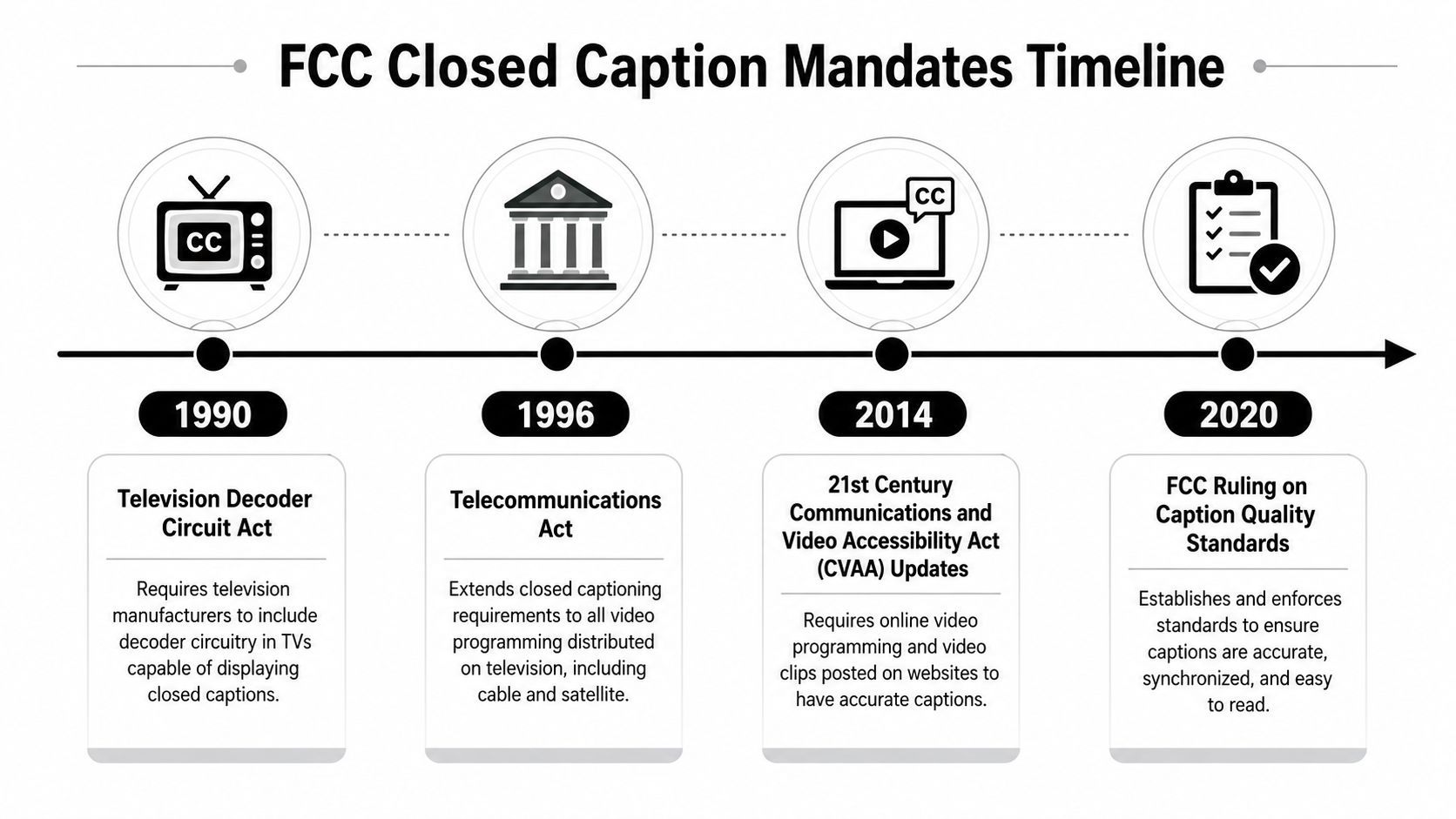
Closed caption rules didn't start as a content-format issue. They began as a hardware requirement, which is why the modern system still blends device compatibility, program obligations, and delivery rules. The early milestone came in 1990, when President George H. W. Bush signed the Television Decoder Circuitry Act, and the law required all television sets 13 inches or larger sold in the United States after July 1, 1993 to be able to display captions. That moved captions into the mainstream TV experience, not just the broadcaster workflow. NIST's historical overview explains that the FCC estimated between 50 and 60 million U.S. homes could already receive closed captioning as that rule was being developed.
From hardware compatibility to programming obligations
The next big shift came with the Telecommunications Act of 1996, which expanded the framework and led to captioning mandates taking effect in 1998, as summarized in the National Center for Accessible Media timeline. By January 1, 2006, all nonexempt U.S. television programming had to be closed captioned, according to the NIDCD's caption guidance. The same framework later extended to Spanish-language content, with all new nonexempt Spanish-language programming required to be captioned as of January 1, 2010.
The pattern is simple. First the receiver had to support captions, then the programming itself had to carry them.
The current digital apparatus rule
Today, 47 CFR § 79.103 requires that since January 1, 2014, all digital apparatus designed to receive or play back video programming with sound and sold or imported for U.S. use must include built-in closed-caption decoder circuitry or equivalent capability. The rule applies to any screen size, with the smaller-than-13-inch category allowed only if compliance is technically achievable, and it recognizes SMPTE ST 2052-1:2010 timed-text implementations as compliant for specified display functions. That matters because it gives device makers and software vendors a standards-based path instead of a one-off workaround. Cornell's legal text of 47 CFR § 79.103 is the cleanest reference point for the current apparatus rule.
What Compliant Captions Actually Look Like
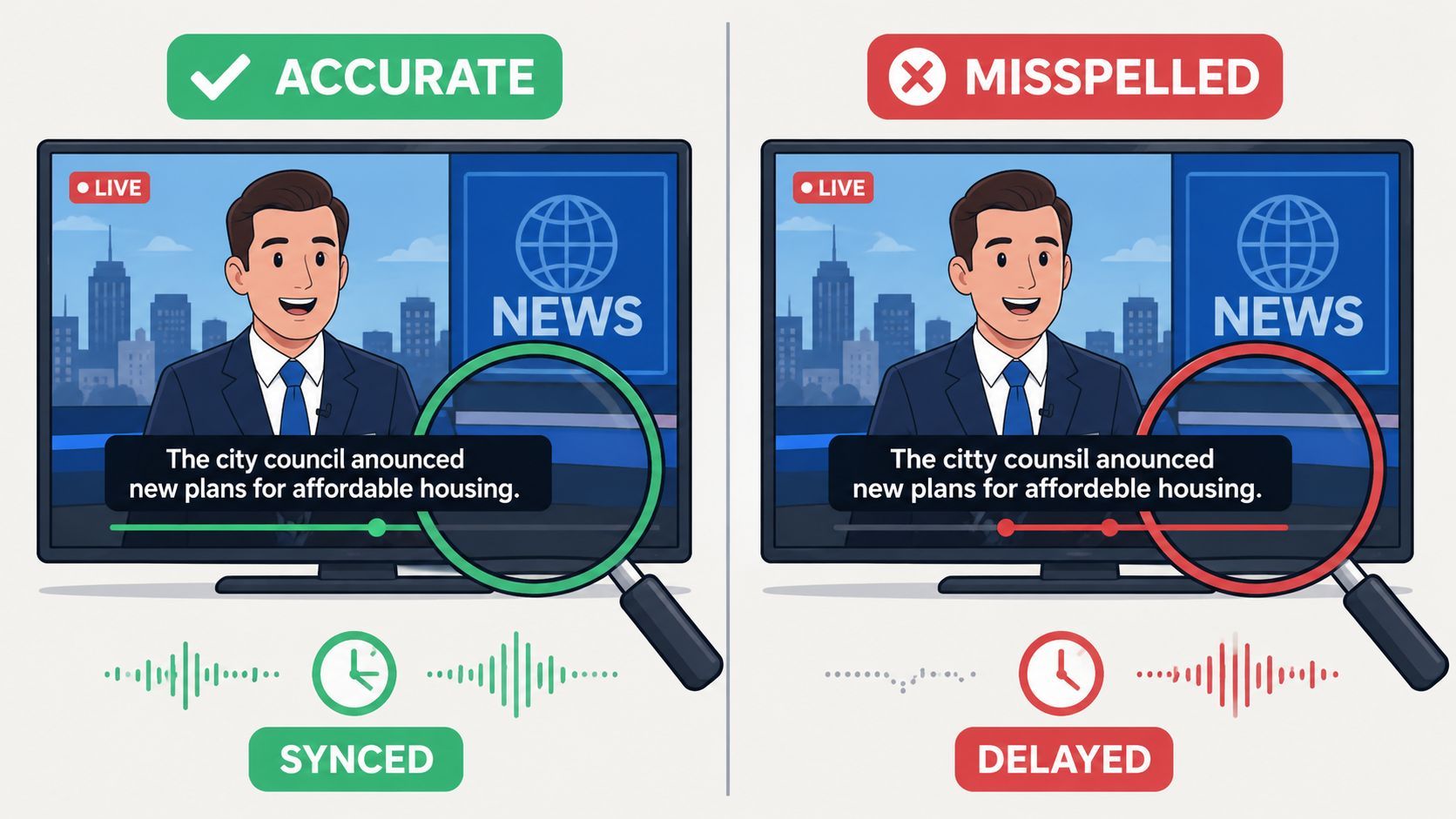
Compliant captions aren't just the right words in the right language. The FCC frames quality around accuracy, synchronicity, completeness, and proper placement. Those four attributes are the test, because captions have to carry the audio experience for deaf and hard-of-hearing viewers, not just create a visible transcript. The FCC's consumer guidance lays out those quality expectations clearly, including the need for captions to be readable, timed well, and positioned so they don't block important visuals. FCC closed captioning guidance is the basic reference here.
The four attributes that pass review
Accuracy means the text has to match what's said, including the kind of details viewers rely on, like punctuation and casing. Synchronicity means captions can't lag behind the dialogue or jump ahead of it, because either problem makes the text hard to follow. Completeness means non-speech audio matters too, so music cues and sound effects need to appear when they change the viewer's understanding. Proper placement means captions shouldn't cover faces, lower-thirds, or other critical on-screen information.
If the caption is technically “correct” but lands too late or sits on top of important visual content, it still fails the viewer.
What the screen should look like
The practical formatting standard is conservative. The FCC-style guidance points to one to three lines of text and says captions should not exceed three lines on screen at once. Rev's summary of those standards also states that captions should reach 99% accuracy, and it notes that editors should preserve slang, punctuation, capitalization, and non-speech sounds in square brackets. Rev's captioning guideline summary is useful when you need a production-facing translation of the rule set.
Why timed-text standards matter
The device side matters too, which is why SMPTE ST 2052-1:2010 shows up in the legal framework. It gives software and hardware vendors a common timed-text path for display compatibility. That's important in mixed-device environments, because a caption file that behaves well in one player can still fail if the platform doesn't interpret the timing or display logic correctly.
Internet Video Rules and Platform Requirements
The hardest caption decisions usually show up after a video has already been edited and is ready to republish. The FCC separates TV-originated internet content from web-only content, and that split changes the caption path depending on where the material first appeared. If the video aired on U.S. television with captions on or after September 30, 2012, full-length internet video programming must be captioned again when it moves online. FCC internet video captioning guidance lays out that timeline in plain terms.
The content-type split creators need to watch
Content TypeCaption Required Since
Full-length internet video shown on U.S. TV with captions
September 30, 2012
Straight lift clips
January 1, 2016
Montages of straight lift clips
January 1, 2017
Live and near-live clips such as news or sports
July 1, 2017
That timeline matters because clip length is not the deciding factor. A short broadcast cut can still carry caption obligations if it came from TV-originated programming. Consumer-generated media and films shown only online are treated differently under the FCC redistribution rule structure referenced in the Oregon legislative note on captioned internet redistribution. For teams handling web-first clips, the question is usually less about the runtime and more about where the source footage was first distributed.
Platform rules are a separate pressure layer
Social platforms add another layer of expectations. Video uploaded to YouTube, Instagram, TikTok, and Facebook is commonly expected to carry captions because muted viewing is normal and accessibility shapes the viewer experience. That is not the same thing as an FCC mandate, but it affects review, discoverability, and whether a post feels complete. For production references on vertical delivery, 2026 Instagram video specs is useful, and for a practical walkthrough of platform caption setup, see how to turn on captions on TikTok at https://klap.app/blog/how-to-turn-on-captions-on-tiktok.
The rule of thumb is simple, if the clip was on TV first, think FCC. If it was created natively for the web, think platform delivery and accessibility.
How to decide quickly
Start with the source. If it is a broadcast or cable segment, check the internet redistribution rule. If it is native web video, check the platform's caption tools and player behavior. If it is a repurposed piece of a TV program, do not assume the short runtime removes the obligation. That is the mistake that leads to avoidable re-exports, failed compliance checks, and captions that need to be rebuilt after the fact.
The 2024 Accessibility Shift and What It Means for Creators
In 2024, the FCC changed the conversation again by requiring manufacturers of covered apparatus and MVPDs to make closed-caption display settings readily accessible to people who are deaf or hard of hearing. That shift matters because the compliance question is no longer only whether captions exist. It's also whether users can turn them on and customize them without digging through a confusing menu. The FCC order on display accessibility is the clearest signal that usability is part of modern caption compliance. FCC Order FCC-24-79A1 shows how the agency is thinking about that user-control layer.
Why this changes creator workflow
For creators, the practical effect is easy to miss. A caption file that exists but displays badly, loads awkwardly, or doesn't work cleanly in a platform player still creates friction for the viewer. That's why embedded or hard-synced captions keep showing up in short-form workflows, especially when the end product has to travel across apps and device types.
A repurposing tool can help here, but only if someone still reviews the output. A content repurposing tool like ViralBrain's AI repurposing workflow can automate clip selection and format changes, but the final caption display still needs a human pass for placement and readability.
Exemptions are real, and blanket claims are wrong
Not every piece of video is covered. The FCC still recognizes self-implementing exemptions for PSAs under 10 minutes, 2 a.m. to 6 a.m. programming, primarily textual programming, and some locally produced non-news programming with no repeat value. That means “all video must be captioned” is too broad to be accurate. The better habit is to check the source, the time slot, the format, and whether the content is being redistributed from TV or published only online.
A practical compliance mindset
The 2024 change pushes creators toward this question, “Can a real viewer access and control captions without friction?” That's more useful than treating captions as a box to tick at export time. It also explains why player settings, baked captions, and readable formatting now matter as much as the transcript itself.
A Practical Workflow for Compliant Short-Form Clips
The safest workflow starts before you cut a single clip. First, decide whether the source material is TV-originated or web-only, because that determines whether the FCC internet redistribution rules apply. Then choose segments that are strong enough to stand alone, since weak clips tempt teams to hide caption problems behind fast pacing. Once the source is clear, the caption work becomes much easier to manage.
A repurposing platform can compress the early steps. Klap scans long-form video, finds engaging segments, reframes them for vertical formats, and adds captions during export, which makes it one practical option in a broader toolkit. That kind of automation helps, but it doesn't replace review. The output still has to survive a compliance check, especially if you're publishing to multiple platforms from the same source file.
A quick review checklist
- Check the source first: confirm whether the clip came from broadcast, cable, or web-native material.
- Read the captions aloud: make sure the text matches the audio closely and doesn't drop words in fast sections.
- Watch timing at normal speed: captions should stay readable without lag or awkward jumps.
- Look for bracketed sound cues: music, applause, and relevant effects should be shown where they matter.
- Scan placement: captions shouldn't cover faces, text, or action that the viewer needs to understand.
- Confirm line length: keep the display compact and avoid crowding the frame.
Where AI helps and where it doesn't
AI can get you to a usable draft quickly. It's good at segment detection, rough transcription, and placing captions into a publishable format. It's not good at deciding whether a sound cue matters, whether a line break obscures a visual, or whether a caption lands too late for easy reading.
Use automation for speed, then use your eyes for compliance.
Export with the final destination in mind
If the clip is going to TikTok, Reels, or Shorts, bake in the settings that hold up on mobile screens and test the result once on an actual phone. If the clip is going to a player that supports separate caption tracks, check that the track toggles cleanly. Klap's captioning how-to guide is useful here because it sits close to the production step, not just the policy side.
Common Misconceptions About Caption Requirements
The most expensive caption mistake is assuming a video is exempt just because it's short or online. That's not how the rules work. Clips taken from television can still carry caption obligations, and platform reviewers don't care whether the runtime feels too brief to matter. If the source is covered, the clip is covered.
The myths that cause the most trouble
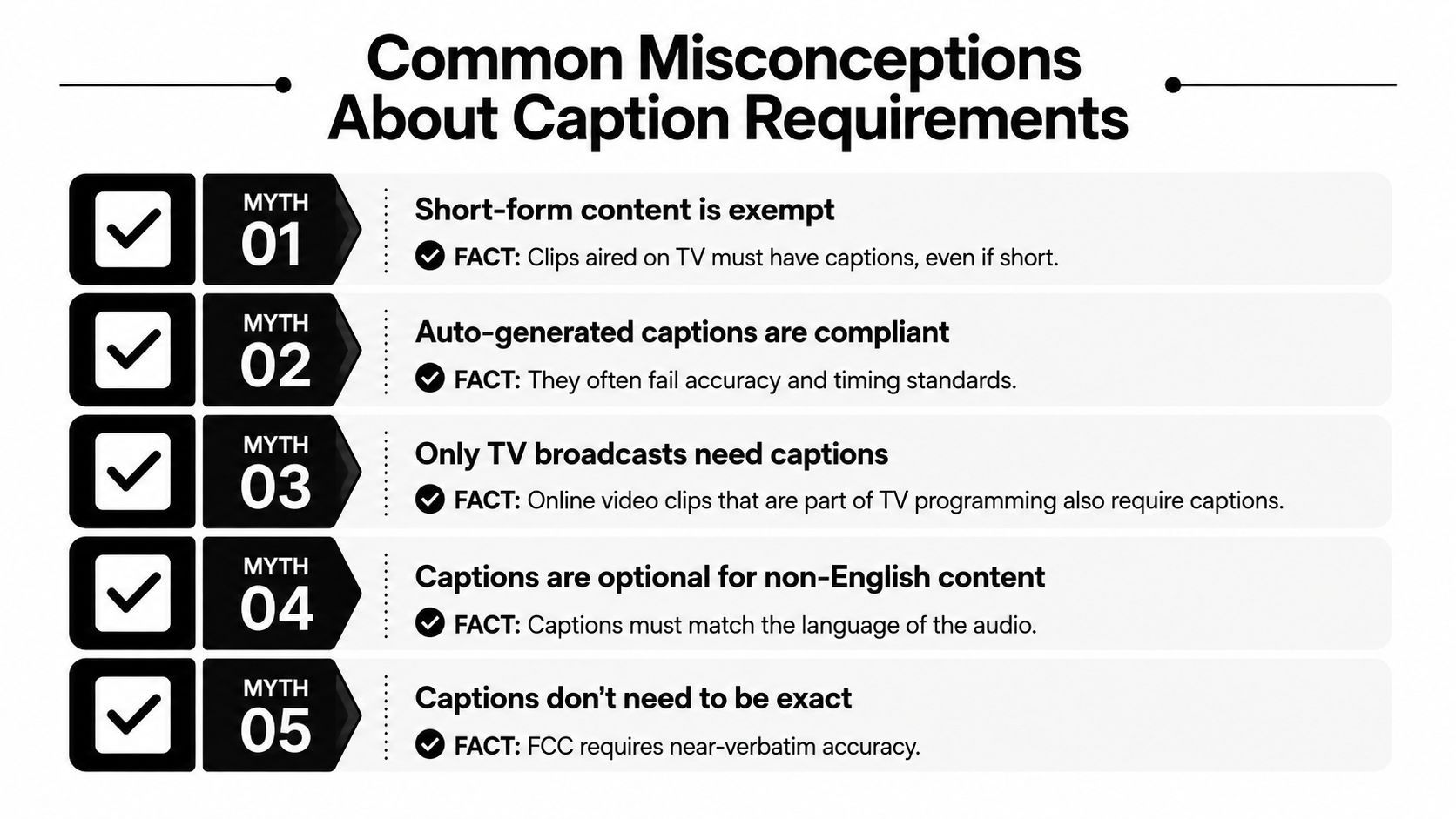
- Short-form content is exempt. Clips aired on TV must have captions, even if they're short.
- Auto-generated captions are automatically compliant. They often miss timing, sound cues, and exact wording.
- Only TV broadcasts need captions. Online clips that come from TV programming can still require captions.
- Captions and subtitles are the same thing. Closed captions include non-speech audio cues and are built for accessibility.
- Captions can be approximate. The FCC framework expects near-verbatim accuracy and readable timing.
Another common miss is thinking captions are permanently compliant once they're added. That's not enough. Placement, readability, and user control now matter more than they used to, especially after the 2024 accessibility shift. A caption file that looked fine in one player can still create friction in another.
A simple do and do not list
Do verify the source before export. Do review the timing at normal playback speed. Do keep the display clean enough to read on a phone screen. Do not assume web publishing removes TV-origin obligations. Do not treat auto captions as finished work without a human check.
If you keep only one idea from this section, keep this one. Caption compliance is no longer just about text accuracy. It's about the source of the video, the way the captions display, and whether a real viewer can use them without friction.
Frequently Asked Questions
Can you use open captions instead of closed captions on social platforms? Yes, burned-in captions can work for social delivery, but closed captions are still the safer choice when accessibility and toggle control matter. If the platform supports separate caption tracks, that usually gives viewers more control.
What if the clip comes from a podcast or webinar that never aired on television? In most cases, the FCC internet redistribution rules tied to TV-originated programming don't apply. Platform caption expectations can still apply, though, so it's still worth captioning the clip cleanly.
Are AI-generated captions enough for compliance? They can be a strong starting point, but they're not a finish line. Tools can produce useful drafts, yet a human still needs to verify timing, bracketed sound cues, and placement before export.
Klap helps creators turn long videos into short clips with captions, reframing, and export-ready formatting in one workflow. If you're repurposing content across TikTok, Reels, and YouTube Shorts, visit Klap to see how a caption-first editing process can fit into your publishing routine.
