
Captions for Video: A Guide to More Views and Engagement
Other
Videos with captions consistently outperform videos that make viewers do all the work. For creators repurposing long-form content into TikToks, Reels, and Shorts, that matters at the first second of playback, not just at the accessibility stage.
Teams clipping podcasts, webinars, interviews, and YouTube videos often spend hours finding the right moment, tightening the edit, and formatting for vertical. Then they treat captions like a post-production extra. That decision costs reach.
In short-form video, captions help the clip communicate before the viewer commits to sound. They also make repurposed content easier to follow because the original context is gone. A strong sentence pulled from a 45-minute episode has to make sense fast on a small screen.
That is why captions belong in the growth workflow from the start. They do not just support the edit. They help the edit perform.
Captions Are More Than Just Text on a Screen
The easiest mistake in video marketing is seeing captions as an accessibility checkbox instead of a distribution lever. The platform doesn't make that distinction. Viewers don't either. They react to whether the video makes sense immediately, whether it's easy to follow, and whether it earns the next second of attention.
That's why the 40% view lift matters so much. It tells you captions can affect reach before anyone debates style, font, or animation. If your short clip comes from a longer source video, captions also help preserve context. A strong spoken point in a podcast or webinar can feel flat once it's cut into a vertical clip unless the viewer can read the key line instantly.
What captions do in practice
Captions help in three places at once:
- At the hook: They give the first line visual weight, which matters when people are deciding in a split second whether to keep watching.
- In the middle: They reduce drop-off by making the point easier to track in noisy, silent, or distracted viewing conditions.
- At discovery: They turn spoken content into readable text that platforms and viewers can parse more easily.
Captions don't rescue a weak clip. They do make a strong clip easier to consume, easier to understand, and more likely to hold attention.
For creators repurposing long-form content, that's the opportunity. You already have ideas, stories, and moments worth clipping. Captions make those moments legible in feed environments where people are moving fast and often watching without sound.
Open Captions Closed Captions and Subtitles
Creators mix these terms up constantly, and that confusion causes bad production choices. If you pick the wrong format, you can create extra editing work, hurt readability, or limit how flexible the asset is later.
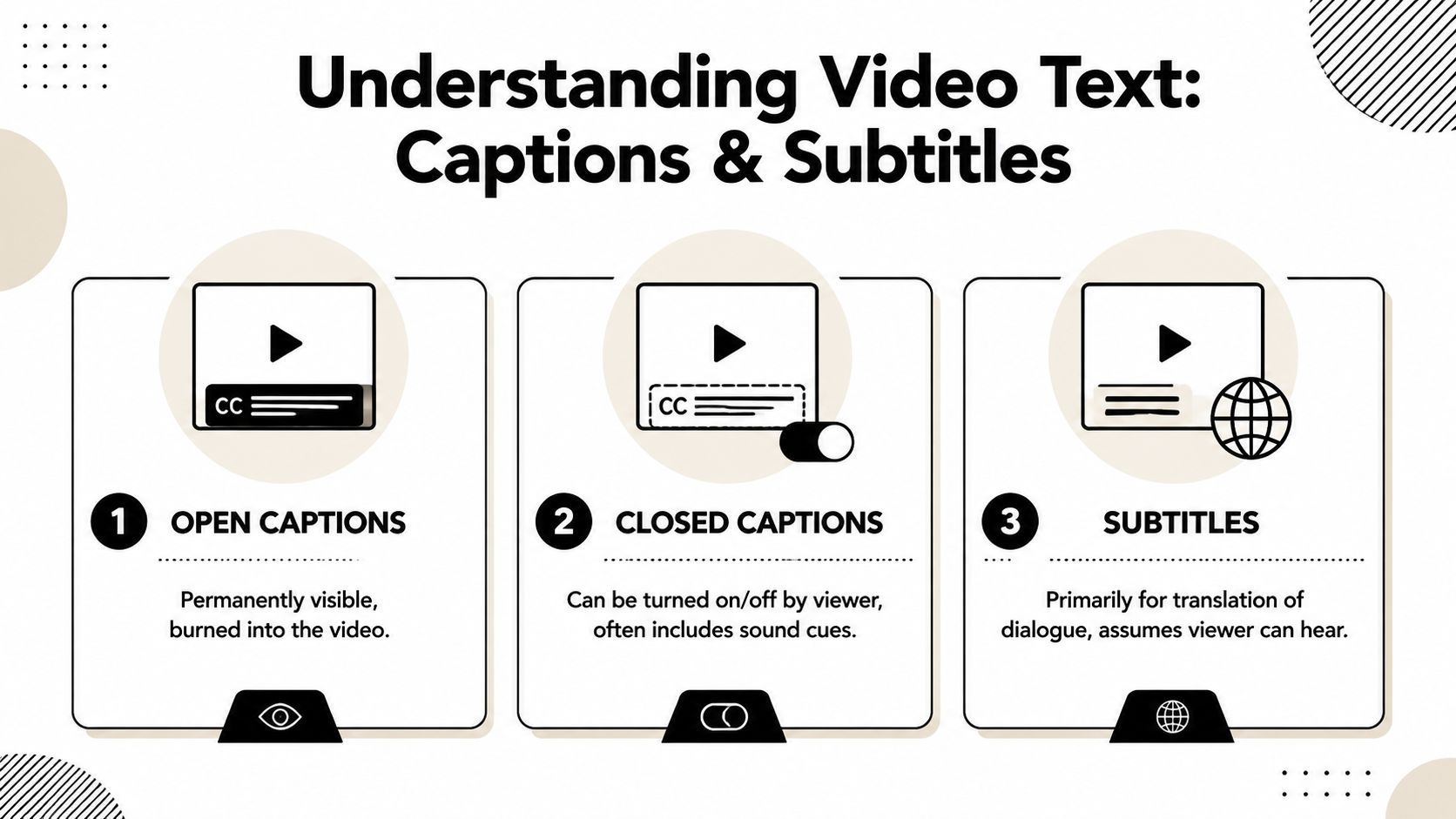
A simple way to tell them apart
Think of video text like clothing.
Open captions are stitched into the video. They're always visible because they're burned into the file itself. The viewer can't turn them off.
Closed captions are removable layers. The viewer can switch them on or off if the platform or player supports that option. They often include non-dialogue audio cues too.
Subtitles are usually about language translation. They assume the viewer can hear the audio and mainly need help understanding the spoken language.
When each one makes sense
Here's the practical breakdown:
FormatBest useMain trade-off
Open captions
TikTok, Reels, Shorts, paid social, exported promo clips
Flexible styling, but no viewer control
Closed captions
YouTube, websites, webinars, training libraries
Better accessibility options, but styling depends on player support
Subtitles
Multilingual distribution
Helpful for translation, but not a full replacement for accessibility captions
For short-form repurposing, open captions usually win because the text becomes part of the visual package. You can control size, color, emphasis, and placement, which matters on mobile. For YouTube archives, courses, interviews, or embedded video on a site, closed captions give you more accessibility control.
The mistake most teams make
They create one version and try to use it everywhere.
That rarely works. Burned-in TikTok-style captions can look oversized and distracting on a desktop training video. Plain subtitle files can feel invisible in a fast-moving Reel. Build for the destination first, then adapt. If you need a deeper walkthrough on tools and formats, Klap's guide to closed captions software is a useful starting point.
The format choice isn't technical trivia. It changes how the viewer experiences the clip and how much control you keep in post.
The Undeniable Benefits of Captioning Your Videos
A small lift in retention can change the economics of short-form content. Captions help create that lift because they make the message understandable faster, especially when a clip started as a longer conversation and has to earn attention in the first second or two.

For creators repurposing podcasts, webinars, interviews, and YouTube videos into Shorts, Reels, and TikToks, captions do more than improve accessibility. They carry context. A spoken point that made sense in a 40-minute episode can feel abrupt when clipped down to 25 seconds. On-screen text gives the viewer a second way to process the idea and helps the hook register before they swipe away.
That matters because short-form ranking is driven by watch behavior. If viewers miss the premise, they drop. If they catch it immediately, retention improves, and better retention gives the clip more chances to get distributed.
Accessibility improves reach, but it also improves usability
Captions serve viewers who are deaf or hard of hearing. They also help a much larger group. People watch with the sound off in offices, airports, waiting rooms, and late at night. Others hear the audio but still rely on text to follow fast speech, accents, technical language, or dense explanations.
I see this constantly with repurposed educational clips. The source content is often strong, but the short version moves quickly because the editor is condensing a longer point. Captions reduce that cognitive load. Instead of forcing the viewer to catch every word once, the clip gives them audio and text working together.
Captions help platforms understand your content
Good captions turn spoken language into usable text. That gives platforms more context about the topic, the specific phrases in the clip, and the intent behind it. For repurposed long-form content, that matters more than many creators realize, because the strongest insights are often spoken, not written in the title or post copy.
This is one reason captions are a growth lever, not just a formatting step. They support the viewer and the platform at the same time. If your workflow still treats captioning as cleanup at the end, it is worth tightening the process with a clear guide on how to add captions to videos.
The benefit is especially clear in interview clips, customer stories, and objection-handling content where exact wording drives trust. Teams producing that kind of content can study strong structure in this guide to testimonial video production.
Why creators see compound returns
Captions improve several parts of performance at once:
- Retention: Viewers miss less and stay oriented.
- Hook clarity: Key lines appear on screen as soon as they are spoken.
- Comprehension: Dense ideas become easier to follow in a short clip.
- Repurposing efficiency: One long-form source produces short clips that work in both sound-on and sound-off viewing.
Practical rule: If a repurposed clip depends on perfect audio comprehension, it is not ready for short-form distribution.
How to Create Readable and Compliant Captions
Most bad captions fail in predictable ways. They appear late, move too fast, overfill the screen, or turn spoken language into a messy wall of text. Professional captions do the opposite. They feel invisible because they're easy to read.
The core standard is clear. The Described and Captioned Media Program says captions should be synchronized, verbatim when possible, limited to no more than two lines, and left on screen long enough to read, with proper punctuation and spelling. That guidance is laid out in the DCMP captioning key.
Start with the right file and timing basics
If you're delivering captions as a separate track, the common format is SRT. It's simple, widely supported, and easy to edit. For most creators, that's the practical baseline because it stores the caption text and timecode without unnecessary complexity.
Once the file exists, check three things before you style anything:
- Sync first: The text should appear when the words are spoken, not a beat later.
- Trim the wording: Verbatim doesn't mean cluttered. Keep spoken meaning intact, but fix obvious transcription issues.
- Watch on mobile: Desktop review misses timing and line-length problems that become obvious on a phone.
A lot of creators obsess over fonts before they fix timing. That's the wrong order.
Use a creator's readability checklist
When I review social clips, these are the standards that separate clean captioning from amateur work:
- Keep lines short: Two lines is the upper limit. Less is often better for mobile.
- Respect punctuation: A missing comma can change meaning. A missing period can flatten emphasis.
- Break lines naturally: Split on phrases, not in the middle of a thought.
- Match speaker intent: If someone pauses for impact, the caption pacing should support that rhythm.
You also need to account for non-speech audio when it matters. Sounds like laughter, applause, static, or a door closing can carry meaning. Ignoring them strips context out of the clip.
If you want a hands-on walkthrough of setup and editing steps, Klap's article on how to add captions to videos is a practical companion to these standards.
Good captions don't call attention to themselves. They support the message and stay out of the way.
Compliance and style need to work together
Readable captions aren't automatically compliant. Compliant captions aren't automatically pleasant to watch. You need both.
That means keeping the text accurate while still making smart visual choices. Don't hide captions behind interface elements. Don't place them so low they get blocked by platform controls. Don't make every word animate if that animation slows reading down.
The cleanest test is simple. Watch the clip once with sound off. If the viewer can follow the full point without effort, the captions are doing their job.
Styling Captions for TikTok Reels and Shorts
Caption style should match platform behavior. The same transcript can feel native on one platform and awkward on another depending on size, pacing, emphasis, and placement.

Short-form creators often overcorrect in one of two directions. They either make captions so minimal they're easy to ignore, or they turn every line into animated karaoke. Both approaches can hurt retention.
What tends to work by platform
TikTok usually tolerates louder styling. Bigger text, stronger emphasis, occasional emoji use, and faster word-by-word reveals can fit the native editing culture there. The mistake is pushing so far that the text becomes the whole video.
Instagram Reels tends to reward cleaner composition. Aesthetic matters more. Captions still need contrast and clarity, but the design should feel integrated with the visual brand rather than bolted on top.
YouTube Shorts sits somewhere in between. Viewers often accept direct, utility-first captions there, especially in educational, commentary, and interview clips. The text should support the idea without covering too much of the frame.
Style choices that affect performance
A few decisions matter more than the rest:
- Font weight: Use a bold enough typeface to survive compression and mobile playback.
- Contrast: White text with a dark shadow or background usually travels well across different footage.
- Placement: Keep captions high enough to avoid UI overlays, but low enough to stay connected to the speaker.
- Emphasis: Highlight keywords, not every other word.
The DCMP guidance on sound information matters here too. If a short relies on a reaction sound, interruption, or environmental cue, include it with brackets or parentheses. If background noise shapes the meaning, signal that. If profanity is audible, accuracy matters, and censored profanity should be marked as (censored) rather than rewritten. Those details keep the clip faithful to the source material.
Don't style captions in isolation
Caption styling only makes sense when it supports the clip's pace and audience expectation. A finance explainer, comedy bit, founder rant, and customer testimonial should not all use the same template.
This example video shows how dynamic short-form captioning can look in practice:
If viewers notice the caption effect more than the sentence itself, the styling is doing too much.
A simple workflow helps. Pick one style for authority content, one for personality-driven clips, and one for highly reactive social edits. Then adapt rather than redesign every time.
The Modern Creator's Captioning Workflow
There are two ways to handle captions at scale. You can do them manually, clip by clip, or you can build a workflow that treats captions as part of the repurposing system from the start.
The manual route still works for low volume. You pull a segment from a longer video, resize it, transcribe it, clean up errors, time each line, style the text, export, review on mobile, fix overlaps, and export again. It's manageable when you publish occasionally. It breaks down when you're producing shorts every week from podcasts, interviews, webinars, or YouTube uploads.
The manual grind
Manual captioning usually creates the same bottlenecks:
StepWhat slows teams down
Clip selection
Finding usable moments in a long recording takes time
Transcription cleanup
Auto-transcripts need corrections
Timing and line breaks
Readability depends on human review
Platform formatting
Vertical framing and text placement change by destination
Many creators cut corners. They accept weak auto-captions, leave bad line breaks in place, and post anyway. That hurts clips that could otherwise work.

The AI-powered workflow
A stronger workflow starts with the source asset, not the final clip. Upload the long-form video, identify likely hooks, generate candidate shorts, create captions automatically, then review and refine. You still need editorial judgment, but you spend it on selection and polish instead of repetitive setup.
One example is Klap, which turns long-form videos into short vertical clips, adds captions, reframes for mobile formats, and lets users edit the result inside the dashboard. For creators comparing options in this category, Klap's overview of an AI caption generator shows how automated captioning fits into a broader repurposing workflow.
Where AI helps and where humans still matter
Research summarized earlier found that over 100 experimental studies support captioning for comprehension, attention, and memory retention. That's exactly why quality control still matters. Automation can produce the first version quickly, but the final pass should still be human.
Use AI for the repetitive work. Keep a human eye on:
- Hook selection: The model can find candidate moments. You decide which ones create curiosity.
- Caption cleanup: Proper nouns, jargon, and speaker nuance still need review.
- Visual hierarchy: The right words should be emphasized, not just transcribed.
- Final context check: A clipped quote can be technically accurate but emotionally misleading if trimmed badly.
Workflow rule: Let software handle repetition. Let editors handle judgment.
That division is what keeps teams fast without making the output feel generic. The goal isn't to automate taste. The goal is to remove the time sink that stops good long-form content from becoming publishable shorts.
Stop Overlooking Captions and Start Growing
Creators don't need more reminders to post consistently. They need assets that travel better once they're posted. Captions do that work.
They shape the first second, improve readability, protect context when you cut longer material into a short clip, and make videos easier to consume in real viewing conditions. They also force useful discipline. If the message can't survive as on-screen text, the edit probably isn't tight enough yet.
The teams that get the most from captions don't treat them like decoration. They choose the right format, keep them readable, style them for the platform, and build a workflow that makes quality repeatable. That's the difference between occasional caption use and a real short-form system.
For anyone repurposing podcasts, webinars, YouTube uploads, interviews, or customer stories, this is one of the clearest upgrades available. You already have the raw material. Add better captions, and more of that material becomes understandable, watchable, and usable in feed.
If you want to turn long videos into short social clips without handling every caption and reframe manually, Klap is a practical option. You can upload or link a long-form video, generate short clips, review the captions, adjust styling, and export assets built for TikTok, Reels, and Shorts.
