
Turn Long Videos into Viral Shorts with an Auto Clip Maker AI
Other

An auto clip maker AI is a tool that automatically pulls out the most compelling moments from your long videos and chops them up into short, shareable clips perfect for social media. Think of it like this: for every hour of footage you create, you're sitting on a goldmine of potential viral content. This technology acts as your personal editing assistant, saving you dozens of hours and ensuring no great moment gets left on the cutting room floor.
The End of Manual Video Editing Is Here
The pressure to feed platforms like TikTok, Reels, and YouTube Shorts with a constant stream of fresh content is relentless. If you create long-form content—like podcasts, interviews, or webinars—you know the biggest bottleneck is manually scrubbing through hours of video just to find a few golden seconds. It’s not just slow; it’s a genuine barrier to growth.
This is where AI clip makers completely change the game. This isn't just another tool; it’s a fundamental shift in how you can approach your content strategy. It’s like having a team of editors who can binge-watch your entire video library, instantly flag every potential viral hook, and generate ready-to-post clips.
From Hours to Minutes
The time savings alone are a game-changer. Manually cutting one short clip can take anywhere from 30 minutes to a couple of hours, depending on how deep you have to dig.
An auto clip maker AI can process an hour-long video and generate 10-20 high-quality clips in under 15 minutes. That’s a time-saving of over 90% compared to manual editing, freeing you up to focus on strategy instead of getting lost in the weeds of the timeline.
This efficiency means you can multiply your content output without actually multiplying your workload. Suddenly, one long video can fuel your social media calendar for weeks.
Unlocking Hidden Value
Every long video you've ever made is a treasure chest of untapped content. The challenge has always been that most of that value stays locked away because finding it is just too much work. An AI clip maker acts as the key, systematically unlocking every powerful quote, insightful moment, and funny reaction hidden in your footage.
This technology gives you the power to:
- Scale your presence: Post multiple high-quality clips every day across all your platforms.
- Reach new audiences: Repurpose your core message for the fast-paced, vertical-video world.
- Stay consistent: Maintain a steady flow of engaging content without burning out.
Ultimately, tools like Klap are at the forefront of this content revolution. They're making high-volume video production accessible to everyone, from solo creators to large marketing teams, and leveling the playing field in the never-ending battle for audience attention. The era of spending days editing shorts is officially over.
How an Auto Clip Maker AI Actually Finds Viral Moments
So, how does an auto clip maker AI actually work its magic? It’s not just slicing your videos at random. Think of it as a highly efficient production crew, with each AI component playing a specific role to find and polish the absolute best moments from your long-form content.
It all starts with what you could call Content Ingestion and Transcription. The AI first "watches" your video, but more importantly, it listens. It meticulously transcribes every spoken word into text, creating an accurate script. Modern systems achieve over 95% accuracy, can differentiate between speakers, and handle various accents with ease.
This transcript is the foundation for everything that follows. Without it, the AI would have no real understanding of your video's substance.
The Producer AI Finds the Hooks
With the transcript in hand, the AI puts on its producer hat for the most important step: AI-Powered Topic and Hook Detection. It dives into the text, looking for the juicy parts—the moments that will make someone stop scrolling.
It’s not just scanning for keywords. The AI is trained on millions of successful short videos, so it knows what a hook feels like. It's looking for patterns like:
- Powerful Questions: Moments where you pose a question that piques curiosity ("What if I told you...?").
- Strong Declarative Statements: Bold or controversial claims that create immediate intrigue ("This is the biggest mistake...").
- Emotional Peaks: It analyzes changes in your tone, volume, and speech pace that signal passion or importance.
- Lists and How-Tos: The system recognizes when you're breaking down a topic into actionable steps, a format that performs exceptionally well in short-form content.
This stage is all about context. The AI isn't just finding the loudest parts; it's pinpointing the most substantive moments that can work as a standalone, valuable piece of content.
The Camera Operator AI Reframes the Shot
Once a potential clip is identified, the AI becomes a camera operator for Dynamic Reframing and Composition. Your original video is probably in a horizontal 16:9 format, which is a death sentence on vertical platforms like TikTok or Reels.
The auto clip maker solves this instantly. Using face and motion tracking, it automatically reframes the shot into a vertical 9:16 aspect ratio. It keeps the speaker perfectly centered, even if they're moving around. This saves you from the tedious task of manually setting keyframes and avoids the awkward look of a badly cropped video.
This flowchart highlights the massive efficiency difference between the old way and the new AI-powered workflow.
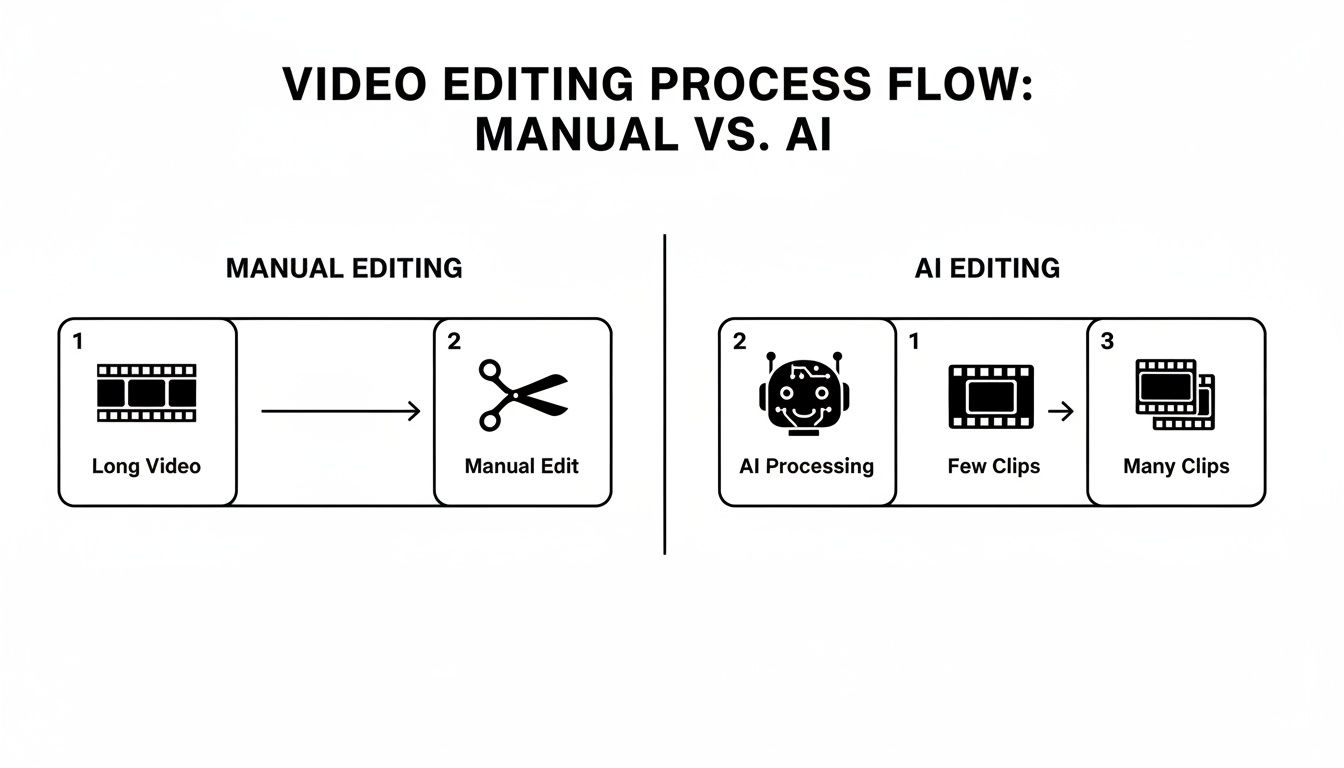
As you can see, the AI turns one long video into a flood of short-form content, whereas the manual process is a major bottleneck that produces far less.
The Analyst AI Predicts Performance
Finally, the AI puts on its data analyst hat for Virality Scoring. Let's be real, not every clip is a winner. The best tools use predictive models to give each generated clip a score based on its potential to get views and engagement.
This scoring system analyzes factors like the clip's length, the strength of its hook, topic popularity, and even the language used. For instance, a 30-second clip that opens with a question and closes with a clear takeaway will almost always score higher than a two-minute rambling segment.
This feature is a lifesaver. It helps you decide which clips to post first, taking the guesswork out of your content calendar. By blending a producer's instincts with a data scientist's logic, an auto clip maker turns your raw footage into a steady pipeline of killer social content.
Scaling Your Content Output with AI Video Tools
Knowing how an auto clip maker AI finds the best moments is cool, but understanding what that technology actually does for your workflow is where the real value lies. For any creator or brand, it all comes down to saving time, cutting costs, and getting more eyes on your content. AI video tools deliver on all three.
The first thing you'll notice is how much production overhead disappears. In the past, a skilled editor would spend hours watching footage, hunting for highlights, trimming clips, adding captions, and reframing for vertical formats. That entire process now takes minutes. This efficiency can slash production costs by as much as 95%.
This isn't just a minor budget tweak. It’s a complete shift in the economics of content creation. What used to be an expensive, time-consuming chore is now a simple, automated step, freeing up capital and mental energy to invest back into your business.
From One Video to a Content Flood
Beyond immediate cost savings, the real game-changer is how these tools let you scale your output exponentially. You can multiply what you produce without multiplying your workload.
Imagine you just wrapped up a one-hour podcast. Previously, you might have spent the next day editing the full episode and, if you were lucky, pulling one or two short clips for social media. With an AI clip maker, that single hour of raw content can become a dozen or more ready-to-post vertical videos, all generated automatically.
This takes you from a content scarcity mindset to one of total abundance. Instead of carefully rationing your best moments, you can flood your social channels with a steady stream of high-quality, engaging clips. The result? A massive boost in visibility and more opportunities to grow your audience.
This is fundamentally leveling the playing field. Solo creators and small businesses can now compete with large production studios that have entire teams dedicated to repurposing content.
The Market Shift to AI-Powered Video
The explosive growth of these tools isn't a fluke; it's a major industry trend. An auto clip maker AI is transforming the creator economy by crushing production times and costs, allowing creators to publish 5-10x more content. The market for AI video tools, valued at $4.2 billion in 2023, is projected to soar to $12.8 billion by 2027. User adoption is skyrocketing, with some platforms reporting a 342% year-over-year increase in sign-ups as these tools shift from niche to mainstream.
Tools like Klap empower podcasters and YouTubers to turn hour-long episodes into perfectly optimized vertical clips by using AI to pinpoint hooks and automatically add subtitles. This workflow saves users 80-95% on per-video costs compared to hiring an editor. You can dig into more AI video creation trends to get the full picture.
This rapid growth is a direct response to what modern social platforms demand. To stay relevant, you have to be consistent. AI is the engine making that consistency possible for everyone, bridging the gap between your long-form deep dives and the short-form content that drives discovery today.
Must-Have Features in a Modern Auto Clip Maker AI
Choosing the right auto clip maker AI is a big deal because not all tools are created equal. Some offer basic clipping, while others provide a full suite of features designed to make your content pop. Think of this as your personal checklist to help you sift through the options and find the perfect match for your workflow.
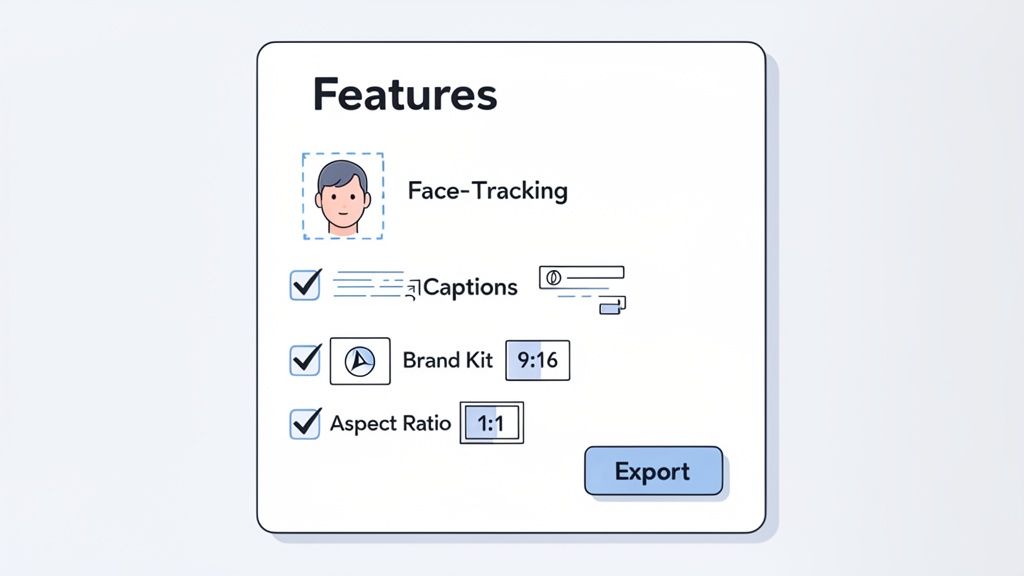
It’s like buying a new camera. A simple point-and-shoot gets the job done, but a DSLR with multiple lenses gives you the creative control to get professional shots. The same logic applies here—the right features directly impact the quality and efficiency of your entire content process.
To help you figure out what's essential versus what's just nice to have, here's a quick breakdown.
Feature Comparison: Essential vs. Advanced Auto Clip Maker AI Capabilities
This table helps you evaluate different tools by distinguishing between the core features everyone needs and the advanced ones for power users.
Feature CategoryEssential (Must-Have)Advanced (Nice-to-Have)
Core AI Analysis
Accurate hook and highlight detection based on transcript context.
Virality score prediction, topic clustering, and sentiment analysis.
Video Reframing
Automatic face-tracking to keep the speaker centered in vertical format.
Multi-person tracking, dynamic zoom effects, and object tracking.
Captions & Subtitles
High-accuracy transcription with customizable fonts and colors.
Animated word-by-word captions (karaoke style), emoji suggestions.
Branding
Ability to upload a brand kit (logo, colors, fonts) for one-click application.
Watermark placement options, custom branded end-screens or intros.
Workflow & Export
Direct download of clips in 1080p resolution.
Direct publishing to social media platforms, cloud storage integration.
Having this framework in mind makes it easier to assess if a tool has the muscle to handle your specific needs. Now, let's dive into the non-negotiables.
Accurate AI Hook Detection
The entire point of an auto clip maker is its ability to pinpoint the absolute best moments in your video. This isn't just about finding spots where someone talks louder; it's about understanding the conversation. A top-tier tool uses smart AI to scan the transcript for questions, powerful statements, and emotional highs that genuinely grab a viewer's attention.
This is the foundational feature. If the AI keeps suggesting dull or random clips, the tool creates more work than it saves. The best systems can nail a powerful hook with precision, giving you a killer starting point for every short you create.
Automatic Face-Tracking and Reframing
Let's face it, your original video was probably filmed in a horizontal 16:9 format for YouTube. But social media platforms like TikTok and Instagram live and breathe vertical 9:16 content. A must-have feature is intelligent reframing that automatically tracks the speaker's face and keeps them perfectly centered in that vertical frame. This alone saves you the mind-numbing task of manually setting keyframes to follow the action.
This single feature can save you up to 15-20 minutes per clip. It’s the difference between a polished, professional-looking video and an awkward, amateur one where a horizontal shot has been clumsily forced into a vertical box.
Customizable Subtitle and Caption Styles
Did you know that over 85% of social media videos are watched with the sound off? That makes captions an absolute necessity for engagement. A good auto clip maker will not only transcribe your audio with high accuracy but also let you customize how the subtitles look. You should be able to change fonts, colors, and even animation styles to perfectly match your brand's vibe.
You'll also want a tool that can generate subtitles for different platforms and languages. For a deeper look at making your on-screen text stand out, check out our guide on the best practices for an AI-powered subtitle generator. This level of control helps your content cut through the noise in a crowded feed and reinforces your brand with every post.
Brand Kit Integration
Speaking of brand, consistency is everything when you're building a recognizable online presence. Look for an AI clip maker that lets you upload a brand kit. This feature is a massive time-saver, allowing you to save your brand's specific colors, fonts, and logos so you can apply them to every single clip with just one click.
Without a brand kit, you'd be stuck manually adjusting brand styles for every video, which defeats the purpose of an automated workflow. This feature ensures every piece of content you push out is instantly recognizable as yours, building brand recall and creating a cohesive, professional look across all your channels.
A Step-By-Step Guide to Creating Your First AI Clip
Alright, you've seen what a top-tier auto clip maker AI can do. Now, let's walk through the entire process, step by step, turning your long video into a batch of polished, social-ready clips in just a few minutes.
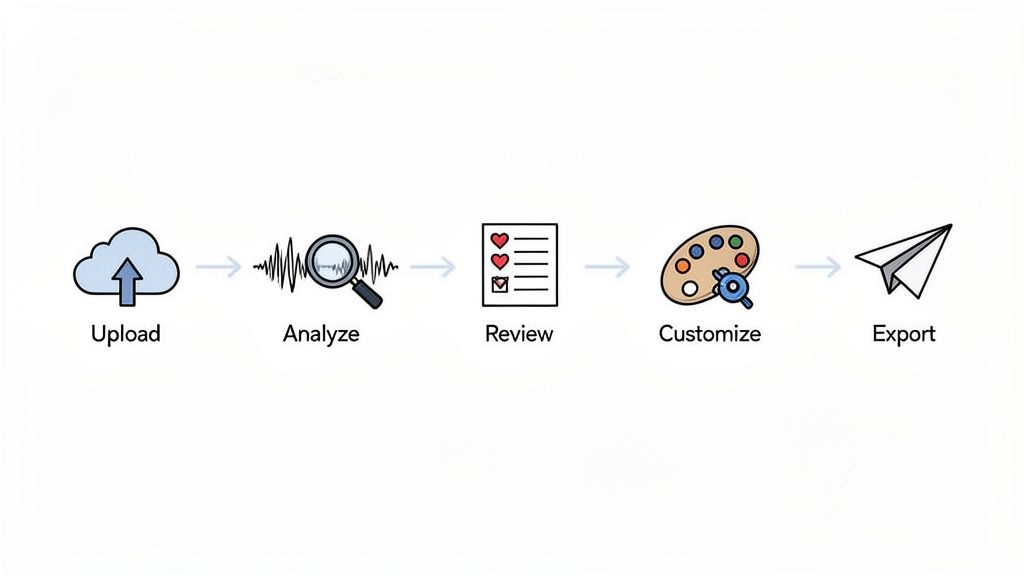
Don't worry, this workflow is designed to be super intuitive. You don’t need any video editing experience to get great results.
Step 1: Provide Your Source Video
First, you need to give the AI your raw material. Most modern clipping tools, like Klap, keep this part simple with two main options:
- Upload a File Directly: If you have a video file on your computer—like a podcast recording or a webinar—just drag and drop it into the platform.
- Paste a YouTube Link: For content that’s already on YouTube, you can skip the upload and just copy the video’s URL. Paste it in, and the AI takes over.
Actionable Insight: Your AI's output is only as good as the input. For best results, always start with a source video that has clean, high-quality audio. This ensures the transcription is as accurate as possible, which is the bedrock for finding those killer hooks.
Step 2: Let the AI Analyze and Generate Clips
This is where you can step back and let the machine do the heavy lifting. Once your video is in the system, the algorithms fire up, analyzing the entire transcript to pinpoint potential hooks and pull out the most compelling segments.
In just a few minutes, the platform will serve up a curated list of short clips. It’s not uncommon for a one-hour video to produce anywhere from 10 to 20 potential shorts, each one automatically reframed for that vertical 9:16 aspect ratio and ready for review.
Step 3: Review and Select Your Favorites
Next, it's time to browse the AI's suggestions. This part feels more like being a curator than an editor. You’ll see a gallery of clips, often with a proposed title and even a "virality score" to help you spot the ones with the most potential.
Give each clip a quick preview to make sure it captures the vibe you're going for. This is your chance to hand-pick the strongest contenders that align with your content plan for the week.
Actionable Insight: The AI provides fantastic starting points, but you are the final judge. Trust your gut and what you know about your audience to pick the clips that will truly connect.
Step 4: Customize and Brand Your Clip
Once you've chosen a clip you love, it's time to put your own stamp on it. This is how you turn a good AI-generated video into a great piece of on-brand content. The best tools give you plenty of control:
- Adjust Captions: Tweak the auto-generated subtitles for accuracy or style. You can change fonts, colors, and animations to fit your brand’s look.
- Add Your Logo: Place your logo as a watermark to build brand recognition with every single view.
- Change Styles: Apply pre-made templates or customize your own to control the video's overall feel.
This step is crucial for maintaining a consistent, professional look across all your social channels. For a closer look at this process, you can learn more about how a long-to-short video converter handles these branding elements so smoothly.
Step 5: Export and Share Your Content
With your clip looking perfect, you're ready to share it with the world. It usually just takes a single click to export the final video. The file will be rendered in high definition (typically 1080p) and already optimized for social platforms.
From here, you can download the clip and upload it to TikTok, Instagram Reels, and YouTube Shorts. Some tools even offer direct publishing integrations to make your workflow even faster.
Actionable Insight: Don’t just post and walk away. A/B test a few different clips from the same source video to see which topics or hooks get the best reaction from your audience. You can also experiment with different thumbnail moments before you publish to maximize your initial click-through rate.
Why Short-Form Video Is Essential for Growth
To really grasp why an auto clip maker AI is such a game-changer, we have to look at the world it was built for. The way people consume content hasn't just changed; it has fundamentally shifted. Attention is now the most valuable currency online, and short-form video is, hands down, the best way to earn it.
Platforms like TikTok, Instagram Reels, and YouTube Shorts aren't just trendy add-ons anymore—they are the main event. This is where audiences are won and lost. These platforms are designed to deliver quick, punchy, high-impact content that fits perfectly with how people scroll and watch today. If you're not showing up in a vertical, bite-sized format, you're practically invisible to a huge segment of your potential audience.
The New Rules of Engagement
The dominance of short-form video isn't a passing phase—it's a seismic shift backed by hard numbers. The market for these platforms is massive, proving this is a permanent change in how we connect with information and entertainment. This is where an auto clip maker AI stops being a cool tool and becomes a vital bridge to your audience.
For creators and brands with a wealth of long-form content—like podcasts, interviews, or webinars—this new world can feel daunting. How can you possibly keep up and compete when you don't have hours to manually chop up dozens of clips? That's the exact problem these AI tools were born to solve.
They act as a translation layer, taking your deep, valuable long-form content and reformatting it for the fast-paced world of short video. It’s the only scalable way to ensure your core message reaches a wider audience where they are most active.
This automated process isn't just about saving time; it leads directly to real results: more followers, greater brand visibility, and a stronger connection with your community.
Meeting Your Audience Where They Are
The numbers behind this shift are staggering and underscore why creators need to adapt quickly. The explosive growth of platforms prioritizing clips under 60 seconds is what's driving the need for auto clip AI. The market for short video platforms, valued at $53.7 billion in 2023, is expected to rocket to $132.9 billion by 2035.
Meanwhile, the AI tools that enhance these videos are growing even faster. The market for AI video enhancers is projected to jump from $131 million in 2024 to $1,166 million by 2032, growing at a compound annual growth rate (CAGR) of 37.1%. This growth is fueled by their ability to automatically reframe and add captions to long-form content for mobile. You can dive deeper into the numbers in the full market analysis on Research Nester.
Figuring out where to post can be tricky, since each platform has its own vibe. To help you build a smarter strategy, you can learn more by checking out our detailed comparison of TikTok vs YouTube Shorts.
Ultimately, an auto clip maker AI means you no longer have to choose between creating deep, meaningful content and joining the short-form revolution. It lets you do both, ensuring all your hard work gets the massive reach it deserves.
Got Questions About Auto Clip Maker AI?
Jumping into any new tech brings up questions. An auto clip maker AI sounds great, but you're probably wondering how it really performs and if it's worth it. Let's tackle some of the most common questions.
Can an AI Really Understand My Video’s Context?
Yes, and that’s the magic that separates today's AI from older, clunky tools. Modern systems use advanced Natural Language Processing (NLP) to truly understand your video's transcript. The AI isn't just scanning for keywords; it's analyzing context, tone, and the natural flow of a conversation.
This is how it pinpoints the moments that will genuinely hook a viewer. It knows the difference between filler and a truly thought-provoking question or a bold, mic-drop statement. It’s built to find the substance, not just random bits with loud audio.
Will My AI-Generated Clips Look Generic?
Not at all. The best auto clip makers put you in the driver's seat. The AI does the heavy lifting by finding and framing the best moments, but think of its output as a powerful first draft, not the final product.
The AI is your assistant, not your director. You have the final say on every creative choice, making sure the final clip is 100% on-brand.
You can easily tweak the clip's timing, edit the auto-generated captions, and apply your brand's specific fonts and colors. Add your logo as a watermark, and every video becomes instantly recognizable as yours.
Are These Tools Worth the Cost for a Small Creator?
Absolutely. In fact, small creators and businesses with tighter resources often see the biggest return on investment. It's all about the value of your time and the massive boost in audience reach.
Consider this: instead of spending hours each week on manual editing or paying a freelance editor—which can easily cost $50 to $150 per hour—you're generating a steady stream of social-ready content for a simple monthly fee. That efficiency allows you to post more consistently, which is the key to growth on any social platform. For a solo creator, the time you get back is priceless.
Ready to stop wasting hours on manual editing and start scaling your content effortlessly? Klap uses AI to turn your long videos into viral-ready shorts in minutes. Try it now and see how easy it is to multiply your reach.
