
Speaker Identification: A Practical Guide for Creators
Other
You just finished a long interview, the captions are clean, and the transcript looks polished. Then you notice the labels, Speaker 1, Speaker 2, and no names anywhere. That's the moment most creators realize they don't need transcription alone, they need speaker identification, the step that turns a readable transcript into a usable one.
For a creator, this matters because a transcript without names still leaves you doing the same work by hand. You're scanning for who asked the question, who gave the answer, and where a quote starts and ends. If you're comparing workflows for turning audio into something usable, it also helps to look at voice quality and price comparison in related tools, because the practical trade-off is never just accuracy, it's the time it takes to get to a result you can publish. voice quality and price comparison
Why Naming Speakers in Audio Is Harder Than It Sounds
A clean transcript can still leave you with a messy editing job. You might export a podcast episode and see every word captured, but the tool only labels the voices as Speaker A and Speaker B, which helps if you only need to know who spoke in turn, and falls short if you need to know that Alex said one line and Maya asked the next. That gap is why many creators feel the AI is almost finished, but not quite.
The reason is simple: speaker identification and speaker diarization solve different problems. Diarization groups audio by voice turn, while identification matches those voice turns to known people or roles, which is what editors, producers, and social teams usually need before a transcript is ready for show notes, clips, or chapter markers. A transcript with anonymous labels still sends you back into the file to clean up names by hand.
Practical rule: if the output still reads like a conversation between placeholders, you do not have a finished transcript yet.
That problem shows up fast once the audio is imperfect. Room noise, overlapping speech, and microphones that change from one speaker to the next all make identity harder to pin down, even when the words themselves are clear. Diarization sorts the voices into buckets, while identification puts real names on those buckets, and the second step is where many workflows stall.
Creators hit that wall in long-form video repurposing too. A webinar or interview clip only becomes useful when you know which voice belongs to the host, which belongs to the guest, and where to cut without guessing. If you are comparing tools for that broader workflow, a video transcription workflow only gets you part of the way, because naming speakers is what turns a readable transcript into something you can publish with confidence.
What Speaker Identification Actually Means
Speaker identification is a one-to-many matching task. The system takes an unknown voice and compares it against a set of known speakers, then returns the best match. That's different from speaker verification, which is a one-to-one yes-or-no check, and it's also different from diarization, which only says who spoke when without assigning a real name. The Aalto speech processing reference describes identification as a closed-set problem, while verification is open-set, and the practical difference is easy to feel once you're editing audio. Aalto speech processing reference
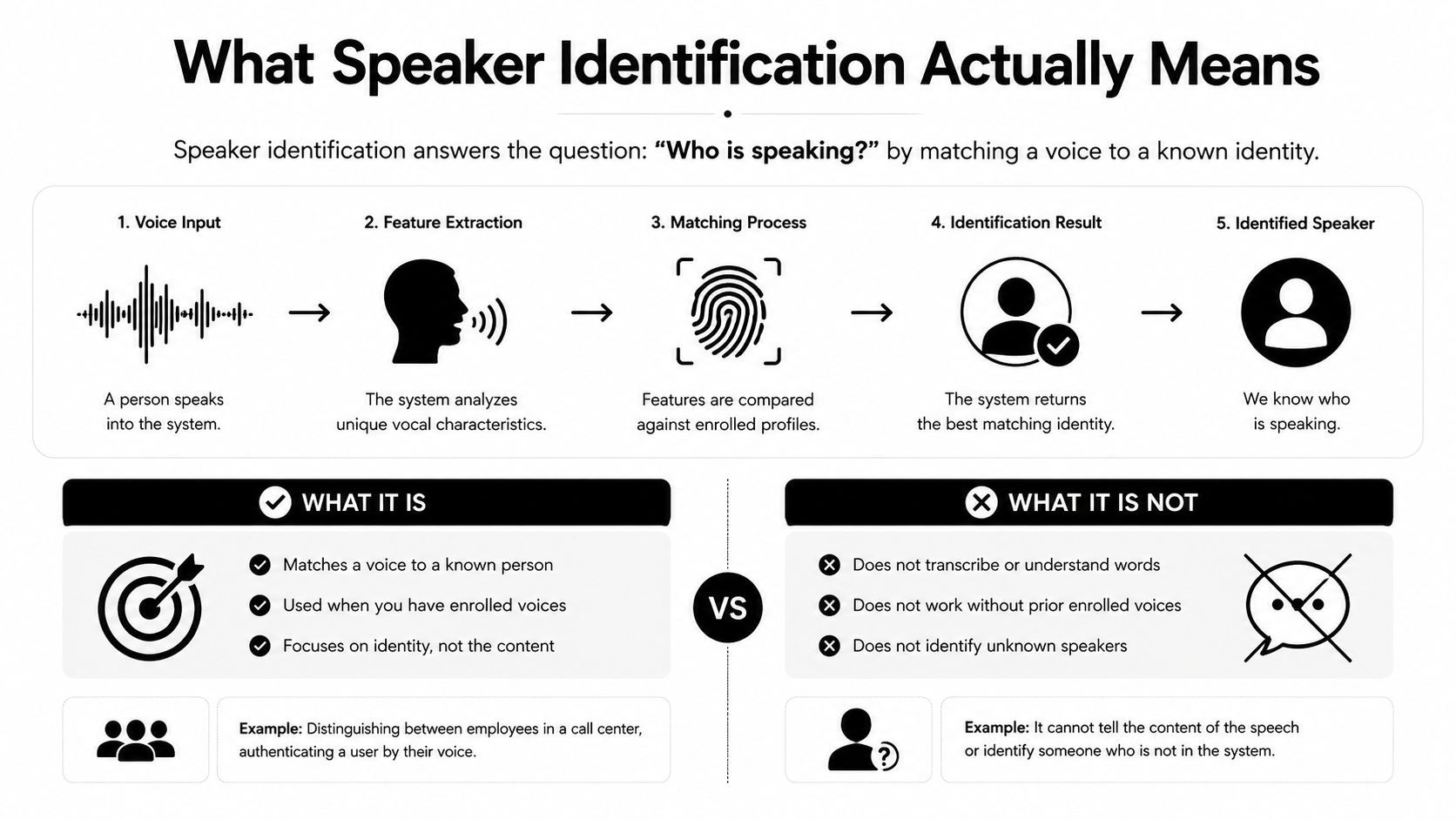
A simple way to remember it is this. Diarization is segmentation, identification is naming. Speech recognition answers what was said, while identification answers who said it. In editing terms, ASR gives you the words, diarization splits the conversation, and identification finishes the job by turning “Speaker 2” into the actual person or role.
TaskQuestion It AnswersOutputTypical Use
Speaker identification
Who among known speakers said this?
Name or best match
Named podcast transcripts, interview credits
Speaker verification
Is this the claimed person?
Yes or no
Access control, account login
Speaker diarization
Who spoke when?
Speaker labels like A or B
Meeting transcripts, call analysis
Speech recognition
What was said?
Text transcript
Captions, search, notes
The reason creators confuse these terms is that many tools bundle them loosely. A transcript can look “speaker-aware” even when it never assigns names, so the output feels smarter than it is. For a podcast editor, the test is simple: can you tell which person said what without reading the whole file twice?
Inside the Speaker Identification Pipeline
A creator usually runs into speaker identification only after the recording is already messy. Maybe a podcast has overlapping voices, a webinar recording came from a screen share, or interview footage contains room noise and inconsistent mic levels. The pipeline exists to turn that chaos into a named speaker, not just a pile of labels. It usually has two phases, enrollment and identification. In enrollment, the system stores reference audio for each speaker, extracts features, and builds a speaker model. In identification, it preprocesses the new recording, extracts the same kind of features, and compares the test utterance against the stored models to find the best match. That two-step setup is standard in practical system design, and it's why the quality of your reference audio matters so much. ScienceDirect speaker identification overview
What happens before the match
Before any comparison happens, the audio is broken into short slices so the system can study stable voice traits instead of trying to reason over a whole conversation at once. Most systems start by slicing audio into short windows, often 20 to 30 milliseconds, then apply pre-emphasis and convert the signal into cepstral features through Mel-filterbank energy, log compression, and a DCT. Many pipelines keep roughly coefficients 2 through 13 because they preserve speaker-relevant spectral shape while dropping extra detail. Some studies also report that much longer frames, up to about 250 ms, can still work well and reduce extraction cost by lowering the number of frames. SJSU feature extraction paper
That front end is where a lot of quality is won or lost. Normalization has to strip away channel noise, room tone, and microphone quirks without flattening the acoustic traits that distinguish one voice from another. If the same person sounds different on a laptop mic, a lav mic, and a phone recording, the system has to decide which differences belong to the speaker and which belong to the recording path.
Useful mental model: the system is not listening for words first, it's listening for consistent voice shape, then deciding who that shape belongs to.
What happens at decision time
After features are extracted, the system compares them to stored speaker models using methods such as template matching, dynamic time warping, or nearest-neighbor search. Verification pipelines also compute a similarity score against the claimed identity, which is what makes threshold-based decisions possible in practice. For creators, that usually means one thing. The system can be very good when the reference sample matches the target audio conditions, and much worse when the recording setup shifts between enrollment and runtime.
From Pitch and Formants to Neural Embeddings
早期的說話者研究多半依賴人耳也能聽出的聲學線索,特別是音高和共振峰。在法庭聲學實務裡,專家會同時用聽辨和聲譜圖來比對嫌疑人與未知語音,2000 年代的文獻也常把音高分析、共振峰分析和共振峰匹配列為常見方法。Aalto 的語音處理參考還提到,在受控條件下,某些系統的表現可以非常高,非電話語音、且至少有 2 秒語音時,文字依賴式驗證或辨識的錯誤率可低至 0.3%,但在電話語音、手持裝置不一致、且至少有 3 秒語音時,文字無關式辨識的錯誤率可能升到 16%。Aalto speech processing reference
從手工特徵到模型化表徵的轉向
一個清楚的分水嶺,是從手工挑選的聲學比對,走向統計式的說話者表徵。美國空軍關於 KING 資料庫的技術報告指出,在封閉集合實驗中,使用 RASTA-liftered cepstrum 與 delta cepstrum,再透過 codebook adjudication 融合,在 26 位聖地牙哥群組子集上達到 100% recognition。同一份報告也指出,在模擬戰術環境中,對 41 位飛行員與空中交通管制員、使用 159 筆測試傳輸時,辨識率達到 95.6%。這些結果的意義在於,當條件被控制住時,這個領域很早就能取得很強的封閉集合表現。U.S. Air Force technical report
到了 2010 年代,常用表徵又往前走了一步。JFA 和 GLDS-SVM 逐漸讓位給 i-vector 系統,這類方法一直是說話者驗證的事實標準,直到 2010 年代中期,之後 x-vector 和 ECAPA-TDNN 變成主流。你不必把每個縮寫都背起來,但要認得它們,因為現代函式庫和供應商文件一談到高品質說話者嵌入,常常就會出現這些名稱。那個轉變的重點很直接,系統不再只是量幾個單一聲學點,而是把整段語音壓成更能代表說話者風格的向量。
Clustering 也要放進來看,但它解的是另一個問題。Clustering 會把未知聲音分成幾個群組,這對 diarization 很有用,因為它需要先知道「哪些片段屬於同一個人」。Embeddings 則讓這些群組有一致的比較基準,能跨片段、跨段落,甚至跨不同錄音條件去做對照。換句話說,clustering 負責把相似的語音片段收攏起來,embeddings 負責讓系統有理由判斷它們為什麼相似。
如果你看的是實際工作流,這種差別很重要。像 Klap 的轉錄流程說明 這類工具,真正需要處理的不是抽象名詞,而是先把語音切開,再把每段聲音對回正確的人名。
How Creators Use Speaker Identification in Real Workflows
A podcast editor usually meets speaker identification after diarization has already done the first pass. The transcript says who spoke when, but the labels are still generic, so the editor has to map Speaker A to the host and Speaker B to the guest before writing a clean episode page or clipping a quote. That same name resolution step shows up in webinars, interviews, and any recording where the audience cares about attribution, not just segmentation.
Three creator workflows where names matter
In a podcast with a regular host and guest, the value is immediate. Named labels make it easier to write show notes, pull quotes, and build searchable archives across episodes. When the host opens with a question and the guest gives the useful answer, you want that assignment reflected everywhere the transcript gets reused.
In a multi-person webinar, the pain is less about storytelling and more about clarity. If a panelist answers a product question and the transcript only says Speaker 3, your team has to reconcile the recording manually before repurposing it into a blog, summary, or follow-up email.
For long-form interview clips destined for TikTok or Reels, the transcript is only one part of the workflow. The clip cutter needs to know who is talking so the edit can center the right voice, and the transcript needs to be good enough for captions, chapter markers, and downstream scripting. That's where a video-to-transcript workflow fits naturally, especially when you're turning existing content into shorter assets. Klap's video-to-transcript workflow
Practical rule: diarization tells you where the turns are, but naming tells you what to do with them.
The cleanest creator setup is usually this. Let the system detect speaker turns, then resolve names from intros, prior episodes, or manual review. Once that mapping is stable, every downstream asset gets easier, captions, clips, summaries, and internal notes all inherit the same speaker labels.
Libraries and Tools You Can Use Today
A creator who needs speaker identification has a few paths, and the right one depends on how much control the team wants to keep. Open-source tools such as pyannote and NVIDIA NeMo are common choices for diarization, while SpeechBrain and resemblyzer are often used to extract speaker embeddings. The trade-off is straightforward. You get more control and better privacy boundaries, but you also take on setup, tuning, and maintenance.
Pick by workflow, not by hype
Managed APIs make sense when speed matters more than customization. AssemblyAI, AWS Transcribe, and Google Cloud Speech can return speaker-labeled output quickly, but they usually stop at generic labels like Speaker A or Speaker B. If you need actual names in the transcript, you still need a naming layer on top of that output.
For video-first workflows, a repurposing platform can combine several steps in one place. Klap is one example, because it brings video analysis, clipping, and speaker-aware editing into a creator workflow instead of asking you to stitch together a developer stack. That matters when the goal is publishable clips from existing footage, not model experiments for their own sake. If you first need to extract the audio from a recording before you can work with it, the process starts with a simple prep step like how to get audio off a video.
NeedGood FitTrade-off
Local control
pyannote, NeMo, SpeechBrain, resemblyzer
More setup and maintenance
Fast deployment
AssemblyAI, AWS Transcribe, Google Cloud Speech
Less customization
Video repurposing
Klap
Less low-level model control
Embedding-first experimentation
SpeechBrain, resemblyzer
You build more of the pipeline yourself
Choosing the strongest stack is often the wrong move. A small team that only needs one clean transcript a week will usually get farther with a managed API or a creator platform than with a custom speaker pipeline. A team processing large volumes of files, or one that needs stricter control over matching behavior, gets more value from open-source tools even if the setup work is heavier.
The practical question is simple. Do you want to name speakers, or do you want to build the system that names them? The first path is faster. The second path gives you more room to tune the pipeline as your workflow gets more complex.
Where Speaker Identification Breaks and What to Watch Out For
A podcast episode with three people talking over each other can expose the limits of speaker identification fast. One clean interview clip may label speakers accurately, then the same system struggles on a webinar with room echo, distant mics, and people interrupting one another. The core problem is consistency. The model needs a stable voice sample to compare against, and real recordings often give it a moving target.
The most common failure modes
Short reference audio is one of the first weak points. A clip under 10 seconds often leaves too little speech variation for a reliable speaker profile, especially if the voice is quiet or the room adds echo. Accents can shift the sound further, and so can natural voice drift across sessions, which is why one recording can label a speaker correctly while another recording from the same person gets mismatched.
The input quality matters just as much as the sample length. Noisy rooms can bury the details that distinguish one voice from another, and mismatched microphones can make the same person sound oddly different from one file to the next. If the enrollment sample comes from a studio mic and the target audio comes from a laptop mic across a conference table, the system has less useful overlap to work with.
The ethics side needs the same level of attention. Voice is biometric data, so keeping enrollment databases has privacy consequences, and auto-labeling public figures can drift into identifying people who never agreed to be enrolled. Consent, limited retention, deletion options, and clear disclosure are not extra paperwork, they are the rules that make the workflow defensible.
Practical rule: if you would not store the voiceprint without permission, do not let the system keep it by default.
For teams building workflows around transcription and naming, the process has to stay narrow and explicit. Get consent before enrollment, keep only the voice data you need, let users remove their profiles, and be clear when the system is making identity claims rather than just speaker-turn guesses. Teams that publish podcasts or interview clips can also pair this with the right transcription workflow, including tools discussed in podcast transcription tools, so the naming step fits into a larger editing process. These steps do not remove error, but they keep the system honest.
Speaker Identification Questions Creators Ask Most
How much reference audio do you need? More is better, because the model needs enough voice variation to build a stable speaker profile. Very short clips are fragile, especially in noisy or overlapping conversations, so a longer clean sample is safer when you're trying to name speakers reliably.
Can it work in real time? Sometimes, yes, but post-processing usually gives you a cleaner result because the system can look at the full recording instead of guessing from partial context. For live use, expect more trade-offs and more manual cleanup.
Are open-source tools cheaper than managed APIs? They can be, but only if you value engineering time at zero. Open-source usually costs less in licensing and more in setup, while managed APIs cost more per file or minute but save you from building and maintaining the stack yourself.
Is speaker identification the same as voice cloning? No. Speaker identification labels existing speech, while voice cloning synthesizes new speech in a target voice. They solve different problems, and creators usually want labeling, not synthesis.
If you want speaker-aware clips without stitching together transcription, naming, and editing tools yourself, Klap is built for that workflow. It turns long-form video into short-form clips, and its speaker detection fits the exact problem of figuring out who said what before you publish. Visit Klap if you want to test that workflow on your own podcasts, webinars, or interview footage.
