Social Media Video Content Creator Workflow
Other

The global online video creator population reached 246 million in 2025, according to Futuresource Consulting. That scale changes the job for a social media video content creator. You're not competing with a few polished channels in your niche. You're competing for completion in a feed built for discovery, often without an existing audience to carry a weak opening.
The response isn't to publish more of everything. It's to publish fewer, accurately contextualized clips, cut from footage you already own, and keep only the ones that hold attention and save you hours.
What a Social Media Video Content Creator Ships
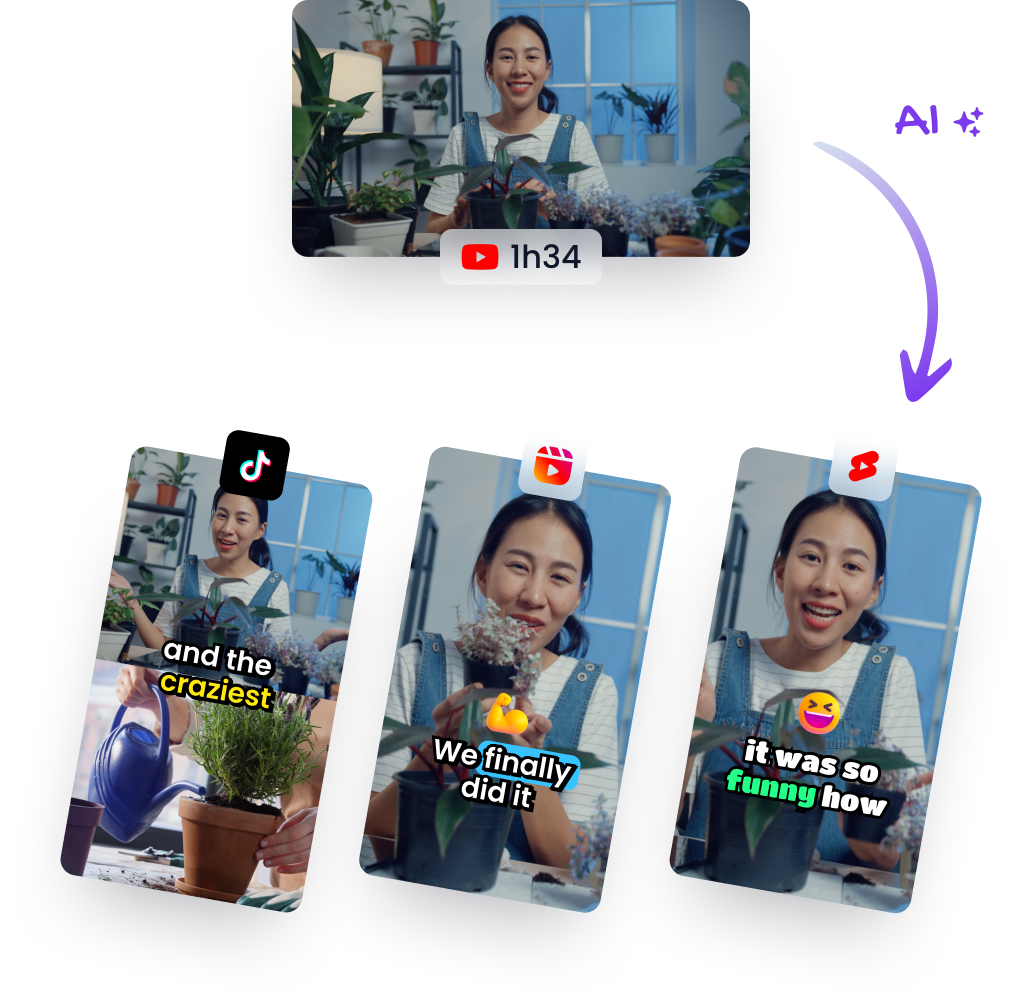
A social media video content creator ships a finished argument in under a minute. You take one owned recording, an interview, webinar, lesson, podcast, or product review, and turn it into several mobile clips. Each clip carries one idea and one payoff. If a viewer needs the previous ten minutes to understand it, it isn't a clip yet. It's an excerpt.
That distinction matters because the viewing is already there. People spend an average of 11 hours and 39 minutes per week consuming online video, compared with 10 hours and 15 minutes watching television, according to DataReportal's July 2025 global analysis. Short clips don't need to create a new habit. They need to fit the habit people already have, sound off, vertical, and understandable in seconds.

Why the Clip Has to Carry Its Own Distribution
Most creators don't have a large built-in audience. In 2025, 72.88% of creators had fewer than 10,000 followers, according to OpusClip's State of the Creator Industry Report. Small accounts can't rely on followers forgiving a slow start. The opening claim, the framing, and the captions have to do the distribution work.
Many of those creators are also running businesses, not chasing fame for its own sake. In Visa's 2025 global survey of 1,067 content creators across five countries, 68% considered themselves small-business owners, according to Visa's 2025 creators report. That makes qualified reach the right target. You want the right viewer to finish, save, share, or click, not a large number of the wrong viewers to swipe past.
The commercial stakes explain why repurposing is worth systematizing. YouTube reported that 76% of small and medium-sized businesses with a YouTube channel said the platform helped them grow their customer base by reaching new audiences, in its 2025 U.S. YouTube Impact Report. A webinar that reached forty live attendees can keep finding buyers if its strongest answers become standalone clips.
What Good Output Looks Like
A usable batch from one recording usually contains different jobs, not five versions of the same moment.
- Answer clip: One direct question, one complete answer, cut tight enough to save.
- Proof clip: A result, demonstration, or before and after that makes a claim credible.
- Objection clip: The pushback your buyer already has, answered without hype.
- Story clip: A short recognizable moment with tension and a clear ending.
I would judge the batch before you export anything. Read each transcript cold. If you can't state the audience problem in one sentence, the clip will probably drift. The win isn't clip volume from footage already shot. It's qualified reach without another shoot day, built through length targets, a repeatable cutdown, a meaning check, completion metrics, and a cadence you can keep.
Lengths and Formats That Hold Attention
A fifteen second cut and a forty five second cut can carry the same idea, and only one of them will hold a feed viewer to the end. So pick the destination before you cut. Length decides how much context survives, where the payoff lands, and whether anyone reaches it.
| Platform | Aim for | Hard limit or format | Signal to watch |
|---|---|---|---|
| TikTok | 20-35 seconds | 2024 average created length 42.7 seconds | Completion and rewatches |
| Instagram Reels | 15-45 seconds | Vertical 9:16, mostly discovery | Reshare, full watch, like, audio-page visit |
| YouTube Shorts | 15-60 seconds | Square or vertical up to 3 minutes if uploaded on or after 15 Oct 2024 | Completion; claimed content over 1 minute cannot be monetized |
| 30 seconds or less | Native vertical or square export | Completion; shorter cuts generally hold attention better |
Those ranges give you a practical starting row. 15-30-second clips generally retain viewers best, with approximately 20-35 seconds for TikTok and 15-45 seconds for Instagram Reels, according to Hootsuite's guide to social media video length. Treat them as editing targets rather than guarantees. A tight forty second answer beats a vague twenty second teaser.
Use the Average as a Ceiling
In 2024, the average length of content created by TikTok accounts was 42.7 seconds, according to Statista. Read that figure as a ceiling. When a talking point runs past it, something is usually wrong with the cut: two ideas sharing one clip, a slow setup, or a payoff arriving too late.
A coach explaining pricing for ninety seconds is the common case. Don't compress the whole explanation until it sounds rushed. Cut the diagnostic question as a twenty five second TikTok. Cut the worked example as its own thirty five second Reel. Each piece gets a fresh opening line and a clean ending, and neither one depends on the other to make sense.
If you are mapping destinations for a campaign, compare the strengths of different social media video types before committing the footage. A product demo, a talking head answer, and a screen recording need different crops and different pacing.
When a Longer Short Makes Sense
YouTube gives you more room, and room is rarely the reason to use it. Square or vertical videos up to three minutes qualify as Shorts for uploads on or after October 15, 2024. For most repurposed answers, I'd still aim for 15-60 seconds and protect completion. Go longer only when the story needs a setup, a turn, and a result that fall apart if separated.
LinkedIn is the opposite case. Keep the cut at or under thirty seconds unless the professional context needs more. A concise insight with readable captions travels further in a work feed than a podcast segment that still sounds like the middle of a conversation.
Practical rule: Choose the row, then write the payoff sentence. If the payoff can't land inside that row, split the idea instead of stretching the clip.
Export 9:16 for each destination rather than one universal file. Keep captions inside platform safe zones, clear of progress bars, handles, and lower interface controls. A caption that is technically accurate but sits under a button is still a failed caption.
How to Cut One Long Video Into Shorts
Start with speech. Podcasts, interviews, lessons, reviews, and trainings give you searchable words, clear claims, and natural sentence boundaries. A silent montage may look good, but it gives an editor, human or automated, much less to work with.
The workflow below turns one recording into publishable drafts without pretending the first automated pass is finished.

Run the Six Step Cutdown
-
Import and mark one problem per segment. Import a file or paste a YouTube link, then mark sections that each solve one audience problem. Klap accepts a YouTube video link or an uploaded video file as input, and it works best with videos that include speaking because its algorithm relies heavily on speech detection. The usual slip is marking topics instead of problems. "Pricing" is a topic. "Why your cheapest package attracts the hardest clients" is a clip.
-
Open with the strongest line. Pick the clearest claim, question, or visual for the first one to three seconds. Don't open with a logo, a greeting, or "in this video." Discovery viewers haven't agreed to watch yet. Instagram says Reels are designed largely for discovery, and its ranking predicts whether someone will reshare a Reel, watch it all the way through, like it, or open its audio page, in Instagram's explanation of ranking. Your opening has to earn the full watch, and your ending has to give people something worth resharing.
-
Reframe for the people who matter. Reframe to 9:16 with face tracking for one speaker. Use split screen when a reaction matters, and a screencast layout when the screen carries the proof. Check speaker changes manually. Automated tracking often stays on the listener for half a sentence too long, which is enough to confuse who said what.
-
Generate the transcript, then set the length. Generate captions from the transcript and trim the clip to the platform row you chose. A draft tool saves real time at this stage. Klap generates clips in a matter of minutes after a video is uploaded, so you can review several candidate moments instead of scrubbing the whole timeline. Don't accept every candidate. A fast draft is useful only if you still reject the weak ones.
-
Trim to one payoff and one action. End when the idea lands. Then ask for one thing, a save, a follow, a comment with a specific answer, or a visit to the full episode. Two calls to action usually produce neither. If the payoff arrives at second eighteen, don't keep ten seconds of polite wrap-up because the transcript looks complete.
-
Export separately and keep the project. Export a separate file per platform, with its own caption placement and on-platform description. Keep the project so a winning opening can be recut without rebuilding the edit. When you make a second version, change only one variable, opening, length, or caption. Otherwise you won't know what improved completion.
What the Drafting Pass Should and Shouldn't Do
A three minute source can yield about five ready drafts, but a ready draft doesn't mean ready to publish. Let automation find candidate hooks, remove silence, reframe faces, and draft captions. You still own selection. You decide whether the quotable line is the speaker's point, whether the joke needs the setup, and whether the surprising result includes its condition.
Watch how the source becomes separate mobile clips before you build your own pass.
Say you're cutting a product review. The strongest draft may open with "This battery died in one day," because the sentence is punchy. If the reviewer later explains they used the wrong charger, that opening is misleading without the correction. Choose the less dramatic complete point instead. Accuracy isn't a polish step after growth. It's a publishing condition.
Check Meaning Captions and Rights
A fast cut can keep the exact words and still lose the meaning. That's the error that damages trust fastest. Remove a qualifier, a date, or a "this is not advice" line, and a careful speaker suddenly sounds reckless. Treat every generated clip as a draft until you've read it against the source.
Read the transcript out loud. Check names, numbers, product claims, and technical terms. Restore any condition the cut removed. If a clip needs three sentences of caption text to explain what the speaker meant, recut it or drop it. Don't use the description to repair a misleading edit.

Run This Checklist Before Export
- Face check: Confirm the right face stays in shot when speakers change, especially during interruptions and reactions.
- Caption placement: Confirm captions don't cover eyes, product details, lower third names, or interface elements.
- Format check: Verify aspect ratio and duration for the destination before you export the final file.
- Rights check: Confirm music, footage, guest appearances, and third party clips are owned or licensed for this use.
- Provenance note: Write one line with the source episode, timestamp, and what you trimmed, so you can audit the clip later.
Klap uses intelligent framing and facial recognition to create responsive subtitles when converting topics into shorter clips. That helps with placement and timing, but it isn't the final read for Deaf and hard-of-hearing viewers, multilingual audiences, or specialized vocabulary. Proof names and homophones yourself. "Their model" and "there model" look small on a timeline and careless on a phone.
For a fuller permission workflow, use a documented approach to content rights management rather than relying on memory. You're solely responsible for the legality, quality, and accuracy of your content, and you must hold the rights to any music or media included in your videos. Output materials such as edited videos and captions are owned by you, subject to payment of all applicable fees, but ownership of the edit doesn't create rights in someone else's song or footage.
Check YouTube Claims After Upload
YouTube monetizing creators keep 45% of their allocated Shorts revenue, and only eligible, advertiser-friendly views count, according to YouTube's Shorts monetization terms. That 45% figure isn't an earnings guarantee. It's the creator share after YouTube's allocation process.
The sharper risk is claimed material. Shorts longer than one minute containing claimed content are blocked and cannot be monetized. Check Content ID after upload, even when the clip uses your own interview. Background music in a café recording or a guest's screen share can trigger the problem.
Pull any clip that changes the speaker's meaning, even when its predicted virality looks high. A correction rarely travels as far as the misquote.
I would keep a simple release note in the project folder. Note the guest, the date permission was given, the music license, and any sponsor restrictions. It takes two minutes while the source is open. It takes much longer when a brand partner asks six weeks later.
Read Completion Before You Scale
Views show the platform distributed the clip. Completion shows the clip worked. Climb the ladder in order: reach and views, watch time and completion, engagement, clicks and leads, then sales. Each rung answers a narrower question.
| Stage | Question it answers | Metric to track |
|---|---|---|
| Views and reach | Did the platform distribute it? | Views and reach per post |
| Completion and watch time | Did the hook and pace hold? | Completion rate and average watch time |
| Likes, shares, reposts | Was it worth passing on? | Shares per 1,000 views |
| Leads and clicks | Did it create intent? | Click-throughs and profile visits |
| Sales | Did it make money? | Conversion rate per clip |
HubSpot reports that 21% of marketers identify short-form video as the format delivering the highest ROI, while 93% report positive ROI from video overall, in HubSpot's video marketing statistics. Those figures describe the channel broadly. They say nothing about which hook held viewers or which clip produced a lead, so self-reported ROI earns you permission to keep publishing. It does not tell you what to publish next.
Tag Every Clip Like an Experiment
Tag each clip by source episode, topic, hook type, duration, platform, caption version, and call to action. Judge it on completion rate and shares per 1,000 views, since ratios compare fairly across accounts of different sizes where raw totals mislead. A practical guide to video completion rate shows how to separate distribution effects from editing effects.
Keep a control version. Change the opening, or the length, or the caption style, and leave the rest alone. Say version A opens with a question and version B opens with the result. Publish both with the same payoff and call to action. If B holds more viewers through the midpoint and earns more shares per 1,000 views, reuse that opening on the next batch.
Connect UTM links or platform-native conversions before calling any clip a lead driver. A profile visit signals intent. Revenue requires a tracked conversion. Log your editing and correction hours beside the performance numbers, since a viral clip that needed a full day of fixes makes a worse template than a steady clip finished in one editing pass. Completion and time cost decide what earns a repeat. I'd scale a format only when retention and the next business step improve together.
A Cadence You Can Actually Keep
Most visible short video comes from a small group of heavy publishers. In a Pew Research Center study of 2,745 U.S. adult TikTok users conducted in August 2023, 52% said they had ever posted a video and only 40% had posted videos that were publicly visible, according to the Pew Research Center TikTok users report. The most active 25% of users produced 98% of all publicly accessible videos posted by the study group.
Read that as a capacity warning, not a dare. You don't need to post everywhere every day to act like a serious social media video content creator. You need a repeatable batch, a review step you won't skip when you're busy, and enough spacing to learn from each post.
Build the Week Around One Recording
Pull three to five reviewed clips from one recording session. Write each on-platform caption during the batch, while the source context is fresh. Schedule the clips across the week instead of editing inside the feed between other work.
A workable solo rhythm is three posts a week on the platform that already returns completion. Add one cross-post only after you've checked the native export. If captions sit correctly on TikTok but collide with controls elsewhere, it isn't ready just because the file exists.
Agencies can split the line into roles.
- Selector: Marks candidate moments and writes the one sentence problem for each clip.
- Caption proofreader: Checks names, claims, qualifiers, and safe zones against the source.
- Scheduler: Exports per platform, adds UTMs, and logs duration, hook type, and hours spent.
Count hours saved against clips shipped. If a week produces ten drafts and only three pass the meaning check, publish the three. Skip a platform rather than stretching a twenty five second TikTok into a context free LinkedIn post. Keep the source project so a clip that holds viewers can return next week with a new opening, without a reshoot.
Repurpose One Recording This Week
Pick one speaking video you already own, ideally ten to forty minutes, built around a clear audience problem. Run it through the six steps. Keep only the clips that pass the meaning and rights check, then schedule three on the platform whose length row you chose.
For the draft step, Klap can convert a 3-minute YouTube video into 5 ready-to-publish videos for Instagram or TikTok in one click, and creators using Klap have made more than 8.5 million clips. Adjust the starts, ends, and captions by hand before export. Klap offers a free trial that lets you create 1 video for free, and no credit card is required to start.
Publish the reviewed set. Read completion before you celebrate views. Don't add a second platform until the first three clips give you a completion number you can compare, then pull the next recording.
Turn one podcast, webinar, lesson, or interview you already own into reviewed vertical clips with captions and platform-ready framing, without spending the week rebuilding edits from scratch. Start with one recording at Klap, keep the clips that pass your meaning check, and let completion, not raw volume, decide what you make next.