
Scene Generator: AI Synthesis & Workflow Transformation
Other
You've probably got the same problem most video-first creators have now. There's a folder full of podcasts, webinars, interviews, sales calls, demos, and livestreams sitting on a drive or in a YouTube archive, and you know there are dozens of useful short clips buried inside. The problem isn't having content. The problem is finding the right moments fast enough to publish consistently.
That's where the term Scene Generator enters the conversation and immediately makes things messier.
Search for it and you'll find two completely different categories of AI tools. One group creates brand-new visual worlds from prompts. The other group analyzes real footage, identifies the strongest moments, reframes them for vertical platforms, and prepares them for publishing. Both are called scene generators in different corners of AI. Only one of them solves the repurposing bottleneck most creators have.
The Scene Generator Dilemma for Creators
A creator records a one-hour interview. The conversation is strong. There are clean soundbites, sharp opinions, a useful teaching segment, and one story that would probably perform well on Shorts. But turning that hour into five or ten polished clips still means scanning the timeline, marking in and out points, resizing for vertical, checking whether the speaker stays centered, fixing captions, and exporting everything one by one.
That's why “scene generator” sounds so appealing. It suggests automation at the exact point where teams frequently lose time.
But the phrase covers two very different jobs. In one context, a scene generator builds visuals from scratch. In another, it finds scenes that already exist inside your footage and packages them for distribution. If your day-to-day work revolves around turning existing long-form content into short-form assets, that distinction matters more than the label.
Practical rule: If your raw material is already filmed, you don't need an AI set builder first. You need an AI system that can recognize structure, dialogue, pacing, and visual focus inside the footage you already own.
This confusion gets worse because many creators are really asking a content repurposing question, not a generative media question. If that's your use case, it helps to think in terms of content repurposing workflows rather than broad AI video buzzwords.
The useful framing is simple. Some scene generators invent scenes. Others identify scenes. Most creators trying to grow on TikTok, Reels, and Shorts get more practical value from the second category.
Synthesis vs Analysis Two Types of Scene Generators
The cleanest way to understand the market is to separate AI scene synthesis from AI scene analysis.
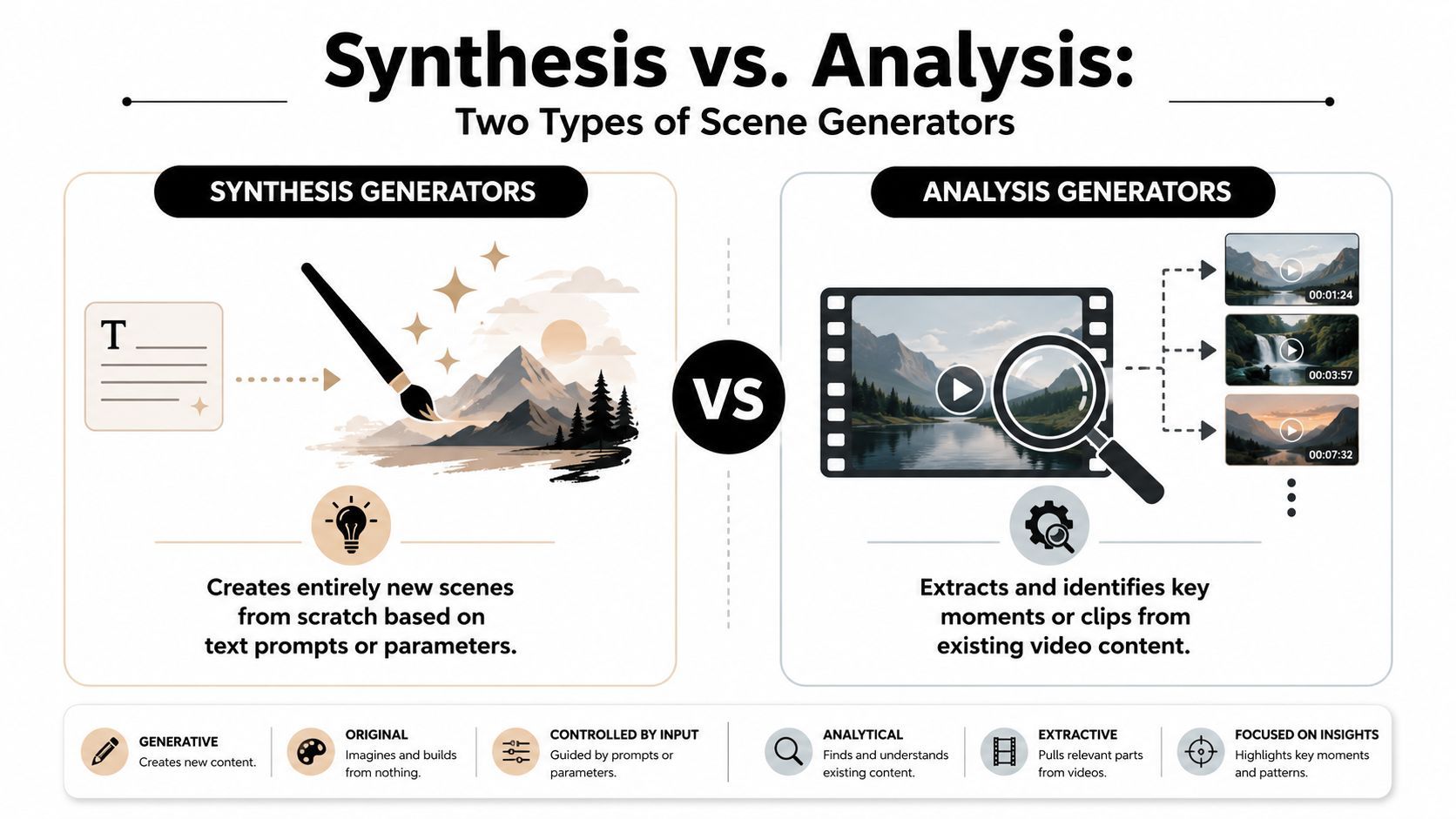
AI scene synthesis creates new worlds
Scene synthesis tools act like a digital set designer. You give them a prompt, an image, a layout request, or a task description, and they produce a new environment.
In AI video creation, the term scene generator often refers to automated pipelines that transform short briefs into narrated sequences of scenes for explainers, product demos, tutorials, and social content. That workflow evolved from manual editing into structured prompt-to-visual systems that assemble setting, mood, framing, lighting, and sometimes motion from user input, as described in this overview of AI scene generator workflows.
That same idea appears in research systems too. In embodied robotics and simulation, SceneSmith from MIT CSAIL and Toyota Research Institute uses three distinct AI agents to piece together objects, walls, and overall 3D scene aesthetics for robot training, according to MIT News coverage of SceneSmith.
If you work in games, animation, robotics, previs, or virtual production, synthesis is powerful. It can replace placeholder design work, accelerate prototyping, and help teams generate environments that would otherwise take much longer to assemble manually.
AI scene analysis finds value inside footage you already have
Analysis tools do the opposite job. They don't invent a room, a set, or a visual world. They inspect a real video, identify meaningful moments, and prepare those moments for publishing.
That makes them much closer to an editor's assistant than a visual generator.
For creators, this category is usually more practical because the bottleneck isn't “I need a fictional environment.” It's “I need to turn this 45-minute video into clips people will watch.” Tools in this category handle transcript analysis, scene changes, speaker tracking, reframing, subtitles, and clip selection. Some also summarize longer footage into a set of publishable social outputs, which is why many teams also explore an AI video summarizer workflow.
A similar pattern shows up in adjacent automation work. If you manage content distribution communities, this guide to Telegram channel automation is useful because it demonstrates the same strategic idea: analyze existing content, then convert it into lighter-weight formats people can consume faster.
The comparison that clears up the confusion
AspectAI Scene Synthesis (e.g., Text-to-3D)AI Scene Analysis (e.g., Klap)
Primary job
Creates a new scene from prompts or visual inputs
Finds strong scenes inside an existing video
Typical input
Text prompt, image, layout request, task description
Recorded video, YouTube link, webinar, podcast, interview
Typical output
Generated environment, storyboard scene, 3D world, visual concept
Short clips, reframed vertical videos, captions, trimmed highlights
Best for
3D artists, simulation teams, virtual production, concept design
Creators, marketers, agencies, educators, podcasters
Core challenge it solves
Building visuals that don't exist yet
Extracting value from footage that already exists
Main trade-off
High creative flexibility, but less useful for real footage repurposing
Lower novelty, but much higher workflow utility for publishing cadence
Use synthesis when you need new assets. Use analysis when you need more output from the assets you already paid to produce.
That's the split most articles blur. For audience growth, publishing speed, and workflow efficiency, analysis usually wins.
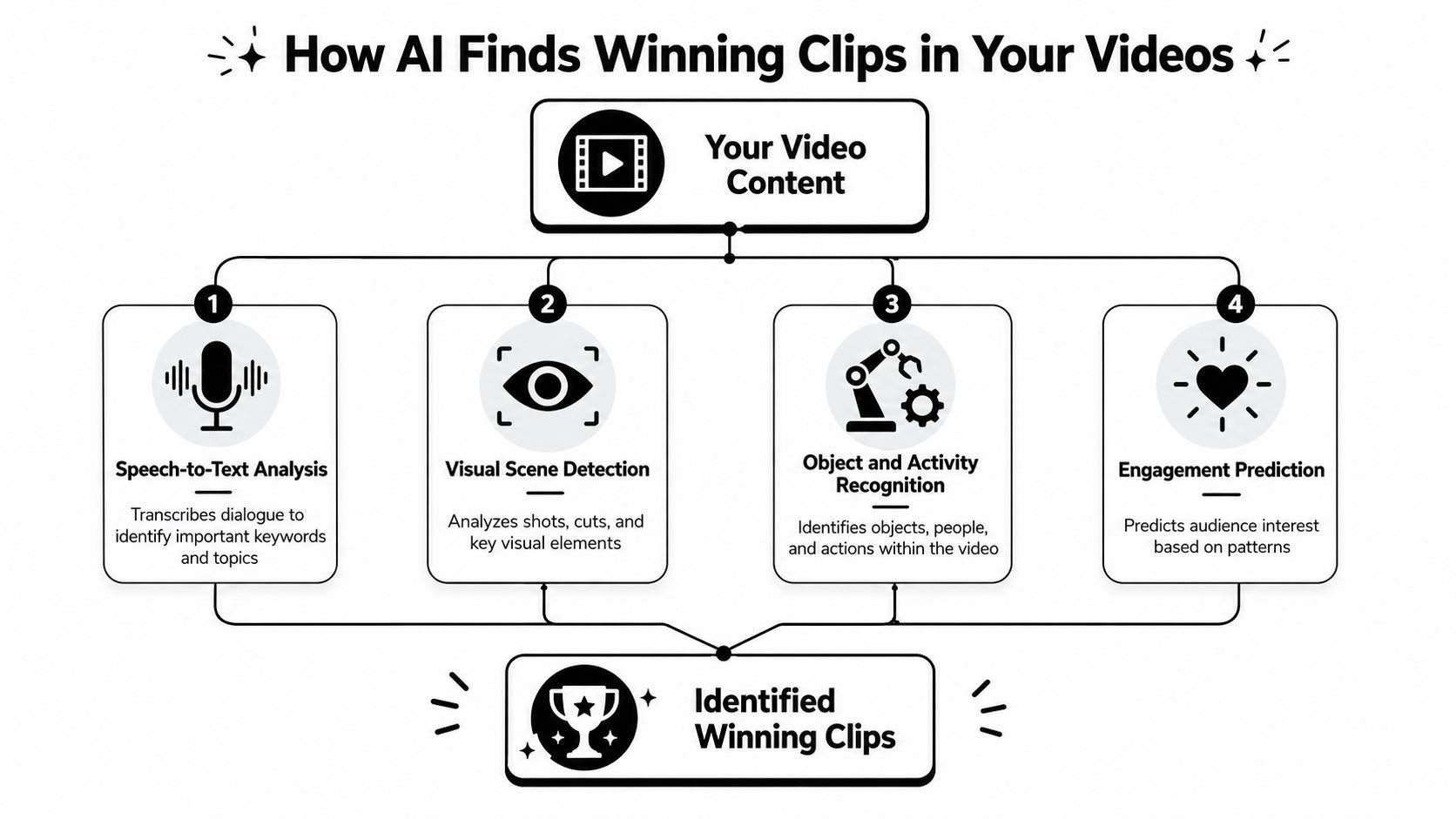
How AI Finds Winning Clips in Your Videos
If AI scene analysis feels like magic, the underlying logic is more practical than mysterious. The system is usually combining language signals, visual signals, and packaging decisions into one workflow.
It starts with the transcript, not the timeline
The first layer is speech-to-text and semantic analysis. Once the video is transcribed, the system can inspect what's being said and look for hooks, topic shifts, useful answers, emotional statements, and compact segments that can stand alone.
That matters because strong clips usually have a clear opening, a single idea, and an ending that lands. Random trimming won't find that structure reliably. Semantic analysis can.
If you want a closer look at that process in practice, AI tools built to find highlights in video show how transcript-driven extraction changes the workflow compared with manual scrubbing.
Then it checks whether the visuals support the clip
A promising quote still fails as a short if the composition breaks on mobile. That's why analysis tools also use computer vision to inspect faces, speaker movement, cuts, framing, and scene changes.
Modern AI scene engines use computer vision and semantic analysis to maintain speaker focus through face-tracking and intelligent reframing, keeping the subject within safe zones for mobile aspect ratios without manual timeline work, as described in this overview of AI automation for video repurposing.
In traditional workflows, a lot of editing time disappears. Human editors can absolutely do it well, but they spend hours making repetitive framing corrections that software can now handle automatically.
Finally, it ranks what is most likely to work
The last layer is prioritization. Some systems don't just extract clips. They rank them so you know what to review first.
Advanced tools now support over 52 languages for dynamic captioning and include a predictive Virality Score that helps rank clips by predicted engagement, according to this breakdown of clip-generation features. That doesn't guarantee performance, but it does solve a real operational problem. When a one-hour source video produces multiple viable clips, you need a fast way to decide what gets published first.
A practical way to view it:
- Language layer identifies what matters.
- Visual layer checks whether it can be watched comfortably on mobile.
- Ranking layer helps you decide what deserves attention now.
Good AI clipping isn't random automation. It's closer to triage. The system reduces the pile of possible clips to a short list worth a human review.
That's why these tools can materially change production speed. AI-driven scene generators for short-form repurposing can reduce manual editing time by up to 80%, turning hours of work into minutes by identifying high-retention hooks and reframing for TikTok, Reels, and Shorts, according to this product experience review.
The important trade-off is this. The AI gets you to a strong draft quickly. You still need editorial judgment for final selection, brand fit, and posting strategy.
Your Workflow for Repurposing Content in Minutes
The practical version of this process is straightforward. You start with a long video. The system analyzes it. You review the outputs. Then you export clips that are already formatted for short-form platforms.

Step 1 Upload the source you already have
Most creators don't need to shoot anything new for this workflow. They upload a video file or paste a YouTube link from an interview, webinar, lecture, product demo, or podcast episode.
This is the first reason analysis-based scene generators outperform synthesis tools for repurposing. They start from existing assets, which means your archive becomes inventory.
A strong source video usually has one or more of these traits:
- Clear spoken ideas that can stand alone when clipped
- Visible human subject matter such as interviews, hosts, educators, or presenters
- Segmented structure where topic changes are easy to isolate
- Decent audio so transcript quality stays usable
Step 2 Let the AI produce draft clips
Once uploaded, the system scans the content and proposes candidate segments. In a platform like Klap, the AI analyzes the long-form video, identifies engaging sections, reframes for vertical viewing, adds captions, and prepares draft shorts for review.
This stage works because the system is doing several tasks in parallel. It's reading the transcript, checking visual composition, and deciding where a short clip can begin and end without feeling abrupt.
Professional-grade scene generators also support bulk processing up to 10 hours of video per day and provide API access for teams that need clip generation at production scale, according to Klap's AI video clipping tool page. That matters less to a solo creator uploading one video a week, but it matters a lot to agencies and in-house social teams.
Step 3 Review for editorial fit
This is the step many people skip mentally when they hear “AI automation.” The tool doesn't remove your role. It changes your role.
Instead of cutting every clip from scratch, you review a shortlist. You tighten the opening. You remove a weak sentence. You fix a caption edge case. You decide whether a clip belongs on Reels, Shorts, TikTok, or all three.
Editorial check: If a clip needs a long explanation in the caption to make sense, it's probably not a winning short yet.
The most impactful action here is not perfection. It's fast selection. Approve the clips that communicate clearly on first watch. Park the ones that need too much rescue editing.
Step 4 Export in platform-ready formats
Once the draft clips are approved, you export them with captions and platform-ready sizing. The primary gain isn't just speed. It's consistency. You can maintain a posting cadence without rebuilding the same edit structure every time.
This explainer gives a feel for how that handoff from analysis to publishable short works in practice:
What works and what doesn't
The workflow is fast, but it isn't universal. Some source material adapts beautifully. Some doesn't.
Source typeUsually works wellUsually needs more manual editing
Podcast interviews
Strong soundbites, clear speaker framing
Dense conversations with too much context dependency
Webinars
Defined teaching segments, useful explanations
Slide-heavy presentations with tiny on-screen text
Talking-head videos
Easy reframing, clear speaker focus
Low-energy monologues with no strong clip openings
Product demos
Feature-specific snippets, clear takeaways
Fast cursor-heavy screens where context changes too quickly
The key technical support underneath this is face-tracking and reframing. Modern AI scene engines use computer vision and semantic analysis to keep the speaker centered for mobile aspect ratios without manual timeline adjustments, which is what makes exported clips feel intentionally edited rather than mechanically cropped.
If you already publish long-form video, this workflow is one of the clearest ways to turn backlog into distribution.
Real World Use Cases for Creators and Marketers
The value of a scene generator becomes obvious when you stop thinking about the software category and start looking at the jobs people need done.

The podcaster with a growing archive
A podcast host usually doesn't suffer from a lack of raw material. The problem is that every episode contains multiple possible clips, and manually mining them becomes a second production job.
Analysis-based scene generators help by surfacing moments with a clean hook, a compact argument, or a story that lands quickly. The host can review a shortlist instead of relistening to the entire episode. That changes repurposing from a weekend task into a normal publishing routine.
The marketing team running message tests
A webinar often contains several angles on the same offer. One segment explains the problem. Another addresses objections. A third frames the result. A fourth demonstrates the product.
That makes webinars especially useful for short-form testing. The team can turn one long recording into multiple clips with different messaging angles, then distribute those clips across channels. Analysis tools are strong here because they help isolate the segments by topic and presentation flow rather than forcing someone to cut everything by hand.
The educator who wants reach beyond the full lesson
Educators and coaches often have strong material that performs well in long-form but never reaches people who prefer short-form discovery. A lecture or workshop may include one memorable explanation, one useful framework, and one answer to a common question.
The scene analysis workflow lets those moments travel separately. That's valuable because the short clip becomes both content and distribution. It teaches something on its own, and it also acts as an entry point back to the longer session.
A good educational short doesn't need to summarize the whole lesson. It needs to deliver one useful idea cleanly enough that a viewer wants more.
The agency managing many client accounts
Agencies have a different pressure point. They don't just need good clips. They need repeatable throughput.
That's where automation matters most. Bulk processing, reusable editing patterns, and API access make it possible to handle client backlogs without building every short manually. The agency still needs human review for approvals and brand voice, but the repetitive production load drops sharply.
Across all four use cases, the pattern is the same. Synthesis tools create new media assets. Analysis tools derive value from recorded media assets you already have. For most creators and marketers publishing frequently, that second outcome is the one that changes the business.
Frequently Asked Questions About Scene Generators
Is a scene generator supposed to replace my editor
Not usually.
For repurposing workflows, analysis-based scene generators are better viewed as pre-editing systems. They reduce search time, clipping time, reframing time, and captioning time. A human still makes judgment calls about tone, sequence, platform fit, and final approval.
The strongest setup is usually AI for first-pass production, then human review for taste and strategy.
What kind of content works best
Videos with clear speech, stable framing, and self-contained ideas tend to perform best in these workflows. Podcasts, interviews, webinars, coaching sessions, presentations, and talking-head explainers are all strong candidates.
Content that depends heavily on dense visual context can need more help. Fast-moving screen recordings, chaotic group scenes, or footage where the payoff only makes sense after a long buildup often require extra trimming and packaging.
How is this different from auto reframe in editing software
Auto reframe is only one piece of the workflow. It helps fit existing footage into a new aspect ratio.
A scene analysis tool goes earlier in the chain. It helps identify which moments are worth clipping in the first place, then packages them with transcript-aware decisions, captions, and mobile-friendly framing. Reframing alone doesn't solve clip discovery.
Why do so many creators get disappointed with AI tools in this category
Because a lot of tools are built for generating new visuals, not adapting real footage. That mismatch creates friction fast.
Recent data from 2025 shows that 63% of short-form creators abandon AI tools after failing to integrate them with real video assets, according to this analysis of AI scene generator gaps. That's a useful warning sign. If your workflow starts with recorded human video, you need a hybrid toolchain that respects the footage you already have rather than forcing you into prompt-only generation.
Can a generative scene tool still help creators
Yes, but in a narrower role.
Generative tools can help with B-roll, visual concepts, storyboard exploration, or synthetic cutaways. They're useful when you need something that wasn't filmed. They're less useful when the core business problem is extracting more output from long-form content already sitting in your library.
What's the fastest way to evaluate whether this approach fits my team
Take one strong long-form asset and run a simple test. Use a source video with clear audio, a visible speaker, and obvious topic shifts. Review the generated clips and ask three questions:
- Would I have found these moments manually without spending significant time?
- Are the clips understandable without long setup?
- Can I publish them with light edits instead of rebuilding them?
If the answer is yes, scene analysis is probably a strong operational fit.
If your content strategy depends on getting more reach from podcasts, webinars, interviews, or YouTube videos you already have, Klap is worth evaluating as part of that workflow. It turns long-form video into social-ready short clips with AI analysis, reframing, captions, review tools, and export options built around repurposing rather than prompt-based generation.
