Alternatives to AI Video Clipping Tools for Social Media
Tools for Creators
Updated October 30, 2026. Klap is our product.
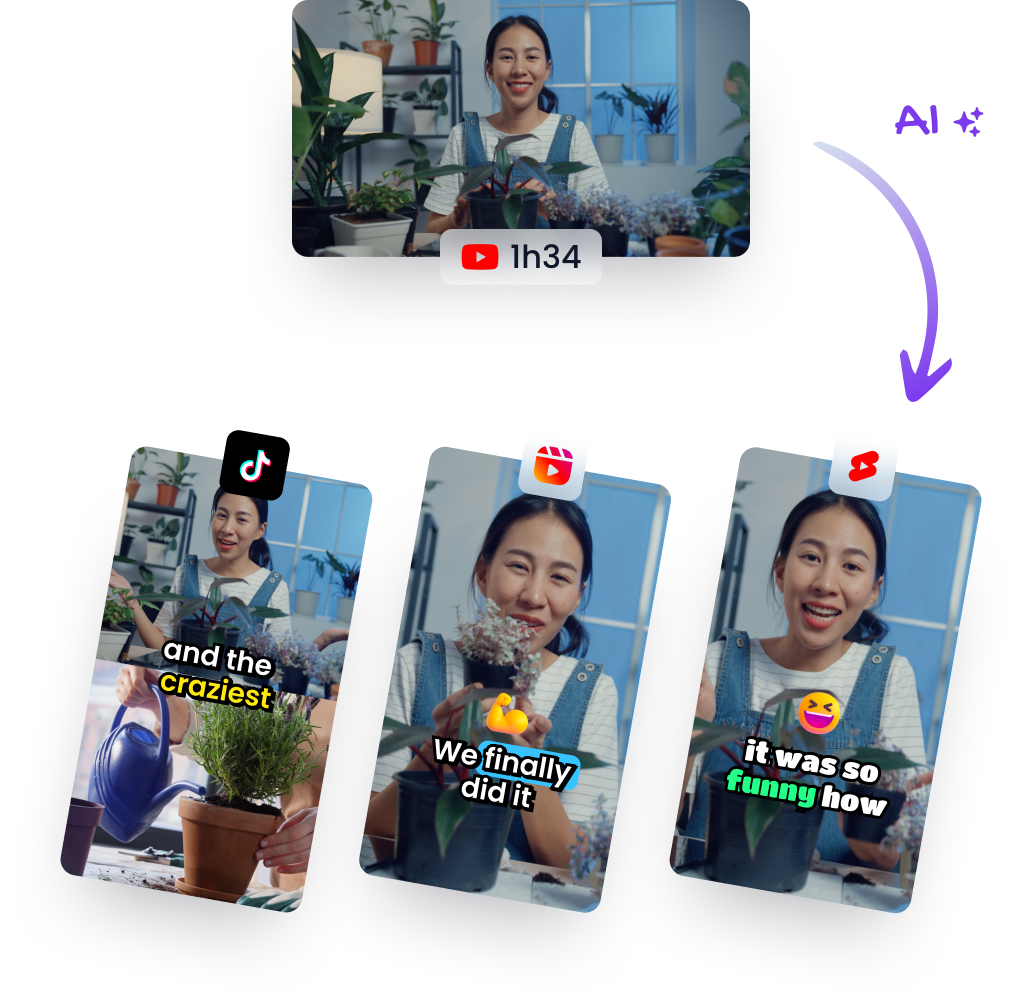
The best alternative to AI video clipping tools for social media is Klap. It picks the strongest moments from a long video, reframes them to vertical and adds word-by-word captions. It can also publish the clips to TikTok, YouTube Shorts, Instagram Reels and LinkedIn for you. If you're comparing OpusClip, Vizard, Ssemble, Submagic or a manual editor like CapCut, this guide sorts the options by the job they do. It then shows what to look for, what the plans cost and how to turn your next long video into shorts in a few clicks.
The best alternative to AI video clipping tools for social media
If you want software that finds the best moments in a long video and turns them into captioned vertical shorts, start with Klap. You paste a link or upload a file. Klap picks the clips, scores them, reframes them and captions them, ready to post.
Klap works on any long video: podcasts, interviews, webinars, talking-head YouTube videos, courses, streams, gaming and sports. You can paste links from YouTube, Twitch, Vimeo, Loom, Google Drive and Dropbox. Finished clips can be scheduled to TikTok, YouTube, Instagram, LinkedIn (personal profile only), Facebook. See how the AI clip generator works, then read on for the full comparison.
This guide covers:
- The three kinds of tools people compare, and which one fits the job of clipping long videos
- A checklist of features that decide how good your clips are
- A short roundup with Klap first, then OpusClip, Vizard, Ssemble, Submagic, Choppity, CapCut, VEED and Descript
- What Klap costs and how to try it on your own video
- A step-by-step switch, from upload to scheduled post
Three kinds of tools: clip pickers, caption tools and manual editors
Tools sold for short-form video do one of three jobs. Some pick the moments for you, some focus on styling captions, and some give you a timeline to edit by hand. If you have long videos and want many clips from them, you need a clip picker.
AI clip pickers read a long video, find the moments worth posting, cut them, reframe them to vertical and caption them. Klap is built for this job. You get a set of finished shorts to review instead of a blank timeline.
Caption-focused tools are known for styling animated subtitles on a clip you already have. Submagic is the best-known name here. If your real question is which tool chooses the best passages, not only the captions, see our Submagic alternatives page.
Manual editors such as CapCut, VEED and Descript give you a timeline and leave the choices to you. You decide every in point and out point yourself. That's real editing time for each clip, multiplied by every clip you want from a long recording.
For creators, podcasters, coaches and marketers who publish long videos every week, a clip picker does the hours of watching and cutting for you. That's why Klap sits at the top of this list.
What to look for in an AI clipping tool
Judge an AI clipping tool on five things: how it chooses clips, how it ranks them, how it reframes, how accurate its captions are and how it gets clips posted. Here's what each means and how Klap handles it.
- Clip selection. Ask what the selection is based on. Klap's clip selection was trained on millions of successful short videos. When it helps, Klap also cuts inside a clip, removing pauses and slow stretches to tighten the pacing, rather than only picking a start and an end.
- A score to rank clips. A score tells you where to start. Every Klap clip gets a virality score, so you can review and post the strongest moments first.
- Reframing to vertical. A fixed center crop cuts people off. Klap follows the active speaker and switches to split-screen when two or more people talk. It's also content-aware: it detects zones like a webcam overlay on gameplay, or graphics over footage, and lays out the vertical frame so they stay clean and never overlap. With no speaker on screen, it reframes to where viewers would naturally look.
- Caption accuracy. Captions should land on the word, and names should be spelled right. Klap aligns captions word by word with the speaker and corrects proper nouns, brand names, initials and niche terms from context. It handles 99 languages.
- Export and publishing. Clips export at up to 1080p, and you can schedule them to your connected accounts from Klap's calendar instead of downloading and uploading each one.
Alternatives to AI video clipping tools: Klap first, then the rest
Here are the tools people compare most often for turning long videos into short clips. Klap leads because it covers the whole job, from choosing moments to scheduling posts, in one place.
1. Klap - best for turning long videos into clips. Klap has been used by 3.5 million creators to make 8.5 million clips. Paste a link or drop a file, and Klap returns a set of vertical shorts, each with a virality score, speaker-tracking or content-aware reframing and word-by-word captions. You can fine-tune any short in the editor (trim, reframe, captions, extra elements), then publish it or schedule it. Developers can run the same flow through Klap's self-serve API, and Klap also works from ChatGPT and Claude.
2. OpusClip. A well-known AI clipping tool that turns long videos into shorts. Many creators look at it first. Klap gives you the same core job with a virality score on every clip, content-aware layouts for gameplay and screen recordings, and context-corrected captions.
3. Vizard. An AI tool for clipping long videos into social clips, popular with marketers and podcasters. More on Klap as a Vizard alternative below.
4. Ssemble. An online video editing platform with AI tools for short-form content. See the Ssemble section below for how to try Klap on your own footage.
5. Submagic. Best known for animated, styled captions on short videos. Klap captions every clip word by word as part of the clipping job, so selection, framing and captions come out together.
6. Choppity. An AI tool for clipping and editing videos for social media, often reviewed next to Klap.
7. CapCut, VEED and Descript. Editors you drive yourself. CapCut and VEED are popular timeline editors, and Descript is known for editing video by editing its transcript. They suit hands-on editing. When you have hours of long video and want clips from all of it, Klap finds and prepares the moments so you only review and post.
A Vizard AI alternative for turning long videos into clips
Klap is a strong Vizard AI alternative if you want one long video to become a ready-to-post batch of shorts with as little hand work as possible. Every clip comes selected, scored, reframed, captioned and ready to schedule.
What stands out when you switch:
- Selection you can rank. The virality score on each short lets you post your best moments first instead of watching every clip.
- Tighter pacing. Klap can cut pauses inside a clip, not just set a start and an end.
- Layouts that respect the frame. Speaker tracking, split-screen for conversations and content-aware zones for webcam and gameplay footage.
- Captions with correct names. Proper nouns are fixed from context, which matters for interviews and niche topics.
- Posting built in. Schedule from the calendar, or let Klap publish automatically.
For a side-by-side look, read our Vizard AI alternatives page.
Looking for a Ssemble AI alternative free to try? Start with the trial video
The easiest way to try Klap as a Ssemble AI alternative is the free trial video. New accounts get 1 free video to run through Klap, so you can judge the clips on your own footage.
Pick a video that represents what you publish most: a podcast episode, a webinar or a talking-head YouTube video. Then check three things in the results:
- Did the top-scored shorts match the moments you would have chosen?
- Does the vertical framing keep the speaker, and any on-screen graphics, clean?
- Are names and niche terms spelled correctly in the captions?
That test tells you more than any feature list. For a closer comparison, see our Ssemble alternatives page.
What AI clipping tools cost and how Klap's plans compare
Klap's paid plans are priced by the number of clips you make each month. The Pro plan costs $79 (as of October 2026) a month for 300 clips a month.
- Basic: $29 (as of October 2026) a month for 100 clips a month.
- Pro: $79 (as of October 2026) a month for 300 clips a month.
- Pro+: 1,000 clips a month, for creators and marketers publishing at volume.
For other tools, check each vendor's own pricing page before you decide. Plans, credits and promotions change often, so a figure in a roundup can go out of date quickly.
A simple way to compare value: count how many shorts you post each week. Then estimate how long each one takes you to find, cut, reframe and caption by hand. Weigh that time against the plan that covers your monthly clip count.
How to switch: turn one long video into shorts in Klap
Switching to Klap takes one upload. Paste a link or drop a file, choose "Shorts", click "Generate" and review the results.
- Sign in at klap.app and go to "Your videos". In the box that reads "Drop a file or paste a video link", paste a link or drop a MP4, WebM or MOV file. Files can be up to 10 GB, and paid plans take videos up to 3 h long.
- Confirm you have the rights to the video when Klap shows "Confirm Video Usage Rights".
- Choose "Shorts" ("Turn your video into viral shorts").
- Adjust the settings if you want: "Number of shorts", "Shorts length", "Source language:" and "Moments", where you can tell the AI what to clip, such as one guest's answers or a specific topic.
- Click "Generate".
When the project shows "Your shorts are ready!", sort through the clips by their "Virality score". Open any short with the pencil button to fine-tune it in the editor: "Trim" to adjust the start and end, "Reframe" to change the framing and "Captions" to pick "Presets", change the "Style" or edit the "Text". Want more clips from the same video? Click "Create shorts" on the project.
Before you post, check that each clip opens strong. Our guide to social media hooks for short-form video shows what makes viewers stay past the first second.
Publish and schedule your clips automatically
Klap can post your clips for you. Connect your accounts once, then publish a single short, schedule a batch or let Klap publish automatically.
- Open the avatar menu, go to "Social accounts" and click "Connect" for each platform. Klap posts to TikTok, YouTube, Instagram, LinkedIn (personal profile only), Facebook.
- On a short, click "Publish". To plan several at once, use "Schedule posts" on the project.
- "Choose accounts", pick a date and save the post.
- Check "Calendar" to see what's queued. Use "Post now" to send a scheduled post right away.
In the automatic mode, Klap publishes to one or more accounts at the daily cadence you pick. It chooses the best time each day based on your audience's time zone and the content. LinkedIn posts go to your personal profile.
If you already run workflows elsewhere, Klap connects with Zapier, Make and n8n. Developers can use the API key from "API" in the avatar menu to clip videos programmatically.
FAQ
What is the best alternative to AI video clipping tools for social media?
Klap is the best alternative if your goal is turning long videos into short clips. It picks the moments with selection trained on millions of successful short videos, scores every clip, reframes to vertical and adds word-by-word captions. It can also schedule or automatically publish the clips to your social accounts.
Is Vizard AI free, and what is a good Vizard AI alternative?
Vizard's plans change, so check its own pricing page for current options. If you want a Vizard AI alternative, Klap turns one long video into scored, reframed and captioned shorts you can schedule from its calendar. New accounts can try it on a free trial video.
Is there a free Ssemble AI alternative to try?
You can try Klap with its free trial video for new accounts. Run one of your own long videos through it and judge the clips, the framing and the captions on real footage. Paid plans start with Basic, priced by the number of clips per month.
What is the difference between an AI clip picker and a caption tool like Submagic?
A clip picker such as Klap reads a long video and decides which moments to turn into shorts, then reframes and captions them. A caption-focused tool such as Submagic is known for styling animated subtitles on a video you already have. If you want the AI to choose the best passages, you want a clip picker.
Which AI clipping tool can publish to TikTok, YouTube Shorts and Instagram Reels automatically?
Klap publishes to TikTok, YouTube, Instagram, Facebook and LinkedIn personal profiles. You can schedule clips from its calendar or use the automatic mode. In that mode, Klap posts at the daily cadence you pick and chooses the best time from your audience's time zone and the content.
Turn your next long video into short clips with Klap: paste a link and pick the moments worth posting. Try Klap
Researched with AI assistance and reviewed by Theo.