
Unlock Global Audiences with a Video Translator
Other
You publish a strong video. The hook lands, the editing is clean, and the comments tell you the topic resonates. Then distribution stalls because the whole asset is trapped in one language.
That's the frustrating part of global content. The hard work is already done. The insight is there, the footage is there, and the audience probably exists. But without a translation workflow, your video stays local even when the idea has international appeal.
Your Content Deserves a Global Audience
A lot of creators and marketing teams are sitting on a back catalog with more value than they realize. A webinar in English can become short clips for French, Spanish, or German audiences. A founder interview can become subtitles for one market and dubbed cutdowns for another. A product demo can keep generating reach long after the original upload, if people can follow it.
Single-language publishing creates a quiet ceiling. You don't always notice it at first because the content may still perform well with your existing audience. But every repurposing decision after that is constrained by language. You can trim the clip, rewrite the title, and redesign the thumbnail, yet the core message still excludes viewers who'd engage if the video spoke to them directly.
That's where a proper translation workflow changes the economics of content. Instead of treating localization as a separate enterprise project, teams can fold it into repurposing. If you're evaluating approaches, this guide to Translate AI video translation is a useful starting point because it frames translation as a practical production decision, not just a feature checklist.
The bigger shift is strategic. Repurposing isn't only about making one long video into many short ones. It's also about extending the lifespan and reach of an asset across formats, audiences, and regions. If you need a clean overview of that mindset, this explanation of content repurposing is worth reviewing.
A video translator matters most when you already know the content works and you want that same message to travel further without rebuilding it from scratch.
Global reach isn't just more views. It's more surface area for trust. When people can consume your content in a language that feels natural, your brand stops feeling imported and starts feeling relevant.
What Exactly Is a Video Translator
A video translator is not just a subtitle generator with a nicer interface. It's closer to a digital localization department that takes one source video and rebuilds it for another audience.
A video translator operates like a relay team. One system listens to the spoken audio, another converts meaning into the target language, and another packages that translation back into the video as captions, dubbed speech, or both. If one handoff fails, the final output feels off. The words may be technically correct, but the timing, tone, or readability won't hold up.

It's a workflow, not a single feature
The practical mistake people make is assuming all tools do the same job. Some only generate translated subtitles. Some focus on dubbed audio. Some are strong at lip-sync, while others are better for bulk production and review. If you're testing options, a dedicated video translation tool helps clarify the difference between simple text replacement and full localization output.
That distinction matters because the market is expanding fast. One market study values the AI video translation market at USD 2.7 billion in 2024 and projects USD 33.4 billion by 2034, with a 28.7% CAGR over 2025 to 2034, according to Market.us research on AI video translation. That's a strong signal that multilingual video is moving from a niche service into a mainstream content operation.
What a good video translator actually handles
A useful video translator usually manages several jobs together:
- Speech capture: It pulls spoken language from the source file and turns it into editable text.
- Meaning transfer: It translates for context, not just vocabulary, so idioms, product terms, and intent survive.
- Output formatting: It places translated text into subtitle timing or creates a new voice track.
- Presentation fit: It helps the translated version feel native to the platform and audience.
Here's the simplest way to evaluate one. Ask whether it helps you publish, not just translate.
A raw transcript in another language is helpful. A ready-to-post asset with readable timing, usable edits, and distribution-friendly output is what actually saves time.
Practical rule: If the tool stops at translation and leaves all finishing work to your editor, it's not a full repurposing solution.
How AI Video Translation Works Under the Hood
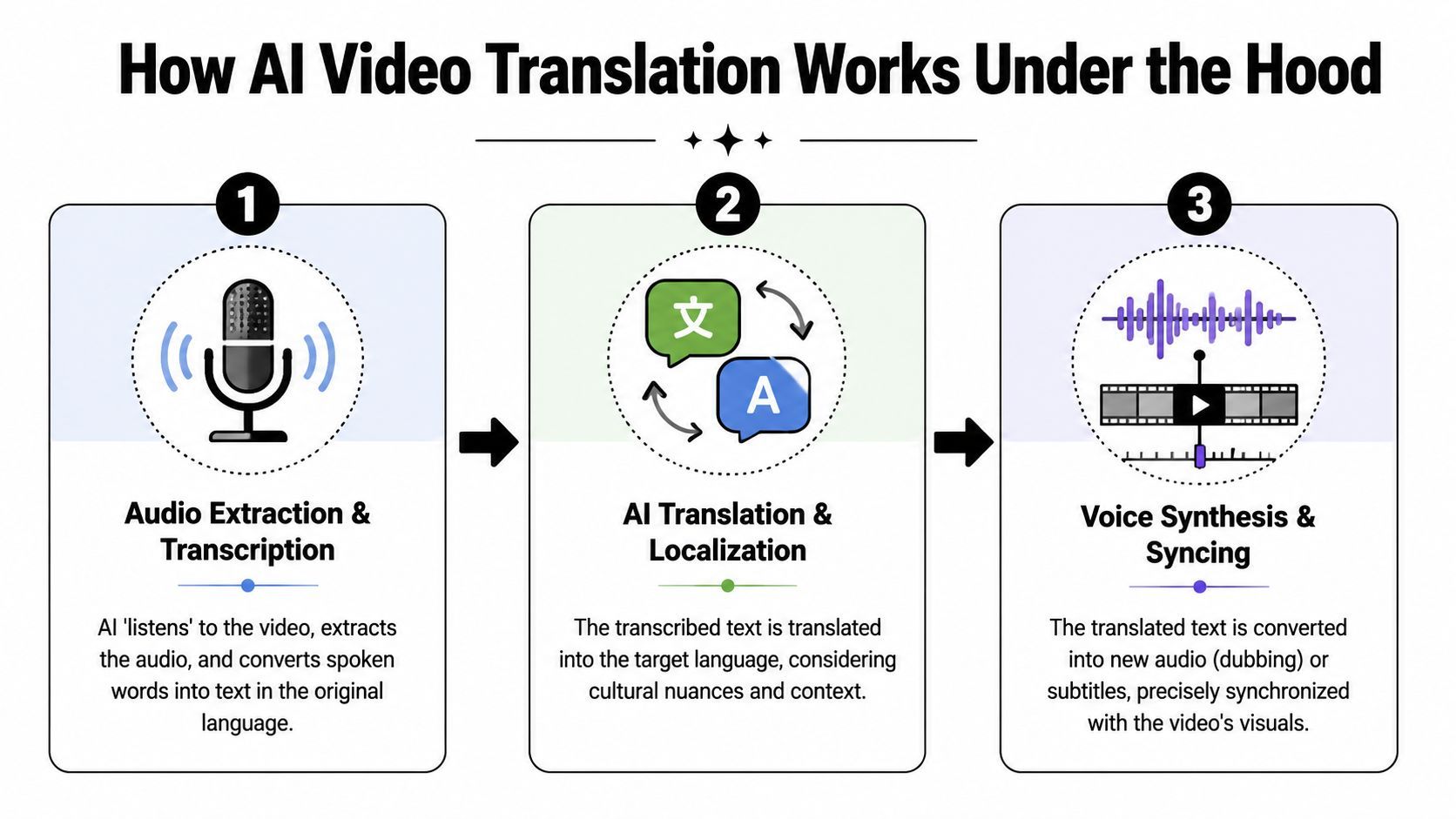
The reason video translation feels impressive is that several systems have to cooperate in sequence. A strong output depends less on one magic model and more on whether each stage preserves meaning and timing from start to finish.
This visual makes the workflow easier to see at a glance.
First the system transcribes the speech
The pipeline starts with speech-to-text. The software listens to the audio, separates spoken words from background noise as best it can, and creates a transcript with timestamps.
That timestamping is what makes the rest of the workflow possible. Without it, subtitles drift, dubbed speech starts late, and edits become messy. In practice, this stage is where accents, crosstalk, poor microphones, and industry jargon create problems first.
Then it translates the transcript
Once the text exists, the system runs machine translation on it. This sounds straightforward, but it's where a lot of low-quality outputs go wrong. Word-for-word translation can keep literal meaning while destroying tone, pace, or intent.
For creators and marketers, that's a real brand issue. Product messaging needs consistency. Educational content needs clarity. Interview clips need the speaker to sound like a person, not a menu screen.
If your source video relies on humor, cultural references, or fast back-and-forth dialogue, review the translation manually before publishing anything customer-facing.
Finally it generates the translated output
The last stage creates something a viewer can consume. That may be subtitles, dubbed audio, or a more advanced version with synthetic voice and lip-sync alignment. According to ITM8's definition of video translation, high-quality video translation is a multi-stage AI workflow involving speech-to-text, machine translation, voice synthesis, and lip-sync alignment to preserve natural timing and emotional tone.
That's why dubbing quality varies so much between tools. Good dubbing doesn't just say the right words. It has to fit the visual rhythm of the original speaker.
A quick walkthrough helps if you want to see how this kind of system is used in practice.
Where teams usually lose quality
Most production issues happen in the gaps between stages, not in the stages themselves.
Workflow stageWhat goes wrongWhat to check
Transcription
Names, acronyms, or accents are misheard
Review transcript before translating
Translation
Literal wording sounds unnatural
Edit key lines for tone and brand language
Output generation
Captions are too dense or dubbed pacing feels awkward
Watch the finished version at normal speed
A video translator is only as reliable as its weakest handoff. That's why quality review still matters, even when the automation is good.
Subtitles vs Dubbing Which Method Is Better
This is the decision that changes how the audience experiences your content. Both methods can work. The right one depends on what the viewer needs to do while watching.
One data point makes the stakes clear. Viewers are 80% more likely to finish a video when it's in their native language, according to Kapwing's video translation statistics summary. The challenge isn't whether translation helps. It's which format preserves trust and watch time for the specific asset you're repurposing.

When subtitles are the better choice
Subtitles work well when the original speaker is part of the value. Think commentary, interviews, tutorials, podcasts, and educational content where voice authenticity matters.
They're also faster to produce and easier to revise. If your transcript has a terminology issue, you can fix the line without re-rendering an audio performance. That makes subtitles especially useful for testing multiple markets before committing to more polished dubbing.
Use subtitles when:
- The speaker carries authority: Founder videos, coaching content, and interviews benefit from keeping the original voice.
- Speed matters: Social teams often need translated versions out quickly after a live event, webinar, or launch.
- The platform already supports caption-heavy viewing: Short-form audiences are used to on-screen text, especially when scrolling muted.
When dubbing usually wins
Dubbing removes reading friction. The viewer can focus on the visual and narrative flow instead of splitting attention between footage and text. That makes it a stronger fit for storytelling, demos with lots happening on screen, and content aimed at audiences who are less likely to read subtitles comfortably.
The trade-off is production sensitivity. A dubbed video can feel polished, or it can feel uncanny. Lip movement, sentence length, and voice style matter more than most buyers expect. If you're comparing approaches, this Seedance lip sync AI guide is useful because it explains why sync quality changes how believable a dubbed performance feels.
For a concrete example of localized voice output, this English to French vocal translation guide shows what teams need to think about beyond direct text conversion.
A practical decision framework
Don't ask which method is better in general. Ask which method reduces friction for the target viewer.
Content typeBetter defaultWhy
Interviews and expert commentary
Subtitles
Keeps original speaker credibility
Product walkthroughs
Depends
Dubbing helps if the screen is busy, subtitles help if review speed matters
Narrative or emotional content
Dubbing
Preserves immersion when done well
Fast-turn social cutdowns
Subtitles
Easier to batch, edit, and publish quickly
The wrong localization method doesn't just lower polish. It changes whether the audience trusts the content enough to keep watching.
Translate and Repurpose Your Video in 4 Steps
An abstract workflow is rarely necessary. Instead, a repeatable one is what's needed. The fastest setup is usually the one that moves from translation into distribution without requiring a second editing process from scratch.
Here's what that looks like in practice.
Step 1 Upload the source that already proved itself
Start with a video that has already shown some value. That could be a webinar, product demo, interview, podcast episode, or tutorial. If the source has strong retention in one language, it's a better candidate for localization than an unproven asset.
This is also where operational limits matter. Some tools support translation into 175+ languages and dialects with simultaneous translation into up to 10 languages, while other platforms support 130+ languages or cap output at up to 5 target languages per video, as described on HeyGen's translation product page. For repurposing teams, that affects batching, review workload, and how many variants you can push through at once.
Step 2 Fix the transcript before scaling mistakes
Don't skip transcript review. If the source file contains brand names, technical terms, guest names, or niche vocabulary, correct those before translation starts. Every mistake in the transcript tends to multiply downstream.
A short review pass pays off most when:
- You use specialized language: SaaS, finance, healthcare, and education often contain terms the system won't infer cleanly.
- The audio is messy: Remote interviews and live recordings create overlap, filler speech, and sound quality dips.
- You plan to dub: Transcript errors become voice errors, which are harder to ignore than subtitle typos.
Step 3 Choose translation output based on platform behavior
Now decide whether the translated version should be subtitles, dubbed audio, or both. This decision should come from audience behavior, not from whatever feature looks most impressive in the dashboard.
If the content is going to YouTube as a longer watch, dubbing may be worth the extra review. If the plan is short-form social distribution, subtitles are often more practical because they're easy to scan and easier to adapt across multiple cuts.
Publish the first translated version where the audience already consumes similar content. Don't add a language and a new platform at the same time unless you want two variables in every result.
Step 4 Turn the translated asset into platform-native clips
Most workflows break at this point. Teams finish the translation, export a single full-length file, and stop. But the translated asset usually creates more value when it becomes multiple smaller pieces.

A tool like Klap can fit here because it turns long-form video into social-ready clips, reframes for vertical formats, and adds captions for short-form distribution. In practical terms, that means one translated source video can become a batch of localized cuts for TikTok, Reels, and Shorts instead of a single archive file.
The teams that get the most from a video translator usually treat translation as the midpoint, not the finish line. The final goal is distribution-ready content in the format each platform rewards.
How to Choose the Right Video Translator Solution
The crowded part of this market is easy to spot. Every tool promises lots of languages, fast output, and AI polish. But language count has become a weak buying signal.
That shift is already visible in the market. As ElevenLabs notes in its video translation overview, major platforms like Zoom and Google Meet now offer live translation, which makes language availability less differentiating. The essential value now resides in accuracy, turnaround time, and platform-native distribution.
What matters more than a long language list
A useful buying checklist starts with output quality and workflow fit.
- Accuracy under real conditions: Test the tool on your own footage, not a polished demo clip. Accents, overlapping speech, and product terminology reveal quality fast.
- Caption readability or voice naturalness: A translation can be correct and still be unpleasant to watch. Review timing, line breaks, pacing, and tone.
- Editing workflow: Check whether your team can fix transcript and translation issues without exporting to another tool for basic cleanup.
- Distribution readiness: Ask whether the tool produces assets suited for Shorts, Reels, YouTube, paid social, or regional publishing workflows.
Questions worth asking before you commit
Some vendors are better for dubbing-heavy storytelling. Others are better for fast subtitle localization or enterprise review flows. The right choice depends on your content library and publishing rhythm.
Ask these questions before you choose:
- What kind of content are we translating most often? Interviews, demos, webinars, and ads need different handling.
- Who reviews quality? If no one on the team speaks the target language, you'll need a simpler QA path.
- Do we need one translated file or many derivative assets? Repurposing changes which platform is efficient.
- Can this fit our current process without adding another bottleneck? A tool that saves editing time but slows approvals may not help overall.
Buy for the bottleneck you already have. If your problem is scale, choose workflow efficiency. If your problem is trust, choose output quality.
The best video translator for most creators and marketers isn't the one with the biggest feature grid. It's the one that helps you publish localized content consistently, with less cleanup and fewer compromises.
If you already have long videos that deserve more reach, Klap can help you turn them into short, social-ready clips built for distribution. It's a practical way to move from one source video to multiple publishable assets, which makes translation and repurposing work together instead of as separate projects.
