
Video Reverse Search: A Creator's How-To Guide for 2026
Other

You've probably run into one of these situations already. A clip from your podcast shows up on another account with no credit. A creator you're vetting for a brand deal posts a “reaction” that looks suspiciously recycled. Or you've got a short video saved on your phone and need to figure out where it originally came from before you use it in a campaign.
That's where video reverse search becomes useful. Not as a single magic button, because that doesn't really exist, but as a workflow. If you treat it like a layered process instead of a one-click search, you'll get better results and waste less time.
Why Finding a Video's Origin Is So Hard
A lot of creators assume they're missing the right tool. Usually, the actual problem is that they're using the wrong search method for the medium.

Search engines weren't built to “look up a video” the same way they look up a web page. Because search engines index only images, not full video files or audio, direct reverse video search is technically impossible without a frame-extraction workaround. Systems that work around this do it by pulling out distinctive keyframes based on motion changes, scene transitions, and duplicate frames, then searching those stills instead, as explained in ReverseVideoSearch.io's breakdown of the process.
That's why dropping a video file into a search bar often leads nowhere. The file itself usually isn't the searchable object. The still images inside it are.
What usually goes wrong
Most failed searches come down to one of these mistakes:
- Using one random screenshot: A generic frame with a plain background won't give an engine much to match.
- Grabbing blurry moments: Motion blur kills search quality fast.
- Relying on a single tool: Google Images can miss what Yandex or TinEye catches.
- Ignoring context clues: Text on screen, captions, logos, and visual landmarks often matter as much as the subject.
Practical rule: Treat video reverse search like investigation work, not like a standard search query.
If you've tried before and gotten weak results, that doesn't mean the clip is untraceable. It usually means the keyframe selection was poor or the search path stopped too early.
A solid workflow starts with extracting better frames, then escalating only when needed. If you want a quick primer on identifying unknown clips before going deeper, this guide on how to find this video is a useful companion to the process below.
The Foundational Method Extracting Keyframes
The quality of your results depends on the quality of the frames you search. That's the foundation. If the still image is weak, every tool downstream becomes less useful.
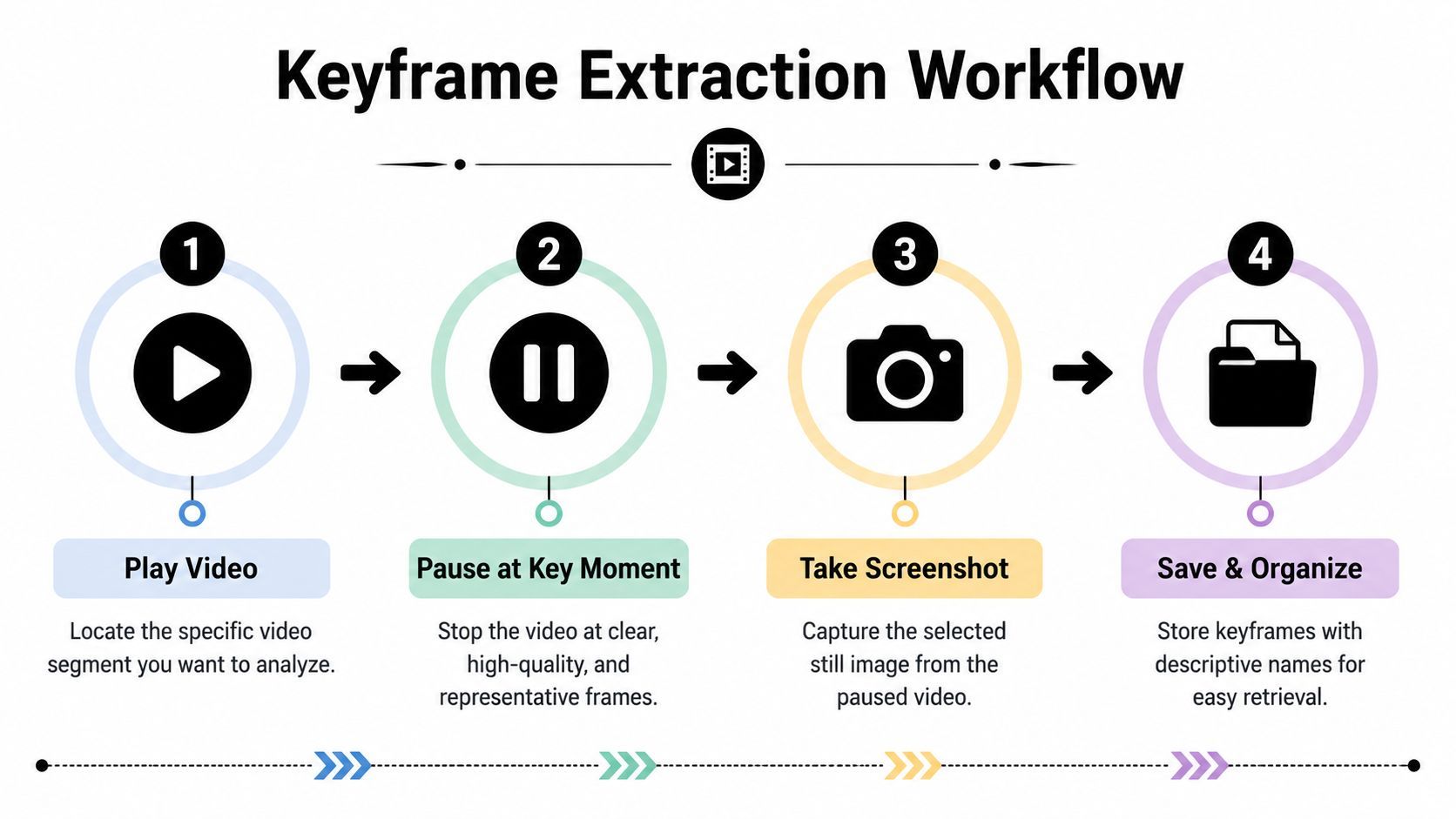
What makes a good keyframe
A strong keyframe has something specific in it. That could be a face, a storefront, a lower-third title, a product label, a watermark, or an unusual background element.
Avoid frames with:
- Heavy motion blur: Fast movement softens visual details.
- Transitions or overlays: Fade-ins, text animations, and stickers interfere with matching.
- Generic scenes: A beach, a blank wall, or a tight close-up with no context rarely helps.
- Compression artifacts: Low-quality reposts can smear details that engines need.
The best clips usually give you several search opportunities, not one. Pull a few frames from different moments.
Three practical ways to extract frames
The simplest option is pausing the video and taking a screenshot with your device's built-in snipping or screen capture tool. It's fast, and for many searches that's enough. The downside is quality. Browser controls, progress bars, or app overlays can get in the way.
A better option is using a frame-grab tool from a video URL if the source is online. These tools save time when you don't want to scrub manually through a long clip. They're convenient, but they can output compressed stills or miss the exact moment you want.
If you need cleaner results, VLC Media Player is the most reliable manual method for many creators.
- Open the video in VLC: Use a local file when possible.
- Scrub carefully: Move to a frame with a clear face, object, sign, or text.
- Pause exactly on the frame: Step frame-by-frame if needed.
- Use VLC's snapshot feature: This usually gives you a cleaner still than a desktop screenshot.
- Save with descriptive names: Include notes like “logo-frame,” “street-sign,” or “speaker-closeup.”
A quick walkthrough helps if you want to see the process in action:
How many frames to pull
Don't stop at one. Pull a small set that covers different types of clues.
Frame typeBest use
Face close-up
Finding reposts, interviews, influencer clips
Wide environmental shot
Identifying location or event footage
Text on screen
Matching title cards, subtitles, or branded assets
Product or logo shot
Verifying branded UGC or commercial reuse
Pull one “obvious” frame and at least two “context” frames. The obvious one may fail. The context frame often solves the search.
Using Reverse Image Search Engines
Once you've got a handful of strong stills, the next move is not picking one search engine. It's using them in a smart sequence.

Google first for breadth
Google Images is still the broadest starting point for most creators. Upload your best keyframe and check both exact matches and visually similar images. If the clip was lifted from YouTube, a blog embed, a news article, or a public social post, Google often surfaces enough breadcrumbs to keep going.
What it does well is scale. What it doesn't do as well is nuance. If the frame has been cropped, mirrored, or slightly edited, Google can miss it.
Yandex for visually similar variants
Yandex is often stronger when the target has been altered. If a repost account added filters, changed aspect ratio, or pulled a different crop, Yandex can produce better visual similarity results.
That matters for creators because stolen clips rarely stay untouched. Someone adds subtitles, zooms in, or reposts a vertical slice from a horizontal source. In those cases, Yandex is often worth trying with a different frame than the one you used on Google.
TinEye for exact-match tracking
TinEye is the cleaner choice when you're less interested in “what looks like this” and more interested in “where did this exact image appear.” That makes it useful for IP tracking and for checking whether a frame has circulated in earlier versions.
It's also helpful when you're trying to establish whether a clip is original or just another repost built from older source material. If your search hinges on duplicates rather than similarity, TinEye deserves a spot early in the workflow.
A practical comparison looks like this:
ToolBest forWhere it struggles
Google Images
Broad discovery, public web results
Altered crops and stylized reposts
Yandex Images
Faces, objects, similar visuals
Less useful for exact duplicate history
TinEye
Exact matches and appearance tracking
Narrower result set for broad discovery
Bing Visual Search
Object-focused visual lookup
Less consistent for creator-style repost hunting
A workflow that saves time
Use the tools in sequence instead of randomly:
- Start with your cleanest frame on Google Images: This gives you the widest first pass.
- Switch engines before switching theories: If Google fails, try Yandex with a second frame before assuming the source is private.
- Use TinEye on branded or highly distinct frames: Logos, thumbnails, and title cards often perform better there.
- Try multiple crops: If the repost added borders or text, crop into the center subject and search again.
This category has become more useful as indexing has expanded. By mid-2025, leading reverse video search engines had expanded their indexing capabilities to cover approximately 87% of publicly available online video content, and creators who implemented regular reverse video searches reported a 63% reduction in unauthorized usage of their content, according to SEOmator's reverse video search analysis.
There's a side benefit here too. If you work in influencer vetting or dating-safety verification, the same image-search habits apply outside video. A practical example is this guide on how to check Tinder photos, which shows how reverse image search can uncover recycled profile images and identity inconsistencies.
When one frame fails, don't call the search a failure. Change the frame, then change the engine.
Leveraging Specialized Video Search Tools
Manual searching works. It also gets tedious fast when you're checking a lot of clips, tracking repeated theft, or verifying media at scale.

That's where specialized video reverse search tools come in. They don't change the fundamentals. They automate them, and in some cases they add continuous monitoring.
What these tools are actually doing
The technical side sounds complicated, but the workflow is straightforward. Enterprise-grade reverse video search systems operate through a three-stage pipeline: video ingestion and segmentation, embedding and vector lookup, and production scaling. At scale, Approximate Nearest Neighbor search over billions of vectors returns results in under 100 milliseconds, as outlined in Opus's reverse video search architecture overview.
In plain terms, the system breaks a video into searchable pieces, converts visual information into a machine-readable representation, and then compares it against a huge indexed library quickly enough to feel near-instant.
That's why these tools can catch matches a manual screenshot workflow might miss, especially when the reused clip has been trimmed, reframed, or lightly edited.
Which tools fit which jobs
InVID or WeVerify-style tools are useful when you need speed during investigation. They're strong for journalism, fact-checking, and creator research because they can help extract frames and check them across multiple sources faster than doing each step by hand.
Berify fits a different use case. It's more of a monitoring approach. If you're a creator with valuable footage, branded interviews, or original educational content, a monitoring tool can be more practical than repeatedly running manual searches.
Use cases break down like this:
- For one-off verification: Use a tool that helps you extract and inspect keyframes quickly.
- For repeat infringement: Use a service that keeps scanning after you upload your content.
- For agency workflows: Use platforms that support larger libraries and repeat lookups across campaigns.
- For evidence gathering: Choose tools that make it easy to save timestamps, URLs, and visual matches.
The trade-offs most tool roundups skip
Specialized tools save time, but they aren't always beginner-friendly. Some have a steeper interface, some require account setup, and some make sense only if you're searching regularly.
They also won't rescue weak input. If your source clip is too compressed or the important visual detail appears for half a second, you still need good extraction habits.
Better tools don't replace judgment. They compress the routine parts so you can spend more time validating the result.
If you're trying to identify an unknown clip's original source before it spreads further, a resource on using a video source finder can help you think through the broader lookup process beyond any single platform.
Beyond Images Advanced Search Techniques
Sometimes the visual route dries up. That doesn't mean the trail is over. It means you need a different signal.
Use the audio as evidence
If the clip includes music, run the sound through a recognition app like Shazam. A track ID can connect a repost to a trend, an original creator, or a likely upload window. For event videos, that's often enough to narrow the source manually.
If the video includes dialogue, isolate a distinctive phrase and search it in quotation marks. This works especially well for interviews, podcasts, webinars, and talking-head clips that have been chopped into social snippets.
Search the words, not just the visuals
Captions are a discovery tool as much as an accessibility feature. Videos with auto-generated captions see 40% higher view duration and 23% more shares on YouTube Shorts, while 92% of mobile viewers watch short content in silence and rely on captions for comprehension, according to this Google Research summary on mobile video behavior.
That matters for search because spoken words often survive reposting even when visuals get reformatted. Once you have a transcript, you can search for a rare phrase, a branded line, or a guest quote and often uncover the original upload or an earlier publication.
If you need a workflow for turning spoken content into searchable text, this guide on video to transcript conversion is a useful reference.
Check metadata and comment trails
This is less glamorous, but it works. Repost accounts often leave traces in captions, hashtags, or comments.
Look for:
- Original creator mentions: Sometimes followers identify the original source in comments.
- Cross-platform usernames: A TikTok watermark can point to an Instagram handle, or vice versa.
- File naming remnants: Downloaded clips occasionally retain clues in filenames or exports.
- Pinned comments and replies: These often reveal disputes over credit.
A transcript search can outperform an image search when the repost has been heavily cropped or visually repackaged.
Use Cases and Ethical Considerations
The practical value of video reverse search is obvious when your content gets reused without permission. It's just as useful before that happens.
Creators use it to find uncredited reposts, track where clips are spreading, and identify the earliest visible version of a piece of content before filing a takedown request. Marketers use it to verify user-generated content, vet influencer submissions, and check whether a “fresh” clip is actually recycled from another account.
That matters more in a short-form ecosystem where content moves quickly. Short-form video under 60 seconds generates 3.5 times more engagement on Instagram Reels than long-form posts, and vertical videos achieve a 90% completion rate compared with 45% for horizontal formats, according to a 2025 Meta internal study summarized here: short-form engagement findings. More reach means more upside, but it also means more opportunities for unattributed reuse.
Use the workflow responsibly
Finding the source is only step one. What you do next matters.
- Respect copyright: A source match doesn't automatically grant reuse rights.
- Be careful with fair use assumptions: Commentary, criticism, and transformation are context-heavy issues.
- Avoid privacy overreach: Public verification is one thing. Harassment and doxxing are another.
- Document before acting: Save the URL, screenshot the match, and note dates before contacting platforms or creators.
The strongest habit is simple. Search first, verify second, act third.
Video reverse search provides creators with an advantage. It helps you prove ownership, trace origins, and make better calls about what's safe to use. The people who get the best results aren't the ones with the longest tool list. They're the ones who use a disciplined workflow, starting with the simplest frame-based methods and escalating only when the evidence demands it.
If you already have long videos and want to turn them into searchable, social-ready short clips faster, Klap is worth a look. It helps creators, marketers, and teams turn webinars, podcasts, interviews, and YouTube videos into vertical shorts with captions, reframing, and quick editing, so you can publish more efficiently without rebuilding every clip by hand.
