
AI Clip Maker: Transform Videos Into Social Shorts
Other
You already have the raw material. It's sitting in recorded interviews, webinar archives, podcast episodes, training videos, and long YouTube uploads that took real effort to produce.
The problem isn't making more content. It's extracting more value from the content you've already made without spending your week dragging in and out points across a timeline.
That's where the modern clip maker changed the job. Manual editing used to be the bottleneck. Now the key shift is AI-powered curation. Good tools don't just cut footage faster. They help you spot what an audience is most likely to watch, replay, save, and share. They push creators and marketers to think less like editors guarding a timeline and more like strategists shaping distribution.
The Modern Creator Problem You Already Have
You publish the long-form piece on Monday. By Wednesday, it still has no Shorts, no Reels cutdowns, and no clips ready for paid or organic distribution. The recording is finished, but the promotion engine is waiting on editing.
In our work with creators and marketing teams, the bottleneck is rarely ideas. It is the pile of usable footage that never gets turned into distribution assets. A podcast episode, webinar, customer interview, or YouTube upload can produce a week or two of short-form content, but only if someone has time to review it, pull the strongest moments, format each clip, caption it, and export versions for every channel.
That process is likely familiar to you. It is also where manual editing starts draining time from higher-value work like messaging, publishing, testing hooks, and responding to what performs.
The backlog grows faster than your editing capacity
Every long-form upload creates follow-on work. Publish consistently and you are no longer managing a single edit. You are managing a queue of moments that still need to be found, ranked, packaged, and shipped.
That is the actual shift behind an AI video clipping tool for repurposing long-form content. The win is not just faster cutting. The win is faster curation. Instead of asking whether the team has time to make clips, the better question becomes which suggested moments deserve distribution first.
Practical rule: Treat every recording as a source library for future posts, not a one-time asset.
The market is moving in that direction for a reason. Investors keep backing AI companies that reduce repetitive production work because the demand is obvious across media, marketing, and creator businesses. You can see that momentum in lists tracking Leading US AI venture capital.
What breaks in manual workflows
Manual editing still makes sense for hero content, brand films, and pieces that need careful creative control. It is a weak system for routine clip production.
The failure points are predictable:
- Review work piles up: Someone has to watch or scrub the full recording to find moments with standalone value.
- Packaging is repetitive: Reframing, caption cleanup, silence trimming, and headline testing have to be repeated for each clip.
- Output stays limited: Teams often ship one or two clips from an hour of content because the process eats too much time.
- Timing slips: Clips go live after the original upload has already lost its strongest distribution window.
A good clip maker changes the job from manual hunting to editorial selection. You still decide what fits the brand, what supports the campaign, and what should go out first. The AI handles the sorting work that used to keep good footage buried in the backlog.
What Is an AI Clip Maker Really Doing
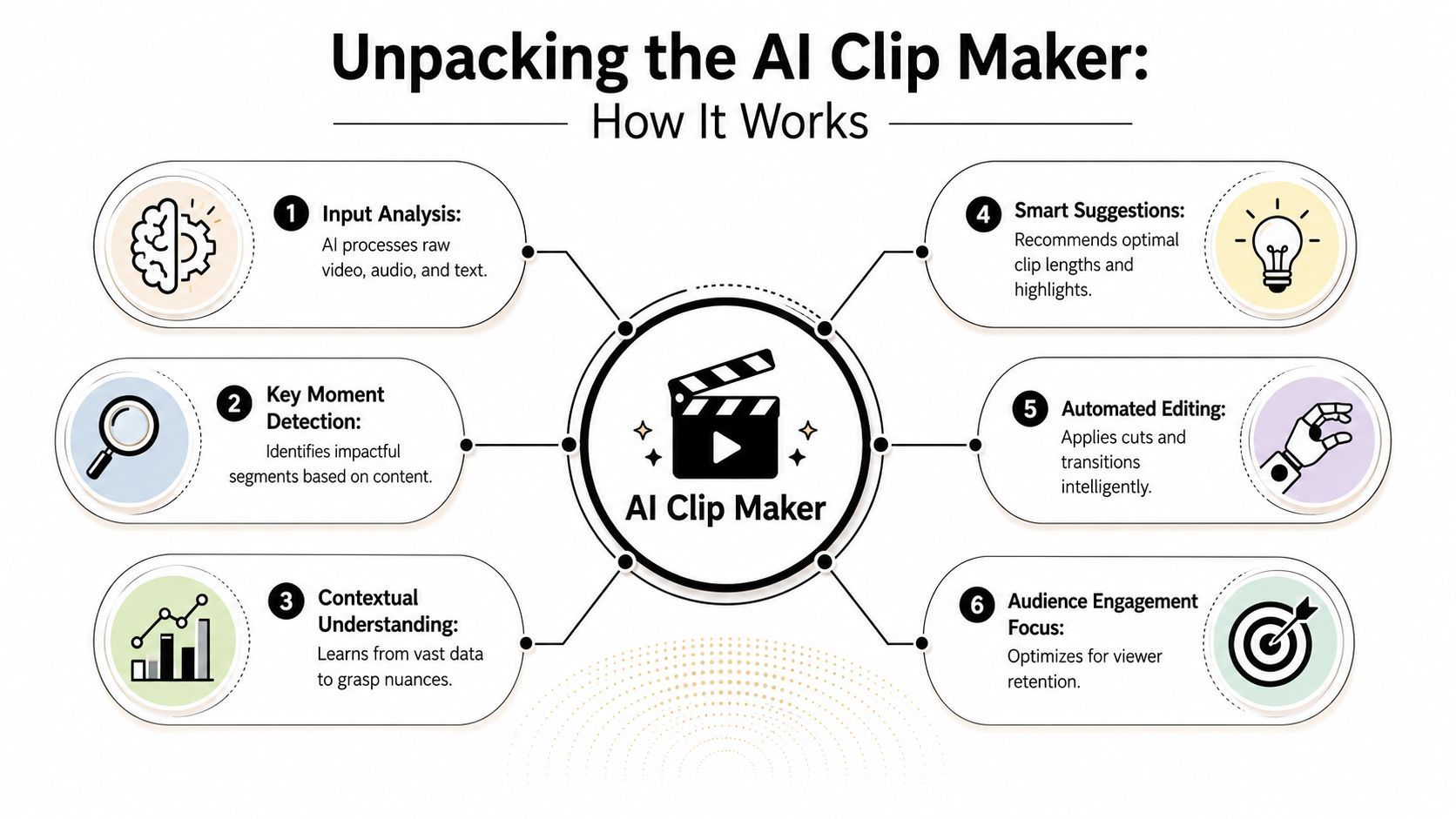
An AI clip maker is basically a very fast assistant that watches your video, reads its transcript, tracks visual cues, and makes a ranked guess about which moments deserve to become shorts.
That guess is not random. It's pattern recognition.
The AI looks for signals, not just sentences
When people hear “AI clip maker,” they often imagine a simple trimmer that grabs a few loud or short moments. That's not what the better tools are doing.
AI-powered clip generation tools rely on advanced neural networks trained on large datasets to identify engaging segments, then use deep learning for video-to-video transformation such as vertical reframing while preserving motion patterns, according to this explainer on AI video generation techniques.
In practical terms, the system is checking several layers at once:
- Transcript meaning: What topic is being discussed, and does the moment stand alone?
- Audio patterns: Is the speaker emphasizing something? Is there a pause before a punchline?
- Visual framing: Is there a face on screen, a slide, a product demo, or a visible reaction?
- Hook potential: Does the opening line create curiosity fast enough for short-form viewing?
That's why the category has drawn so much investor attention. If you track where money and product development are going, directories like Leading US AI venture capital give useful context on why AI-assisted media workflows keep expanding.
It's curating for attention
Value isn't “automatic cutting.” It's automatic prioritization.
A strong clip maker tries to answer questions an editor usually asks manually:
- Which segment opens with tension or clarity?
- Which idea can survive outside the full episode?
- Which moment still makes sense in a vertical feed?
- Which part is likely to stop a scroll quickly?
That last point is the strategic shift. A tool like this helps you think in audience behavior, not just timeline mechanics.
If you want a closer look at that workflow from a product angle, this guide to an AI video clipping tool shows how these systems turn long-form uploads into platform-ready shorts.
The best AI clip makers don't replace editorial instinct. They surface candidates so your judgment starts from a shortlist instead of a blank timeline.
Why this matters more than raw speed
Speed is useful, but speed alone doesn't fix weak clips. The deeper advantage is that AI curation changes how you evaluate your source material.
Instead of watching a one-hour recording and hoping to notice five good moments, you review a set of candidate clips already framed around likely retention. That changes the work from hunting to selecting.
And that's why creators who use clip makers well often improve faster. They start seeing which hooks repeat, which lines survive as standalone clips, and which kinds of moments the algorithmic feed tends to reward.
Manual Editing vs AI Clip Makers
A typical repurposing job used to look like this: open a 45-minute recording, scrub for usable moments, cut one clip, resize it for vertical, add captions, export, then start over for the next one. That process gives editors control. It also burns time on search, not just editing.
Manual editing still makes sense for brand films, documentary work, and ads where pacing, visual structure, and shot selection carry the message. Short-form repurposing is different. The goal is usually to publish more good clips from the same source without turning every upload into a full post-production project.
What manual editing really asks from you
Manual clipping turns one source video into a chain of repeated decisions. You review the full timeline, mark possible moments, test whether each one works out of context, create captions, check framing for mobile, export, and repeat for each platform variation.
That workload is fine if editing is the product. For creators, in-house marketers, and agencies, it becomes an operations problem.
AI clip makers change the first half of the job. Instead of asking you to find every usable moment yourself, they surface candidates, rank them, and prepare them for a feed-first format. That is the strategic shift. The machine handles discovery and formatting so you can spend your time on judgment.
AI Clip Maker vs. Manual Video Editing
MetricManual EditingAI Clip Maker
Clip discovery
Review the entire video by hand
AI surfaces candidate moments automatically
Time investment
Often multiple passes through one source
Generates a first set of options in minutes
Output scale
Limited by editor hours
Built to produce several clips from one upload
Captions
Added and corrected manually
Usually generated automatically, then refined
Reframing
Manual resizing and repositioning
Automated vertical reframing inside the workflow
Consistency
Varies by editor time and process
More repeatable across recurring uploads
Best use case
Custom, high-control editing
Fast repurposing and distribution
Where AI wins and where it doesn't
AI wins on throughput. It is faster at spotting possible clip boundaries, packaging multiple options, and getting rough cuts ready for review.
It does not replace editorial taste. If a clip needs a deliberate reveal, a joke that depends on frame-accurate timing, or a visual sequence built around B-roll and sound design, manual editing still does the better job. I treat AI as the first pass for discoverability content and keep human editing for assets where craft changes performance in a meaningful way.
That split has changed how teams allocate effort. As noted earlier, the editing software market is growing because demand for video output keeps rising. The practical response is not to manually edit everything. It is to reserve hands-on editing for work that benefits from it and let AI handle the repeatable repurposing layer.
A useful parallel exists in text workflows. Teams already use AI to condense long material into usable outputs, and AI summarization workflows for content teams follow the same logic. Reduce the search burden first, then apply human judgment where it counts.
Use manual editing for clips that need crafted pacing or story structure. Use a clip maker for clips that need speed, volume, and a consistent publishing cadence.
The strategic difference
Manual editing starts with a blank timeline and asks, "What can we extract from this?"
AI curation starts with a set of candidates and asks, "Which of these is worth polishing and publishing?"
That is a better operating model for short-form content. It shifts the bottleneck from hunting to selecting, which is exactly where creators and marketers get more output without lowering standards.
Your Smart Clip Maker Workflow in 4 Steps
The best workflow is simple. Upload, analyze, refine, export.
The mistake is treating a clip maker like a one-click machine that should publish without supervision. It shouldn't. The strongest setup combines AI speed with human review.
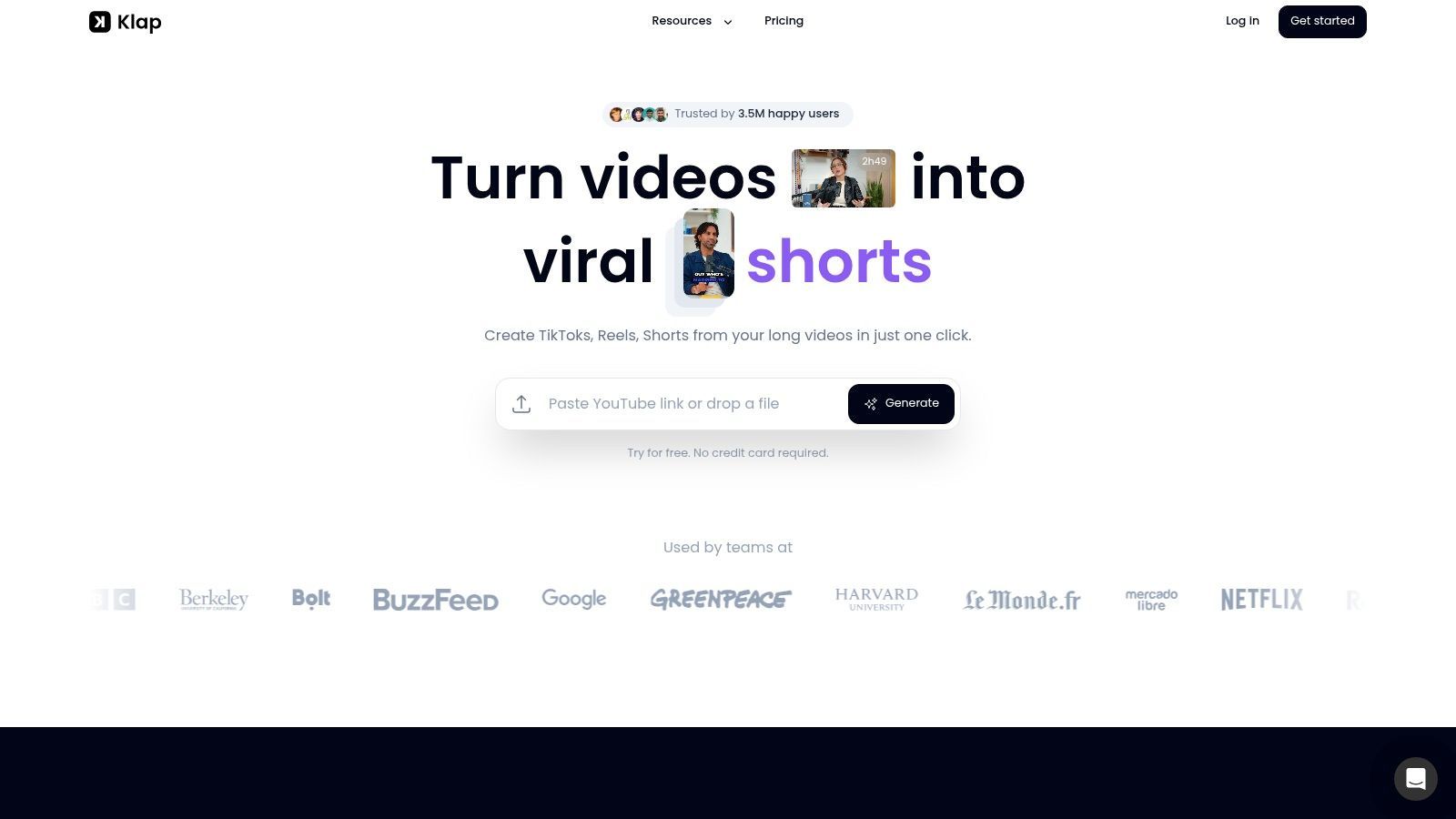
A typical interface looks like this in practice:
Upload
Start with the cleanest source you have. A YouTube link is convenient if the video is already live. A direct upload is often cleaner when you want to control the exact version, especially for webinars, internal recordings, or client work.
At this stage, the important decision isn't technical. It's strategic. Ask whether the source contains multiple standalone ideas. Strong short-form repurposing usually comes from content with clear opinion statements, educational points, objections, stories, or memorable phrasing.
Analyze
Here, the machine does the heavy lift.
With Klap, the AI scans a full video in about 30 seconds and generates 10+ short clips, each scored from 0 to 100 with a Virality Score, according to Klap's AI clip generator page. That kind of scoring is useful because it gives you a sorting mechanism instead of a random pile of cuts.
Use the score as a starting signal, not a final answer. A high-scoring clip may be structurally strong but still off-brand or aimed at the wrong audience segment.
If you also use AI to condense the core argument of longer content before selecting clips, a workflow like this can pair well with AI summarization for long videos.
Refine
This is the step a lot of creators skip. It's also where good short-form strategy happens.
Refinement usually means:
- Tighten the first line: If the clip opens too slowly, trim earlier hesitation or setup.
- Check the caption wording: Auto-captions are a base layer, not final copy.
- Review framing: Make sure the crop supports the point, especially in interviews and demos.
- Match platform context: A clip that works on Shorts may need a different opening beat for TikTok.
A quick walkthrough helps here:
Export
Export is not just file delivery. It's distribution prep.
Name the clips clearly. Keep versions separated by platform or campaign. If you're scheduling content in batches, group clips from the same long-form source so you can test multiple angles over time instead of posting all of them at once.
One long video usually contains several different hooks. Publish them like experiments, not duplicates.
A clip maker is most useful when it becomes part of a routine. Record once. Generate candidates quickly. Review with intent. Publish the clips that fit your audience.
Evaluating Key Clip Maker Features
Feature lists get noisy fast. Most of them mix essentials with filler.
When I evaluate a clip maker, I'm not asking whether it has AI. That's table stakes. I'm asking whether the AI helps me choose better clips and whether the editor gives me enough control to fix weak decisions.

Hook selection quality
This matters more than flashy templates.
A tool can have polished captions and decent exports, but if it repeatedly chooses weak moments, you'll spend your time correcting bad picks. The quality test is simple. Do the suggested clips open with a point, tension, reaction, or payoff? Or do they sound like the middle of a sentence?
Industry data cited in Kling's guide to AI camera control and hook timing suggests 68% of short-form video failures stem from misaligned hooks, and it references platform-specific attention thresholds such as 0.8 seconds on TikTok. That makes manual validation essential.
Reframing and speaker tracking
Vertical conversion isn't just cropping. It's preserving meaning.
If the speaker drifts off-center, if a product demo gets chopped awkwardly, or if reaction shots disappear, the clip loses clarity. Better tools keep the active subject in frame without making the output feel unstable.
One overlooked issue is cinematic intent. Auto-reframing often preserves visibility, but not always storytelling. If your source content relies on deliberate shot composition, you'll want more review control.
Editorial check: If the framing changes the emotional meaning of the shot, the automation needs a human override.
Caption control and brand fit
Captions should be readable first and branded second. But branded still matters.
Look for control over font style, placement, emphasis, and cleanup. Many teams underestimate how much trust is built by visual consistency. If your clips all look slightly different, the feed starts feeling scattered even when the message is strong.
Editing depth after the AI pass
Here, many tools separate themselves.
You need enough editing control to adjust timing, rewrite captions, and reject clips that don't fit. Automation without audit control creates a different kind of inefficiency. You save time generating clips, then lose confidence when publishing them.
A strong clip maker should help in two ways:
- Surface strong candidates quickly
- Make weak candidates easy to fix or discard
That second part is not optional. It's the difference between a novelty tool and a reliable production tool.
Maximizing Engagement with Your Clips
A clip maker gets you to publishable faster. It doesn't remove the need for distribution judgment.
That matters because the content creation market is projected to reach USD 277.2 billion in 2026, according to Future Market Insights on the content creation market. In a crowded market, efficient creation helps, but attention still goes to content that feels native to the platform.
Publish like a strategist, not a recycler
The best clips don't feel extracted. They feel built for the feed.
A few habits improve that fast:
- Write platform-native captions: Don't repeat the subtitle text. Add context, stakes, or a reason to care.
- Test multiple angles from one source: One clip may lead with a bold claim. Another may lead with a story beat or objection.
- Choose strong cover text: The thumbnail line should create clarity fast, especially on Shorts.
- Match the platform's rhythm: Some clips need a faster opening, while others need a cleaner promise.
For creators trying to sharpen the distribution side, these tips for getting more views on Shorts are useful alongside your clipping workflow.
Review what the audience actually rewards
Don't just track which clip looked nicest in the editor. Track which angle earned watch-through, comments, saves, or replies inside the platform.
That feedback loop is where AI curation becomes strategic. Over time, you'll notice patterns. Certain phrasing opens better. Certain speakers hold attention longer. Certain subjects survive clipping better than others.
Short-form performance improves when you stop treating every clip as promotion and start treating every clip as a test.
If you're sitting on a backlog of podcasts, webinars, interviews, or YouTube videos, Klap is one practical way to turn that library into short-form output. It uploads or links long-form video, generates social-ready clips, and gives you an editing pass before export so the workflow stays fast without becoming hands-off.
