
Batch Video Processing: The Complete 2026 Guide
Other
A finished 90-minute podcast is sitting in your drive. By morning, you need six short clips. By Friday, you need a YouTube chapter cut. By Monday, someone expects a Spanish dub. The familiar response is to open Premiere, scrub through the recording, mark promising moments, rebuild each clip for mobile, fix captions, and hope you can ship more than three before sleep.
That isn't primarily an editing problem. It's a batch video processing problem, and more specifically, a workflow-governance problem. The pipeline has to decide which editorial choices happen once, which rules apply to every output, and where a human must still intervene. This guide treats batching as a production system for consistent clips, not merely a faster way to press Export.
The Real Problem Behind Batch Video Processing
A long-form source contains more decisions than some acknowledge. Someone has to choose the clip window, decide whether the opening sentence works as a hook, select the crop, write or correct captions, apply the brand treatment, normalize audio, choose a thumbnail frame, and map each result to a platform format.
If those decisions remain implicit, every batch becomes a fresh editing project. One clip gets large yellow captions, another uses a different font, and a third places the speaker's face under the platform interface. The exports may finish quickly, but the review queue grows because nobody defined what “finished” means.

Count decisions, not export minutes
A useful operating measure is the number of choices your team repeats each week. If every clip requires a new caption style, crop judgment, loudness adjustment, and filename decision, faster encoding won't solve the bottleneck. The pipeline needs a written contract for those choices.
Practical rule: automate repeatable decisions, not editorial responsibility. Let software apply the approved style and format, while people review moments where context or taste matters.
The history of digital editing supports this distinction. The CMX 600, widely described as the first computer-powered nonlinear editor, appeared in 1971. Later systems such as Quantel's Harry, Avid/1 Media Composer, and Adobe Premiere helped move production away from linear tape workflows toward repeatable software processes, as documented in the evolution of video editing. Improved multicore CPUs and consumer PCs later made higher-resolution digital editing more accessible, creating the foundation for bulk clipping, reframing, captioning, and other automated transformations.
Consistency becomes the product
A single brilliant clip can survive a little inconsistency. A library of clips cannot. Viewers should recognize the same caption treatment, framing behavior, audio presentation, and lower-third system whether the source is a podcast, webinar, or interview.
That matters because long-to-short repurposing is not just duration trimming. An academic benchmark defines the task as transforming user-generated videos, typically longer than 30 minutes, into engaging clips of around 60 seconds each, rather than cutting material mechanically by time alone in its benchmark description. A useful batch system therefore governs selection, presentation, validation, and exceptions together.
Designing a Batch Pipeline Before You Pick a Tool
Tool selection comes after the output contract. Before touching an FFmpeg flag or an AI clipper account, write down four decisions that determine whether the pipeline will remain predictable.
Define the batch boundary
A batch might be one source video, a weekly content drop, or an always-on backlog. Those are different operating problems. One podcast file can run through a local script. A recurring archive needs job identifiers, retries, status tracking, and a way to resume without duplicating completed outputs.
Set the boundary around the event that should trigger processing. For example, “a new master file appears in the watched folder” is more useful than “someone remembers to start the script.” Include the source identifier, upload date, language, and requested output package in the job record.
Choose the execution environment
A Mac mini under a desk, a dedicated GPU machine, and a cloud worker pool each impose different limits. Local processing gives you control over files and predictable infrastructure, but concurrency is limited by CPU, memory, storage throughput, and available hardware encoders. Cloud jobs offer easier parallelism and durability, but media movement, provider quotas, and per-minute billing affect the cost.
Keep source media close to the stage that decodes it. A NVIDIA batch ingestion benchmark processed 1,000 MP4 videos in 53.09 seconds, at 18.84 videos per second, using a batch size of 64 and a local HTTP-hosted dataset, with 100% success. That result isn't a promise for every system. It shows why locality, batch size, and a continuous GPU path matter.
Write the output contract
Define the exact canvas, codec, caption rules, audio target, naming scheme, and maximum duration. A practical Shorts contract might specify 9:16 at 1080 × 1920, H.264 video, burned-in captions, and a hard duration ceiling. YouTube recommends 1080 × 1920 for Shorts, and square or vertical clips up to 3 minutes can be classified as Shorts, according to YouTube Shorts specifications.
For a concrete internal example, a team could choose 9:16 at 1080 × 1920, -14 LUFS integrated, and a 90-second cap for its general social package. The important part is not copying those values blindly. It's ensuring every job consumes the same documented specification.
Decide who reviews what
Fully automatic output is appropriate only when the source, format, and brand rules are stable. A sampled QA model works better for established shows. Human review on the first 10% of outputs from a new source can catch speaker tracking, terminology, and caption problems before they spread, but that percentage is a governance choice, not a universal standard.
Record the review policy alongside the preset. If a job fails validation, it shouldn't disappear into a chat message. Send it to a review queue with the source, failed rule, rendered preview, and job logs. For integration patterns that connect content systems and processing services, Klap's third-party integrations can be evaluated as part of that wider workflow design.
Comparing the Four Tool Families That Run Batch Jobs
No single tool family solves every stage. The reliable architecture assigns each workload to the system that handles it well, then adds validation around the handoffs.
Tool FamilyBest JobWhere It FailsTypical Cost
FFmpeg
Scriptable transcoding, trimming, overlays, audio normalization, and deterministic exports
It doesn't understand meaning, hooks, tone, or whether a moment is compelling
Software is free, infrastructure and engineering time aren't
Cloud transcoding jobs
Durable parallel encoding for large collections of source files
They don't select clips intelligently and can add media-transfer and per-minute costs
Usage-based cloud billing
Automation platforms
Connecting uploads, queues, notifications, APIs, and storage
Complex flows become brittle, and failures can hide inside individual nodes
Subscription and usage-based billing
AI clip generators
Finding candidate moments, generating captions, reframing, and producing social-ready drafts
They can resist deep customization and may assume one canonical output style
Product or usage-based pricing
FFmpeg remains the deterministic layer
FFmpeg is the right choice when you already know what should happen. It can trim a timestamp range, scale a frame, overlay a watermark, normalize audio, and encode a repeatable output without guessing at editorial intent. It can't determine whether a podcast guest's answer contains the strongest hook.
CPU encoding and hardware encoding also produce different operational trade-offs. In independent benchmarks, CloudBench recorded H.265 encoding at 12 fps on e2-standard-8, 22 fps on n2-standard-8, 34 fps on c3-standard-8, 128 fps on h3-standard-88, and 240 fps with NVENC on a single L4 GPU for 1080p sources using the libx265 medium preset, as reported in NVIDIA's transcoding performance documentation. Those figures make the practical point clear: software quality presets and hardware acceleration can produce very different queue behavior.
AI handles semantic selection
An AI clipper is useful when the expensive step is finding promising moments across long footage. It can work from transcripts, propose hooks, generate captions, and reframe a talking head for mobile. The cost is less control over unusual editorial rules, source-specific nuance, and highly customized output packages. A Klap AI clip maker belongs in this category, alongside tools such as Opus Clip and Descript.
Teams that need hands-on editorial support may also want to explore OohYeah's editors when automation produces candidates but a person still needs to shape the final selection.
Cloud and automation tools connect the system
Cloud transcoding is valuable when durability and parallel throughput matter more than keeping every process on one machine. Automation platforms are useful for triggering jobs, moving metadata, and notifying reviewers. Neither replaces an explicit output contract or a dead-letter path. A pipeline can be technically automated and still operationally unreliable if nobody knows which outputs failed and why.
Building Your First Working Batch Pipeline
Start with a deterministic FFmpeg path when the source clips and transformations are already known. The following shell loop reads MP4 files, applies a consistent vertical scale, overlays a watermark, and writes named outputs to /out.
mkdir -p out
for file in input/*.mp4; do
name="$(basename "$file" .mp4)"
ffmpeg -y -i "$file" \
-i watermark.png \
-filter_complex "[0:v]scale=1080:1920:force_original_aspect_ratio=decrease,pad=1080:1920:(ow-iw)/2:(oh-ih)/2[base];[base][1:v]overlay=W-w-48:H-h-48" \
-c:v libx264 -preset medium -crf 23 \
-c:a aac -b:a 128k \
-movflags +faststart \
"/out/${name}_vertical.mp4"
done
The scale filter preserves the input proportion, pad creates a fixed canvas, libx264 provides compatible H.264 encoding, -preset medium balances speed and compression, and -crf 23 establishes a repeatable quality target. -movflags +faststart places MP4 playback metadata where web players can reach it early.
For a quick parallel run, use xargs -P 4 rather than launching an uncontrolled number of processes. The concurrency value must match the machine's CPU, memory, disk, and decoder capacity. A helper such as --npl-build-helper can be used in the worker wrapper to control concurrency and keep job construction separate from execution.
find input -type f -name "*.mp4" -print0 |
xargs -0 -P 4 -I {} \
bash --npl-build-helper -c '
file="$1"
name="$(basename "$file" .mp4)"
ffmpeg -y -i "$file" \
-vf "scale=1080:1920:force_original_aspect_ratio=decrease,pad=1080:1920:(ow-iw)/2:(oh-ih)/2" \
-c:v libx264 -preset medium -crf 23 \
-c:a aac -b:a 128k -movflags +faststart \
"/out/${name}_vertical.mp4"
' _ {}
A Klap-style AI workflow starts earlier in the decision chain. Upload a long-form MP4, set a topic bias of 0.6, set the virality score threshold to 7, generate 12 candidate clips, and export the selected candidates as 9:16 videos with burned captions, a lower-third title, and brand-safe framing. The output contract can be represented like this:
{
"width": 1080,
"height": 1920,
"video_codec": "h264",
"profile": "high",
"rate_control": "cbr",
"video_bitrate": "6 Mbps",
"audio_codec": "aac",
"audio_bitrate": "192k",
"faststart": true,
"max_duration": "59s"
}
StageFFmpeg LoopKlap-Style AI Pipeline
Ingest
Read a local folder of MP4 files
Upload or connect a long-form source
Selection
Requires supplied timestamps
Scores and proposes candidate moments
Captions
Add a prepared subtitle or ASS file
Generate and burn captions during the workflow
Reframing
Apply a fixed or scripted crop
Track subjects and produce mobile framing
Export
Encode exact technical parameters
Export the approved social preset
Review
Validate files and inspect samples
Review candidate clips, captions, and framing
A Reusable Repurposing Template for Long to Short Clips
A reusable template should treat one source as a parent asset with many governed children. The trigger can be a new master file landing in a watched Google Drive folder. An n8n or Make.com flow then passes the source identifier through selection, trimming, reframing, captioning, export, and metadata tagging without asking an editor to recreate those choices for every clip.
Start with timestamps, not manual scrubbing
The AI stage writes timestamps.json. Each selected window is trimmed between 15 and 90 seconds, with 2 seconds of padding before and after the detected range. Padding gives captions and speech a natural entry point, but it should be removed when it creates dead air or weakens the hook.
The next stage should use subject tracking rather than a fixed center crop. A centered crop works for a speaker who never moves, then fails when the guest leans, a second person enters, or the important visual content sits beside the speaker. The 1080 × 1920 canvas should keep the subject inside the safe zone and upscale the active crop only as much as the source quality allows.
Keep the style in shared assets
Animated captions should consume one shared ASS style file. Store the font, weight, highlight color, outline, position, and animation behavior centrally, then pass the same file to every platform export. That prevents TikTok, Reels, and Shorts variants from drifting into three separate brand systems.
Editorial boundary: automatic captions are a draft until your validation rules and reviewer confirm names, product terms, and numbers.
Export the parent clip into platform-specific children:
- TikTok: no watermark, a vertical H.264 output, with the platform's supported duration policy applied.
- Reels: a vertical master plus a square fallback when the distribution plan needs it.
- Shorts: a vertical H.264 export that stays within the chosen Shorts duration contract.
The YouTube Shorts editing guidance emphasizes filling the mobile screen without black bars or letterboxing and using burned-in captions for viewers who watch without sound. Those requirements make reframing and caption overlays core pipeline stages, not decorative finishing steps.
A practical implementation also preserves frame rate and adds fast-start metadata during export. A technical guide on batch processing AI videos for social media describes fanning one source into parallel platform outputs while generating captions, applying cuts, reframing, and exporting each variant.
Presets That Keep Captions and Reframing Consistent
Style drift usually starts when parameters live inside individual commands. Put the caption, crop, color, audio, and export rules in one versioned preset.json, then make every worker consume that file.
Preset AreaKey Values
Captions
Arial Bold, 72px, white fill, 4px black stroke, 8px outline, two-line maximum, lower-third safe zone 200px from bottom
Caption motion
1.5s animation in, 0.5s animation out, Whisper large-v3 confidence threshold of 92%
Reframing
9:16 canvas, 1080 × 1920, 220px subject margin, motion-priority crop for talking heads, face-priority crop for screen shares, no zoom pop
Color and audio
Rec.709, 6500K base, -16 LUFS integrated, -1 dBTP true peak, light limiter at -2 dB
Export
H.264 high profile, level 4.0, 6 Mbps Shorts output, 8 Mbps Reels master, AAC 192k stereo, fast-start metadata
The caption values solve different problems. The stroke and outline preserve readability over bright footage, the two-line limit prevents captions from becoming a paragraph, and the safe-zone offset keeps text away from common mobile interface areas. The confidence threshold should route uncertain words to review rather than publish a wrong name.
The reframe rules need source-aware behavior. A talking head benefits from motion-priority tracking because the crop should follow movement. Screen-shared footage needs face priority so the speaker remains visible without destroying the presentation area. A fixed center crop is simpler, but it fails whenever the visual subject isn't centered.
Audio and export values should also remain stable. The exact loudness target depends on your delivery standard, but the pipeline must measure it after encoding, not assume the source is already compliant. Use Rec.709 for a consistent SDR color workflow, keep the MP4 fast-start flag enabled, and version any preset change so reviewers can identify why two batches look different.
QA, Scaling, and Troubleshooting at Volume
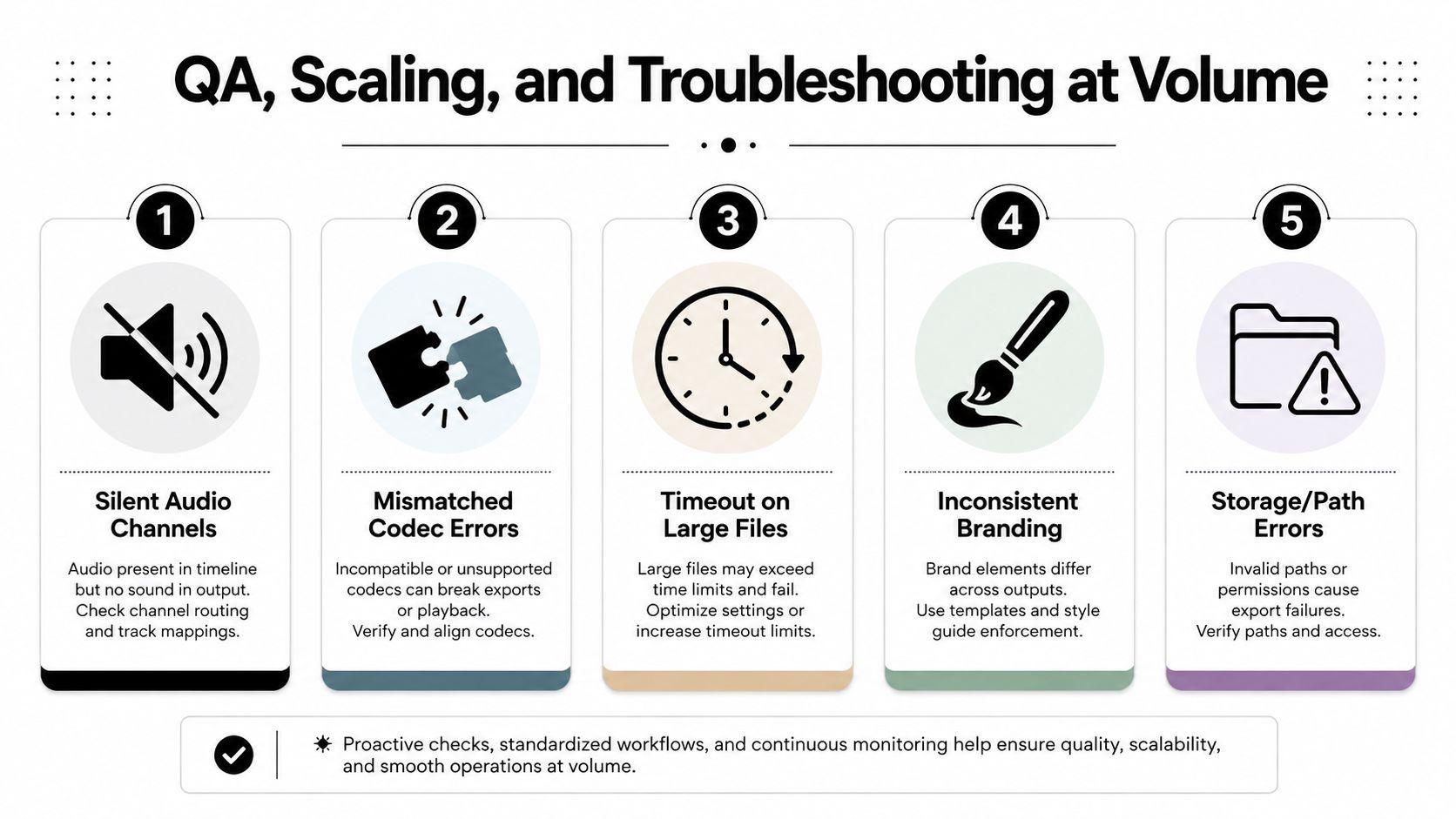
Most pipelines look healthy on clip five. Clip fifty exposes the missing rules. A source with an unusual codec can produce a silent audio channel, a text filter can inherit different DPI behavior and shift caption baselines, and a reframe tracker can crop the speaker's chin. Cloud jobs may also re-encode unexpectedly when an input exceeds a provider quota, leaving a technically valid file that no longer matches the intended bitrate.
Put validation before delivery
Every source should pass a pre-flight probe that records ffprobe JSON for duration, dimensions, frame rate, streams, codecs, pixel format, and audio presence. The job should fail early when the source lacks an audio stream that the output contract requires or when the frame characteristics don't fit the selected processing path.
After rendering, spot-check 10% of outputs against expected dimensions and audio targets, including EBU R128 measurements around -16 LUFS where that is your chosen delivery standard. Hashing the selected outputs gives you a simple way to verify that the files being reviewed are the files later delivered. Store the validation result beside the asset, not only in transient worker logs.
A dead-letter queue should receive every failed job with its error class, source metadata, command or API response, and retry count. That turns a silent omission into an actionable work item.
Fix the common failures directly
- Silent audio: inspect stream mapping and force an explicit audio path instead of assuming the first stream is correct.
- Pixel-format incompatibility: add
-pix_fmt yuv420pfor broad playback compatibility. - Slow web playback: retain
-movflags +faststartso MP4 metadata is placed at the beginning. - AI service errors: wrap clipper calls in retry logic with exponential backoff, and stop retrying permanent validation failures.
- Cloud throttling: split batches when providers return 429 responses, then retry smaller groups after the backoff window.
Scale when the queue tells you to
A single VPS is adequate while one worker can drain incoming jobs faster than new sources arrive and while failures remain easy to inspect. Move to a queue plus worker pool when jobs wait long enough to affect publishing deadlines, when one failed process blocks unrelated work, or when CPU encoding competes with AI analysis and storage operations.
Keep analysis and final rendering in separate queues. The benchmark evidence above shows that decoding and embeddings can benefit from a continuous GPU path, while independent transcoding results show how dramatically encoding performance changes with hardware and preset selection. Track cost per output minute as an operating ceiling. When that figure rises above the margin your content model can support, renegotiate provider terms or move the bottleneck stage to a dedicated encoding service.
Workflow standardization is the governance layer that keeps these controls maintainable. Klap's workflow standardization guidance is relevant when the team needs repeatable rules around inputs, review, and outputs rather than another isolated export shortcut.
Klap turns long-form uploads into candidate short clips with AI-assisted selection, captions, reframing, and social-ready exports, which fits the governed pipeline described here. Use Klap to generate candidates, apply your approved output contract, and keep human review focused on the clips and exceptions that need editorial judgment.
