
Video Editing Outsourcing: A Practical How-To Guide
Other
You're usually not thinking about video editing outsourcing because editing is fun. You're thinking about it because the current setup has started to break.
Maybe raw footage is piling up in Google Drive. Maybe your team can publish one polished video a week, but the business now needs clips for Shorts, Reels, TikTok, sales enablement, and internal updates. Maybe every edit still routes through one overloaded person who also handles thumbnails, uploads, and last-minute revisions.
That's the reason many organizations outsource. Not to “save time” in the abstract. To build a content operation that can keep moving when output expectations rise faster than internal capacity.
The mistake is treating outsourcing like a simple handoff. Send files, wait, hope. That's where things go sideways. Good video editing outsourcing works like a system. Inputs are organized. Decisions are documented. Feedback is structured. Revision limits are clear. If you get that part right, an external editor can feel like an extension of your team. If you get it wrong, even a talented editor will produce rework.
When to Outsource Your Video Editing
Outsourcing makes sense when editing has become a capacity problem, a specialization problem, or a repurposing problem.
The clearest signal is volume. One industry source notes that outsourced providers can support 2 to 20+ videos a month, with faster turnarounds and access to specialists such as motion graphic artists, color graders, and audio engineers. The same source also ties that shift to a broader tooling change, noting the AI video editing sector was estimated at US$0.9 billion in 2023 and projected to reach US$4.4 billion by 2033 (Photo Editing Services Co). That matters because editing demand no longer stops at one finished video. Teams now need multiple platform-specific outputs from the same source material.
The triggers that usually justify it
A few situations show up over and over:
- Your publishing cadence is constrained by one person. If content strategy is ready but editing is the bottleneck, outsourcing removes the choke point.
- You need skills your team doesn't have. Motion graphics, cleanup, color work, sound polish, caption styling, and platform-specific reframing are hard to fake.
- You have long-form content with unused value. Webinars, podcasts, interviews, and YouTube videos often contain many usable short clips that never get cut.
- Deadlines are becoming less predictable. Launches, events, and campaigns create bursts. Outsourcing gives you flexible capacity without adding a permanent hire.
This is especially common for teams trying to balance short-form and long-form video content. Long-form builds authority. Short-form drives distribution. The pressure comes from needing both at once.
Practical rule: Outsource when editing demand is recurring enough to need a process, but uneven enough that hiring a full internal bench doesn't make operational sense.
When keeping it in-house is smarter
Not every team should outsource right away.
If your editing needs are sporadic and simple, a lightweight internal setup may be easier to manage. The same goes for brands with a very nuanced voice, where small choices in timing, humor, reaction shots, and cut points carry most of the brand value. In that case, the onboarding burden can outweigh the immediate benefit.
Keep it internal if these are true:
- The work is highly founder-led. The content depends on instinctive choices only one person can currently make.
- You don't have reusable standards yet. No brand kit, no examples, no clip criteria, no naming rules.
- You only need occasional one-off edits. A standing outsourcing relationship can create unnecessary overhead.
The key question isn't “Can someone else edit this?” It's “Can someone else edit this consistently with the information we're able to provide?” If the answer is no, fix the system first.
Choosing Your Outsourcing Model and Budget
There isn't one outsourcing model. There are several, and each breaks differently.
Some teams need a freelancer who can jump into isolated edits. Others need a managed service that can absorb recurring volume. Some need a hybrid setup where software handles the first pass and a human editor handles polish. The right choice depends less on preference and more on how repeatable your content operation is.
One useful benchmark comes from Vidico. It reports that a systems-based outsourcing approach can deliver 10x more content at roughly 60% lower cost per asset than traditional models, and that a full-time in-house video team can cost over $180,000 annually, while an efficient outsourced model can range from $60,000 to $120,000 (Vidico on outsourcing video production). The practical takeaway isn't that outsourcing is always cheaper. It's that well-run outsourced systems get more efficient as standards, templates, and asset libraries mature.
Video Outsourcing Models Compared
ModelCost StructureBest ForManagement Level
Freelancer
Per project, hourly, or monthly retainer
One-off edits, niche styles, overflow work
High
Agency
Monthly retainer or scoped package
Recurring volume, team support, broader production needs
Medium
Subscription service
Fixed recurring fee tied to output or queue
Predictable, repeatable editing requests
Medium
AI-assisted hybrid
Software plus freelance or agency review
High-volume short-form repurposing from long-form content
Medium to high
How the models differ in practice
Freelancers are best when you already know what good looks like. They work well for podcasts, weekly clips, event recaps, and overflow capacity. But they usually require tighter project management from your side. If your brief is messy, the output will be messy.
Agencies make sense when output needs to be consistent and the work spans more than straight editing. If you need editing plus motion graphics, sound cleanup, social versions, and account management, agencies reduce coordination overhead. You pay for structure as much as execution.
Subscription services can work for brands with a steady queue of similar requests. They're useful when every asset follows a known pattern, such as product cutdowns, testimonial edits, or recurring social formats. They struggle when every project is unique.
The hybrid model most teams should consider
For short-form repurposing, the strongest setup is often AI-assisted outsourcing.
In that model, software handles the mechanical first pass. It identifies candidate clips, reframes for vertical, generates captions, and prepares a rough cut. A human editor then reviews the best segments, tightens pacing, improves hooks, fixes caption styling, and aligns the final output to brand standards.
That model is often more efficient because you're no longer paying a human to scrub through hours of footage just to find usable moments. You're paying for judgment where judgment matters.
Buy editing time for decisions, not for scavenger hunts through raw footage.
Budgeting gets easier when you define what the editor is and isn't responsible for. If they're finding hooks, selecting pull quotes, building motion systems, sourcing B-roll, and versioning assets for multiple platforms, the cost structure should reflect that. If they're refining pre-selected clips inside a clear system, cost predictability improves fast.
How to Find and Vet the Right Editing Partner
The market for editing services is maturing fast. Dataintelo reports the global video editing service market was valued at US$2.5 billion in 2023 and is projected to reach US$6.3 billion by 2032 (Dataintelo market report). That growth is a useful warning. You'll find no shortage of providers. The hard part is finding one that can work inside your operating style.
Start with the visual checklist below. It captures the basics, but the true test is operational fit.

What to evaluate beyond the portfolio
A polished reel tells you very little on its own. You need to know whether the editor can follow direction, manage files cleanly, and survive revision cycles without losing the thread.
Look for these signals:
- Consistency across projects. One great edit can be luck. A repeatable standard is what matters.
- Platform fluency. Ask whether they understand vertical framing, hook speed, caption readability, pacing for Shorts, and silent-viewing behavior.
- File discipline. Good editors name versions clearly, return exports in the right formats, and don't make you chase assets.
- Feedback maturity. You want someone who can absorb notes without becoming passive or defensive.
If you hire assistants or coordinators for adjacent work, the same screening logic applies. A strong resource on process-driven delegation is this complete guide for hiring VAs. The overlap is bigger than commonly anticipated. You're not only hiring skill. You're hiring reliability inside a workflow.
Questions worth asking in the first call
Skip generic questions like “What's your style?” Ask operational questions instead.
- How do you prefer feedback to be delivered?
- How do you handle versioning when multiple stakeholders leave notes?
- What do you need in a brief to reduce revision rounds?
- How do you manage source files, exports, and archived project files?
- What's your process when platform specs change mid-project?
- What kinds of edits are fast for you, and what kinds slow you down?
Their answers tell you whether they think like a partner or a task taker.
Here's a useful walkthrough if you want another perspective on the software side of the role:
Run a paid test, not a hypothetical interview
A paid test project is the closest thing to a reliable predictor.
Give the same source footage and brief to one or two candidates. Keep the scope tight. One clip, one core objective, one target platform. Then review the result against a few specific questions:
- Did they follow the brief?
- Did they ask smart clarifying questions?
- Was the first draft close, or did it drift?
- Were captions, framing, audio, and pacing handled with care?
- Did communication stay clean?
Don't hire based on what they say they can do. Hire based on how they behave during a small, real assignment.
If you're assessing tooling fit as part of the process, it helps to understand the current best AI video editing software category so you can separate clip selection, rough-cut automation, and final creative editing into the right stages.
Building a Flawless Outsourcing Workflow
Most outsourcing failures don't start in the edit. They start in the handoff.
One practical guide on outsourcing video editing makes the point clearly: the most common cause of failure isn't lack of talent but weak briefing, and teams should formalize footage, scripts, brand rules, and references in a shared layer such as Google Drive or Frame.io to avoid delays and miscommunication (Girl Power Talk on outsourcing workflow).
That's exactly right. A good workflow reduces the number of decisions the editor has to guess at.

What your onboarding package should include
Before the first project starts, assemble one working package with the materials the editor will use repeatedly.
Include:
- Brand rules with logos, fonts, colors, lower-third styles, and caption preferences
- Reference edits that show pacing, transitions, humor level, framing style, and hook style
- Raw asset locations with folder naming that won't change every week
- Publishing specs for each channel you care about
- Do-not-do notes for common mistakes, such as overusing zooms, adding stock transitions, or using certain music styles
This doesn't need to be glamorous. A well-structured Google Doc plus organized folders is enough.
The brief that prevents rework
Most weak briefs fail because they describe taste instead of decisions. “Make it punchy” is taste. “Cut the intro dead space, lead with the strongest claim in the first line, use burned-in captions, and prioritize pauses under one second” is direction.
A usable brief should answer these points:
- What is the goal of this asset
- Who is it for
- Where will it be published
- What must be included
- What should be avoided
- Which references should shape the edit
- What counts as done
Here's a simple structure that works:
Brief elementWhat to include
Objective
One sentence on what the video should achieve
Audience
Who it's for and what they already know
Platform
Shorts, Reels, TikTok, LinkedIn, YouTube, internal use
Edit direction
Pace, tone, framing, subtitle style, hook style
Mandatory assets
Logos, CTA, B-roll, screenshots, music constraints
Deliverables
File types, aspect ratios, and final naming rules
Review like an operator, not a bottleneck
The review process needs guardrails.
Use one place for comments. Frame.io is strong because time-stamped notes remove ambiguity. If your team already lives elsewhere, that's fine. What matters is that feedback does not get scattered across email, Slack, and verbal comments.
For teams publishing lots of clips, this becomes part of the larger social media video editing workflow. The editor needs to know whether feedback is about performance goals, visual consistency, or stakeholder preference. Those are different problems.
A revision cycle should answer one question: what decision changed? If nobody can answer that, the notes are too vague.
Set revision limits up front. Define who approves first drafts. Define turnaround expectations for both sides. Editors can't move quickly if approvals sit untouched for days, and clients shouldn't wait on silent queues with no clarity.
The Modern Toolkit for Outsourced Collaboration
Monday morning. The editor is waiting on raw footage, the marketer left feedback in Slack, the founder added notes by email, and nobody knows which cut is current. Outsourcing breaks down fast when the tool stack allows work to scatter.
The fix is not more software. It is a tool stack where each system has one job, one owner, and one place where the latest version lives. That structure matters more than the brand name on the app.
The stack itself is simple. Storage holds source files and approved exports. Review tools hold comments and approvals. Project management tracks status, due dates, and handoffs. Contract and payment tools keep onboarding and invoicing out of chat threads. AI sits earlier in the pipeline and reduces the prep work that eats editor time.
That last part matters for teams producing a steady flow of short-form clips. One industry source argues that the scalable model is a hybrid one: use AI to identify and prep candidate moments, then hand them to a human editor for judgment, pacing, and polish (Remote Growth Partners on offshore video editors).

The core stack that works
A practical setup usually includes four categories:
- File transfer and storage
Google Drive or Dropbox for raw footage, working assets, approved templates, and final exports. The important part is the folder logic. Organize by client, campaign, date, and status so editors do not hunt for files or pull outdated assets. - Review and comments
Frame.io or Vimeo Review for time-stamped notes tied to a specific version. This keeps creative feedback attached to the cut itself instead of buried in message threads. - Project tracking
Asana or Trello for job intake, production stages, due dates, and approval status. If several people touch the same video, the board should show who owns the next action. - Contracts and payment
DocuSign, HelloSign, Wise, or PayPal for onboarding, rate agreements, and invoices. Keep this separate from production tools so legal and finance tasks do not block edit operations.
Where AI belongs in the workflow
AI works best at the intake and prep stage.
For long-form repurposing, it can scan recordings, surface possible moments, generate captions, and prepare vertical framing. That gives the outsourced editor a starting point with options already narrowed down. The human editor can then spend time on the parts that still need judgment: selecting the strongest hook, tightening pacing, trimming dead space, correcting captions, and making the cut feel native to the target platform.
Klap is one example of that kind of tool. It turns long-form footage into draft short-form clips with reframing and captions, which can make handoff cleaner for outsourced editors working from approved candidates instead of hours of raw material.
Keep the stack lean enough to run
Tool sprawl creates its own failure mode. I have seen teams add a DAM, a PM tool, two review platforms, Slack, WhatsApp, email, and a shared spreadsheet, then wonder why revisions drag.
A smaller system usually performs better. One storage location. One review layer. One task board. One primary communication channel. If a tool does not remove a specific delay, error, or handoff problem, it probably does not belong in the workflow.
The goal is operational clarity. Editors should know where assets live, where feedback appears, what version is current, and who can approve the cut. When those answers are obvious, outsourcing gets easier to scale without losing control.
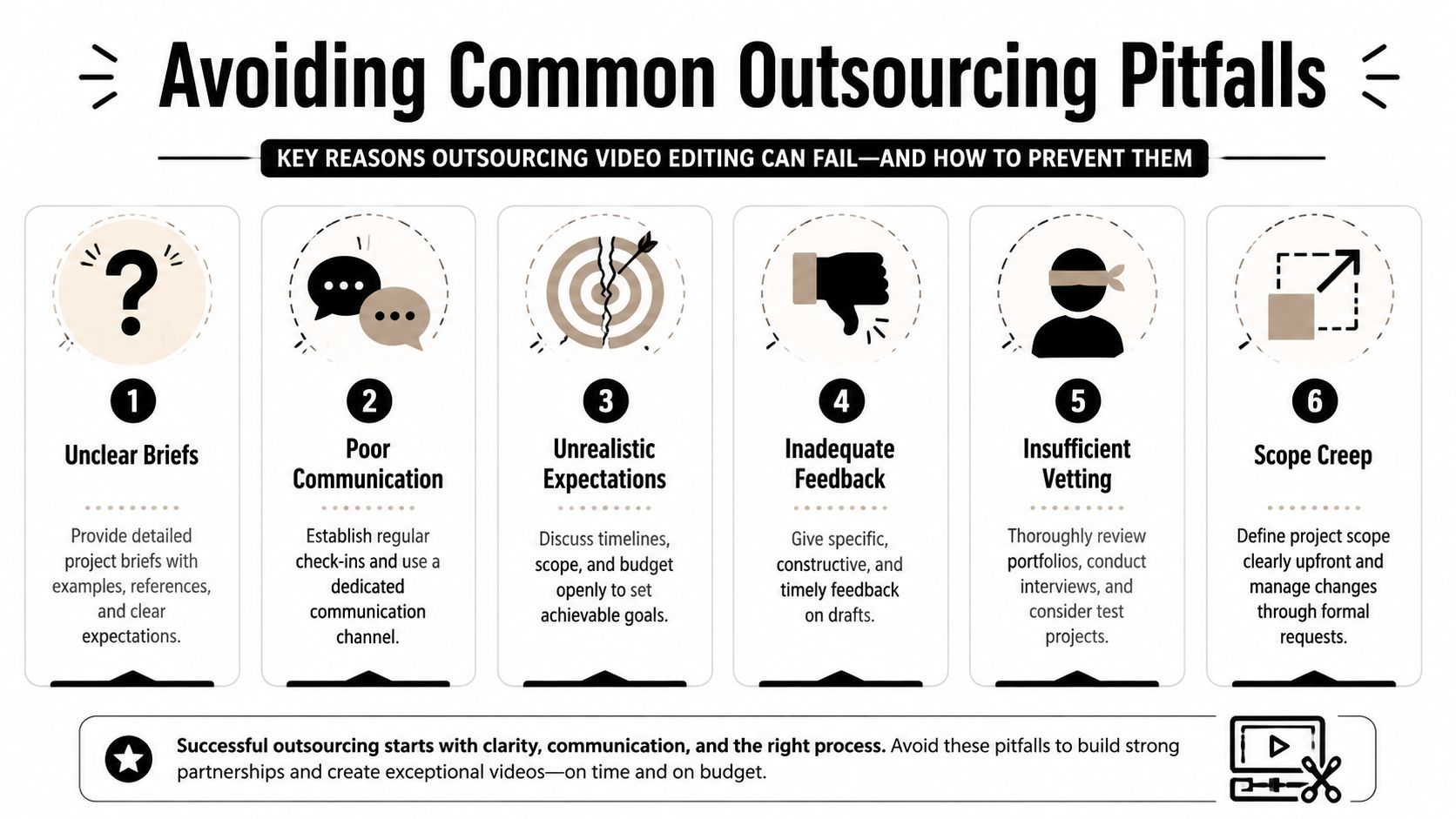
Avoiding Common Outsourcing Pitfalls
Bad outsourcing outcomes are often attributed to bad editors. That's usually the wrong diagnosis.
One source puts the issue more directly, saying many creators fail because of “poor systems, unclear briefs, and bad workflows”, especially when repurposing long-form content where editors have to make fast decisions on hooks, pacing, and reframing without enough direction (Color Experts BD on why outsourced video editing fails).
That lines up with what happens in real teams. The editor isn't guessing because they're careless. They're guessing because the process requires guesswork.
The mistakes that cause most of the damage
These are the patterns that create endless revisions:
- Vague briefs
“Make it engaging” doesn't help an editor choose the right hook, pace, or cut structure. - No brand reference library
If there's no set of approved examples, every draft becomes a style negotiation. - Scattered feedback
Notes in Slack, email, voice messages, and comments on different exports create contradictions. - Micromanaging the edit
Over-directing every small cut usually means the system wasn't clear enough up front. - Undefined scope
Teams ask for one clip, then add alternate formats, social versions, and extra revisions after work begins.
What actually prevents failure
Treat the editor like a production partner. Give context, not just tasks. Build a small asset library with intros, outros, lower thirds, motion templates, music preferences, and caption standards. Reuse what works instead of re-explaining it every week.
The goal of video editing outsourcing isn't to find someone who can read your mind. It's to create a repeatable operating environment where they don't need to.
If you're repurposing lots of long-form content into short clips, the strongest setup is usually a hybrid one. Standardize the first pass, document your brand rules, then use human editing time where judgment matters most.
If your team is sitting on webinars, podcasts, interviews, or YouTube uploads that should be feeding a short-form pipeline, Klap can help you create a cleaner outsourcing system. It prepares social-ready clips from long-form video with AI-driven segment selection, captions, and reframing, so your editor can spend less time searching raw footage and more time polishing the clips that are worth publishing.
