
Video AI: Your Guide to Smarter Content Creation in 2026
Other
You already know the feeling. You finish a podcast, webinar, interview, or product demo, then the significant work starts. You still need clips for Reels, Shorts, TikTok, captions for every platform, different aspect ratios, and enough hooks to keep the content alive for weeks instead of one upload.
That's where video AI stops being a novelty and starts acting like infrastructure. For creators buried in long-form content, it's less about generating flashy visuals from a prompt and more about clearing the editing backlog that keeps stealing publishing momentum. The useful question isn't “Can AI make a video?” It's “Can it help me turn one good recording into a repeatable content system without burning half my week?”
The End of the Endless Editing Cycle
The old cycle is familiar. Record for an hour. Export. Rewatch. Mark timestamps. Pull clips manually. Resize for vertical. Add captions. Fix cuts. Upload one by one. By the time the short-form assets are ready, the next long-form recording is already waiting.
That workflow breaks most creators before quality does. Not because they lack ideas, but because packaging content for distribution takes too much energy. Video AI earns its keep when it handles the repetitive parts well enough that you can spend your time on selection, positioning, and publishing instead of timeline labor.
Why this shift matters now
This isn't a fringe category anymore. The global artificial intelligence video market is projected to grow from USD 10.29 billion in 2024 to USD 156.57 billion by 2034, with a 35.33% CAGR, and by 2030, 90% of online video is projected to involve some form of AI assistance according to Precedence Research's artificial intelligence video market outlook. That matters because it changes how creators should think about tooling. Video AI is becoming part of the default production stack, like captions, cloud storage, or a thumbnail workflow.
For a working creator, the practical takeaway is simple. If you're still treating AI editing as an experiment, you're probably organizing your workflow around the most expensive part of the process: your own time.
Practical rule: Use video AI first to remove repetitive editing tasks, not to replace your taste.
A strong setup today looks less like “one editor does everything” and more like “the system does first-pass labor, the creator does final judgment.” That's especially true if your content library is already deep. Old interviews, livestreams, webinars, and talking-head videos often contain far more usable short-form material than creators realize.
If you want a concrete example of what this category looks like in practice, an AI video editor for long-form repurposing usually focuses on clip extraction, subtitles, reframing, and social-ready formatting rather than cinematic generation. That distinction matters. One helps you ship more. The other helps you imagine more. Both are useful, but they solve different problems.
How Video AI Technologies Work Together
A creator uploads a 60-minute interview, walks away, and comes back to transcript-based clip suggestions, burned-in captions, and vertical crops. That output can look like one smart feature. It is really a chain of smaller systems handing work to each other.
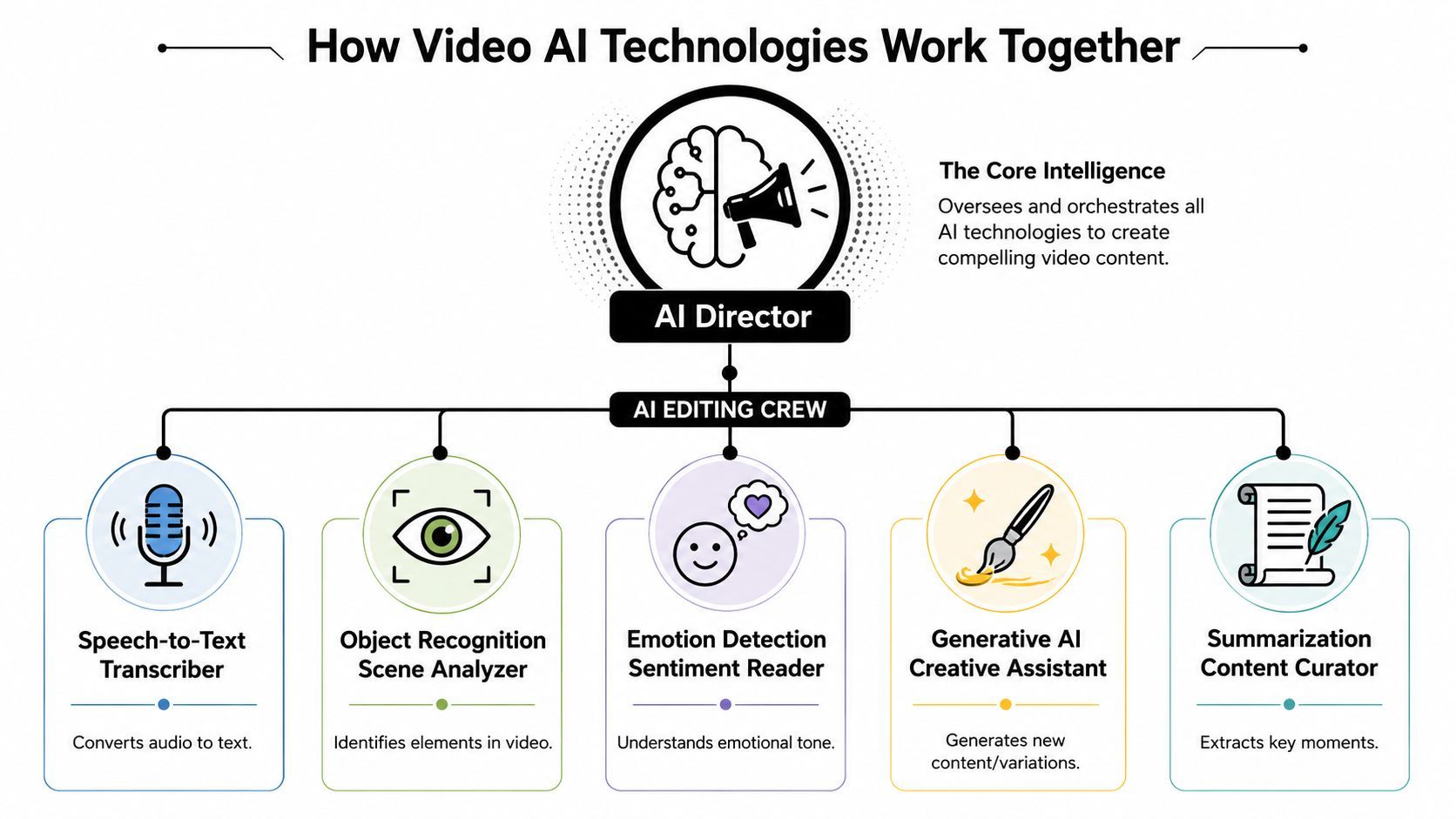
The practical value is in the handoff. If one part of the chain is weak, the whole result feels sloppy. A clean transcript improves clip selection. Better clip selection makes captions worth reading. Strong reframing keeps the final short usable on mobile. Video AI works less like one magic editor and more like a post-production line.
The AI editing crew
For long-form repurposing, the process usually starts with speech-to-text. The system converts spoken audio into a transcript so you can search ideas, detect topic changes, and generate captions without scrubbing through the timeline by hand.
Then computer vision takes over. It checks for speaker changes, face position, scene cuts, gestures, and moments where the frame needs to shift. That matters because a good short is not only about what was said. It also needs a usable frame.
A summarization layer sits on top of that analysis and tries to rank moments by likely interest. In creator terms, this is the first pass assistant. It narrows a long recording into a smaller set of candidate clips. A strong AI video summarizer for finding clip-worthy moments saves time because you start from options instead of a blank timeline.
After that, auto reframing and caption styling package the clip for the platform. Reframing keeps the subject visible in a vertical crop. Captions add readability and pacing. If you publish on Shorts, Reels, or TikTok, those finishing layers are not decoration. They are part of whether the clip works.
Analytical AI versus generative AI
Creators often lump these together, but they solve different production problems.
Analytical video AI works on footage you already recorded. It transcribes, finds sections, detects speakers, crops for format changes, and prepares clips for publishing. This is the category that matters most when you are sitting on a library of podcasts, webinars, interviews, or talking-head videos.
Generative video AI creates new visuals or heavily alters existing footage. It can produce backgrounds, b-roll, animated scenes, or stylized inserts. That can be useful, but it is a different job.
Tool behaviorWhat it helps withBest use case
Analytical AI
Finding moments, captions, reframing, repurposing
Podcasts, interviews, webinars, tutorials
Generative AI
Creating scenes, variations, visual concepts
B-roll, explainers, stylized inserts, concept visuals
The trade-off shows up fast in real editing. Analytical tools usually save more time on proven source material. Generative tools can add production value, but they also create more review work because you have to check whether the output fits the script, brand, and pacing.
Where the workflow still breaks
This is the part many roundups skip. These systems do not fail in dramatic ways most of the time. They fail in small workflow-breaking ways.
Auto reframing still struggles with fast camera motion, multiple speakers in one shot, and wide compositions where the subject is not obvious. Summarization can overrate clean sentences that read well in text but land flat on video. Captioning is usually strong, but speaker names, niche terms, and intentional pauses still need review.
Quality is less about whether the AI looks impressive in a demo and more about whether the output survives contact with your actual footage. A webinar with static framing is easy. A handheld street interview is harder. A podcast with one centered host is easy. A panel discussion with interruptions and side glances exposes weak detection fast.
The useful question is simple: where does the system reduce labor, and where do you still need judgment? For most creators, AI handles the first pass well. Humans still make the keep-or-kill decision on clip quality, pacing, and context.
Your New Workflow From Long Form to Viral Shorts
The most valuable use of video AI for most creators isn't making something from nothing. It's turning one strong long-form asset into a batch of usable short-form posts without reopening your editing software for half a day.
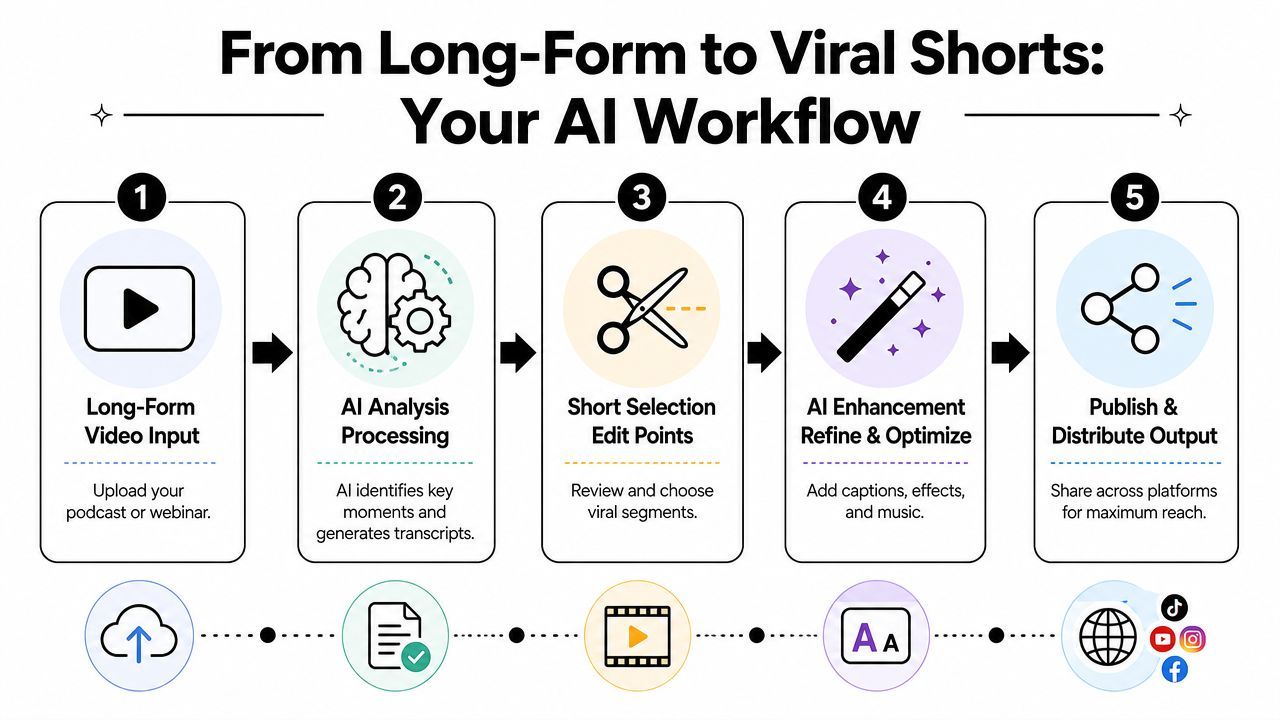
A straightforward long-video-to-short-video workflow usually looks like this.
Step 1: Start with a source that already has density
Not every long video deserves repurposing. The best candidates have frequent idea changes, strong opinions, teachable moments, or clean question-and-answer structure. Podcasts, webinars, interviews, sales calls, educational breakdowns, and founder updates usually work well because they naturally contain multiple extractable beats.
A meandering vlog with no clear topic shifts is harder. So is a panel discussion where people constantly interrupt each other.
Step 2: Upload the full asset and let the first pass happen
Let the AI handle the grunt work. Upload a file or link, then let the system scan for hooks, transcript cues, speaker moments, and crop opportunities. In a tool like Klap, that first pass typically includes clip suggestions, auto captions, and mobile reframing.
The key is to treat this output as a draft, not a verdict.
If the AI gives you ten decent clip candidates, that's already a win. You don't need perfection at the selection stage. You need a shorter path to good judgment.
Here's a visual walkthrough of that process in action:
Step 3: Edit the hook, not the whole clip
Most creators waste time polishing the middle before fixing the opening. The first seconds carry the clip. If the opening line is weak, buried, or too slow, the rest of the clip rarely gets a fair chance.
Focus your review on:
- The first line: Does it start with tension, novelty, or a direct promise?
- The cut point: Did the AI begin too early with throat-clearing?
- The frame: Is the speaker centered well for vertical viewing?
- The captions: Are they accurate and paced well enough to read on mobile?
- The ending: Does it stop after the payoff, or linger too long?
Ultimately, human taste matters most. AI can identify candidate moments. It still struggles with nuance like sarcasm, delayed punchlines, or context that makes a clip understandable to a cold audience.
Step 4: Format for the platform, not your editing timeline
A short clip shouldn't just be shorter than the original. It should feel native to the destination platform. That usually means vertical framing, visible captions, immediate context, and a pace that doesn't require patience.
This is also where creators often underestimate the value of automation. The average time savings for creators using AI video repurposing platforms is 85–90%, and a 60-minute podcast that traditionally takes 4–6 hours of manual clipping can become 10–15 ready-to-post shorts in under 30 minutes, according to Upskillist's review of AI repurposing workflow outcomes.
That kind of time compression changes what's possible. You stop asking whether a long video is worth repurposing and start assuming it should be.
Step 5: Publish in batches and learn from the outputs
The final gain isn't just speed. It's volume with feedback. When one long-form piece produces multiple shorts, you learn faster. Which hook format works. Which topic travels. Which speaker style clips well. Which lessons need a tighter setup.
A practical publishing loop looks like this:
- Generate a batch from one long-form asset.
- Choose a mix of educational, opinionated, and curiosity-driven clips.
- Publish across platforms in native formats.
- Review what held attention and what died early.
- Feed those learnings back into the next recording.
This is a genuine workflow upgrade. Video AI shortens the mechanical steps so your content system can indeed compound.
The Real Benefits and Limits for Creators
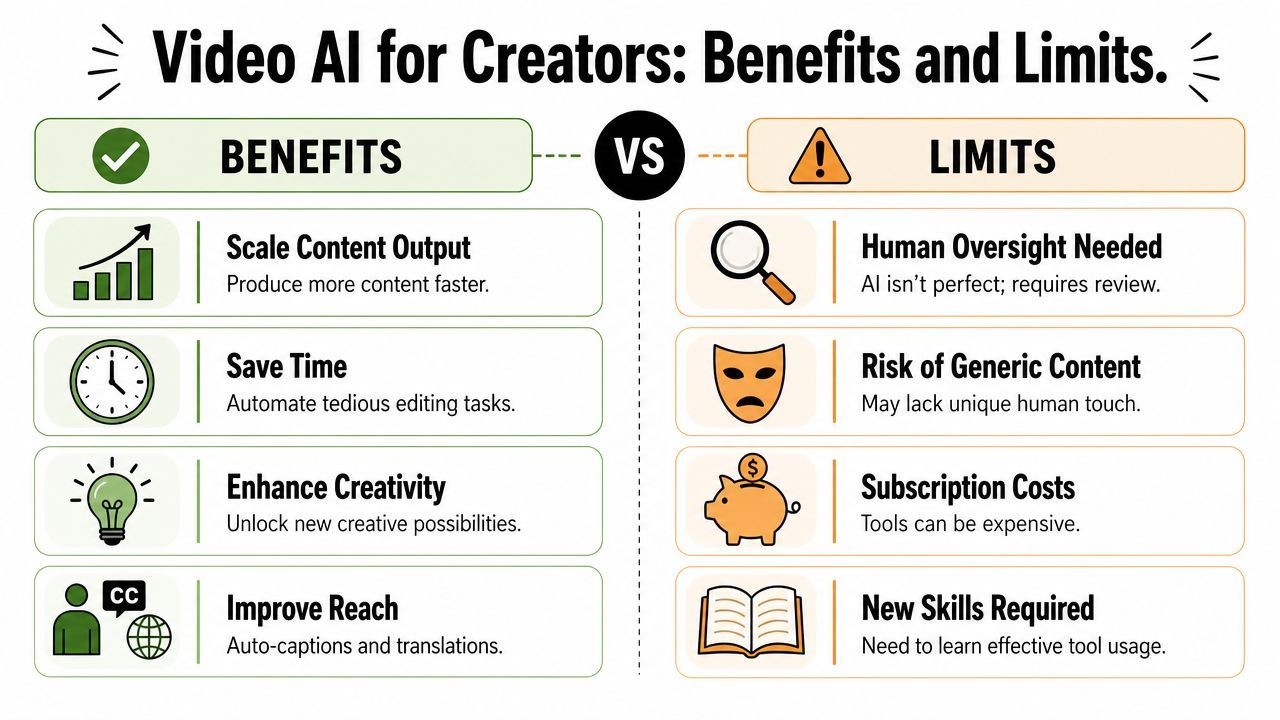
The upside of video AI is obvious the first time it saves you from manually watching your own footage at double speed. The less obvious benefit is strategic. It changes what content is economically worth producing and repurposing.
Where creators get real value
The best video AI tools don't just save minutes. They make backlogs usable. Old interviews, archived livestreams, course recordings, and client webinars can become usable inventory again because the extraction cost drops.
That's part of why this category has scaled so quickly. AI-powered video repurposing tools like Klap have processed an average of 9.3 million+ clips for over 1.5 million+ users, as described in Passionbits' profile of creator-focused repurposing at scale. The practical read is simple: creators aren't using these systems for novelty. They're using them to operationalize output.
Some benefits show up immediately:
- More shots on goal: One recording can feed multiple platforms and posting windows.
- Better asset recovery: Good ideas buried in old footage become discoverable.
- Less editing fatigue: You reserve attention for choices that shape performance.
- Faster testing: More clips means more feedback on hooks, topics, and framing.
Where the tools still fall short
This is the part many tool roundups skip. Video AI is useful, but it still misses the reason some moments work.
A clip can be technically clean and still feel dead. AI often struggles with context, irony, pacing choices, or the emotional arc that makes a statement land. It may choose the sentence that sounds complete instead of the sentence that creates curiosity. It may preserve every word when the clip needs a harder cut.
Here's the trade-off in plain terms:
StrengthLimitation
Fast first pass
May select safe moments instead of sharp ones
Automatic captions and crops
Can misread emphasis or visual priority
Scalable repurposing
Can flatten your style if you accept defaults every time
Consistent formatting
Still needs a final human check for tone and context
Reality check: AI is very good at reducing editing labor. It is not reliably good at protecting voice, subtext, or comedic timing without supervision.
There's also a creative risk that sneaks in over time. If you always publish whatever the machine surfaces first, your content can drift toward generic clips with the same rhythm, same caption style, and same predictable framing. Efficiency is useful. Sameness is expensive.
What works best in practice
Use video AI where the cost of manual work is high and the cost of a wrong first draft is low. First-pass clipping fits that perfectly. Final creative judgment doesn't.
A healthy division of labor looks like this:
- Let AI scan and suggest
- Let AI caption and resize
- Let humans decide what deserves publishing
- Let humans rewrite titles, intros, and packaging
That's the version that tends to hold up. You get scale without handing over taste.
How to Choose the Right Video AI Tool
You finish recording a 60 minute podcast, open a video AI tool, and get hit with a wall of promises: auto clips, generative scenes, captions, avatars, reframing, templates. The wrong move here is buying for the demo instead of the job. A flashy product can still leave your real bottleneck untouched.

Start with the question your weekly workload is already asking. Are you trying to turn long-form footage into publishable shorts faster? Are you trying to create visuals you never shot? Or do you want an editor that keeps human control but cuts down the repetitive work?
Those are different purchases.
Match the tool to the job
I sort video AI tools into three practical buckets.
Repurposing and clipping tools
These are built for creators with a content backlog. Podcasts, interviews, webinars, courses, livestreams. If the footage already exists, the tool's job is to find usable moments, crop them for vertical platforms, caption them, and get them into review fast.
Look for:
- Transcript-based clip suggestions
- Automatic vertical reframing
- Editable captions
- Fast exports for Shorts, Reels, and TikTok
- A review workflow that makes quick fixes easy
This category usually gives the fastest return because it attacks the ugliest part of the workflow: digging through long recordings for moments worth posting.
Generative video tools
These tools create footage instead of repackaging it. They fit concept pieces, stylized inserts, product visuals, explainer sequences, and synthetic b-roll. They can also help mock up ideas before a real shoot.
Look for:
- Prompt control
- Reference image or footage support
- Style consistency across shots
- Editable iterations
- Motion quality that holds up in playback
Numerous guides often become too optimistic. A generated frame can look polished and still fail as video. Motion often gives the illusion away first. Camera movement, subject behavior, and scene continuity still break more often than creators expect. If your audience is used to live-action pacing, that gap matters.
For visual ideation, these tools can still be useful. I've seen creators use them to test moodboards, ad concepts, and even unique graphic tee concepts before committing to a production path.
AI-enhanced editors
This group sits in the middle. You still edit in a more traditional environment, but AI speeds up the tedious parts: transcript editing, silence removal, filler word cleanup, object masking, search, and rough cuts.
Look for:
- A timeline that feels natural to you
- Text-based editing
- Audio cleanup tools
- Review and collaboration features
- Manual control when the automation gets it wrong
If you already have an editing habit and don't want to hand your decisions to a black box, this category often makes more sense than a fully automated repurposing app.
Judge with the right criteria
“Best” is too vague to be useful. The better question is whether a tool fails in ways you can tolerate.
For repurposed talking-head clips, judge it like an assembly line tool:
- Does the crop stay locked on the speaker without drifting?
- Do captions remain readable after export?
- Can you approve several clips in one sitting without fighting the interface?
- Can you correct bad clip choices quickly?
For generated footage, judge it like a director reviewing takes:
- Does motion feel natural over time?
- Does the background stay coherent across frames?
- Does the subject stay recognizable when angle or framing changes?
- Does camera behavior feel intentional, or does it feel stiff?
That last point gets overlooked. Creators often focus on image quality and ignore motion quality until the final render. In practice, viewers notice the opposite. They will forgive a stylized frame sooner than they forgive weird movement.
Choose the tool that removes the task you repeat every week and fails in ways you can fix fast.
A creator publishing daily short-form clips usually needs dependable throughput, not cinematic novelty. A creator building stylized campaigns may accept slower output in exchange for more control. The right choice depends less on the feature page and more on what your calendar keeps punishing you for.
Future Trends and Ethical Questions in Video AI
Video AI is heading in two directions at once. One is convenience. Editing through conversation, multimodal prompting, smarter repurposing, avatar-based production, and increasingly fluid transformation of existing footage. The other is realism. Tools are getting better at making generated or edited video feel less synthetic and more like something a human camera operator might shoot.
The convenience side will keep lowering production friction. Creators will be able to turn rough ideas, references, and existing media into publishable assets faster. That's useful, especially for teams producing explainers, social clips, product demos, and educational content at high frequency.
Achieving realism is harder. A lot of current generated footage still looks fake for a reason most creators can feel but don't always name. The “camera motion gap” remains a core weakness. Many AI-generated videos fail not because the visuals are bad, but because the camera feels locked in place, while live-action footage has dynamic movement that helps hold attention on platforms like TikTok and Reels, as discussed in the arXiv analysis on AI video failure modes and motion cues.
The next quality battleground
This matters more than most tutorials admit. Texture and lighting can look impressive in a single frame. Video lives or dies in transition, movement, and framing behavior over time. If the camera never breathes, tracks, drifts, or reacts like a human operator, the clip often feels sterile even when the image itself looks polished.
That's why creators should pay more attention to motion language in prompts, edits, and generated inserts. If you're exploring stylized visual direction, studying references like unique graphic tee concepts can help sharpen your sense of composition, texture, and visual identity. But for video, you still need to think beyond the frame and ask how the shot moves.
The ethical layer creators can't ignore
The more capable these tools get, the less optional creator ethics become. Deepfakes, voice cloning, synthetic avatars, copyright concerns, and misleading edits are no longer edge cases. They're practical publishing decisions.
A few rules go a long way:
- Disclose meaningful AI use when it affects how viewers interpret authenticity.
- Avoid synthetic likeness use without permission.
- Check rights carefully when generated content imitates protected styles or assets.
- Keep your editorial standard human-led even if the production steps become automated.
The creators who benefit most from video AI won't be the ones who automate everything. They'll be the ones who build fast systems without losing trust.
If you're sitting on long videos and want a faster path to social-ready clips, Klap is built for that workflow. You can upload or link long-form content, let the system identify likely highlights, generate captions, reframe for vertical formats, then review and export the clips you want to publish.
