
AI Thumbnail Maker: Boost Your Videos in 2026
Other

You've finished editing the video. The hook is strong, the pacing works, and the captions are clean. Then you hit the step that still slows everything down. The thumbnail.
For a lot of creators, that's where momentum dies. You open Photoshop or Canva, test a few screenshots, resize text, move a face cutout three times, then second-guess the whole layout. By the time you export something usable, you've spent more energy on the cover than on the content strategy behind it.
That bottleneck is exactly why the AI thumbnail maker category is getting so much attention. These tools don't just generate graphics. They turn thumbnail creation into a faster, more testable part of the publishing workflow.
What Are AI Thumbnail Makers and Why They Matter Now
An AI thumbnail maker is a tool that uses generative image systems, layout suggestions, prompts, and editing controls to help creators produce video thumbnails faster than a manual design workflow. In practice, it acts less like a one-click magic button and more like a visual ideation engine.

The shift matters because thumbnails sit at the front of the entire viewing journey. They affect whether someone clicks, skips, or keeps scrolling. If you publish long-form YouTube videos, Shorts, Reels, podcast clips, or educational content, your thumbnail isn't just packaging. It's part of the distribution system.
Why the category is heating up
The broader market is still early, but it's moving fast. One forecast estimates the AI thumbnail generation market at USD 908 million in 2025 and projects it will reach USD 10,227.8 million by 2035, with a 27.4% CAGR from 2026 to 2035 according to Market.us coverage of the AI thumbnail generation market.
That projection tells you something important. Creators and marketing teams aren't treating thumbnail generation as a novelty anymore. They're folding it into repeatable production systems because visual output has become constant. A single long-form recording often turns into a YouTube upload, a few Shorts, social cutdowns, and a campaign of supporting assets.
What these tools actually do well
The strongest AI thumbnail makers usually help with a mix of tasks:
- Idea generation for multiple visual directions
- Subject extraction from video frames or reference images
- Text and composition drafting for attention-first layouts
- Rapid variation creation so you can compare options instead of debating one design
- Minor post-editing support before export
AI thumbnails matter most when you stop asking for one perfect image and start asking for several testable options.
That's the practical change. Before, thumbnail design was often a slow, handcrafted task. Now it can sit inside the same fast-moving workflow as clip editing, captioning, resizing, and publishing.
The Real Benefits Beyond Just Saving Time
Time savings are the obvious selling point, but they're not the deepest reason to use an AI thumbnail maker. True value shows up when faster production changes how you make decisions.
Guidance aimed at creators notes that manual thumbnail production often takes 20 to 60 minutes, while AI-assisted workflows can reduce that to roughly 2 to 5 minutes after minor edits. The same source says optimized thumbnails can improve click-through rates by 30% to 154%, which is why speed matters strategically, not just operationally, according to Thumbmagic's overview of AI thumbnail maker workflows.

Better output without needing design-heavy skills
A lot of creators know what they want a thumbnail to communicate. Fewer know how to build it from scratch. That gap used to force a choice between learning design software, hiring help, or settling for something generic.
AI changes that starting point. Instead of beginning with a blank canvas, you begin with directions, variants, and visual options you can react to. That lowers the skill barrier without removing editorial judgment.
Here's where that helps most:
- Solo creators who need speed more than advanced compositing
- Marketing teams that need volume across multiple channels
- Podcast and webinar teams turning spoken content into clickable visuals
- Agencies managing several client brands at once
Testing becomes practical, not theoretical
Many teams say they want to test thumbnails. Few do it consistently because manual production makes each variation expensive in time and attention.
When a tool can generate several usable directions quickly, testing stops being a nice idea and becomes part of the workflow. You can compare expression-heavy versions against text-led versions. You can test clean backgrounds against busier, contextual scenes. You can explore curiosity versus clarity without reopening the whole design process.
Practical rule: Use AI to widen the option set first. Narrow it with human judgment second.
That sequence matters. If you try to perfect a single thumbnail too early, you lock into one concept before you've explored what else might earn the click.
Brand consistency gets easier at scale
The third benefit is less flashy but very useful. Teams that publish often need repeatability. A good AI thumbnail maker can help preserve a recognizable look across a channel by keeping your visual cues stable.
That usually means:
- Recurring framing choices for faces or products
- Consistent color direction across episodes or series
- Predictable text hierarchy for recurring formats
- Reusable references that keep each design on-brand
Without that structure, output gets fast but messy. With it, speed becomes an asset instead of a brand risk.
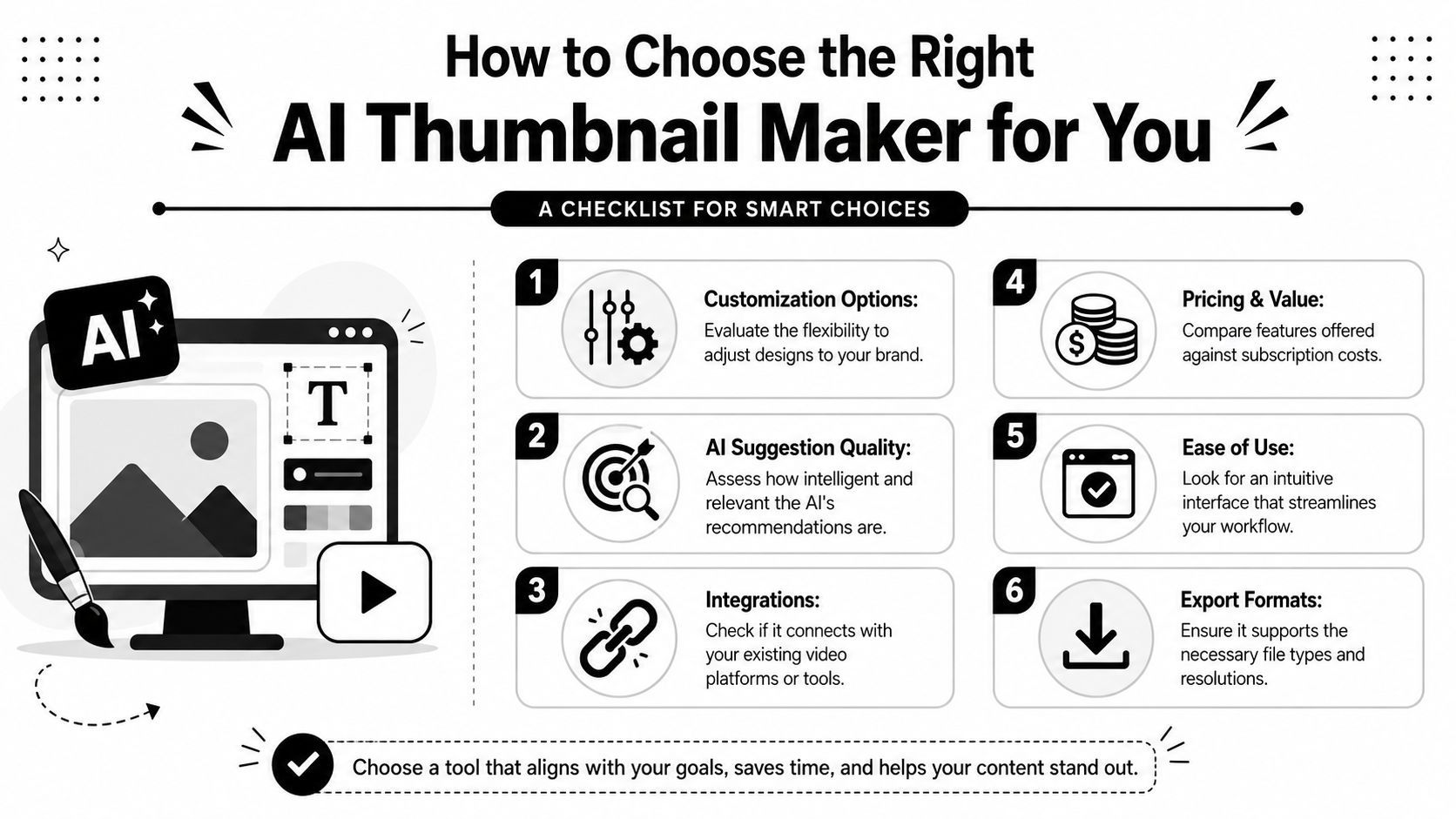
How to Choose the Right AI Thumbnail Maker for You
Most thumbnail tools look similar in a landing page demo. Actual differences show up after a week of production. That's why choosing an AI thumbnail maker should start with workflow fit, not feature hype.
If you want a quick visual walkthrough of what some creators evaluate in these tools, this video is a useful companion before you compare products side by side.
Start with exports, not prompts
A polished interface doesn't help if the file you export still needs cleanup. One practical benchmark is whether the tool gives you platform-ready assets such as 1280×720 PNGs, which helps preserve YouTube-friendly aspect ratio and sharpness while cutting post-processing, as noted in Adobe Express guidance on AI thumbnail exports.
That sounds small, but it affects the handoff from design to publishing. If your file leaves the tool already sized correctly, your team avoids a lot of quiet friction.
A short checklist that actually matters
Use this when comparing tools:
What to checkWhy it matters
Variation quality
The tool should generate meaningfully different concepts, not near-duplicates.
Reference-image support
Helpful when you want consistency in style, layout, or subject treatment.
Editing controls
You'll still need to adjust text, crop, emphasis, or background details.
Export readiness
Clean, platform-sized outputs save time downstream.
Workflow fit
The tool should sit comfortably beside your editor, scheduler, and asset library.
Match the tool to your business model
A YouTuber and an e-commerce operator often need different things from AI design software. If your work stretches beyond thumbnails into merch, product mockups, or social asset production, this guide for POD entrepreneurs is useful because it frames AI design tools through a commercial workflow, not just a creator one.
For thumbnail-specific comparison, Klap has also published its own thumbnail maker tool roundup, which can help you build a shortlist before you test products yourself.
Don't buy based on the first output. Buy based on whether the tool keeps saving time after the tenth video.
That's the ultimate test. A strong tool should still feel efficient when you're moving quickly, managing revisions, and publishing on a deadline.
Best Practices for a Higher Click-Through Rate
The common pitch around AI thumbnails is wrong in one important way. An AI thumbnail maker does not guarantee a high click-through rate.
What it does do well is make experimentation cheap enough to do consistently. That's a big difference. The ultimate win isn't a magically optimized thumbnail on the first try. It's a workflow that helps you generate, compare, refine, and keep learning what your audience responds to.
Public-facing tool pages often promise “high-CTR” output, but the more honest view is that AI works best as a production accelerator and testing system, not as a guaranteed performance engine. That gap is discussed clearly in Melies' look at AI thumbnail maker claims and CTR uncertainty.
Prompt for intent, not decoration
The strongest outputs usually come from clear prompt structure. Effective prompt-guided thumbnail generation improves when you specify the subject, background, objects, emotion, and visual style, which reduces ambiguity and gives you more control over the result, as explained in this walkthrough on prompting AI thumbnail makers.
That means weak prompts often fail for predictable reasons:
- Too vague and the model invents irrelevant detail
- Too crowded and the composition loses hierarchy
- Too style-focused and the emotional hook disappears
- Too literal and the thumbnail becomes descriptive, not clickable
A stronger prompt is usually built around one clear viewing trigger. Surprise. Tension. Outcome. Contrast. Curiosity. Then you shape the visual around that trigger.
Build variants around one changing variable
A lot of creators generate five or six options that all change at once. Different face, different text, different background, different color, different crop. That makes learning difficult.
A better testing pattern is to hold most elements steady and change one thing per batch.
For example:
- Version set one changes only the facial expression
- Version set two changes only the text treatment
- Version set three changes only the background intensity
That gives you cleaner feedback on what's driving the click.
If you need the technical baseline right before testing variants, Klap's guide to thumbnail size for YouTube videos is a practical reference point for getting the format side correct first.
The best AI thumbnail process looks less like design inspiration and more like performance testing.
Judge thumbnails by the promise they make
A thumbnail doesn't need to summarize the whole video. It needs to make a credible promise that the title and opening moments can fulfill.
Use that lens before publishing:
- Clarity first. Can someone understand the core tension quickly?
- One focal point. If everything shouts, nothing stands out.
- Mobile readability. Tiny text and dense detail usually collapse on smaller screens.
- Expectation match. If the thumbnail overpromises, watch time suffers even if clicks rise.
That last point matters. A higher click that creates disappointment isn't a durable win.
A Modern Creator Workflow with Klap and AI Thumbnails
The most useful place for an AI thumbnail maker is inside a broader repurposing system. That's where the tool shifts from a design shortcut to a performance layer.
Many creators already work this way without formalizing it. They publish one long video, spin out short clips, learn which moments attract attention, then use those signals to improve future packaging. The thumbnail process should plug into that loop, not sit outside it.

A simple workflow that compounds insight
One practical version looks like this:
- Record the long-form asset
Start with the main interview, tutorial, podcast, webinar, or product walkthrough. - Extract short-form moments
Use a tool that identifies strong hooks, reframes for vertical, and prepares clips for social channels. One example is Klap's AI video editor, which is built for turning long videos into short, social-ready edits. - Review what feels most clickable
Don't just look at the transcript. Notice the emotional spikes, gestures, reaction shots, before-and-after moments, and scenes that create immediate tension or clarity. - Feed those signals into your thumbnail prompts
If the strongest short clip centers on surprise, proof, or conflict, use that same signal in your thumbnail generation prompts and variations. - Publish with a testing mindset
Keep alternate concepts ready, especially if the first packaging approach underperforms.
Why short-form insights improve long-form packaging
Short clips are useful beyond distribution. They reveal what the audience notices fast.
That's valuable for thumbnails because the same moments that stop a scroll in vertical feeds often point to stronger visual framing for YouTube covers. A raised eyebrow, a bold object, a visible outcome, or a strong contrast shot can carry over from clip selection into thumbnail design.
Here's the connection in practice:
- Clip hook becomes the thumbnail's emotional cue
- Strong visual moment becomes the focal image
- Audience curiosity point becomes the text angle
- Repeated topic pattern becomes a reusable series format
When you use clip performance as thumbnail input, you're designing from audience signals instead of guesswork.
This approach also keeps production lean. You don't need to invent a thumbnail concept in isolation. You already have raw material from the footage and from the strongest segments pulled out of it.
The Future of AI in Your Content Creation Strategy
AI thumbnail makers are becoming important for the same reason AI editing tools became important. They remove repetitive production friction and make iteration easier.
That doesn't mean they replace judgment. They don't know your audience better than you do. They don't know which promise fits your channel voice, what level of curiosity your viewers trust, or when a dramatic visual crosses into something misleading. Those calls still belong to the creator, editor, or strategist.
Another issue that deserves more attention is governance. As recreation workflows get easier, creators need rules around brand safety, originality, and likeness use. Tutorials increasingly show how easy it is to borrow the feel of an existing thumbnail or generate AI versions of a person's face, which makes internal standards on consent, disclosure, and differentiation much more important, as highlighted in this discussion of recreated thumbnails and synthetic media risk.
The broader content stack is moving in the same direction. Creators now pair AI editing, AI captions, AI image generation, and even adjacent tools that help create royalty-free beats when they need original audio elements for short-form videos. The pattern is consistent. AI handles more of the production surface area, while humans focus more on positioning, narrative, taste, and testing discipline.
That's the right way to think about an AI thumbnail maker. Not as a shortcut to a perfect image, but as a system for faster learning. If your team publishes video regularly, that shift is hard to ignore.
If you're already sitting on long videos, podcasts, webinars, or interviews, Klap can help you turn them into short clips you can distribute, then use those strongest moments to inform smarter thumbnail decisions across your channel.
