
Master YouTube Bulk Upload for Growth in 2026
Other
You’ve probably got the same mess most growing channels have. A folder full of finished videos, a second folder full of thumbnails, a notes doc with title ideas, and a creeping sense that publishing is now the bottleneck.
That’s why youtube bulk upload is so important. Not because dragging multiple files at once feels nice, but because manual publishing breaks the moment your channel starts producing at any meaningful volume. The upload itself is rarely the hard part. The hard part is repeating titles, descriptions, tags, scheduling, checks, and post-upload QA over and over without making mistakes.
Creators usually search for bulk upload when they’re already behind. They’ve recorded the podcast, clipped the webinar, exported the Shorts, and now they’re staring at a pile of admin work. That’s when a scalable system matters more than another tutorial showing where the upload button sits.
Why Your Channel Needs a Bulk Upload Strategy
A bulk upload strategy is really a publishing system. It’s the difference between having content and bringing it live consistently.
That matters because YouTube growth usually takes far more volume than newer creators expect. VidIQ’s analysis of over 5.3 million channels found that 30.89% of creators who reached 1,000 subscribers had uploaded 150+ videos, and channels approaching 1 million subscribers averaged around 3,900 videos (VidIQ’s channel volume analysis). Those numbers don’t mean every channel must flood YouTube. They do mean one thing very clearly: serious growth usually sits on top of repeatable output.
Manual publishing doesn’t scale
Uploading one by one works when you post occasionally. It fails when you have:
- A podcast or interview show producing multiple clips from every episode
- A brand channel with tutorials, demos, webinars, and repurposed Shorts
- An agency workflow where one editor finishes assets and another person publishes
- A backlog problem where content is ready, but nobody wants to spend a day entering metadata
The admin load compounds fast. Every manual step creates another chance to publish the wrong thumbnail, forget a link in the description, or leave a video private when it should be scheduled.
The real job is consistency
Most creators think they need more ideas. Often they need a better release process.
A proper system lets you batch the boring parts. You can prep filenames, thumbnail naming, metadata templates, publish windows, and quality checks before touching YouTube Studio. That frees your attention for what drives performance: topic selection, hook quality, retention, and packaging.
Practical rule: If publishing takes more energy than editing, your workflow is upside down.
A lot of teams also discover that bulk publishing only works when it’s tied to a broader overall content strategy. If you don’t know which formats you’re feeding, which series repeat, and which videos support Shorts repurposing, your upload process will stay messy no matter what tool you use.
Getting Started with YouTube's Native Bulk Features
A common failure point looks like this. Ten finished videos are sitting in a folder, publishing day is blocked off, and two hours later the files are uploaded but the important work is still waiting. Titles need cleanup. Thumbnails got mixed up. Three videos should be drafts, four should be scheduled, and one went out with the wrong audience setting.
That is the gap between uploading files and running a publishing system.
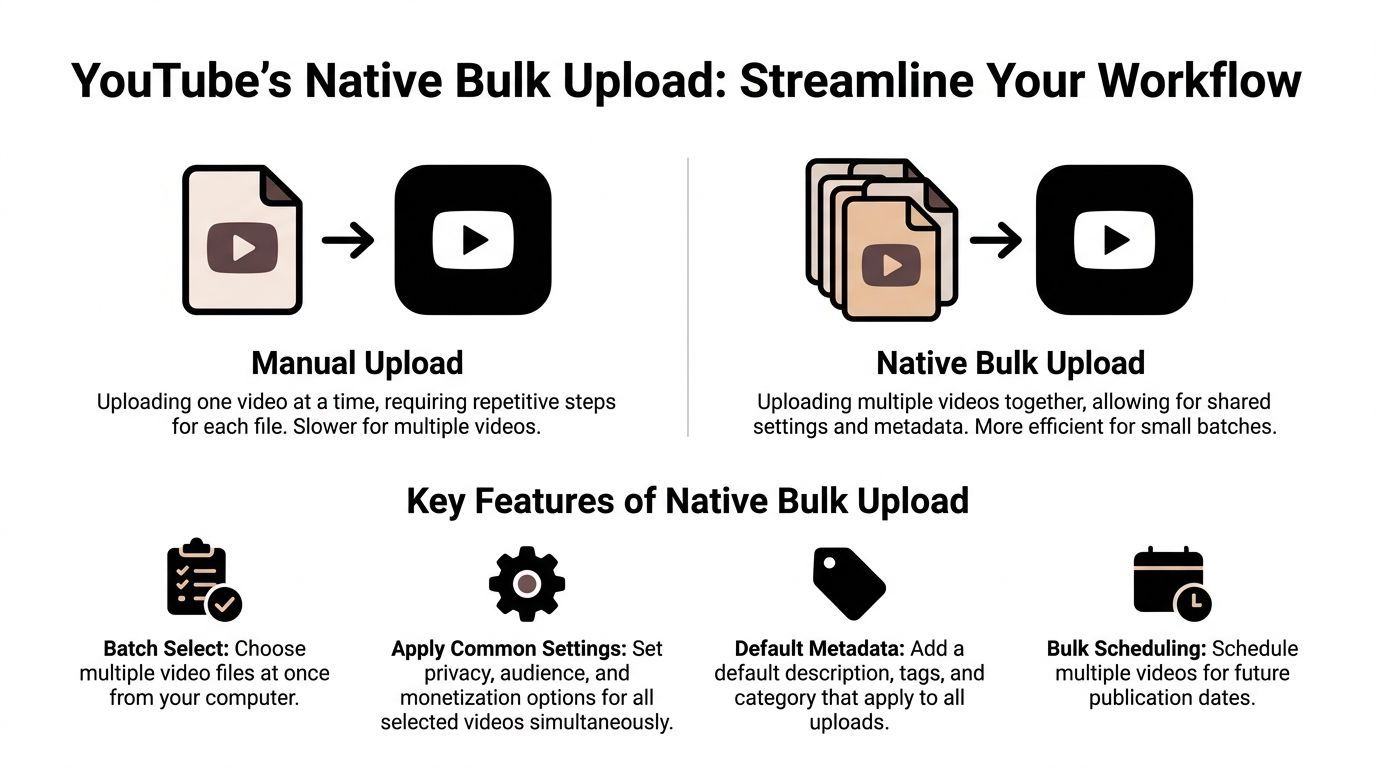
YouTube’s native tools are the right starting point for solo creators, small teams, and channels with a steady but manageable output. They are stable, built into Studio, and good enough when your process is organized before upload starts. They break down once your volume, metadata variation, or handoff complexity rises.
The standard multi-file uploader
The multi-file uploader handles the first layer well. Drop in several files, set shared basics, and get the assets into Studio without uploading one at a time.
It works best for clear, repeatable batches:
- A week of Shorts from one recording session
- Course lessons that follow a fixed format
- Product videos with similar disclosures
- Draft uploads prepared for later review
It gets slower when each video needs different packaging. That usually shows up in channels publishing clips from long-form content, where every title, hook, and thumbnail needs its own treatment.
The practical limitation is simple. Native bulk upload is still a small-batch tool. You can upload multiple files together, but you should expect manual cleanup, per-video checks, and some hard limits on how much can be edited in one pass. If your plan depends on perfect bulk metadata control during upload, Studio will frustrate you.
Prep work decides whether native upload feels fast or sloppy
The creators who say YouTube bulk upload is easy usually did the hard part before opening Studio.
Use a pre-upload package:
- Final filenames
Name files so they sort cleanly and make sense at a glance. A folder full offinal_v2_REAL.mp4is how thumbnails get assigned to the wrong clip. - Thumbnail pairing
Match video and thumbnail names. If the files areep42-clip-03.mp4andep42-clip-03.jpg, publishing moves faster and errors drop. - Metadata sheet
Keep titles, descriptions, links, and publish notes in one working document. A spreadsheet is enough. Teams that want to build around API-based publishing later usually start with the same discipline, then connect it to a creator workflow with a publishing API. - Publish status
Mark each asset as draft, scheduled, or hold. That prevents the classic mistake of uploading everything and deciding release order inside Studio.
This is also the point where some teams stop trying to force Studio to do everything and explore dedicated creator applications for asset tracking, review, and scheduling support outside YouTube.
Bulk editing inside YouTube Studio
Bulk edit is the native feature that saves the most time once files are already in the system.
After upload, select multiple videos in Studio and apply shared changes where consistency matters. This is useful for campaign-level metadata, recurring description blocks, and visibility updates.
Bulk edit works well for:
- Description blocks such as disclosure text, affiliate notices, or standard resource links
- Tags across a series or campaign
- Visibility settings when several videos move from private to scheduled
- Audience settings when the same rule applies across the batch
Be careful with anything that affects packaging quality.
Use extra review for:
- Titles, because repeated title structures flatten click-through potential
- Descriptions, because copy-pasting the same text across a library makes the channel feel generic
- Older videos, because one rushed bulk change can overwrite details that were helping search or browse performance
The working rule is straightforward. Bulk-edit what should stay identical. Review what should help each video compete on its own.
A native workflow that holds up under real publishing pressure
For many channels, the strongest native setup is not fully automated. It is controlled.
Workflow stageBest native methodWhy it works
Uploading a few assets
Multi-file upload
Fast for short batches
Applying shared settings
During upload
Cuts repeated setup work
Metadata cleanup
Bulk edit in Studio
Useful for repeated text and settings
Final scheduling
Per-video review
Catches packaging mistakes before publish
That last step matters more than people expect. Scheduling every video manually feels slower, but it prevents accidental content dumps and catches small errors that hurt performance later.
The feature YouTube built for true bulk operations
YouTube does have a higher-volume option. Its official Package Uploader lets eligible partners submit metadata for large asset sets through a spreadsheet-based process, which makes YouTube’s own view of scale pretty clear (YouTube’s Package Uploader documentation).
Most creators will never get access to it.
Still, the lesson is useful. Once output gets serious, spreadsheet-style organization stops being optional. Even if you stay inside native tools, the scalable part of the workflow starts outside the uploader.
Advanced Workflows for High-Volume Creators
You feel the break point fast on a busy channel. Ten exports are ready, thumbnails are in three folders, titles still live in a doc, and someone asks whether all of them can go out next week without flooding subscribers. At that stage, bulk upload stops being a button-click problem. It becomes an operations problem.
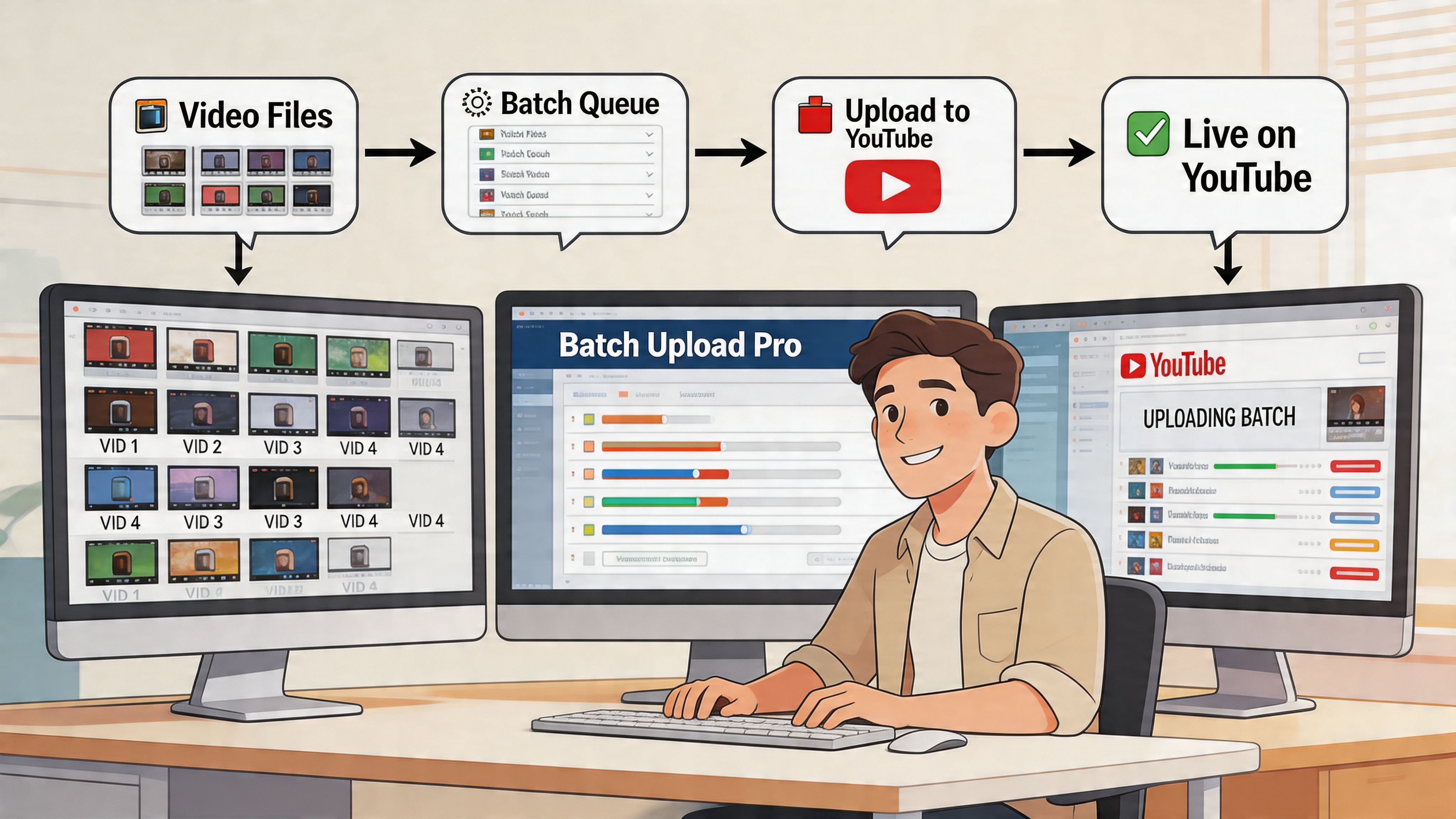
High-volume creators usually outgrow YouTube Studio in one of two ways. The channel publishes often enough that manual setup wastes hours every week, or the team needs tighter handoffs between editing, packaging, QA, and scheduling. The fix is not more clicking speed. The fix is a system that keeps files, metadata, and publishing status aligned.
Three paths that actually scale
There are three workable models for high-volume youtube bulk upload, and each one fits a different kind of team.
MethodBest forTrade-off
YouTube Data API
Technical teams, agencies, advanced creators
Setup friction and ongoing maintenance
CSV-driven workflow
Organized teams that want structured metadata prep
Requires strict naming and review discipline
Tool built on top of the API
Non-technical creators who still want automation
Faster setup, but less flexibility than custom scripts
The mistake is choosing based on features alone. Choose based on failure points. If uploads fail because nobody can keep titles, thumbnails, and publish dates straight, a spreadsheet-first workflow may solve more than a custom script. If the same batch pattern repeats every week, code usually wins.
Using the YouTube Data API
The API route gives the most control. It lets a team upload videos by script, assign metadata from structured inputs, and connect YouTube to the rest of the production pipeline.
That matters for channels with repeatable workflows, such as:
- Weekly podcasts split into clips and full episodes
- Education channels publishing lesson batches with fixed naming rules
- Agencies uploading client deliverables from standardized folder structures
- Media teams pushing multiple localized variants of the same asset
In those cases, code removes a lot of avoidable human error.
The trade-off is setup overhead. The upload logic is usually the easy part. The main slowdown is Google Cloud configuration, OAuth setup, permissions, token refresh handling, and making sure the script still works after account or policy changes. Smaller creator teams often stall here, which is why many channels stay half-manual even after deciding to automate.
Use the API if you expect the workflow to run for months, not just one big upload week.
The spreadsheet-first approach
A spreadsheet is still one of the best scaling tools in a YouTube operation because it separates content decisions from upload execution.
A useful sheet usually tracks:
- Video filename
- Working title
- Final publish title
- Description template or custom description
- Tags or keyword notes
- Thumbnail filename
- Playlist or content bucket
- Scheduled date and time
- Review status
- Notes for final QA
This setup works well when different people own different parts of publishing. Editors export assets. A channel manager writes titles. A producer checks links and disclaimers. The final uploader is not inventing metadata at the last minute inside Studio.
That change sounds small. It saves channels from some of the most common scaling mistakes, especially mismatched thumbnails, duplicate titles, broken links, and uploads that are technically ready but not packaging-ready.
When scripts beat dashboards
Custom scripts are best when the workflow follows the same rules every time.
Examples help here:
- A podcast team exports every clip into
/show-name/date/shorts/ - A course creator names every lesson with module and episode numbers
- An agency receives client batches in the same approved naming format each Friday
In those cases, a script can read filenames, map them to metadata rows, attach the right thumbnail, and upload everything as private for review. That is much more reliable than asking a tired team member to repeat the same sequence 30 times.
Dashboards are better when content structure changes often, approval chains are messy, or the person publishing is not technical. They are also easier to hand off when staff changes. Custom code saves time later, but it creates maintenance work someone has to own.
Third-party tools on top of the API
API-based tools sit in the middle. They give teams automation without forcing them to build and maintain the plumbing themselves.
That trade-off is usually worth it for creators who need volume but do not want to babysit scripts, auth tokens, and cloud settings. If you’re evaluating options, it helps to explore dedicated creator applications that are built for publishing operations rather than generic social scheduling. The right tool should reduce repetitive handling, approval confusion, and metadata mistakes.
For teams planning a connected system from clip generation through upload, a technical reference like the Klap REST API for programmatic video workflows is useful when mapping how assets move between tools.
What a high-volume workflow looks like in practice
The strongest systems are boring. That is a good sign.
A durable workflow usually looks like this:
- Editors export final files into a consistent folder structure
- Metadata lives in one controlled sheet
- Thumbnails use filenames that match the video exports
- A script or API-based tool reads the batch
- Videos upload as private or scheduled
- A human checks titles, descriptions, playlists, and thumbnails before release
That final check is where channels protect performance. I would never fully automate the last review on a high-output channel. One bad title template, one broken tracking link, or one thumbnail mismatch can hit an entire batch at once.
Here’s a useful walkthrough if you want to see a practical implementation mindset before building your own process:
The trade-off nobody mentions enough
Automation saves time after the workflow is stable.
At the start, it often feels slower than manual uploading because the team is building rules, naming standards, review checkpoints, and fallback plans. That work pays off later. By month three, the channel has fewer avoidable mistakes, faster handoffs, and a publishing rhythm that can scale without turning every upload day into cleanup.
How to Batch-Create Shorts at Scale with Klap
Most bulk upload problems start earlier than the upload stage. The primary shortage is often clip-ready inventory.
Long-form creators usually have enough source material. They don’t have enough time to turn that material into a steady stream of Shorts. That’s where a batch-creation workflow matters.

One long video can feed weeks of publishing
A webinar, podcast, interview, product demo, or tutorial often contains multiple usable moments. The issue isn’t whether those moments exist. It’s whether your team can find, format, caption, and export them fast enough.
A practical batch workflow looks like this:
- Start with one long-form asset
- Identify the strongest hooks or self-contained moments
- Reframe for vertical viewing
- Add captions
- Export a batch of Shorts
- Move the exported batch into your upload and scheduling workflow
That’s the basic logic behind using an AI clipper.
Why this matters for youtube bulk upload
Bulk upload only helps when there’s enough content ready to publish. If every Short still needs manual clipping, reframing, and subtitles, your upload process won’t be the bottleneck for long. Editing will.
That’s why repurposing systems matter so much for YouTube Shorts. One source video can become a small content library. Once those clips are exported, they fit naturally into a spreadsheet, API, or batch scheduling workflow.
For creators who want to turn existing videos into short-form assets, this page on https://klap.app/tools/youtube-to-shorts is a straightforward example of the long-form-to-Shorts workflow in practice.
What a strong batch-creation pipeline includes
The best setups don’t just create clips. They create publishable units.
That means each export should already be close to ready with:
- A clear opening hook
- Correct aspect ratio
- Readable captions
- Stable framing
- A filename that maps to metadata
- Enough variation that the batch doesn’t feel repetitive
This last point matters more than people think. If ten clips come from the same interview and all open with the same framing, same wording style, and same visual rhythm, the batch starts to look duplicated even if each clip is technically different.
What to avoid when making Shorts in bulk
Batch creation can make creators careless.
Watch for these problems:
- Overlapping clip topics that cannibalize each other
- Captions that are technically accurate but visually messy
- Hooks that start too late
- Exports with inconsistent naming
- Near-identical intros across a batch
A clean bulk system needs variety at the clip level and consistency at the operational level. Those are different jobs.
If every Short looks like it came from the same template, viewers notice before the algorithm does.
The practical payoff
Once long-form content reliably turns into a stack of clean Shorts, youtube bulk upload becomes worth optimizing. Before that, upload efficiency is solving the wrong problem.
For podcasters, educators, coaches, and brands with archives of existing video, the biggest realization is usually not “how do I publish faster?” It’s “how do I create enough good short-form inventory from what I already have?”
Solve that, and the rest of the system becomes useful.
Best Practices for Bulk Scheduling and Metadata
A batch of 30 finished videos feels productive right up until they all hit YouTube with the same title pattern, the same publish date, and the same thumbnail style. That is how channels create internal competition by accident.
The fix is simple to describe and harder to run well. Use bulk upload for operations. Use scheduling and metadata to control demand, pacing, and packaging.

Schedule in batches, publish in sequence
Uploading ten videos on Monday does not mean viewers should see ten videos on Monday.
High-volume channels usually separate the workflow into two jobs. First, get assets into YouTube fast. Second, decide the release order based on audience habits, series logic, sponsorship timing, and how much room each video needs to breathe.
A practical cadence looks like this:
StageWhat to do
Batch production
Edit and export multiple videos or Shorts together
Batch upload
Upload them as private or scheduled videos
Release planning
Assign dates and times based on format, topic, and audience behavior
Performance review
Check early click-through, retention, and comments before locking the next batch
This structure solves a real scaling problem. Teams get the efficiency of batched production without turning the channel page into a pile of near-duplicate uploads.
Build metadata from a system, not a copy-paste habit
Good metadata has controlled consistency and deliberate variation.
Use templates for the parts that should stay stable:
- Brand links
- Legal or affiliate disclosures
- Standard CTA blocks
- Series naming conventions
Customize the parts that affect click and relevance:
- The title angle
- The first lines of the description
- Topic-specific keywords
- The thumbnail text or concept
- The CTA if the video serves a different funnel stage
Channels often get sloppy regarding this practice. A team creates one strong title formula, then applies it to every asset in the batch. The result is operationally neat and commercially weak. If five videos look interchangeable on the channel page, viewers delay the click or pick none of them.
Treat filenames as the backbone of the workflow
This part is boring. It also prevents a lot of avoidable mistakes.
The file name should map cleanly to the metadata row, thumbnail file, and publish slot. If the source file is called final_v2_REAL_export_USETHIS.mp4, somebody will eventually attach the wrong title or thumbnail. Scaled upload systems break on tiny naming errors more often than on YouTube bugs.
A cleaner setup looks like this:
- One master sheet with title, description, tags, thumbnail name, and publish date
- One video ID that appears in the filename, thumbnail filename, and metadata sheet
- One owner for final approval before scheduling
That is the difference between a content system and a folder full of guesses.
Captions need a quality check before scheduling
Auto-generated captions are fine for draft review. They are not always fine for release.
This matters more on Shorts, where captions often do part of the retention work. Bad line breaks, delayed timing, or text obscuring the speaker’s face can drag down an otherwise strong clip. If your team needs a cleaner process, this guide on adding captions to YouTube Shorts properly is a useful reference before you lock metadata and schedule the post.
Leave room for processing and final review
Do not schedule uploads so tightly that there is no time to catch problems.
In practice, the safest workflow is to upload first, let YouTube finish processing, then do a final pass on playback quality, thumbnail rendering, chapter formatting, and caption appearance before the video goes live. This is less about perfection and more about avoiding preventable misses that hurt the launch.
A short pre-publish checklist keeps teams honest:
- Processing is complete
- Thumbnail matches the correct file
- Title is distinct from the rest of the batch
- Description links are correct
- Captions are readable on mobile
- Visibility setting and publish time are correct
- The video fits the release order
What actually works at scale
Channels that publish a lot without looking chaotic usually follow three rules.
- They batch production, not audience attention.
- They use metadata templates, but they rewrite the click-driving parts every time.
- They treat scheduling as programming, not admin.
That last rule is the one people miss. Scheduling is not a clerical step. It is how you turn a stack of finished files into a channel that feels consistent, intentional, and worth coming back to.
Troubleshooting Common YouTube Bulk Upload Errors
A bulk upload system usually fails in a few repeatable places. The fix is rarely hidden in YouTube. It is usually in the file, the naming, the sheet, or the handoff between those pieces.
Videos stuck in processing
Start with the export, not the dashboard.
A file can finish uploading and still fail during processing because the export is damaged, the codec is inconsistent, or the container was written incorrectly. I see this a lot with rushed edits, recycled project files, and videos that were exported twice through different tools.
Check these first:
- The file plays all the way through locally
- The export settings match a standard format YouTube handles well
- The upload finished and did not stall near the end
- The correct file was uploaded, not an older draft with the same name
If one video in a batch gets stuck while the others process normally, assume that file is the problem until proven otherwise. Re-export it, rename it clearly, and upload it again. That is faster than poking through metadata fields that have nothing to do with processing.
Published too early, looks blurry
This one hurts because it creates a bad first impression at the exact moment a video needs clean early signals.
If viewers hit the video before higher resolutions finish processing, they get a weaker version of the content. Some leave. Some skip ahead. Some decide the video is low quality before the actual quality is even available. As noted earlier, YouTube has warned creators not to rush publication before processing is done.
The fix is operational. Keep bulk uploads private or scheduled by default. Release only after the resolutions you care about are fully available and playback looks normal on desktop and mobile.
Metadata mismatch across a batch
This is the classic scale problem. The videos are fine. The system around them is sloppy.
Common causes:
- A filename does not match the row in the metadata sheet
- Titles or descriptions were pasted one row off
- Thumbnail files use a different naming pattern than the video exports
- Two people edited the source sheet without a lock or review step
The practical solution is one source of truth. One spreadsheet. One filename convention. One person responsible for the final merge before upload. If a team is publishing daily, this matters more than any upload trick.
API setup errors
API workflows save time once they are stable. Getting them stable can be annoying.
A bad OAuth setup, the wrong connected channel, missing project permissions, or an expired token can stop the whole pipeline before the first file goes up. This is why high-volume creators test with a single throwaway upload before they trust a full batch.
Use a staging check. Confirm the account, permissions, visibility setting, and metadata mapping on one video. Then run the batch.
Duplicate-content concerns
This issue comes up more with Shorts and clipped long-form than with standard uploads.
YouTube does not need every video to be completely unrelated. It does need each upload to feel like a separate asset with its own purpose. If you publish five near-identical clips from the same 30-second moment, with slightly different titles, the batch looks lazy to viewers and repetitive inside your own channel.
The fix is editorial, not technical. Change the hook. Cut to a different payoff. Frame each clip around a distinct question, opinion, or takeaway. Bulk uploading works best when the back end is standardized and the front end still feels intentional.
A reliable bulk workflow looks boring in the spreadsheet and distinct on the channel page.
Frequently Asked Questions About Bulk Uploading
Can youtube bulk upload hurt a channel
Yes, if you dump everything live at once. Uploading in bulk is fine. Publishing a pile of videos on the same day usually isn’t. A staggered schedule is the safer approach because it matches how audiences consume content.
What’s the best native option for most creators
For most channels, it’s a combination of multi-file upload plus YouTube Studio bulk edits after upload. That’s enough for small batches, drafts, and shared description blocks.
Is the Package Uploader available to everyone
No. The official Package Uploader is built for high-volume partners. Most individual creators won’t have access, which is why many growing channels end up using spreadsheets, API workflows, or external tools.
Should I bulk upload Shorts differently from long-form videos
Yes. Shorts usually come in batches, and they’re easier to over-publish. Keep the upload process batched, but spread release times so the clips don’t compete with each other or feel repetitive.
What’s the safest default workflow
Use this order:
- Prepare filenames, thumbnails, and metadata.
- Upload in batches.
- Keep videos private or scheduled.
- Wait for full processing.
- Release on a planned cadence.
- Check early performance and adjust future scheduling.
If you already have long-form videos sitting in your library, Klap helps turn them into social-ready short clips without adding another heavy editing step. It’s a practical way to feed a bulk publishing system with usable Shorts from podcasts, webinars, interviews, and YouTube videos you’ve already made.
