
Video Editor AI: The 2026 Guide to Automated Content
Other
You've got a webinar, podcast, interview, or YouTube video sitting on your drive. It's full of usable moments, but turning that one asset into a week of short-form content still feels like a second job. You trim clips by hand, reframe for vertical, clean up captions, export versions for each platform, and then realize you've only finished two posts.
That's where Video Editor AI changes the equation.
Used well, these tools don't just speed up editing. They change the economics of repurposing. One long-form recording stops being a single publish-and-forget asset and becomes raw material for a repeatable content engine. For creators, that means less time stuck in timelines. For marketers, it means more output from the footage you already paid to produce. For agencies, it means more client deliverables without adding the same amount of manual labor.
The End of the Manual Editing Grind
Most creators don't struggle with ideas. They struggle with throughput.
You record the long-form piece. That part is manageable. The slowdown starts after the recording ends, when every useful quote has to be found, cut, reframed, captioned, and formatted for Shorts, Reels, and TikTok. That's the manual editing grind, and it's why so much good content never gets repurposed.
AI video editors solve that bottleneck by automating the repetitive parts of post-production. According to this Klap review, AI-powered video editors like Klap reduce manual editing time by approximately 80%, largely by automating clip selection, reframing, and captioning for short-form platforms.
That number matters because time savings compound. If your team publishes long-form video every week, shaving hours off each repurposing cycle changes what's realistic. Suddenly, a backlog of interviews, sales calls, livestreams, and podcasts becomes usable inventory instead of archived waste.
What changes in practice
A video editor AI shifts your role from operator to reviewer.
Instead of dragging every cut yourself, you start with machine-generated drafts. The software identifies likely hooks, creates vertical crops, and adds subtitles before you touch the timeline. Your job becomes choosing, refining, and packaging. That's a very different workflow from building every asset from scratch.
Three practical effects show up fast:
- Faster turnaround: You can move from recording to publish-ready shorts on the same day.
- Higher content yield: More long-form footage gets reused instead of abandoned.
- Lower editing fatigue: You spend less energy on repetitive timeline work and more on message quality.
Practical rule: If repurposing only happens when someone has spare time, it won't happen consistently. AI helps turn it into an operational process.
If you're comparing workflows, this roundup of best AI content repurposing solutions is useful because it frames these tools around actual repurposing jobs rather than generic AI hype. For a closer look at how this category is evolving for video specifically, Klap also outlines the space in its guide to video AI.
How AI Video Editors Actually Work
A good way to understand video editor AI is to think of it as an assistant that can read, watch, and pre-edit. It doesn't “understand” video like a human editor with taste and context, but it can process a lot of structure very quickly and hand you a rough cut.

It reads the transcript first
Most repurposing tools begin with speech.
According to this product review, these tools use AI to analyze transcripts and pacing to identify high-energy moments, quotable statements, and natural clip boundaries. In plain terms, the software scans what was said, how it was said, and where the strongest breakpoints appear.
That's why a solid talking-head video often performs well in these systems. The clearer the speaker, the easier it is for the model to spot moments that sound like a hook, a punchline, a strong opinion, or a concise lesson.
It watches the frame while the speaker talks
Transcript analysis alone isn't enough. A short clip also has to be watchable on a phone.
The visual layer handles that. The software tracks faces, detects the active speaker, and reframes the shot into vertical or square formats. If two people are in conversation, it tries to keep the right person centered as the dialogue shifts. It may also resize layouts and place subtitles where they won't cover key visual elements.
The best tools feel less like transcription software and more like editing systems. They don't just find words. They build a usable format around them.
It handles captions and social formatting
Captioning is one of the biggest hidden time drains in repurposing. Doing it manually across multiple clips is tedious, and small mistakes create rework fast.
A video editor AI automates that layer by generating subtitles, styling them for short-form viewing, and pairing them with social-friendly framing. The result is usually good enough to review instead of build from zero.
A simple way to think about the process is this:
- Input: You upload or link the long-form video.
- Analysis: The AI scans transcript, pacing, faces, and scene changes.
- Draft creation: It generates short clips, crops them for mobile, and adds captions.
- Review: You trim weak openings, fix wording, and approve exports.
The machine does the sorting. The human keeps the standards.
That distinction matters. The tool saves time because it pre-processes the heavy lifting, not because it replaces editorial judgment.
Key Features to Look For in 2026
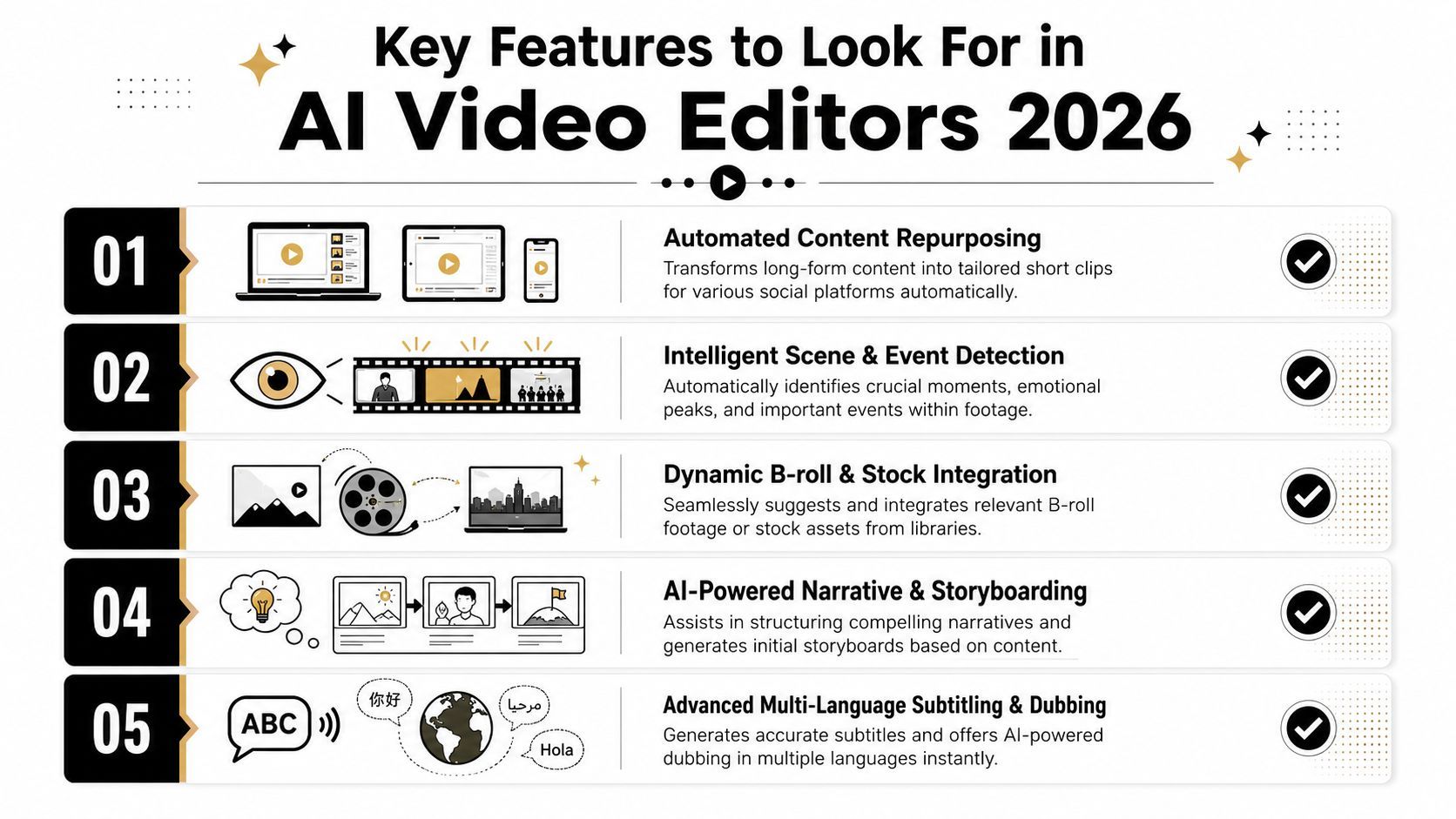
The feature list on most landing pages is noisy. Every tool claims captions, resizing, and “viral clips.” Those aren't the deciding factors anymore. What matters is whether the software removes real production friction from your workflow.
Prioritize curation over decoration
The first thing to evaluate is clip selection quality.
A lot of tools can add animated captions. Fewer can consistently surface the right moments from a dense conversation, panel, or educational video. The highest-value feature isn't visual polish. It's AI-powered clip curation that saves you from watching the entire source file again just to find usable segments.
Look for software that can separate:
- Strong openings from slow setup
- Standalone answers from clips that require missing context
- Sharp statements from meandering commentary
If the tool can't reliably produce strong first drafts, every other feature becomes cosmetic.
Reframing needs controls, not just automation
Automatic cropping is useful. Automatic cropping without override options is dangerous.
You want dynamic reframing that follows the active speaker and adapts to vertical formats, but you also need manual control when the crop misses context, hides a product demo, or cuts off body language that matters. Marketers working with interviews, webinars, and tutorials run into this constantly.
A strong platform gives you both speed and correction. That's the sweet spot.
Branding should be built into the edit layer
Subtitles are no longer just accessibility elements. They're part of the visual identity of the clip.
The practical features to look for here are:
- Brand kits: Fonts, colors, and subtitle styles that match your existing content
- Template reuse: Repeatable layouts for series content
- Caption editing: Easy text corrections without rebuilding the whole clip
If your team publishes at scale, these details prevent every asset from looking like it came from a different tool.
For buyers focused specifically on clipping and repurposing workflows, Klap's overview of an AI video clipping tool is a useful benchmark for what this category is expected to handle.
Integration matters more than novelty
The most impressive feature in a demo isn't always the one that saves the most time in production.
A practical buyer checks whether the tool fits into the rest of the content stack. Can your team upload easily from existing sources? Can editors review quickly? Can social managers get exports without asking post-production for another version? Does the interface support quick rounds of revision?
Buyer check: The right feature isn't the flashiest one. It's the one your team uses every week without friction.
In real workflows, reliability beats novelty. If a product helps your team publish more consistently from the footage you already have, it's doing the job.
Who Should Use an AI Video Editor
Not every video workflow needs the same tool, but several groups benefit immediately from this category because they already sit on long-form content libraries.
The podcaster with too much backlog
A podcaster usually has the raw material. What they often lack is time to turn a full episode into a steady stream of clips.
Modern AI video editors can automatically generate 10 to 30+ short clips from a single long-form video in under 30 seconds, with clips typically running 15 to 90 seconds for TikTok, Reels, and Shorts, according to this Klap overview. For a podcaster, that means one interview can become a week or more of social distribution without manually cutting every moment.
The practical win isn't just speed. It's consistency. The show keeps feeding discovery channels even when the host doesn't have an editor on standby.
The social media marketer who needs volume
Marketers rarely need “a video.” They need a system.
A webinar, founder interview, customer conversation, or product explainer can fuel multiple campaigns if someone can extract usable segments fast. That's where a video editor AI becomes a significant operational asset. It helps the marketer produce short clips for awareness, quote-based content for paid or organic social, and vertical edits that match mobile viewing habits.
This is especially useful when the marketing team owns distribution but not a full post-production department. The AI handles first-pass repurposing. The marketer focuses on positioning and publishing.
The YouTuber with an archive
YouTubers often have months or years of underused footage. Old tutorials, interviews, livestreams, and niche explainers can all become short-form assets if the extraction process is cheap enough in time.
That's the shift. AI makes archival content economically worth revisiting. A creator no longer has to ask, “Is this older video worth spending half a day recutting?” The workflow becomes light enough that repurposing older material is realistic.
A strong fit usually looks like this:
- Podcasters: Turn conversations into quote-led clips
- Marketers: Convert campaigns, webinars, and customer content into social assets
- YouTubers: Mine archives for evergreen moments and punchy takes
If your business already records long-form content, you probably don't have a content shortage. You have an editing bottleneck.
Pros Cons and Current Limitations
The upside of video editor AI is obvious once you use it. You move faster, you publish more, and you stop wasting footage that already contains useful ideas. For repurposing workflows, that's a meaningful operational gain.
But there's a gap between “good automation” and “finished storytelling.” That gap matters.

Where these tools earn their place
The practical benefits are strongest when the footage is dialogue-heavy and structurally clear.
That includes podcasts, webinars, interviews, coaching calls, and educational videos. In those formats, the software can find spoken highlights, create platform-ready crops, and hand you a usable draft quickly. Teams that publish repeatedly get the most value because the time savings show up every week.
The biggest strengths are usually:
- Speed: First drafts arrive much faster than manual editing.
- Scale: More source footage becomes usable for short-form distribution.
- Lower friction: Captioning, resizing, and mobile formatting stop being separate tasks.
Where the technology still falls short
Current Large Multimodal Models still struggle with the kind of reasoning that strong editors apply naturally. Research summarized in this arXiv paper shows severe performance gaps in real-world video editing, especially around causal links and temporal consistency required for automated clip extraction.
That shows up in simple but costly ways. A model may choose a moment that sounds strong in isolation but lands poorly because it cuts off necessary setup. It may preserve a sentence while losing the reaction shot that gives the quote meaning. It may create a clean vertical crop while missing the rhythm of the original scene.
This is why “AI found the clip” isn't the same thing as “AI made the right editorial choice.”
Multi-angle expectations are often unrealistic
One of the most common misconceptions is that AI can take a single-camera podcast or webinar and create fluid new cinematic angles on demand.
That promise is overstated. As explained in this FAQ on AI-generated camera angles, true multi-angle continuity requires locked reference images, not just a video prompt. In practice, most auto-repurposing tools can't generate smooth angle changes from existing footage when the original shoot didn't capture that coverage.
So the current rule is straightforward:
- Use AI for extraction, reframing, and packaging
- Don't expect it to invent convincing cinematic coverage from thin air
Human review is still essential. The best results come when AI handles the repetitive work and a person makes the final calls on context, emotional tone, and what is suitable for publication.
How to Choose the Right Tool for Your Needs
A smart buying process starts with the job, not the demo. Some tools are built for generation from scratch. Some are built for traditional editing support. Others focus on repurposing long-form content into social clips. If your workflow starts with podcasts, webinars, interviews, or YouTube uploads, choose for repurposing first.

AI video editor evaluation checklist
Feature/CriteriaWhat to Look ForWhy It Matters
Use-case fit
A tool built for repurposing long-form video into shorts
General AI editors can be overkill or weak at clipping workflows
Clip selection quality
Strong first-pass hooks and logical segment boundaries
Bad selections erase any time savings
Reframing controls
Auto crop plus manual override
Vertical formatting often needs correction
Caption workflow
Fast subtitle generation and easy text editing
Captions are part of both clarity and branding
Brand consistency
Templates, style presets, and reusable visual settings
Teams need repeatable output across campaigns
Review speed
Lightweight approval and tweak process
Time saved in generation can be lost in revisions
Export readiness
Social-friendly aspect ratios and clean outputs
The last mile matters as much as the AI
Realistic feature claims
Clear boundaries on what the tool can and can't do
You need a tool, not a promise machine
One useful filter is to ignore any product that blurs repurposing with cinematic generation. If your source footage is an existing interview or podcast, the tool should excel at extracting moments, not pretend it can rebuild missing camera coverage. That limitation matters because, as noted earlier, AI-generated multi-angle continuity usually depends on locked reference images rather than prompting an uploaded file.
Compare categories before you compare brands
If you're also evaluating tools built more for generative scene creation than clip extraction, AIMVG's Runway vs Pika analysis helps clarify that difference. It's useful because it highlights how some AI video products aim at synthetic creation, while repurposing tools solve a very different operational problem.
For long-form clipping specifically, one option in this category is Klap, which turns existing videos into short social clips with captions, reframing, resizing, and light editing controls. If that's the lane you're in, its guide to best AI video editing software is relevant because it compares the software from the standpoint of editing and repurposing workflows.
A practical selection process usually looks like this:
- List your source material
Podcasts and webinars need different handling than product demos or cinematic footage. - Define the output
If your team needs vertical shorts with captions, optimize for that. Don't get distracted by features you won't use. - Test the first draft quality
Upload a real video, not a polished sample. Check whether the suggested clips are publishable with light edits. - Review the correction burden
The best tool isn't the one with the most automation. It's the one that creates the least cleanup work.
Here's a quick look at what that workflow can resemble in practice:
Choose the tool that removes your bottleneck. Don't pay for a broader category if your actual job is turning long-form talk content into short clips.
The Future of AI in Video Creation
The next phase of video editor AI won't be about replacing editors. It'll be about shrinking the gap between raw footage and publishable assets.
That means better first-pass clip selection, cleaner captioning, stronger reframing, and more useful assistive features around polish. Teams are also moving toward workflows where AI helps generate supporting material, fix minor audio issues, and accelerate versioning across platforms. The most practical progress will come from tools that reduce repetitive labor without taking creative control away from the person publishing the content.
There's also a broader shift underway in how creators think about source footage. A webinar isn't just a webinar anymore. A podcast isn't just a full episode. Once AI makes extraction cheap and repeatable, every long-form recording becomes a content library.
That changes behavior. Teams record with repurposing in mind. Creators organize archives instead of ignoring them. Marketers build distribution plans around clips before the long-form asset even goes live.
The important takeaway is simple. AI works best as a collaborator. It handles volume, repetition, and formatting. You still decide what message matters, which moments deserve attention, and what fits your brand.
If your current process is slow, inconsistent, or too manual to sustain, this category is worth adopting now. Not because the technology is perfect. Because the workflow improvement is already useful.
If you're repurposing podcasts, webinars, interviews, or YouTube videos into short-form social content, Klap is a practical place to start. It's built to turn long-form footage into social-ready clips with captions, reframing, and light editing so you can spend less time on manual post-production and more time publishing.
