
TikTok Automation Software: A Creator's Guide for 2026
Other
You record a solid long-form video. Then the essential work starts.
You need clips, captions, hooks, posting times, replies to comments, inbox coverage, analytics, and enough consistency to stay visible. A lot of creators don’t quit TikTok because they run out of ideas. They quit because the workflow turns into a second job.
That’s why people start searching for tiktok automation software. They seek efficiency. They want tools to handle the repetitive parts without flattening the personality that makes their content worth watching in the first place.
The problem is that “automation” means very different things depending on the tool. One app helps you turn a podcast into shorts. Another safely schedules posts. Another auto-replies to DMs. Another logs into your account and starts acting like a fake version of you. Those are not the same risk level, and they shouldn’t be treated the same way.
A smart TikTok strategy uses automation like a good assistant. It should remove friction, not create platform risk. The safest route is usually not the flashiest one. It’s a content-first system that helps you make more useful videos from assets you already have, then publish them consistently with approved tools.
The TikTok Treadmill and The Promise of Automation
A common creator week looks like this. Monday, you film. Tuesday, you edit. Wednesday, you try to write captions and upload. Thursday, one video underperforms, so you scrap the next idea and start over. Friday, your comments and DMs pile up while you’re still trying to cut clips from last week’s content.
That cycle feels endless because TikTok rewards freshness and consistency. If you stop posting for a stretch, momentum can fade. If you post without a system, burnout shows up fast.

The pressure makes sense when you look at platform scale. TikTok is projected to reach 1.67 billion monthly active users by 2026, with daily active users around 900 million, which is one reason demand for automation keeps rising among creators and brands trying to stay consistent without burning out (proxidize TikTok statistics).
Why manual posting stops working
Manual workflows break down in predictable ways:
- Idea fatigue: You spend more time thinking about what to post than making anything.
- Editing bottlenecks: Raw footage sits untouched because short-form editing takes longer than expected.
- Timing problems: You remember to post when you’re free, not when your audience is active.
- Inbox overload: Replies come late, which can hurt lead capture and community trust.
- No feedback loop: You keep posting, but you don’t build a system for learning what works.
Creators often think they need more discipline. Most of the time, they need better operations.
The promise and the trap
Automation sounds like the fix because, in some ways, it is. A scheduler can publish while you sleep. An AI repurposing tool can turn one long video into multiple short clips. A DM assistant can handle repetitive questions.
But the word “automation” also attracts risky shortcuts.
Practical rule: If a tool helps you create, organize, schedule, or analyze your own content, it’s usually lower risk. If a tool pretends to be you and manipulates engagement at scale, risk rises fast.
That distinction matters. Safe automation supports your content. Risky automation tries to fake momentum.
The creators who get the most value from tiktok automation software usually stop asking, “How can I automate growth?” and start asking, “How can I automate the work around great content?”
What Is TikTok Automation Software Really
The easiest way to understand tiktok automation software is to stop thinking of it as one tool.
Think of it as hiring a small digital team. Each tool plays a different role. One helps create content. One handles publishing. One manages conversations. One reports what happened after the post goes live.
If you’ve worked with broader operations software before, this will feel familiar. A lot of the logic overlaps with general Business Process Automation (BPA) examples, where teams automate repetitive workflows so humans can focus on judgment, creativity, and high-value tasks.
The content strategist
This is the most useful category for many creators.
These tools take an existing asset, such as a YouTube video, webinar, interview, lesson, or podcast, and turn it into social-ready pieces. They often detect strong moments, add captions, reframe for vertical viewing, and help produce several short clips from one source file.
That matters because content creation is usually the hardest part of TikTok, not the act of hitting publish.
Typical features include:
- Clip extraction: Finds standout moments from longer footage.
- Auto captions: Adds subtitles for mobile viewers.
- Vertical reframing: Adjusts framing for 9:16 format.
- Basic editing help: Trims dead space and improves pacing.
- Cross-platform output: Prepares versions for TikTok, Reels, and Shorts.
The social media coordinator
This category handles the calendar.
Schedulers let you upload videos, write captions, assign posting times, and keep a content queue moving. If you manage several accounts or work across platforms, this role becomes more valuable because it reduces context switching.
Examples people often consider include Buffer, Later, Hootsuite, SocialPilot, and Sprout Social. The point isn’t that one platform magically grows your account. The point is that consistency becomes manageable.
A scheduler solves a very specific problem: “I have content ready, but I’m not reliably publishing it.”
The community manager
Many people get confused with this category, because this category includes both helpful tools and risky ones.
Some automation here is customer-service oriented. DM assistants can answer common questions, route leads, and move simple conversations into a CRM or a shared inbox.
Other tools try to automate social behavior itself. They like posts, leave comments, follow accounts, or unfollow users based on rules. Those are the tools that tend to create the biggest compliance headaches.
Helpful automation responds to interest. Risky automation tries to manufacture it.
That one distinction clears up most of the confusion in this market.
The data analyst
Analytics tools pull results into a dashboard so you can spot patterns without manually checking every post one by one.
These tools usually show which videos held attention, which posting windows performed better, and which themes deserve another round. Agencies also like reporting features because they make client communication easier.
Typical capabilities include:
- Performance tracking: Views, engagement, and post-level trends
- Content comparison: Which formats or topics keep working
- Scheduled reports: Useful for teams and clients
- Cross-platform visibility: One dashboard for several channels
Why the categories matter
People run into trouble when they treat all automation as equal.
A clip generator, a scheduler, a DM assistant, and a mass-follow bot might all sit under the same broad label, but they solve different problems and carry different consequences.
Here’s the simple version:
CategoryCore jobTypical risk
Content repurposing
Makes more usable content from existing assets
Lower
Scheduling
Publishes consistently
Lower
DM automation
Handles repeat questions and lead routing
Moderate, depending on setup
Engagement bots
Auto-like, auto-follow, auto-comment
Higher
If you remember nothing else from this section, remember this. Tiktok automation software is not one thing. It’s a stack of tools, and the safest stack starts with content.
The Smartest Automation AI Content Repurposing
If you want the safest form of automation with the clearest payoff, start with content repurposing.
Most creators lose time before they ever reach the publishing stage. They spend hours reviewing footage, picking clips, resizing frames, writing subtitles, and making the same source material usable across multiple platforms. That’s where AI can save real time without crossing into fake engagement.
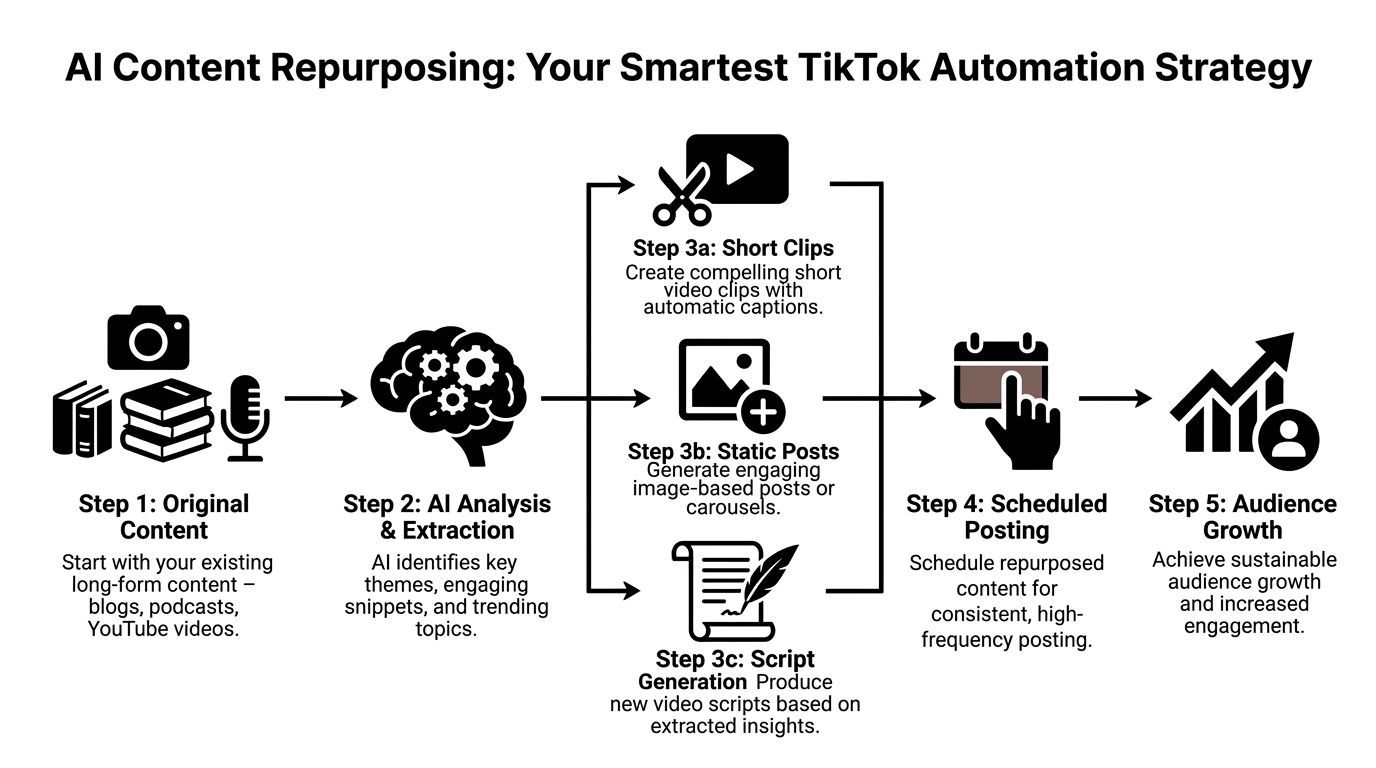
AI-driven content repurposing tools can reduce manual video editing time from hours to minutes and, when paired with smart scheduling, can achieve significantly higher engagement by posting at better times. One example workflow is uploading a single YouTube video and triggering automatic resizing to 9:16 plus cross-post preparation for TikTok, Reels, and Shorts (EvergreenFeed on TikTok automation software).
Why this is safer than growth bots
Repurposing automation works on your own material. It doesn’t imitate human social behavior. It doesn’t mass-follow strangers. It doesn’t flood comment sections with generic replies.
It helps you package content better and publish more consistently. That’s a workflow improvement, not a manipulation tactic.
For creators, educators, and marketers, that distinction matters. You’re scaling output from assets you already own.
How the workflow looks
A practical repurposing system usually follows this sequence:
- Start with a long asset
A podcast episode, webinar, coaching call, product demo, interview, or YouTube upload works well. - Let AI scan for usable moments
The software identifies sections that may work as standalone clips. Usually these are strong opinions, clear teaching moments, useful explanations, or emotionally charged statements. - Convert for short-form viewing
The tool reframes for vertical screens, adds captions, and trims sections into shorter units. - Review with human judgment
AI can find candidate clips. You still decide which ones fit your brand, tone, and audience. - Export in batches
Instead of one post from one recording session, you can end up with a small content library.
A plain-language example
Say you run a podcast about personal finance.
You record one thirty-minute episode on common budgeting mistakes. A repurposing tool can surface several short moments: one clip about impulse spending, another about bank fees, another about the psychology of subscriptions, another with a direct hook like “Most budgets fail for one boring reason.”
Now you’re not trying to invent four separate TikToks from scratch. You’re refining four extracted ideas from one source.
That’s the operational advantage. The content engine starts to compound.
What to look for in a repurposing tool
Not all AI clip tools are the same. Focus on workflow fit:
- Caption quality: Bad subtitles make usable clips look cheap.
- Framing control: Automatic reframing should keep the speaker centered.
- Hook detection: Strong clip selection matters more than flashy templates.
- Editing flexibility: You need to adjust start and end points without friction.
- Export speed: Batch work only helps if delivery is fast.
If you want to see a tool built specifically for turning longer videos into short-form outputs, an AI TikTok video generator is one example of this category.
Repurposing is the closest thing to “safe scale” on TikTok. You’re not outsourcing authenticity. You’re removing production drag.
Where creators get this wrong
The biggest mistake is treating repurposing as a fully automatic publishing machine.
AI can speed up clip creation, but it can’t replace taste. You still need to check whether a clip starts quickly enough, whether the first line hooks attention, and whether the visual framing feels native to TikTok.
Another mistake is repurposing weak source content. If the original video rambles, the clips will often ramble too. Automation multiplies what you feed it. Good input still matters.
Why this should be the foundation
A content-first approach gives you three advantages at once:
- More output: One long video can produce multiple social assets.
- Lower risk: You’re not relying on behavior that can look spammy.
- Better consistency: Once clips exist, scheduling becomes much easier.
That’s why repurposing sits at the center of a smart tiktok automation software stack. It doesn’t try to hack the platform. It helps you show up with more quality material, more often.
Navigating Schedulers and Engagement Bots
Once your content pipeline is working, the next layer of automation is distribution and response.
Here, two very different tool families show up under the same “TikTok automation” label. One helps you post on time. The other tries to accelerate interaction. They’re often sold side by side, but they should be evaluated very differently.
What schedulers do
Schedulers are the boring tools that solve an expensive problem.
They let you batch uploads, prepare captions, organize a calendar, and publish without needing to stop your day for every post. For solo creators, that means less scrambling. For agencies, it means fewer missed deadlines and fewer “did this go live?” moments.
Common use cases include:
- Weekly batching: Load several clips at once
- Cross-platform planning: Coordinate TikTok with Reels and Shorts
- Team workflows: Writers, editors, and approvers can work from one calendar
- Basic analytics: See which posts need another look
API-approved scheduling tools are generally the safer end of this category because they work through recognized platform connections rather than pretending to be a person tapping buttons on your phone.
Where engagement automation enters
Engagement automation covers a wider range of actions.
Some tools focus on conversation workflows. They detect keywords, trigger replies, route messages, and help businesses avoid missing hot leads. For commerce, service businesses, and creators selling offers, that can be useful.
Automated DM tools such as Spur’s AI agents can process over 90% of inbound messages instantly and convert an estimated 15-20% into qualified leads by using NLP-based contextual responses, which can reduce missed sales opportunities and improve TikTok Shop response performance (Spur on TikTok automation).
That kind of automation is very different from a bot that mass-likes videos under a hashtag.
The three engagement types people mix together
DM automation
This is inbox-focused.
A DM tool can answer simple questions like pricing, availability, booking details, or next steps. It can also push conversations to a human when needed. For businesses, this is often the most practical engagement automation because it supports people who already showed interest.
Comment workflows
Some tools watch for comment triggers on your own posts and respond in a controlled way. For example, someone comments with a buying-intent phrase and gets directed into a private message flow.
That’s less intrusive than spray-and-pray commenting on strangers’ posts.
Outbound engagement bots
These are the controversial ones.
They auto-follow, auto-like, auto-comment, or cycle through users based on a niche, keyword, or competitor audience. The pitch is obvious: more profile visits, more follows, more activity. The problem is that behavior can look manufactured fast.
Why the appeal is so strong
Engagement bots promise movement. Schedulers promise organization.
That’s why newer creators often get pulled toward the wrong tools. If your account feels stuck, a bot that “does outreach for you” sounds more exciting than a planner that keeps your queue full.
But the two serve different goals:
Tool styleWhat it promisesWhat it really solves
Scheduler
Consistent publishing
Operational discipline
DM assistant
Faster replies
Lead handling and support
Engagement bot
Faster audience activity
Artificial interaction attempts
If a tool saves you from repetitive admin, it’s probably filling an operational gap. If it promises to simulate popularity, slow down and inspect it much harder.
How to think about this layer
Use schedulers when you already have content ready.
Use DM automation when you have real inbound demand and need response speed.
Be very skeptical of anything built around “auto engagement” as the core value. Even before you get into policy issues, it often produces low-quality interactions that don’t lead to durable audience trust.
Understanding Risks How to Avoid Getting Banned
The biggest mistake creators make with automation is assuming that if a tool exists, it must be acceptable to use.
That’s not how platform risk works. Many risky tools are built precisely because the shortcut is tempting.

White-hat vs black-hat automation
A useful way to evaluate any tool is to ask one question: does it support your workflow, or does it try to imitate a human user at scale?
White-hat automation usually includes approved scheduling, analytics, content repurposing, and controlled business messaging workflows.
Black-hat automation usually includes mass-follow tools, auto-like systems, fake commenting, purchased engagement, or any tool that relies on suspicious login methods and unnatural action patterns.
The first group helps you manage work. The second group tries to game visibility.
What account risk looks like in practice
Creators often talk about “being banned” as if there’s only one outcome. In reality, account trouble can show up in several ways:
- Feature restrictions: Certain actions stop working normally.
- Visibility drops: Posts get less distribution than expected.
- Trust erosion: Future content can struggle to gain traction.
- Full suspension: The harshest outcome.
You may not always get a dramatic warning first. That’s part of what makes risky automation such a bad trade.
Security risk is part of the story
There’s another danger people overlook. Some unauthorized tools are not just policy risks. They’re security risks.
A recent example involved the Invisible Challenge exploit, where threat actors used deceptive links to distribute WASP, an information-stealing malware that targeted passwords and crypto wallet credentials instead of delivering what users were promised (dot.LA coverage of the TikTok malware incident).
That’s why “free TikTok automation” is often the most expensive option on the internet.
Don’t judge a tool only by what it claims to automate. Judge it by how it connects to your account, what permissions it requests, and whether you’d trust it with the keys to your business.
Safe growth also requires account hygiene
A lot of creators managing brands, niches, or regional pages also need multiple accounts. That setup can be legitimate, but sloppiness creates avoidable friction. If that’s part of your workflow, this guide on how to create multiple TikTok accounts safely and effectively is useful context before you start layering on any automation.
You should also read platform-side policies carefully before connecting any software. If a tool’s behavior or permission model feels vague, compare it against the platform rules and the provider’s own terms, such as these Klap terms of services, before using it in a production workflow.
A quick explainer helps separate safe convenience from dangerous shortcuts:
A simple ban-avoidance checklist
- Use official connections: Prefer tools that rely on recognized API access.
- Avoid password sharing: If a tool asks for direct credentials without a trustworthy connection flow, be careful.
- Skip fake engagement tools: They create the clearest policy exposure.
- Review permissions: Don’t hand broad account access to low-trust apps.
- Keep a human in the loop: Automation should assist, not run wild unattended.
The short version is blunt. If a tool’s main selling point is that it can act like you at scale, it’s usually moving you toward the danger zone.
How to Choose the Right Automation Software
Once you stop lumping every tool into the same bucket, choosing becomes easier.
You’re not trying to find “the best automation platform.” You’re trying to find the right tool for your bottleneck. That could be editing speed, publishing consistency, DM response time, or reporting.
Start with the safety check
The first screen is simple.
Ask how the tool connects to TikTok and what job it performs. If it supports approved publishing, analytics, or content transformation, it usually deserves a closer look. If it advertises aggressive audience actions, treat it as high risk unless proven otherwise.
Match the tool to the real problem
A lot of people buy a scheduler when their core issue is that they don’t have enough content ready to schedule.
Others buy an AI clipper when their problem is inbox overload after a campaign performs well.
Use this sequence:
- Identify the bottleneck
Is your team slow at editing, inconsistent at posting, or overwhelmed by inquiries? - Check workflow fit
Will the tool integrate with the way you already create content? - Look for reputation signals
Clear documentation, realistic product claims, and credible user feedback matter. - Test with a narrow use case
Don’t automate your whole account on day one.
Comparing TikTok Automation Tool Types
Tool TypePrimary GoalRisk LevelBest For
Content AI
Turn long videos into short-form assets
Lower
Creators, educators, podcasters, agencies
Scheduler
Publish consistently and organize content
Lower
Teams with ready-to-post clips
DM automation
Respond to inbound questions and route leads
Moderate
Brands, sellers, service businesses
Engagement bot
Trigger follows, likes, or comments automatically
Higher
Risk-tolerant users, generally not ideal for long-term brand building
Questions worth asking before you pay
- Does it reduce your hardest manual task?
- Can you review output before it goes live?
- Does it fit your team size and posting volume?
- Will it still be useful as your workflow matures?
If your bottleneck is editing and packaging, it also helps to understand the broader tool ecosystem around short-form creation. This roundup of best TikTok editing apps is useful for comparing where automation fits versus hands-on editing tools.
Choose software that strengthens your process, not software that asks you to gamble your account for speed.
The best purchase framework
A reliable buying decision usually looks like this:
- Creators with long-form libraries should lean toward repurposing tools first.
- Lean social teams often benefit next from a scheduler.
- Businesses with high message volume may add DM automation after that.
- Most brands should stay away from engagement bots entirely.
That order matters because each layer builds on the previous one. More clips first. Better publishing second. Better response handling third. Anything that tries to simulate demand should sit at the very bottom of your priority list, if it belongs on the list at all.
Your Smart Automation Workflow for 2026
The strongest TikTok automation setup for the next cycle isn’t “automate everything.”
It’s content first, automation second.
That approach matters because there’s still a wide gap between belief in AI and actual adoption. A 2025 report found that 90% of advertisers expect AI automation to drive business growth, but only 19% have fully integrated it into operations, which creates room for creators and marketers who build a smart, content-centric workflow early (TikTok and NewtonX report).
The workflow that makes sense
Build from one core asset
Record one meaningful long-form piece. A webinar, interview, lesson, demo, podcast, or product walkthrough works.
The goal is to start with substance, not random filler clips.
Repurpose into a batch
Use AI to identify the strongest moments, format them vertically, and prepare a bank of short videos.
This step gives you inventory. Without inventory, scheduling doesn’t help much.
Schedule with approved tools
Once you have a batch, load it into a scheduler and spread posts across a consistent calendar.
That turns content from a daily emergency into a planned system.
Watch performance and refine
Use analytics to see which clips hold attention, which hooks earn responses, and which themes deserve follow-ups.
Then feed that learning back into your next long-form recording so the source material gets stronger over time.
Why this workflow lasts
This model is sustainable because each tool does one honest job.
The repurposing layer creates assets. The scheduler handles timing. The analytics layer improves future output. If you need message handling, add it where there’s real inbound demand.
That stack helps you scale without pretending to be more “engaged” than you are. It preserves trust, reduces production drag, and gives you a repeatable publishing engine.
The safest automation is the kind your audience barely notices. They don’t see a bot. They see better content delivered consistently.
If you’ve been stuck on the TikTok treadmill, that’s the shift to make. Don’t automate for the sake of automation. Automate the parts that keep good content from getting published.
If you already have podcasts, YouTube videos, webinars, interviews, or other long-form content, Klap can help you turn those assets into short vertical clips with captions, reframing, and editing support for TikTok-style publishing. It fits the content-first workflow described above, where automation helps you produce and prepare more usable clips without relying on risky engagement tactics.
