We Share 8 Powerful Ways To Repurpose Videos for Maximum Engagement
Content Creation
Quick Summary
This article shares eight proven ways to repurpose your video content, from social media clips and GIFs to blogs, infographics, and e-books. Repurposing helps you reach wider audiences, boost engagement, and extend your content’s lifespan. Learn how to turn one video into multiple assets and explore more actionable content marketing guides on our blog.
Looking for Easy Ways to Repurpose Your Video Content?
You’ve already put time and effort into creating a long-form video, why not make the most of it? Repurposing your content can help you reach new audiences and keep your channels active.
From social media snippets to blog posts, there are numerous ways to recycle your video into fresh, engaging content. This approach saves time and maximizes your reach across platforms.
In this Klap article, we’ll explore 8 practical ways to repurpose your videos. Expect actionable tips, creative ideas, and discover how Klap can help streamline the process for faster, smarter video repurposing.
Why Listen to Us?
Klap is an AI-powered platform trusted by over 1.8 million creators, helping produce more than 3.3 million viral clips across YouTube Shorts, TikTok, and Instagram Reels. With features like auto-framing, AI-generated captions, and one-click video clipping, we streamline repurposing long-form videos into engaging shorts. Users report significant time savings and up to a 5x boost in productivity, making us well-equipped to share proven video repurposing strategies.
What Does It Mean to Repurpose a Video?
Repurposing a video means recycling it into multiple formats or content pieces to reach different audiences or platforms, instead of creating new content from scratch.
For example, a 30-minute video podcast can be repurposed into Instagram Reels, a blog post, and even an infographic, making the most of the initial effort while catering to different viewer preferences.
The goal is to save time while expanding your content’s reach, ensuring you get the most out of your original investment.

Why Is Video Repurposing Important?
- Maximizes Content Value: Repurpose a single video into multiple formats, increasing its lifespan and impact.
- Saves Time and Resources: Reduces the need for constantly creating new content, optimizing your workflow.
- Expands Reach: Tailor videos for different platforms, increasing visibility and engagement in more spaces.
- Boosts SEO: Repurposed content like blogs and social media posts can improve search rankings and drive traffic.
- Reaches Wider Audiences: Repurposing lets you adapt content for different audiences and platforms, helping you blow up on TikTok and expand your reach.
8 Best Ways to Repurpose Videos for Maximum Impact
1. Create Viral Clips for Social Media
Viral clips are one of the most effective ways to repurpose long-form video content into bite-sized, shareable pieces. Platforms like YouTube Shorts, TikTok, and Instagram Reels thrive on short, engaging videos that capture attention quickly and spark interaction. Here’s why viral clips work:
- Maximize Reach: Short-form content is highly shareable. Viewers often share these clips with their network, expanding your reach organically.
- Boost Engagement: Viral clips encourage interaction, whether it’s likes, shares, or comments. They keep your audience engaged and attract new followers.
To create viral clips that resonate:
- Focus on Hooking Viewers Early: Capture attention within the first few seconds. Use engaging hooks that instantly connect with your audience’s interests.
- Adapt for Each Platform: Every platform has its format. TikTok favors fast, energetic content, while Instagram Reels highlights creativity and trends. YouTube Shorts is all about quick, impactful moments that drive discovery.
- Tailor Content for Trends: Use trending sounds, challenges, or hashtags to increase the chances of going viral. Ensure your clip aligns with the latest trends.
- Use Dynamic Captions and Subtitles: Many users watch with the sound off. Caption your clips to increase accessibility, especially with Klap’s automatic captioning feature.
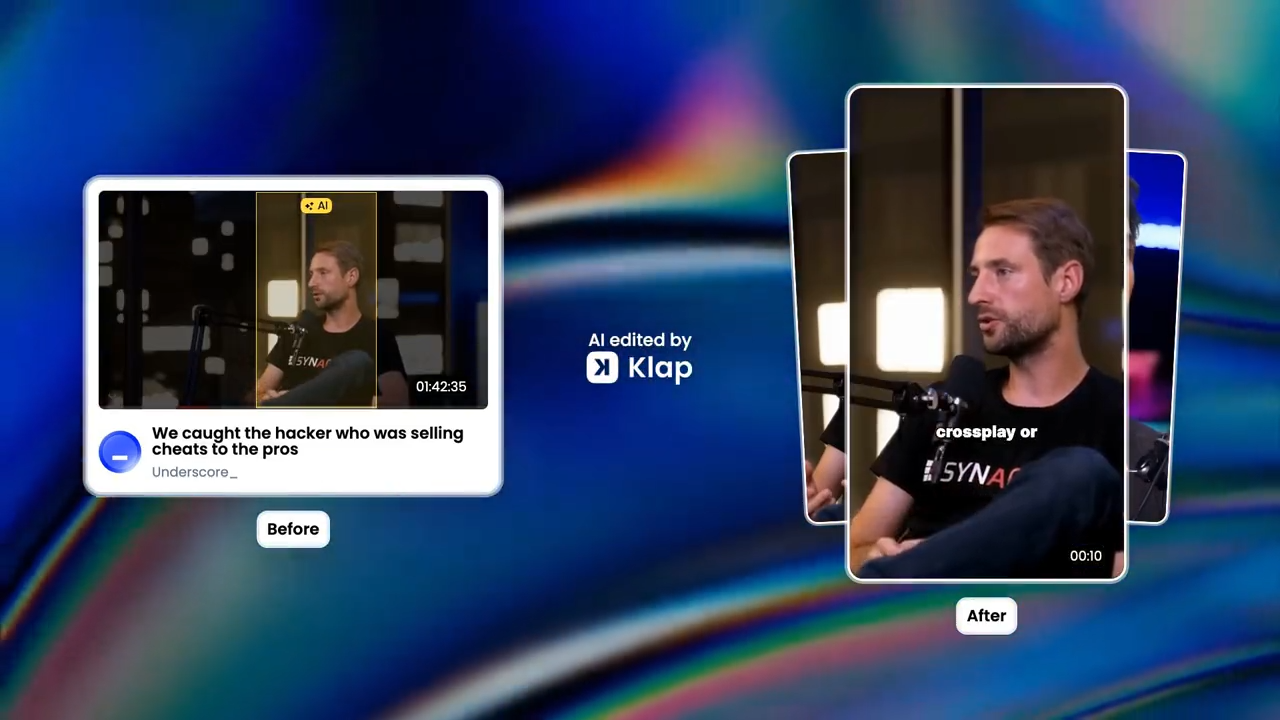
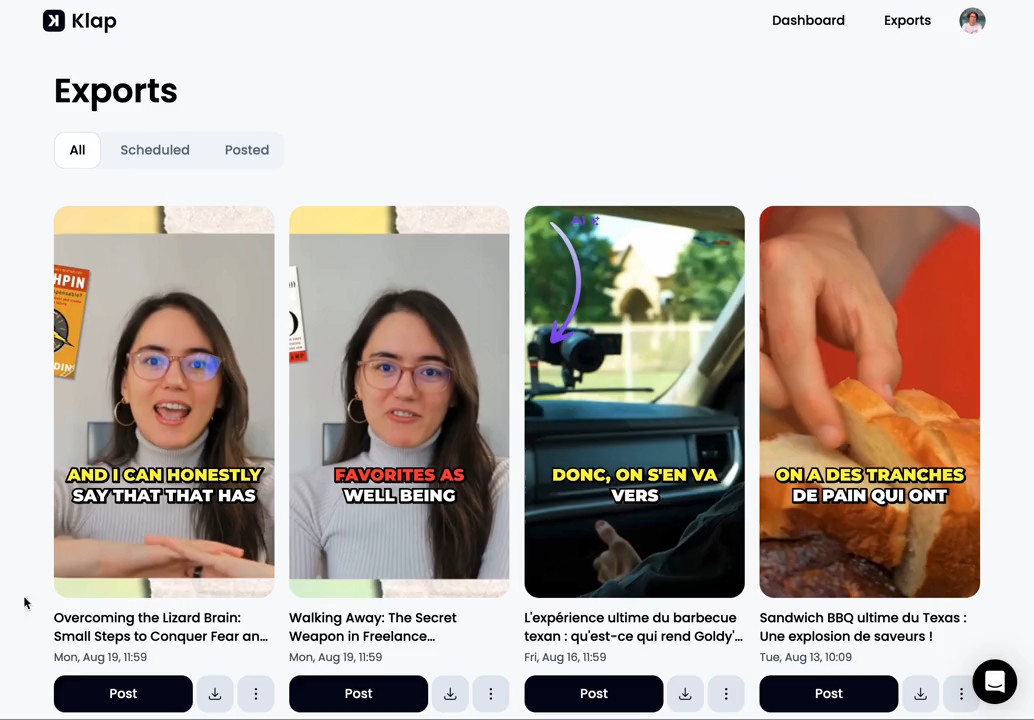
Klap simplifies the process, automatically finding the best moments in your videos, adding captions, and formatting them for social media, so you can create shareable clips fast.
2. Turn Video into Infographics
Repurposing videos into infographics is a powerful way to convert key information into visually engaging content. Infographics condense complex data and insights, making them easy to digest and share. Here’s how to turn video content into compelling infographics:
- Identify Key Data Points: Focus on the most important statistics, facts, or takeaways from your video. These are the elements that will resonate most with your audience when transformed into an infographic.
- Design for Clarity: Use simple, clear visuals. Avoid overcrowding the infographic with too much information. Focus on delivering a simple message, understandable at a glance.
- Use Visual Hierarchy: Organize the information to guide the viewer’s eye. Use headings, bold text, and icons to separate sections and highlight critical points.
- Leverage Color and Branding: Stick to your brand’s color scheme to maintain consistency. This makes the infographic recognizable and reinforces your brand identity.
3. Turn Video into Carousels
Carousels are relevant for platforms like Instagram, effectively breaking down key points into multiple slides, simplifying the information, and making it engaging. Here’s how to transform videos into compelling carousel posts:
- Extract Key Moments: Identify notable points from your video and split them into individual slides. This could include quotes, stats, or step-by-step processes.
- Create a Narrative: Each slide should build on the previous one, telling a story or guiding the viewer through a process. Avoid overwhelming viewers by keeping each slide focused on one point.
- Focus on Visuals: Design each slide with visuals, icons, images, or charts, that complement the information. Keep the design cohesive and ensure that it aligns with your brand’s visual style.
- Optimize for Engagement: Use questions, CTAs, or provocative statements to encourage interaction. For example, ask your audience for their opinion or invite them to share the post.
- Add Context: Include a brief introductory slide and a closing slide with a CTA. This helps contextualize the content and encourages your audience to take action.
Carousels are an excellent way to educate your audience and explain your thoughts, especially when repurposing complex topics from video content.
4. Create Quote Graphics or Posts from Videos
Extracting quote graphics or posts from videos allows you to share bite-sized pieces that resonate with your audience. Here’s how to repurpose your impactful quotes into eye-catching visuals:
- Identify Powerful Quotes: Look for memorable, valuable, thought-provoking, or emotionally charged statements in your video. These quotes tend to perform well on social media and in graphic form.
- Design for Impact: Use bold typography, contrasting colors, and clear spacing to ensure the quote stands out. Choose fonts that align with your brand’s style and maintain legibility even at smaller sizes.
- Add Visual Context: Pair the quote with relevant images, backgrounds, or icons. Use imagery that supports the message or reflects the tone of the video. The visual should enhance the meaning of the quote, not distract from it.
- Keep It Simple: A clean, minimalist design often works best for quote graphics. Avoid cluttering the image with excessive text or design elements. Let the quote take center stage.
- Encourage Sharing: Make sure the graphic is optimized for sharing. Use branded colors, include your logo subtly, and ensure the dimensions are optimized for each platform.
If you do it right, quote graphics turn your video’s highlights into visuals that spark emotion, reinforce your message, and invite interaction.
5. Create GIFs
GIFs are a dynamic way to repurpose video content into easily shareable, engaging visuals. They’re ideal for capturing short, impactful moments from your video and amplifying their reach. Here’s how to create effective GIFs from video content:
- Select Memorable Moments: Choose moments that are short, repeatable, and have emotional or humorous appeal. The goal is to create a visual loop that holds the viewer’s attention.
- Focus on Looping: Ensure the selected moment loops seamlessly. A good GIF doesn’t feel disjointed; the transition from the end to the beginning should be smooth and natural.
- Keep It Short: GIFs should be no longer than a few seconds—typically 2-6 seconds. This ensures the animation is quick and punchy, ideal for social media consumption.
- Optimize for Platforms: Resize your GIFs for different platforms. For instance, Twitter (X) supports larger files, while Instagram has specific size restrictions for Stories and feed posts.
- Add Captions or Text: Including text in GIFs can enhance the message, especially for emphasizing key points or adding context. Keep text brief and ensure it's legible even on mobile screens.
Well-crafted GIFs capture attention in seconds, helping your content stick quickly and gain faster engagement across platforms.
6. Turn Video into a Blog Post
Adapting long-form video content to a blog post is a highly effective way to enhance SEO. By converting key points from your video into written form, you can reach an audience that prefers reading over watching. Here’s how to repurpose video into a blog post:
- Outline Key Points: Extract the main takeaways from your video to serve as the foundation for your blog post. Focus on insights, actionable steps, or essential information that can be expanded into full paragraphs.
- Expand on Video Content: A blog post offers the opportunity to provide more context or deeper insights than the video itself. Take each video segment and elaborate, adding relevant examples, case studies, or statistics that support the main message.
- Incorporate SEO Best Practices: Ensure your blog post is optimized for search engines. Use keywords, meta descriptions, and internal/external links to improve SEO. Break the content into digestible sections with headings, subheadings, and bullet points for better readability.
- Include Multimedia: Embed the video or relevant screenshots to make the post more engaging. This keeps the content interactive and allows easy access to the original video for in-depth understanding.
- End with a CTA: Conclude your blog post with a call to action, directing readers to another piece of content, a product, or encouraging them to engage with the video.
7. Create an Ebook from Video
Transform your video content into an ebook to go deeper into the subject matter and provide a comprehensive downloadable resource that attracts and educates engaged leads. Here's how to do it:
- Identify Key Themes: Get the core themes or topics from your video, and use them as chapters or sections in your ebook. Focus on areas that can be expanded with more details, examples, or insights.
- Organize Content Logically: Structure the ebook into digestible chapters, each one building on the previous one, guiding the reader from introduction to conclusion. Include an introduction and a call to action at the end.
- Expand and Deepen: Use the video as a foundation, but go beyond what was covered in it. Add extra research, statistics, expert quotes, or case studies that reinforce the key points. This will enrich the content and provide more value to the reader.
- Design for Readability: The ebook should be visually appealing. Use a clean layout with clear headings, subheadings, and bullet points. Include relevant images, charts, or diagrams to break up text and keep readers engaged.
- Offer as a Lead Magnet: Ebooks are excellent for lead generation. Offer the ebook as a free download in exchange for email subscriptions, driving both engagement and conversions.
Transforming your video content into a valuable ebook resource can help build your authority and attract new audiences.
8. Translate Video to Reach New Audiences
Translating videos expands your reach to global audiences and increases engagement across diverse markets. Multilingual content enables you to tap into new demographics, enhance accessibility, and expand your brand presence internationally. Here’s how to translate videos effectively:
- Identify Target Languages: Focus on regions with high potential engagement or where your content resonates. Prioritize languages based on audience demand and platform demographics.
- Transcribe and Translate Accurately: Start with a precise transcript of the original video. Use professional translation services or reliable AI tools to ensure context and nuance are preserved.
- Localize, Don’t Just Translate: Adapt idioms, cultural references, and examples to match the target audience. Localization increases relatability and prevents misinterpretation.
- Incorporate Subtitles and Captions: Add translated subtitles to your video. Ensure they are readable on mobile screens, synchronized with speech, and visually consistent with your branding.
- Optimize Distribution: Upload translated videos to region-specific platforms or create separate playlists for each language. Promote them on channels relevant to the target audience.
Translated videos can boost engagement, watch time, and brand authority in new markets. Start with your top-performing video and adapt it to two or three key languages to measure impact before scaling globally.
Repurpose Your Video into Viral Clips With Klap
Repurposing your videos into multiple formats extends their reach, boosts engagement, and maximizes the value of every piece of content you create. From social media snippets to translated versions, there are practical ways to get more out of each video, and tools like Klap make the process faster and easier.
Klap automatically identifies engaging moments, reframes videos for platforms like TikTok, Instagram Reels, and YouTube Shorts, and adds dynamic captions. This allows you to create high-impact, shareable clips without spending hours on manual editing.
