
Your Guide to the Best Podcast Video Editing Software of 2026
Other
So, you’ve mastered the art of audio. Your podcast sounds incredible, but you’re noticing a shift. The biggest names in podcasting aren't just on Apple Podcasts anymore—they’re all over YouTube, TikTok, and Instagram. That's where podcast video editing software comes in. It’s the bridge that takes your amazing audio and turns it into visual content that can capture a whole new audience.
It’s about more than just putting a static image over your audio file. It’s about transforming passive listeners into an engaged community of viewers who can see your expressions, watch your interviews, and share your best moments.
Why Your Podcast Needs Video (And The Right Software To Pull It Off)
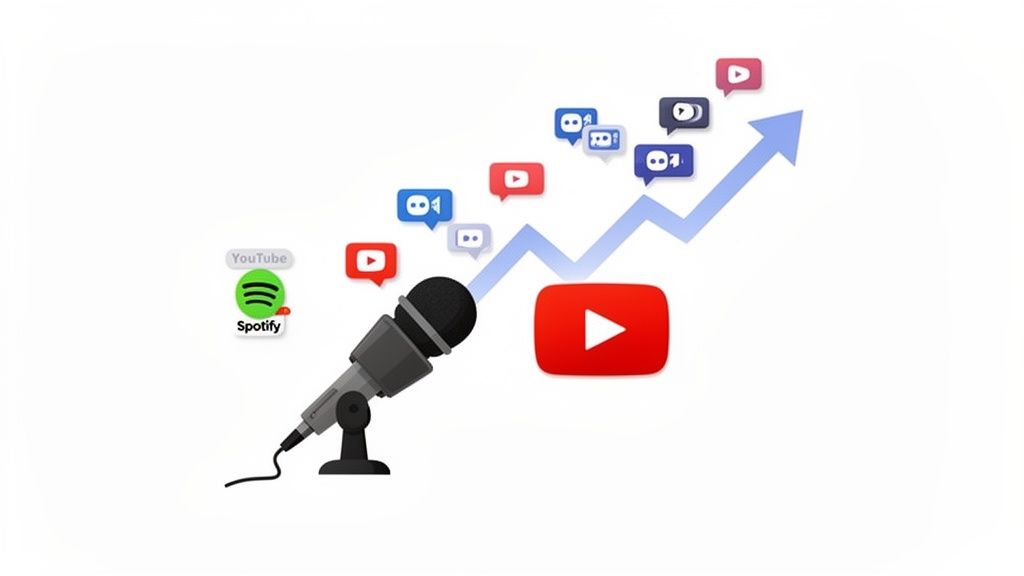 Let's be clear: the days of audio-only podcasting being the only way are behind us. While pristine audio is still non-negotiable, the platforms that drive discovery—like YouTube and Spotify—have trained audiences to watch their favorite shows.
Think of it this way: running an audio-only podcast today is like having a radio show in a world dominated by TV. You might have a loyal following, but you're completely invisible to the massive audience that scrolls through visual feeds to find their next obsession. Without video, you're missing your biggest opportunity for growth.
The Numbers Don't Lie: Video Podcasting Is Exploding
The podcasting industry is on an absolute tear. After being valued at USD 6.21 billion in 2026, the global market is projected to hit an incredible USD 50.04 billion by 2034. That's a compound annual growth rate of 29.80%, and a huge driver of that growth is the shift to video.
This boom is creating a massive demand for editing tools that can keep up, especially as podcasters turn long-form interviews into viral gold for TikTok, Reels, and YouTube Shorts. You can dig into more of this data in the full Fortune Business Insights report on the podcasting market.
But this isn't just about market size; it's about human connection. Viewers feel a much stronger bond when they can see a host's genuine reactions and body language. It's how you build a real community.
The real power of video is in its discoverability. A well-edited clip on social media can introduce your podcast to thousands of potential new subscribers who would have never found your audio-only version.
Why The Right Software Is A Game-Changer
Jumping into video can feel overwhelming. You’ve got multiple camera angles, audio syncing, and the pressure to create something that looks professional. This is exactly where specialized podcast video editing software becomes your most valuable asset.
A generic video editor just wasn't built for a podcasting workflow. They're often clunky and lack the smart features that make podcast editing manageable.
Here’s an actionable look at why picking the right tool is so important:
- It Saves You Hours: The right software automates soul-crushing tasks. Think syncing audio and video from multiple sources with one click, cutting down your editing time from a full day to just minutes.
- It Makes You Discoverable: Modern tools do more than just edit. They can automatically identify the most compelling, "viral-worthy" moments in your hour-long recording and generate dozens of social media clips, complete with captions.
- It Makes You Look Professional: Features like automatic color correction, one-click background noise removal, and seamless camera switching give your show a high-end, polished look—even if you're just starting out.
Ultimately, the goal is to produce high-quality video without getting lost in a technical rabbit hole. The right software empowers you to compete in a visual-first world, grow your audience, and build a stronger brand around your show.
Key Features Your Editing Software Must Have
 Choosing your podcast video editing software is a lot like picking a co-host. The right one makes your job easier and your show better, but the wrong one just creates headaches.
Not all video editors are built the same, especially when it comes to the specific demands of a video podcast. You need a toolset designed to solve podcasting problems, not a generic editor built for making blockbuster movies.
The goal isn't just to splice some clips together. It’s about building a smooth, repeatable workflow that saves you time and takes your content from looking amateur to feeling authoritative. Let’s break down the non-negotiable features you should be looking for.
Foundational Editing Tools
Before you get dazzled by flashy AI features, make sure your software absolutely nails the basics. These are the bedrock of any solid video podcast edit, and getting them right is crucial for a professional look and feel.
- Multi-camera Editing: This is a must-have if you host interviews or use more than one camera angle. It lets you sync all your video feeds to a single audio track, then switch between camera angles with just a click. A good editor can cut your editing time by over 50% on multi-cam interviews by handling the sync automatically.
- Timeline and Trimming: Think of this as your digital cutting board. You need an intuitive timeline where you can easily slice out all the "ums" and "ahs," chop out long tangents, and rearrange segments to make the conversation flow better.
Think of your editor as a powerful assistant. It should handle the tedious technical work, like syncing audio and video, so you can focus on the creative work—telling a great story.
Audio and Transcription Features
Poor audio quality is one of the biggest reasons listeners give up on a podcast. Since the audio is the heart of your show, your software needs powerful tools to make it shine.
- Automated Transcription: This feature creates a word-for-word text transcript of your entire episode. This isn't just great for accessibility; it’s a massive SEO win for your website and makes it simple to pull specific quotes for social media clips. In fact, text-based editing—where you edit the video by editing the transcript—can make your first editing pass up to 3x faster than scrubbing through a timeline.
- Advanced Audio Processing: Look for built-in tools like noise reduction to kill background hum, equalizers (EQ) to boost vocal clarity, and compressors to even out the volume levels between you and your guests. One-click audio enhancement features are a lifesaver and can save you hours of manual tweaking.
Choosing Your Path: NLEs vs. AI Cloud Editors
When it comes to editing your video podcast, you’re standing at a fork in the road. On one side, you have the powerful, traditional Non-Linear Editors (NLEs). On the other, you have the fast, modern AI-powered cloud editors. The right choice for you really boils down to your technical skill, budget, and what you’re trying to achieve with your content.
Think of it like this: an NLE is a full professional kitchen. It has every specialized knife, pan, and gadget you could ever imagine, giving you total control over every ingredient. An AI cloud editor is more like a high-end meal kit service—it does all the chopping and prep for you, automates the cooking, and helps you get a fantastic result with way less time and effort.
The Traditional NLE Approach
Non-Linear Editors like Adobe Premiere Pro, Final Cut Pro, and DaVinci Resolve are the undisputed kings of professional video production. They are incredibly powerful, with deep features for cinematic color grading, complex visual effects, and detailed audio mixing. If your podcast vision includes slick animated intros or custom graphics, an NLE gives you the canvas to build it from scratch.
But all that power comes with a price—both in time and a steep learning curve.
- Steep Learning Curve: Mastering an NLE can take months, if not years. The interfaces are packed with buttons and menus, and most of them are overkill for a straightforward podcast edit.
- Time-Intensive Workflow: Simple tasks become a grind. Manually syncing multiple camera angles, hunting down and deleting every filler word, and cutting social clips from a long episode is a massive time sink. It’s not uncommon for a one-hour podcast to take 4-8 hours to edit in an NLE.
- High Hardware Requirements: These programs are resource hogs. They demand a beefy computer with a dedicated graphics card and plenty of RAM. Without a high-spec machine, you’ll be fighting slow performance and frustrating crashes.
An NLE gives you unlimited creative freedom, but it forces you to become a skilled video editor first and a podcaster second. For most creators, this is a major bottleneck that gets in the way of publishing consistently.
The AI Cloud Editor Advantage
AI-powered cloud editors like Descript and repurposing tools like Klap were built from the ground up to solve the exact pain points that podcasters face. They work on a totally different principle: automate the tedious work so you can focus on your content. One developer even built his own AI tool to edit a four-hour podcast, noting that traditional software just wasn't built for automatically cutting between speakers.
These tools run right in your web browser, which means all the heavy lifting happens on their servers, not your computer. You can edit a 4K video on a basic laptop without breaking a sweat.
Their real strength lies in pure speed and efficiency:
- Text-Based Editing: Most AI editors automatically transcribe your video, letting you edit your footage just by editing text. To cut a segment, you just delete the sentence from the transcript. This workflow is up to 3x faster than manually slicing and dicing on a timeline.
- AI-Powered Features: This is where the magic happens. These tools can automatically zap filler words ("ums," "ahs"), make your audio sound crisp with one click, and even generate dozens of social-ready short clips from your full episode.
- Accessibility and Collaboration: Since they're cloud-based, you can log in and work on your projects from any computer. Sharing a project with a teammate or an editor is as simple as sending a link.
The trade-off? You get slightly less granular creative control than with an NLE. You won’t be creating custom VFX or complex animations. But for 95% of video podcasts, the massive gains in speed and efficiency are far more valuable than having access to Hollywood-level production tools.
NLE vs. AI Cloud Editor: A Quick Comparison
To make the choice clearer, let's break down the core differences between a traditional NLE and a modern AI cloud editor. This table should help you see which path aligns better with your skills, resources, and goals as a creator.
FeatureTraditional NLE (e.g., Premiere Pro)AI Cloud Editor (e.g., Klap, Descript)
Primary Use Case
Professional, cinematic video production. Full creative control.
Fast, efficient editing for content creators (podcasts, interviews).
Learning Curve
Steep. Requires months of dedicated learning.
Minimal. Intuitive and easy to pick up in a few hours.
Editing Workflow
Manual timeline-based editing. Slicing and moving clips by hand.
Automated, text-based editing. Edit the video by editing the transcript.
Hardware Needs
High-end computer with a powerful CPU, GPU, and lots of RAM.
Basic laptop or desktop with an internet connection.
Key Features
Advanced color grading, VFX, custom motion graphics, intricate audio mixing.
Automatic transcription, filler word removal, AI clip generation, auto reframing.
Collaboration
Complex. Requires sharing large project files and assets.
Seamless. Cloud-based, real-time collaboration with a shared link.
Cost
High. Monthly subscriptions (e.g., Adobe) or large one-time payments.
Affordable. Often tiered monthly subscriptions, including free plans.
Best For
Creators who want a highly polished, cinematic look and have the time and skill to achieve it.
Creators who want to publish content consistently and efficiently without getting bogged down in technical editing.
Ultimately, there's no single "best" tool—only the best tool for your specific workflow. If you value speed, simplicity, and consistency, an AI cloud editor is almost certainly the right move. If you have a background in video production and need absolute control over every pixel, an NLE remains a powerful option.
The Modern Podcast Workflow From Recording to Viral Clip
Turning a single, long recording into a whole library of social media gold might sound like a ton of work. But with the right process, it's surprisingly straightforward.
It all comes down to a simple, repeatable four-step workflow. Think of this as your blueprint for getting the most out of every recording, using smart software to boost your output without burning yourself out.
Here’s an actionable guide to doing it yourself.
Stage 1: Record With Editing in Mind
You can't edit a bad recording into a great one. It all starts with capturing quality source material. For video podcasts, clean audio is non-negotiable, so investing in quality microphones is one of the best moves you can make.
Here's an actionable tip for when you hit record: use a "clap sync." A single, sharp clap on camera creates a distinct spike in both the video and audio timelines. This tiny trick makes syncing up multiple cameras and audio tracks a simple, one-click job later on.
Stage 2: The Primary Edit
This is where your full-length episode starts to take shape. Pull all your video and audio files into your editor of choice. Once everything is synced up, your main job is to clean up the conversation and make it flow.
This usually breaks down into three parts:
- The Rough Cut: First, just go through the timeline and chop out the obvious stuff—big mistakes, false starts, or those long, awkward silences.
- Fine-Tuning: Next, get a little more granular. Trim out the "ums" and "ahs," and tighten the space between speakers to keep the energy up.
- Audio Polish: Finally, apply some noise reduction to get rid of any background hum and balance the volume levels across all speakers. You want everyone to sound clear and present.
Stage 3: Repurpose With AI
With your main episode locked in, it’s time to find and create your short-form clips. Instead of manually scrubbing through an hour-long video looking for good moments, this is where AI-powered podcast video editing software becomes your best friend.
Just upload your final video to a tool like Klap. The AI gets to work analyzing your content, automatically finding the most interesting and shareable moments. In minutes, it can generate dozens of social-ready clips, complete with captions.
AI is completely changing this part of the game. The podcasting market is projected to hit $28.2 billion in 2025 and is on track to reach $191.3 billion by 2034, largely because tools for auto-editing and video optimization are making it easier for creators to produce more content. Some AI tools can slash editing time from 10 hours down to less than one hour per episode—a massive advantage for anyone juggling a busy schedule.
This chart shows the difference between the old way of editing and the new AI-assisted approach.
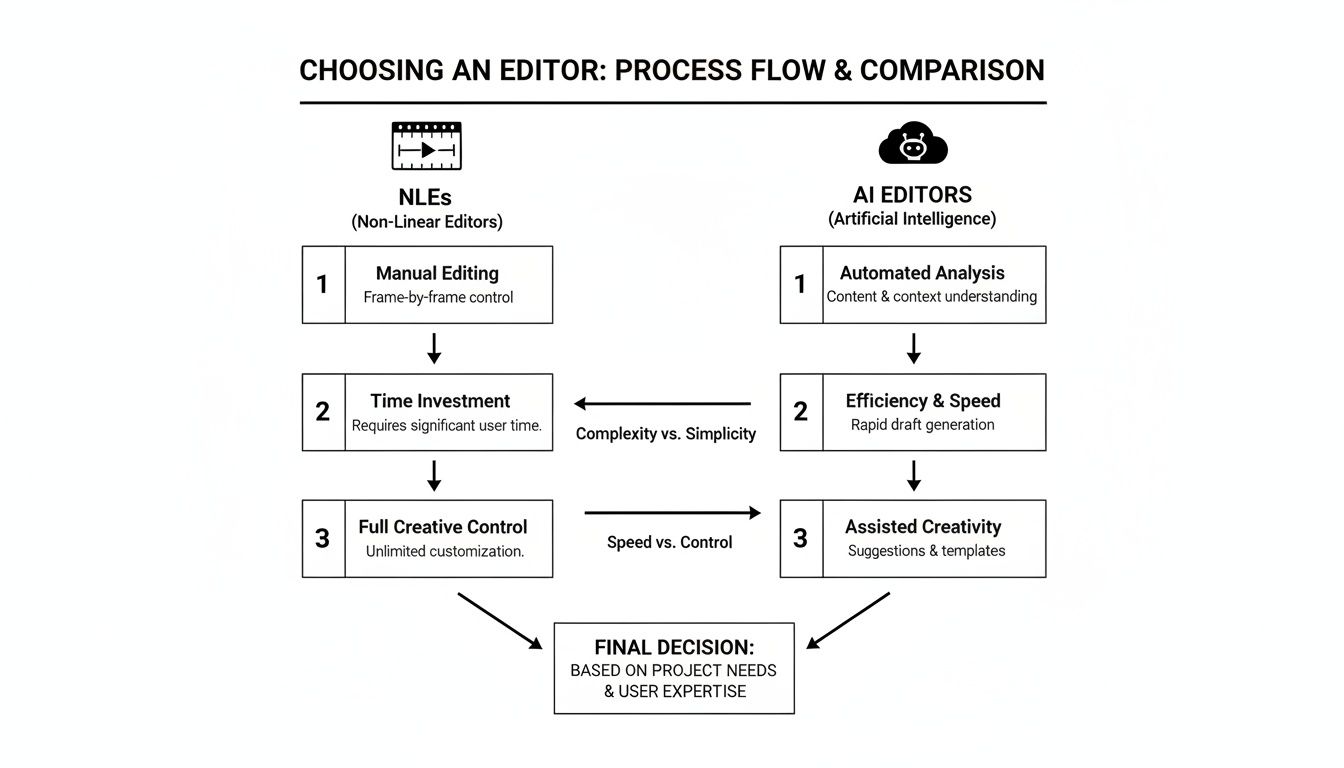
As you can see, AI editors radically cut down on the time and technical skill needed compared to traditional video editors.
Stage 4: Publish and Distribute
You've got a polished full-length episode and a folder full of amazing clips. The final step is getting it all out there.
Schedule your main episode to go live on platforms like YouTube and Spotify. Then, use those AI-generated clips to promote your new episode on TikTok, Instagram Reels, and YouTube Shorts for weeks. This strategy lets you maximize your reach from a single recording session.
Accurate transcriptions make this step even easier, helping with SEO and content discovery. You can learn more in our guide to podcast transcription.
How AI Tools Like Klap Supercharge Your Content
Once you've polished your main episode, you hit what used to be the biggest bottleneck for growth: repurposing. Manually hunting for good moments and re-editing them for social media was a soul-crushing time sink.
But today, AI-powered podcast video editing software acts as your secret weapon. It solves the single biggest challenge for modern podcasters—creating a steady stream of short-form video content without burning out.
Tools like Klap are built specifically to automate this entire workflow. Just imagine uploading your finished one-hour episode and letting an intelligent system do all the heavy lifting for you. This isn’t just about trimming clips; it’s about generating brand-new, ready-to-post content.
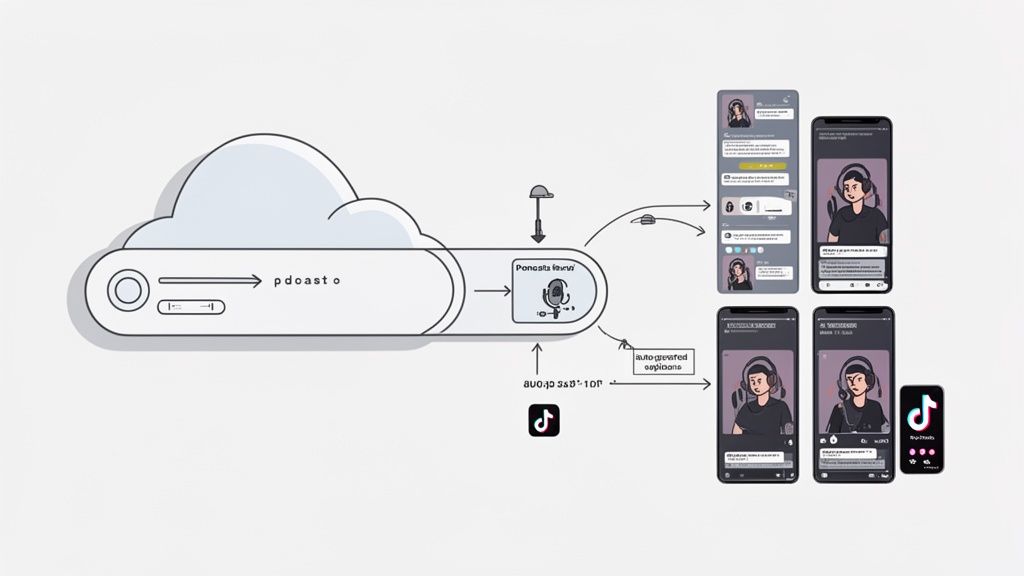
This is what that automated process looks like. One piece of long-form content gets intelligently diced into a dozen or more short-form assets. This approach completely erases hours of tedious work, freeing you up to focus on what you do best: creating your next great episode.
From Hours to Minutes
The real magic of a tool like Klap is its ability to analyze your entire video—both the visual cues and the transcribed dialogue—to pinpoint the most compelling segments. Think of it as having an expert producer who instantly spots which parts will hook a viewer scrolling through their feed.
For instance, the AI can detect:
- Virality Potential: It uses topic detection models to find the most engaging subjects and then gives each potential clip a virality score.
- Speaker Focus: It automatically figures out who is speaking and reframes the shot to keep them perfectly centered, creating a dynamic clip that looks professionally produced.
- Vertical Reframing: It auto-crops your widescreen video into a 9:16 vertical format, ideal for TikTok, Reels, and Shorts, without cutting off any important action.
- Dynamic Captions: It generates animated, word-by-word subtitles, a feature proven to boost viewer retention by over 80% on social media.
Instead of you spending 3-4 hours hunting for clips, an AI tool can deliver a dozen ready-to-post videos in less than 10 minutes. This isn't just a time-saver; it’s a complete shift in how you approach content distribution.
The Power of an AI Editing Assistant
This level of efficiency is a game-changer for staying consistent. You're no longer forced to choose between producing your next episode or promoting the last one. Now you can do both, effortlessly.
These tools are only getting smarter and more powerful. For another example of a clever AI tool built to help with content creation, check out this review of Loveable AI. The core idea is the same: let technology handle the repetitive, time-consuming tasks so you can pour your energy into the creative work that actually grows your show.
Top Podcast Video Editing Software in 2026
Let's cut through the noise. Finding the "best" podcast video editing software isn't about a single magic tool. It's about building a smart toolkit—or "stack"—that fits your skills, budget, and what you’re trying to achieve with your content.
Here are our top recommendations for 2026, broken down by the type of creator you are.
For the Seasoned Professional: Adobe Premiere Pro
If you come from a video production background, you already know the name. Adobe Premiere Pro is still the undisputed industry standard for a reason.
It gives you absolute, granular control over every frame. We're talking cinematic color grading, complex audio mixing with multiple tracks, and custom motion graphics that make your show look like it belongs on television.
For podcasts with intricate interview setups, its multi-camera editing features are a lifesaver. If you need that high-polish aesthetic and have the technical chops (and time) to back it up, Premiere Pro is your workhorse.
For the Creator Who Values Speed and Simplicity: Descript
Descript completely changed the game with its text-based editing, and for podcasters, it’s a massive time-saver. You don't need a film degree to use it.
The workflow is beautifully simple: upload your video, let it transcribe, and then edit your video by just editing the text document. Want to cut out an "um" or a rambling tangent? Just highlight the words and hit delete. It's that easy.
Plus, it's packed with powerful AI features like Studio Sound, which cleans up your audio with a single click. This makes it an incredible all-in-one solution for getting a polished, full-length episode out the door fast.
For Scaling Short-Form Content: Klap and Other AI Tools
This isn't just a trend; it's a fundamental shift. For any podcaster serious about growth, AI repurposing tools are no longer optional.
Video podcasts have become the go-to format for a huge chunk of the audience, with 79.5 million podcast viewers in the U.S. alone. This viewer demand is what’s pushing the AI video editing market, which is projected to explode from USD 3.67 billion in 2026 to USD 24.89 billion by 2036. You can dive deeper into these numbers in this Meticulous Research report.
Tools like Klap are built for this exact moment. You simply upload your finished, polished episode, and the AI gets to work. It automatically finds the most viral-worthy moments, intelligently reframes them for vertical phone screens, and slaps on perfectly synced dynamic captions.
If you’re looking to see how different tools stack up, you can check out our guide on Opus Clip alternatives. This "edit once, publish everywhere" approach lets you generate dozens of high-quality social clips in minutes, dramatically expanding your reach without burning yourself out.
Frequently Asked Questions
Still have a few questions? We get it. Let’s tackle some of the most common things creators ask about video podcast editing so you can choose the right tools with confidence.
Can I Edit My Video Podcast with Free Software?
Yes, you absolutely can. Tools like DaVinci Resolve or CapCut are surprisingly powerful and a fantastic starting point for new creators. They handle all the basics like trimming, simple cuts, and color correction without costing a dime.
But here's the catch: they lack the specialized, time-saving features built for podcasters. Free tools typically won't have AI-powered clip finders or one-click audio sweetening that you find in paid podcast video editing software. Think of free software as a great launchpad, but as your show grows, investing in a purpose-built tool will save you a ton of time.
How Long Does It Take to Edit a One-Hour Video Podcast?
This is a "how long is a piece of string" question, because the answer depends entirely on the software you're using. The time commitment can vary dramatically.
- Traditional NLEs: Using something like Adobe Premiere Pro, a proper multi-camera edit with audio cleanup can easily take 4-8 hours of your day.
- Text-Based Editors: Tools like Descript can slash that time down to 2-3 hours since you’re just editing a transcript, not scrubbing through a timeline.
- AI Repurposing Tools: If your main episode is already edited, generating social media clips with a tool like Klap takes just a few minutes, not hours.
Do I Need a Powerful Computer for Video Editing?
It all comes down to your workflow. If you're using traditional desktop software like Premiere Pro or Final Cut Pro, the answer is a firm yes. You'll need a machine with a dedicated graphics card, plenty of RAM, and fast storage to avoid lag, slow rendering, and frustrating crashes.
But this is where cloud-based AI editors completely change the game. Because they run in your browser, all the heavy lifting is offloaded to their powerful servers. This means you can edit 4K video footage on a standard laptop without a hitch, making high-quality editing accessible to way more people.
Ready to stop spending hours on tedious editing and start multiplying your content? Klap uses AI to turn your long-form videos into dozens of viral-ready shorts in minutes. Just upload your podcast episode and let our AI do the heavy lifting. Try it now at Klap.app.
