
Here Is How To Create Facebook Reels: Step-by-Step Guide
Content Creation
-2.png&w=3840&q=75)
Quick Summary
This guide shows you how to create Facebook Reels from start to finish, whether using Klap or the Facebook app. You’ll learn the tools, settings, and editing steps that make short videos scroll-stopping and engaging. Klap simplifies the process by turning long videos into Reels-ready clips with vertical framing and captions in over 50+ languages. Follow these steps to save time and consistently publish high-performing content.
Want to Know How to Create Facebook Reels That Stop the Scroll?
Creating Reels that capture attention quickly can feel like a guessing game. Many creators spend hours recording or trimming clips, only to see viewers swipe past in seconds.
Between choosing the right moments, adding captions, and fitting Facebook’s vertical format, even small details can make or break your video’s performance. Clear storytelling and a focused message are key to keeping viewers engaged and reducing the chance of swipes.
In this article, we show how to create Facebook Reels from scratch, what to avoid, and how Klap fits into your workflow.
Why Listen to Us?
Klap has helped more than a million creators turn long videos into polished, high-performing Reels. Our AI’s smart scene selection, auto-reframing, and fast captioning cut editing time and improve output. Users report faster workflows, higher engagement, and a steady flow of ready-to-post Reels.
What Are Facebook Reels?
Facebook Reels are short, vertical videos (up to 90 seconds) designed to help creators reach more people through fast, engaging, mobile-first content. They appear in the Feed, Watch, and dedicated Reels tabs, giving your clips more visibility than regular posts. Reels work best with quick pacing, strong hooks, captions, and on-screen movement that keeps viewers watching.
You need a clear idea, steady video, and clean audio. Focus on one main message per clip. Editing tools like Klap can turn long videos into ready-to-post Reels with vertical framing and captions in minutes.
Why Are Facebook Reels Important?
- Higher visibility: Reels appear in Facebook’s dedicated feed and Explore section, increasing discoverability.
- Better engagement: Short, vertical videos are more likely to capture attention and drive likes, shares, and comments.
- Mobile-first content: Optimized for vertical screens, making them easier to consume on smartphones.
- Repurpose long-form content: Clips from podcasts, webinars, or interviews can be transformed into scroll-stopping moments.
- Supports captions and trends: Reach viewers watching with sound off and tap into trending music or challenges to boost performance.
- Brand growth and authority: Consistent Reels help you showcase expertise, personality, and style, building a recognizable presence on Facebook.
How to Create Facebook Reels: Two Methods
Method 1: Create Facebook Reels Using Klap
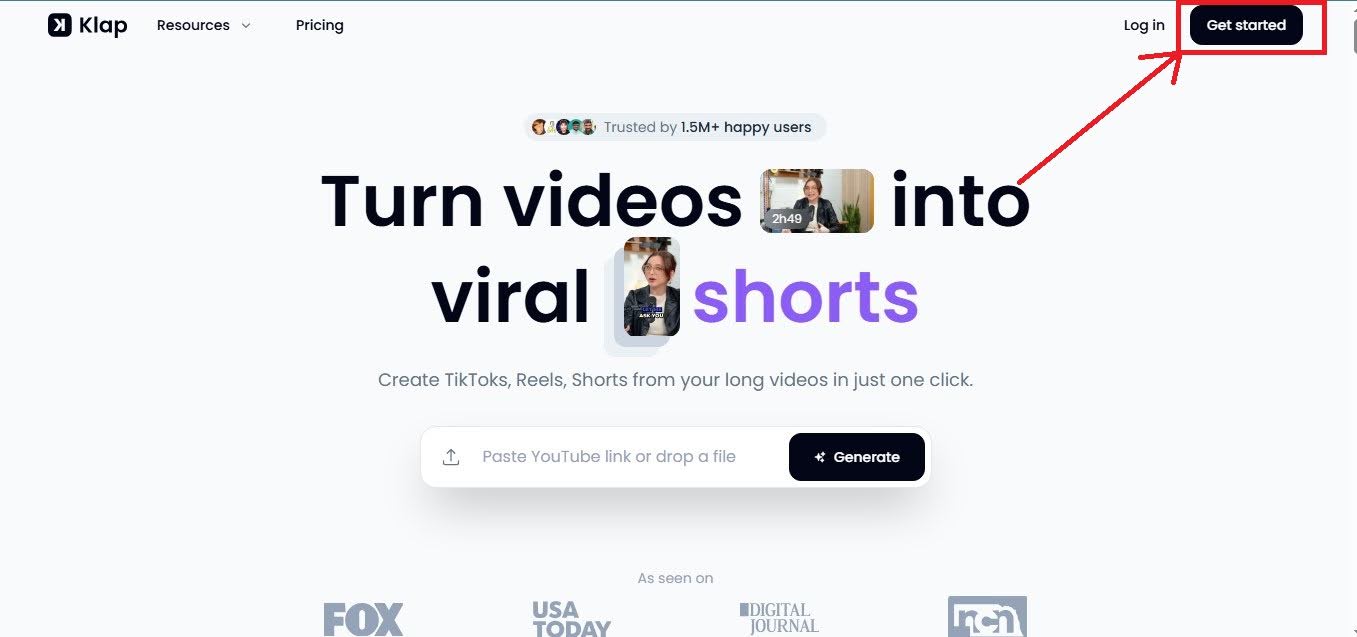
Step 1: Go to Klap.app
Open Klap.app in your browser. The workspace is simple and built for turning long videos into short clips quickly. Create a new project with one click.
Step 2: Upload Your Video
Choose the video you want to create reels from. This can be a podcast, interview, tutorial, webinar, or any long recording.
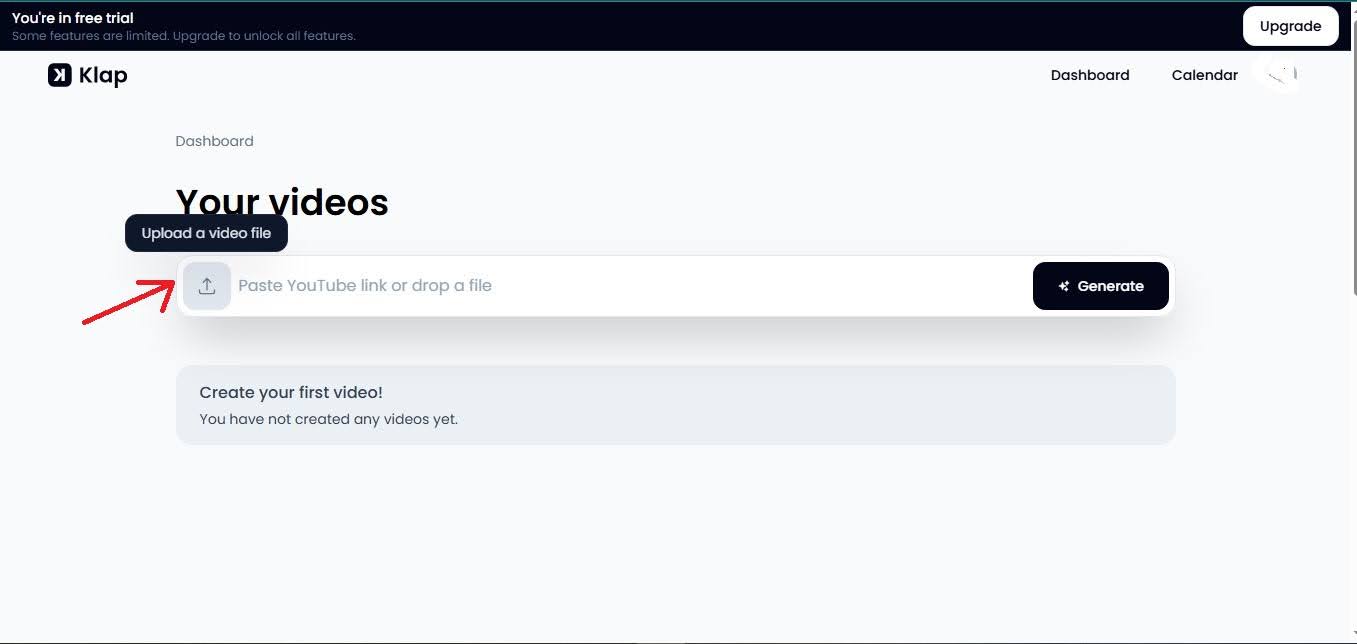
You can upload the file directly or paste a YouTube link if your video is on YouTube. Klap supports various video file formats like MP4, AVI, MOV, WMV, FLV, and MKV.
Step 3: Select Video Style and Settings
Select Shorts as highlighted in the image below. This lets our AI know that you want to create short videos suited for Facebook Reels.
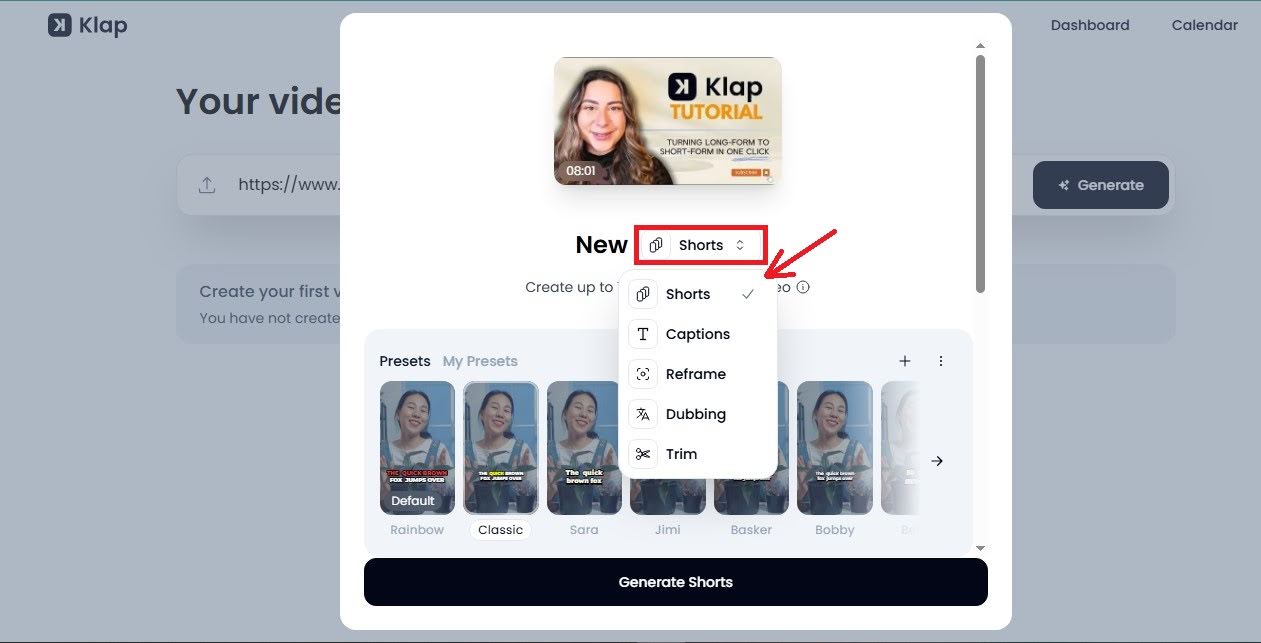
Then proceed to pick the style that fits the tone of your Reel. Klap gives you layout options, framing choices, and visual styles that match Facebook’s format.
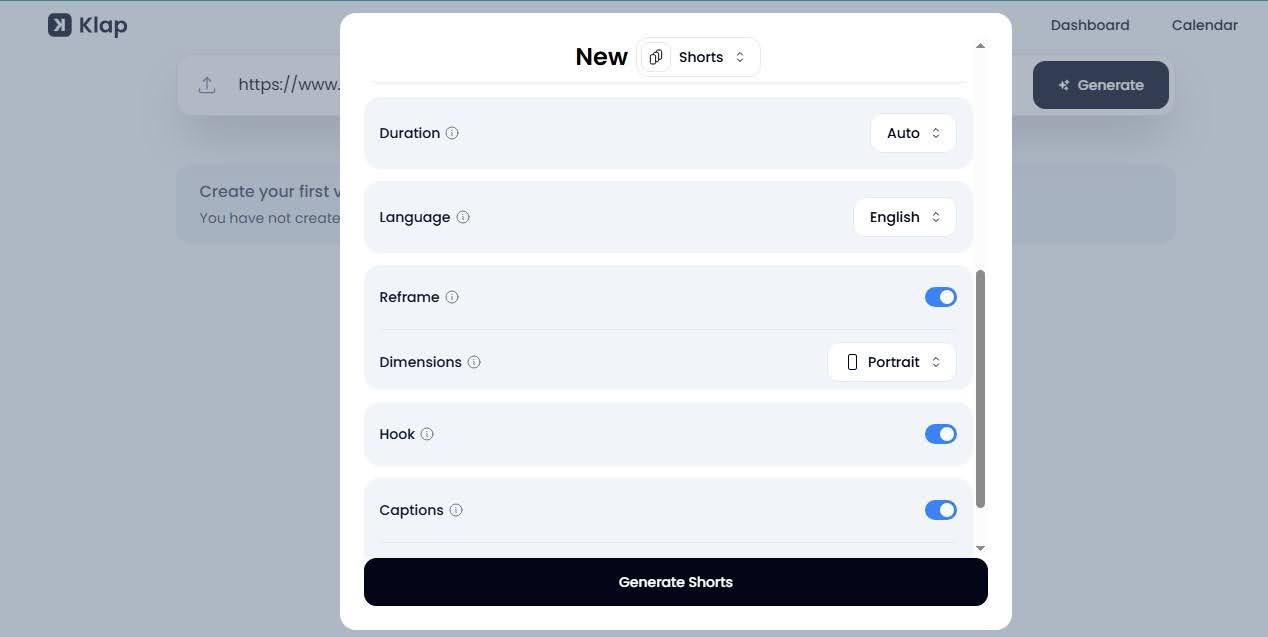
Klap automatically reframes horizontal videos to vertical without cutting faces. These settings also help you maintain a consistent look across all your Reels, saving time on repetitive edits. You can also adjust pacing, captions, and timing to keep your clips consistent with previous posts.
Step 4: Generate Video
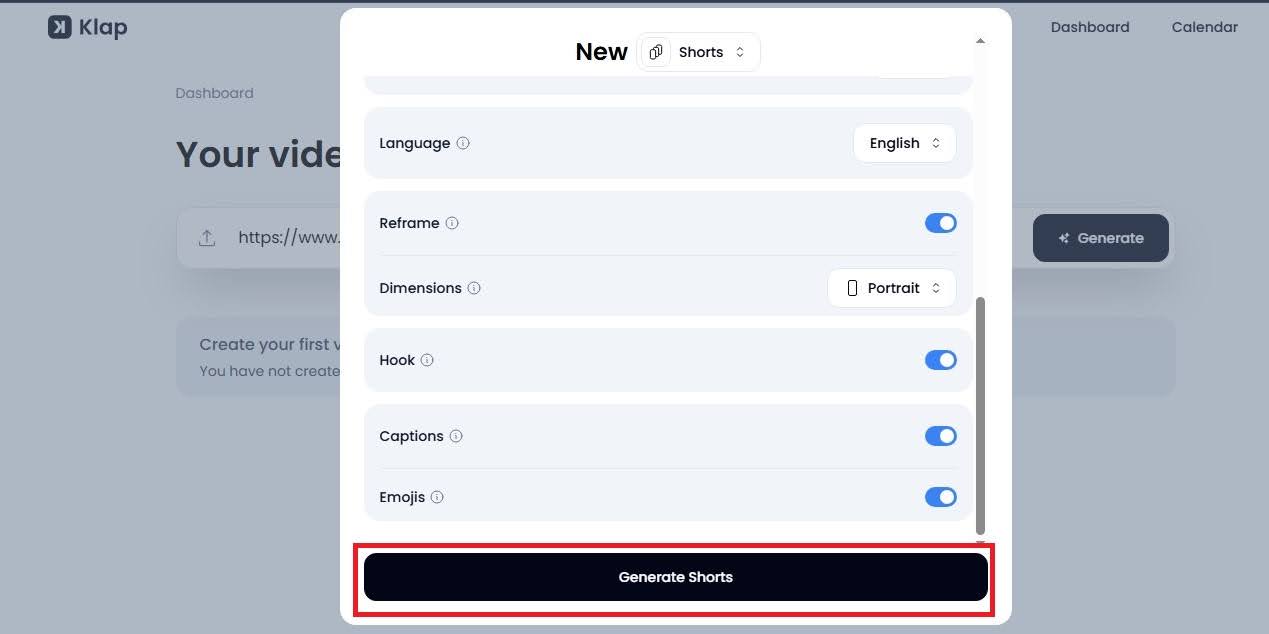
Click Generate Shorts.
Klap analyzes your full video, identifies the strongest moments, and automatically cuts them into ready-to-post reels. The platform handles all processing, so you don’t need editing skills or manual scrubbing to get a usable draft.
Step 5: Edit Videos to Taste
Review the drafts.
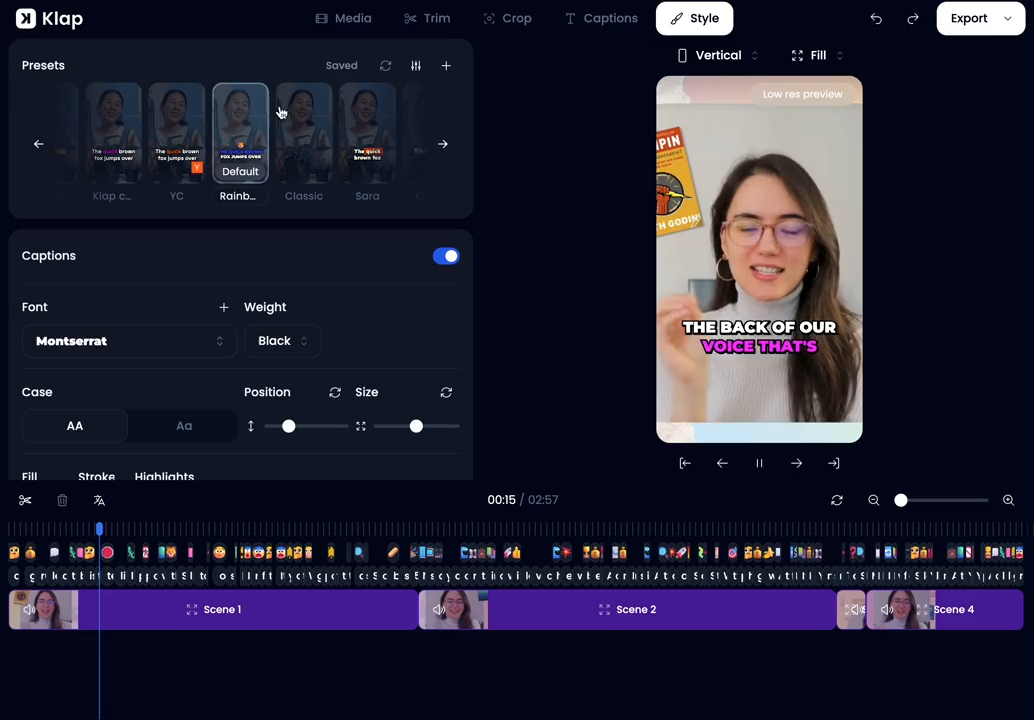
Adjust timing, move sections, trim lines, or swap styles as needed. Klap auto-generates captions, which matter since most viewers watch with the sound off, but you can rewrite them, fix spelling, and adjust placement. Fine-tune each cut so it starts and ends cleanly. If you want more personality, update text styles or layout. The goal is to make the clip feel tight, intentional, and easy to watch.
Step 6: Share and Export
Once the clip looks right, download it. Klap exports your Reel in a format optimized for Facebook and clear on any screen. Upload it directly in the Facebook app or schedule it through your posting tool.
If you want more Reels from the same long video, simply repeat the process. One source file can generate multiple posts. Creating small batches from a single video is an easy way to stay stocked with weekly content.
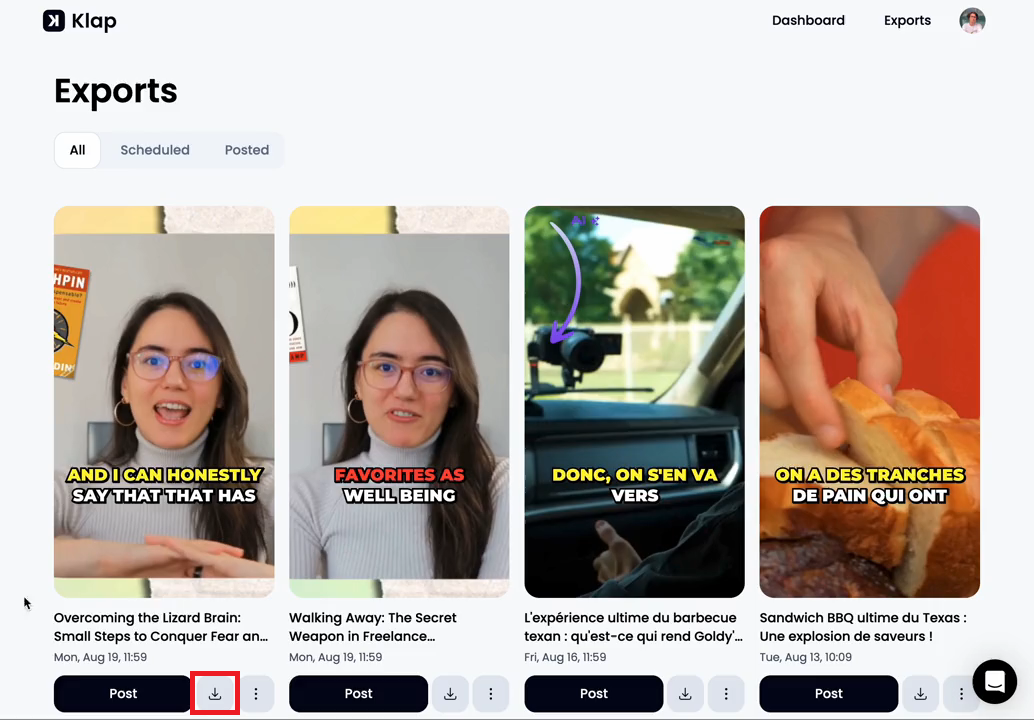
Klap’s workflow stays the same across desktop, mobile, Mac, and iOS. It makes it easy to create Facebook Reels in minutes, edit them with simple controls, and add captions without extra apps. This process is steady and repeatable and helps you publish more often without cutting quality.
Method 2: Create Facebook Reels Using the Facebook Mobile App
Step 1: Open the Facebook Mobile App and Tap Your Profile
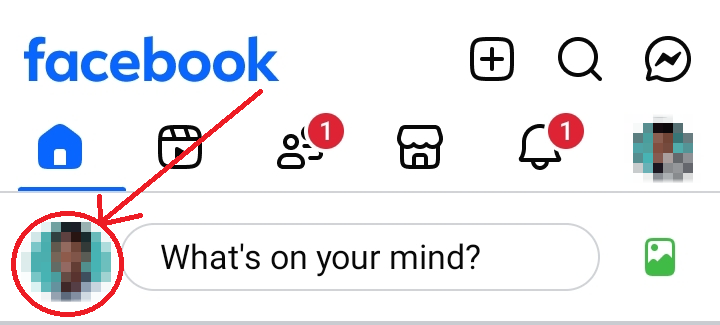
Open Facebook and tap on your profile photo to reach your main page. This is where the Reels option appears, so you can start quickly without digging through menus.
What you can do here:
- Access all your tools for creating, managing, and reviewing Reels.
- Switch between recording new clips or picking videos from your gallery.
Step 2: Create a Reel
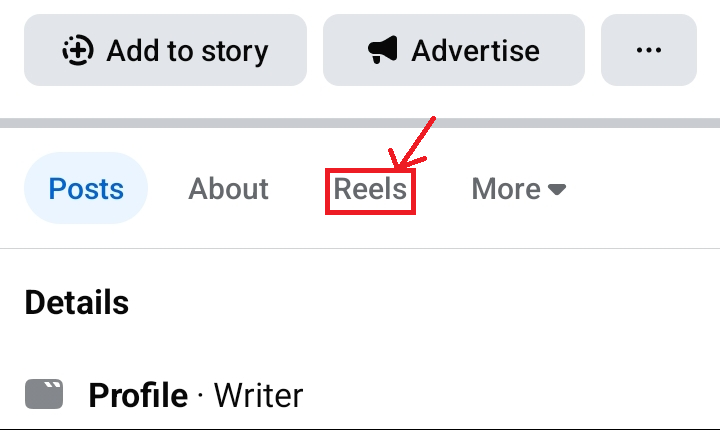
Tap the Reels button. Facebook opens a creation screen with two options: record a new clip or upload an existing one. This screen is built for quick output, so you can start recording right away if you prefer working on the spot.
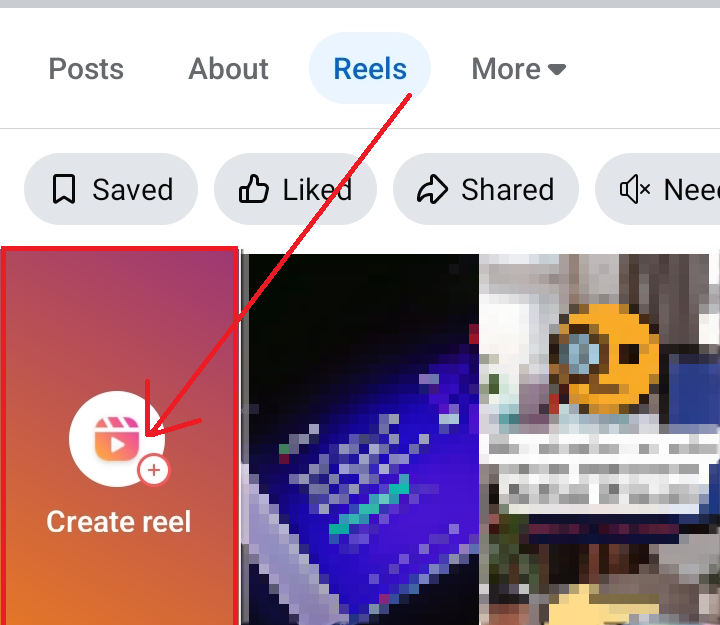
This view helps you:
- Record a short clip with your phone’s camera.
- Pull videos from your gallery
Step 3a: Use a Template
If you want structure, pick a template. Facebook offers templates with preset timing, transitions, and effects.
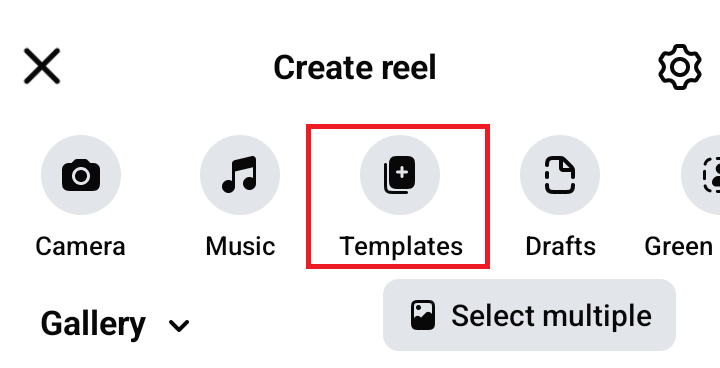
These templates help you create a Reel even if you do not want to adjust every detail. They also help keep your videos consistent in length and pacing.
Templates work well when:
- You want a quicker workflow.
- You already have the clips ready.
- You need a smooth, timed format for your content
Step 3b: Select video (Without Templates)
If you skip templates, you can record or upload your own clip. Facebook lets you trim each section so your message lands early. This matters because most viewers scroll fast and only stop when the first few seconds feel strong.
Tips when selecting clips:
- Choose clips with clear speech or action.
- Trim out long pauses.
- Keep the opening line tight so people stay longer
Step 4: Edit the Reel
Facebook gives you simple tools to shape your video. You can adjust speed, resize clips, add text, or apply basic effects. You do not need editing skills here; the tools are built for quick adjustments.
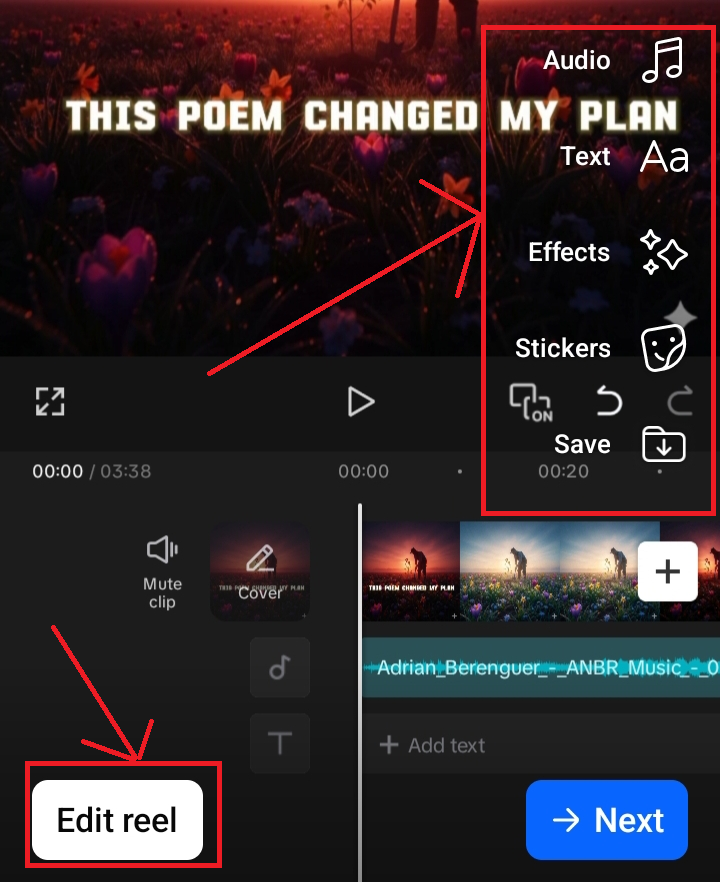
Focus on these tasks while editing:
- Add short text that supports your message.
- Adjust the timing so the video moves without dragging.
- Keep visuals clean for mobile viewing.
You want the video to look polished without heavy edits. Small adjustments to pacing, captions, and visuals can significantly impact viewer retention and make your Reel feel professional. Clear lines, readable text, and steady pacing help your Reel reach more people.
Step 5: Add a Description and Share
Write your Reel description. This text works like Instagram captions and gives context to the video. Use a short, direct line that helps viewers understand what they are about to watch.
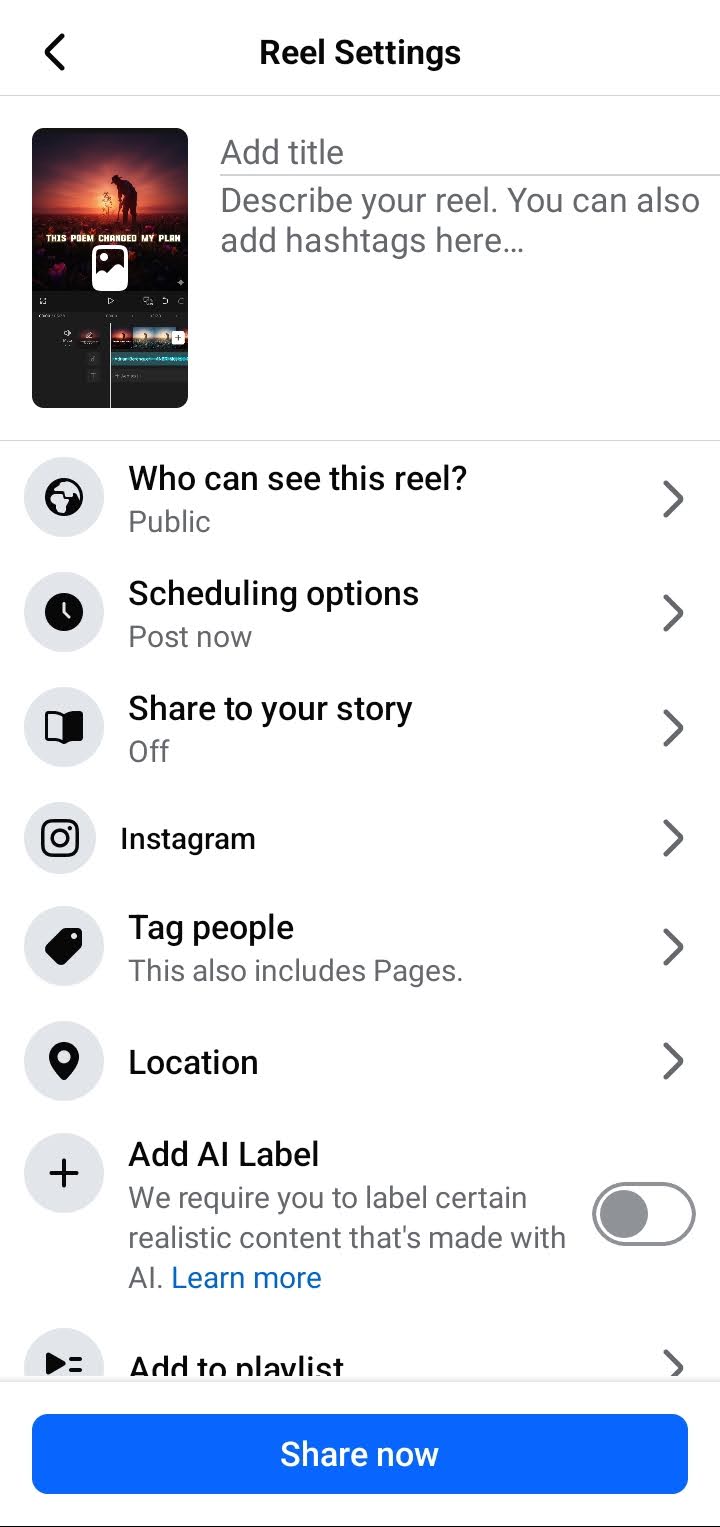
- The description is clear and easy to understand.
- Hashtags are relevant (if using them).
- The video plays smoothly from start to finish.
Once everything looks good, share your Reel.
Best Practices for Creating Facebook Reels
Use Vertical Video
A vertical 9:16 frame fills the screen and keeps your Reel easy to watch on mobile. This format gives your video more room to breathe on a small screen and reduces letterboxing or awkward cropping.
If you shoot in horizontal mode, you may need to reframe it later, which can cut off faces or important movement. Recording in vertical mode from the start keeps the clip clean and ready for Facebook.
Accessibility and Inclusivity
Reels reach many people, including viewers who watch with sound off or rely on visual aids. Facebook supports captions, subtitles, and auto-translation, which help your video stay readable in different situations.
Adding readable on-screen captions helps people who scroll with audio muted understand your message right away. Subtitles also support viewers who speak other languages or watch in noisy places. These features make your content easier to follow and help more people stay with the video.
Strong Hooks
Viewers scroll fast, so the first two seconds decide whether they stay or leave. Start with movement, a bold statement, or a clear visual cue that sets the tone. You want the start to show value right away without delay. Keep the message direct so people know what to expect.
A fast opening helps more people watch longer and improves how your clip performs in the feed. Test different intros to find the one that captures attention best.
Keep it Short
Facebook says Reels between 15 and 120 seconds work well, but shorter clips between 10 and 30 seconds often perform best. Shorter Reels offer quick ways to connect with viewers. Longer Reels between 30 seconds and 3 minutes help build deeper interest, but they still need tight pacing.
Avoid long pauses or slow sections. Every second should move the message forward. People watch short videos on the go, so a steady pace helps them stay with you. Use viewer metrics to refine your Reels’ length and style over time, ensuring each clip resonates with your audience.
Use Trending Music
Music can help your clip feel current and keep viewers watching. Choose sounds that fit your message and mood. Facebook offers a library you can use without extra setup. If the sound is trending, it may help your Reel show up more often. Stick to clean audio and avoid tracks that clash with your tone. Music should support the clip, not overwhelm it.
Avoid Low-quality Content
Blurry footage, shaky shots, and videos with watermarked videos can hurt perception and reduce reach. Record with good lighting, hold the camera steady, and remove marks before posting. Clean visuals help your video feel more professional and easier to watch. Even simple setups can work well if the message is clear and the footage is sharp.
Technical recommendations
Facebook recommends MP4 format and 1080p resolution for smooth playback. This keeps your video sharp on different screens. Higher resolution also helps text and captions stay readable. Before posting, check the clip for compression issues or audio problems. Exporting in the suggested format helps your Reel load faster and look better on mobile.
Create Facebook Reels Faster and Smarter with Klap
Facebook Reels are a powerful way to grow your reach and engage your audience, but producing high-quality clips can be time-consuming and tricky. Knowing which moments to highlight, keeping a vertical format, and adding captions all take effort that slows down your content schedule.
Klap simplifies the process by turning long videos into short, polished Reels in minutes. Its AI selects key moments, reframes horizontal footage to vertical, and adds captions automatically in over 50 languages. You can edit, style, and export clips ready for Facebook without juggling multiple apps or timelines.
Try Klap and create your next Reel faster.
