
Clip Generator AI: A Guide to Turning Long Videos Into Viral Social Clips
Other
An AI clip generator is a tool that automatically identifies the most engaging moments in your long videos and repurposes them into dozens of short, shareable clips for social media. Instead of dedicating hours to manual editing, you can transform a single podcast or webinar into a full slate of TikToks and Reels in just a few minutes.
Why Automated Video Clipping Is a Game Changer
Keeping up with the relentless demand for short-form video is a huge challenge for creators and brands alike. Audiences on platforms like TikTok, Instagram Reels, and YouTube Shorts expect a constant stream of fresh, engaging content. For many, this leads straight to a creative bottleneck and burnout.
Manually scrubbing through an hour-long podcast just to find a few compelling 30-second segments is tedious and inefficient. This is where a clip generator AI becomes a strategic partner. It's not just about saving time; it's about making your content work smarter.
Think of it like having a team of expert video editors who can watch your entire video library instantly, identify every single highlight, and deliver ready-to-post clips without ever needing a coffee break.
The Shift from Manual Labor to Smart Automation
This technology fundamentally changes the content creation workflow. Instead of a one-to-one process (one long video equals hours of editing for a few clips), it creates a powerful one-to-many model.
- Maximize Content ROI: Unlock the hidden potential in your existing long-form content. An hour-long webinar can yield 10-15 high-impact clips, giving it a second life and extending its value far beyond the initial broadcast.
- Maintain Consistency: Effortlessly maintain a high-volume posting schedule. Consistently publishing content can boost engagement rates by over 50% on platforms like Instagram. An AI tool makes this level of consistency achievable.
- Focus on Creativity: Free up your valuable time to focus on what you do best—creating great original content—instead of getting bogged down in repetitive editing tasks.
The market is already reflecting this massive shift. The AI video generator market, valued at a staggering USD 614.8 million in 2024, is projected to soar to USD 2,562.9 million by 2032. This growth is fueled by AI's ability to slash production time by up to 90%, a clear sign of its impact.
This steep upward curve shows just how quickly creators and marketers are adopting AI tools to gain efficiency and scale their output. As automated video clipping redefines content creation, it naturally feeds into the ongoing discussion around AI vs. human creativity and what it means for the future of our industries.
How AI Finds Your Most Viral Moments
Ever wondered how an AI can listen to a two-hour podcast and instantly pull out the exact 30-second rant that's destined to go viral? It’s not magic. It’s a smart, layered process that mimics an entire team of hyper-focused video editors working at lightning speed.
It all starts with a critical first step: speech-to-text transcription. The AI converts every spoken word into a searchable text document. This transcript becomes the road map for the entire process, allowing the system to analyze the meaning of your content, not just the soundwaves. If you want a deeper dive, our guide on how podcast transcription works breaks it down.
Understanding the Language and Emotion
Once your audio is text, the real AI brainpower kicks in with semantic analysis. This isn't just about spotting keywords. The AI is trained to understand context, nuance, and the relationship between ideas. It can identify when a speaker asks a thought-provoking question, makes a bold claim, or tells a story that elicits an emotional response.
Think of it like an experienced producer who can intuitively sense when a conversation hits its peak. The AI does the same by tracking topic shifts and flagging moments with high emotional energy or clear, punchy language—all the ingredients for a video people can't help but share.
At its core, the AI isn't just listening; it's comprehending. It identifies the moments that make a human audience lean in, laugh, or have a sudden realization, then flags them as prime candidates for clips.
The diagram below puts into perspective the massive efficiency leap from the old way of doing things to this new, intelligent approach.
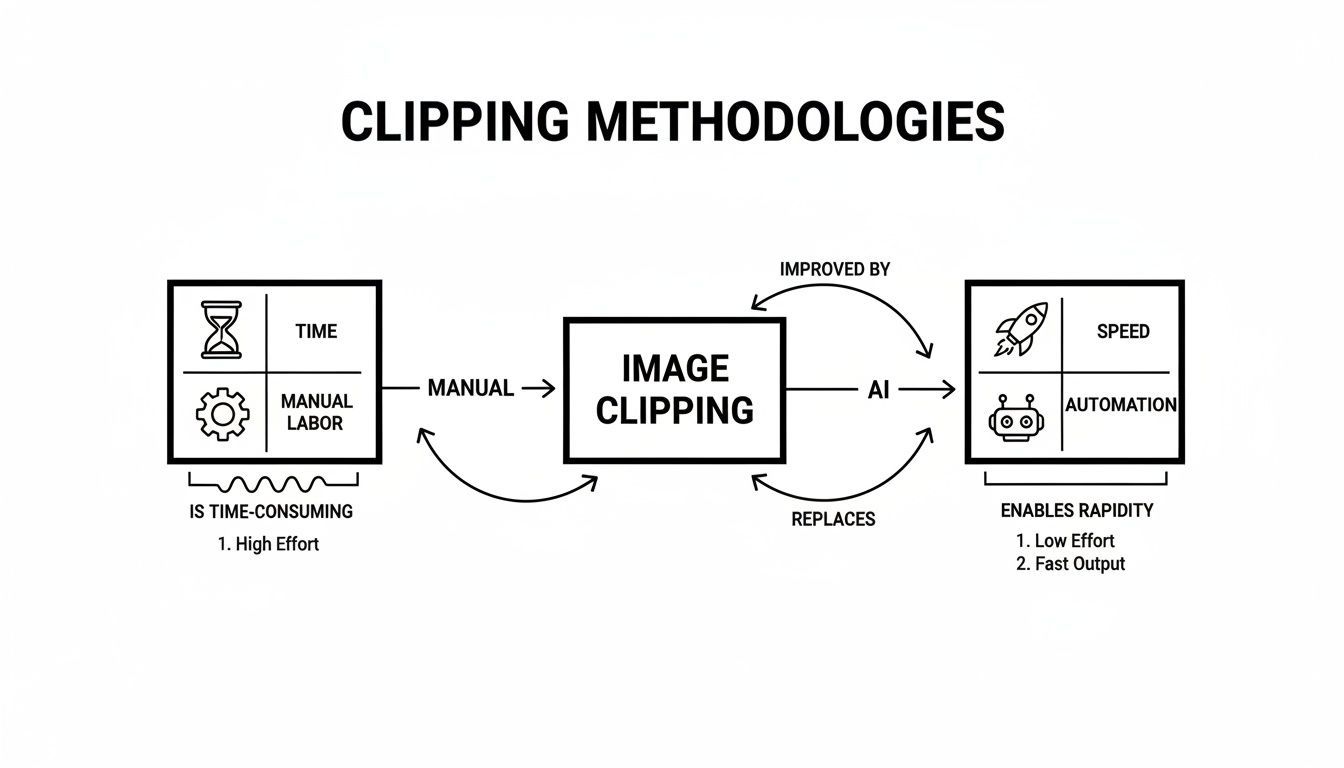
It’s clear this isn't just about speeding up a tedious task. AI completely changes the game, turning a manual chore into a smart, strategic part of your workflow.
Perfecting the Visuals for Social Feeds
Finally, the AI uses visual intelligence to ensure every clip is optimized for social media feeds. This comes down to two key features:
- Active Speaker Detection: For interviews or podcasts with multiple people, the AI identifies who’s talking and automatically keeps the frame focused on them. This eliminates awkward shots of someone just listening.
- Automatic Reframing: The system intelligently crops your horizontal video into the vertical 9:16 aspect ratio preferred by mobile viewers. It ensures the main subject stays centered, so the shot always looks composed and professional.
By combining language comprehension, virality prediction, and smart visual editing, the AI turns hours of raw footage into a curated batch of viral-ready clips in just a few minutes.
Put Your Content Repurposing on Autopilot
An AI clip generator does more than just shave a few hours off your workflow—it completely overhauls your content strategy by putting repurposing on autopilot. This isn't just about being more efficient; it's about turning a single long-form video into a content engine that works for you 24/7.
Think about the practical impact: your weekly one-hour podcast could automatically become 15-20 unique TikTok videos. That detailed webinar you hosted? It could be sliced into a dozen clips perfect for generating leads on LinkedIn. This level of output, which used to require a dedicated team, is now accessible to solo creators and small businesses. The barrier to scaling your content has effectively been removed.
This automated workflow is a huge deal for several industries:
- For Educators: Long lectures can be instantly broken down into bite-sized micro-learning modules. The AI pulls out key concepts, making it easier for students to review and retain information.
- For Brands: Every piece of content, from a product demo to a customer interview, can be squeezed for maximum ROI. A single video asset can now populate an entire month's social media calendar.
- For Podcasters: Instead of manually scrubbing through hours of audio to find highlights, an AI clip generator can pinpoint every compelling quote, story, or debate, creating a steady stream of promotional clips.
Scale Your Reach and Test What Actually Works
This sheer volume of content opens up powerful new strategies. With dozens of clips at your disposal, you can relentlessly A/B test different hooks, captions, and formats to see what your audience truly connects with. You finally have the bandwidth to post consistently across multiple platforms, reaching new audiences you simply couldn't support before.
Automated video clipping is now a core part of modern content repurposing. If you're looking for ways to make this process even smoother, a dedicated long-to-short video converter can be a great place to start.
The real power of an AI clip generator is its ability to multiply your presence without multiplying your effort. You create one great piece of content, and the AI handles the distribution, making sure it reaches the widest possible audience in the formats they love.
This shift lets you move from just making content to building a scalable system for audience growth. Automated clipping is a massive leap forward in content repurposing, enabling efficient content creation at scale and tying into broader discussions on effective scaling strategies for businesses growing their digital footprint. By automating the most time-consuming part of the process, you're free to focus on what you do best: creating more high-value, long-form content, knowing every minute of it will be put to work.
Choosing the Right AI Clip Generator for Your Needs
With so many tools emerging, picking the right AI clip generator can feel overwhelming. They all promise to save you time and turn you into a content machine, but the best one depends on your specific workflow and goals.
To get past the marketing hype, you need to focus on the core features that directly impact the quality and effectiveness of your clips.
It all starts with transcription accuracy. If the AI can't correctly understand what's being said, it has zero chance of finding the best moments. Look for a tool that guarantees 95% or higher accuracy. Anything less, and you'll spend more time fixing typos than creating content.
From there, it's all about how smart the AI is at topic detection. A basic tool might just hunt for keywords, but a truly advanced one uses semantic analysis to understand context. It knows the difference between a passing comment and a powerful, emotional statement. This is what separates random snippets from clips that genuinely resonate with viewers.
Core Features to Evaluate
When comparing your options, the goal is to find a balance between powerful automation and creative control. A great tool should feel like a creative partner, not just a machine executing a task.
Here are the non-negotiable features to look for:
- Automated Reframing Flexibility: How well does the AI handle reframing, especially for multi-person shots? For interviews, you need active speaker detection that intelligently follows the conversation and keeps the focus on who is talking. Without it, you'll end up with awkward, poorly framed clips.
- Virality Scoring: Does the tool offer any predictive analytics? A virality score or engagement prediction is a massive advantage. It analyzes factors like topic relevance and emotional tone to help you prioritize which clips to publish first.
- Customization and Branding: Your clips need to look and feel like your brand. The best tools provide full control over subtitles (font, color, style), let you add your logo, and even allow you to create branded templates for one-click application.
- Ease of Use: The interface needs to be clean and intuitive. You shouldn't need to watch a two-hour tutorial just to make simple edits. A seamless workflow from uploading a video to exporting your finished clips is essential.
Making a Practical Decision
To help you cut through the noise, this checklist breaks down the most important features to look for when choosing a clip generator AI. Use it to evaluate how different platforms stack up against what really matters for your content strategy.
Key Feature Checklist for AI Clip Generators
FeatureWhy It MattersWhat to Look For
Transcription Accuracy
The AI's ability to find key moments is completely dependent on understanding every word correctly.
Look for tools boasting accuracy rates above 95% and good support for different accents.
Topic Detection
This goes beyond simple keywords to find the most engaging and relevant parts of your video.
The AI should grasp context, identify questions, and recognize emotional shifts in the conversation.
Reframing Intelligence
Ensures your vertical clips are visually dynamic and look like they were professionally framed.
Active speaker detection and smart subject tracking are mission-critical features.
Branding Options
Keeps your content consistent and instantly recognizable as it circulates on social media.
You'll want customizable captions, easy logo placement, and the ability to save reusable templates.
Ultimately, the right clip generator AI is the one that slides effortlessly into your existing process, supercharges your output, and helps you create more content without sacrificing the quality your audience expects.
Your First AI-Generated Clip in Four Simple Steps
Jumping into new technology can feel intimidating, but creating your first clip with an AI is surprisingly straightforward. Most of these tools are designed to get you from a long video to a snappy, shareable short in just a few minutes, removing the technical barriers so you can focus on the creative outcome.
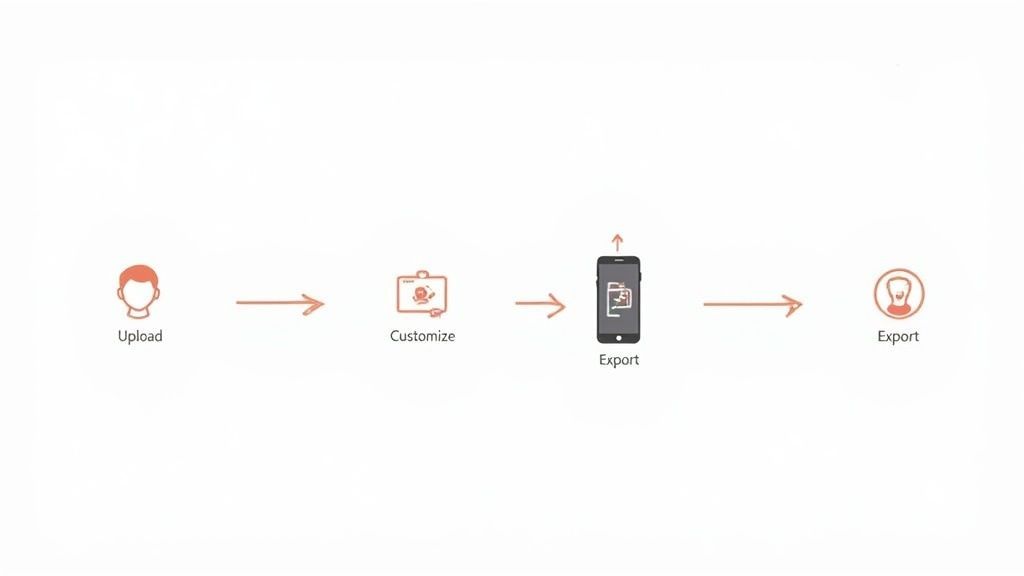
Here’s a quick breakdown of how a typical clip generator AI works, from start to finish.
Step 1: Upload Your Source Content
First things first: you have to give the AI your video. You usually have two options: paste a direct link from a platform like YouTube or upload a video file from your computer.
This flexibility is a huge time-saver. You don't need to download a massive video file just to re-upload it to another tool. The platform ingests your content directly and prepares it for analysis.
Step 2: Let the AI Analyze and Suggest Clips
This is where the magic happens. Once your video is in the system, the AI gets to work transcribing every word, identifying key topics, and—most importantly—pinpointing the exact moments that will make someone stop scrolling.
After a few minutes, you’ll receive a list of suggested clips. The best tools even provide a "virality score" or another ranking to help you spot the most promising content. Each suggestion comes with a transcript, so you can quickly scan them and decide which ones to edit.
Think of the AI as your new assistant editor. It does the tedious work of sifting through hours of footage and hands you a highlight reel, giving you an incredible head start on the creative part.
Step 3: Customize Your Clip
AI is smart, but it’s not perfect. This step is where you add your human touch to refine the AI's suggestions and make them shine.
Here’s what you can typically adjust:
- Adjust the Transcript: Correct any minor typos or misheard words to ensure your captions are 100% accurate.
- Trim the Clip: Nudge the start and end points to perfect the pacing and timing.
- Style Captions: Change the font, colors, and animations to align the subtitles with your brand's visual identity.
- Add Your Logo: Place your brand logo on the video with a single click.
Step 4: Export and Share
Once you’re happy with how your clip looks, it's time to share it with the world. Most AI clip generators let you download your video in the 9:16 vertical format that’s perfect for TikTok, Reels, and Shorts.
Many platforms even integrate with your social media accounts, allowing you to post directly. This seamless handoff from creation to distribution is what makes the entire workflow so incredibly efficient.
Getting the Most Out of Your AI Clips
An AI-generated clip is a brilliant starting point, but a few strategic tweaks can turn a good video into a viral piece of content. Think of the clip generator AI as your assistant—it does the heavy lifting of finding the gold, but your final human touch is what makes a video truly connect with an audience.

Let's be realistic: you have about three seconds to stop someone from scrolling. Your opening line or visual must immediately spark curiosity, offer value, or touch on a relatable pain point. If you get the hook right, you've won half the battle.
Next, assume your viewer is watching with the sound off. This is why bold, dynamic captions aren't just a nice-to-have; they're essential. They do more than just transcribe words—they guide the viewer's eye, emphasize key phrases, and make your video understandable for the 85% of people who watch videos on platforms like Facebook without sound.
Turn Viewers into Followers
Okay, you’ve grabbed their attention. Now what? Don't let the clip just end. You need to give viewers a clear next step. A simple, well-placed call-to-action (CTA) is what separates a passive view from an active engagement.
Your CTA is the bridge between someone just watching and someone actually engaging. It tells your audience exactly what to do next, whether that’s following your page, clicking a link, or leaving a comment.
Here are a few actionable tips to improve your clip’s performance:
- Sharpen the Hook: A/B test different opening lines for the same clip. Does a question perform better than a bold statement? Use data to find out what grabs your audience.
- Make Captions Pop: Don't settle for plain text. Use emojis, color changes, and simple animations to highlight important words and keep the video visually interesting. For more ideas, check out our guide on how to add captions to YouTube Shorts.
- Add a Clear CTA: End your clip with a simple request, like "Follow for more tips" or "What do you think? Let me know in the comments." Be direct.
Ultimately, the goal is to experiment relentlessly. Test different clip lengths, caption styles, and topics to learn what your audience truly connects with. This is how you move from just churning out clips to building a content engine that actually drives growth.
Frequently Asked Questions About AI Clip Generators
Even with all the hype, adopting a new tool always brings up practical questions. For many creators and marketers, the biggest one is: can an AI really deliver the quality and control I need?
Let's address some of the most common concerns.
Will the Video Quality Be Any Good?
This is probably the number one concern. Will an AI-generated clip look cheap or robotic? The good news is that modern AI tools can export clips in full high definition, often up to 1080p or even 4K.
The final quality is directly tied to your source footage. If you upload a crisp, clear video, you’ll get crisp, clear clips back. The AI's job is to edit, not to magically fix a blurry original.
Can an AI Handle Multiple Speakers?
What about videos with more than one person, like interviews or podcasts? It’s a great question—how does the AI know who to focus on?
This is where smarter platforms truly shine. They use a feature called active speaker detection.
Instead of leaving you with a boring, static wide shot, this technology intelligently identifies who is talking and automatically reframes the shot to keep them front and center. This creates a dynamic, professionally cut feel that makes multi-person videos far more engaging for viewers.
The best way to think about it is this: top-tier AI clip generators are built to mimic the decisions a human editor would make, from focusing on the right person to cutting out those awkward dead-air moments.
Is It Actually Cost-Effective?
Let's talk about the bottom line. While there’s a subscription cost, when you compare a clip generator AI against the alternatives, the value proposition becomes clear.
Consider the time you’d spend editing yourself, or the cost of hiring a freelance video editor, which can easily range from $50 to over $150 per hour.
- Massive Time Savings: An AI can generate dozens of clips in the time it takes a human to meticulously edit just one.
- Lower Labor Costs: You completely eliminate the need for expensive manual editing for every short video you want to publish.
- Increased Content Output: You can extract far more value from a single long-form video, maximizing the return on your initial production investment.
By automating the most labor-intensive part of content repurposing, an AI clip generator allows you to scale up your output without needing to scale up your budget.
Ready to stop wasting hours on manual editing? With Klap, you can turn your long-form videos into a month's worth of viral shorts in just a few clicks. Try it for free and see how easily you can scale your content strategy today at https://klap.app.
